
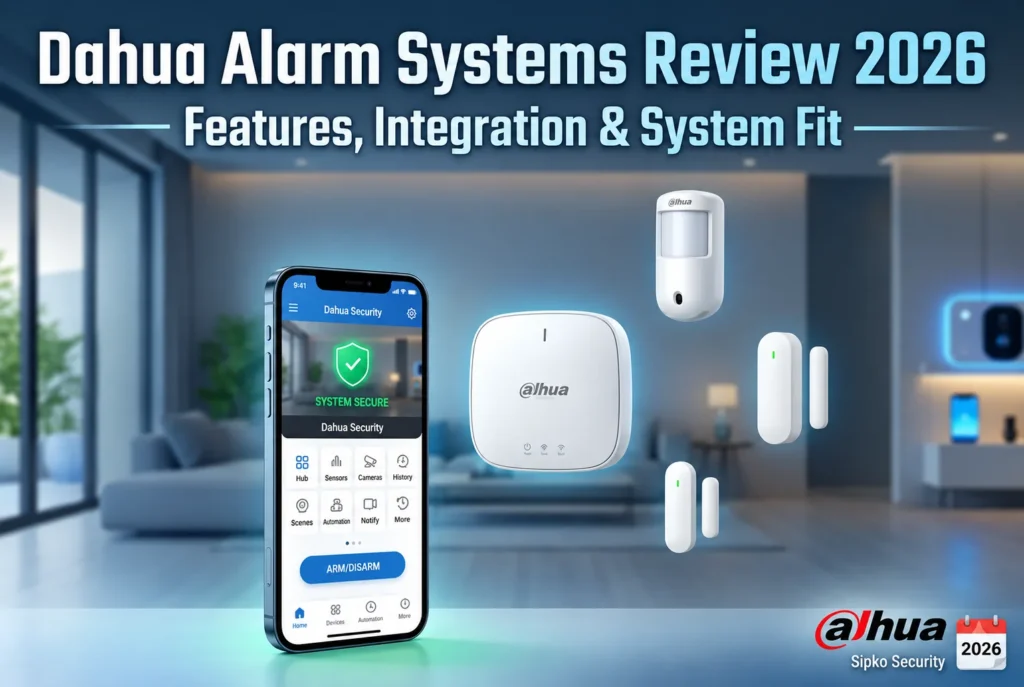
2026 Official Review Unbiased Technical Audit Full Deep-Dive Sipko Professional Verification Licensed Melbourne Installer May 20, 2026 ⭐ 4.5/5 — SIPKO Rating
🔒 THE MOST COMPREHENSIVE DAHUA ALARM REVIEW — 2026 EDITION Last updated: · Security Professionals

Dahua Alarm Systems Review 2026: Complete Technical Guide

If you’ve been searching for an honest, technically grounded Dahua alarm systems review, you’ve landed in the right place. Dahua Technology has become a serious contender in the wireless alarm system market — offering competitive pricing and solid performance. But the question most property owners are actually asking is: “Is Dahua the right alarm system for my property, and how does it compare to Ajax and other platforms?”

This Dahua alarm review is written by security professionals who install, repair and maintain Dahua systems across residential and commercial properties. We don’t just read the spec sheets. We configure these systems in real properties, troubleshoot them when things go wrong, and advise clients on whether Dahua is the right fit for their specific situation. This is the honest review we wish existed when we first started working with the platform. If you’re currently using Dahua and considering an upgrade to a more advanced system like Ajax, we can help you transition seamlessly.

This guide covers everything — from Dahua hub models and sensor types to Dahua alarm pricing and professional monitoring costs. Whether you’re protecting a residential home, small business, or commercial property, you’ll find the technical details and real-world insights you need to make an informed decision. At the end of this review, we’ll explain how professional installation services can help you upgrade to a better system if Dahua isn’t meeting your needs.

1. Dahua Alarm Systems Review: Introduction & Overview

Chapter 1 The Scope

The security alarm market has undergone a dramatic transformation over the past five years. Wired systems that required days of installation and wall-chasing are being replaced by wireless platforms that can be deployed in hours. In this shift, Dahua Technology — a Chinese-founded security technology company — has emerged as a serious alternative to premium brands like Ajax. Dahua brings competitive pricing, solid wireless technology, and deep CCTV integration to the market.

But competitive pricing doesn’t automatically mean “best value for you.” This Dahua alarm review exists to answer that question honestly. We’ll cover the technology, the hardware, the app, the monitoring options, the pricing, the real-world limitations, and — critically — how Dahua performs in real-world conditions across different property types and climates.

Property crime remains a significant concern globally. According to recent crime statistics, residential and commercial break-ins continue to be among the most common property crimes. A properly installed, professionally configured alarm system is one of the most effective deterrents available — and choosing the right platform matters.

The Professional Standard: Our team has installed, repaired and maintained Dahua systems across residential and commercial properties for years. We’ve seen what works, what fails, and what clients wish they’d known before buying. Everything in this review is based on real-world field experience — not manufacturer marketing. If you’re currently using an older alarm system or Dahua and want to upgrade to a more advanced platform like Ajax, we specialize in professional system migrations and can handle the entire installation process for you.
2001 Dahua Founded

Dahua Technology was founded in Hangzhou, China, and has grown into one of the world’s largest video surveillance manufacturers.

2M+ Devices Installed

Over 2 million Dahua alarm devices are active globally across residential, commercial and industrial properties in more than 100 countries.

IP55 Weather Rating

All outdoor Dahua devices carry an IP55 weather resistance rating — suitable for diverse climates and weather conditions.

6yr Battery Life

Dahua sensors are engineered for up to 6 years of battery life under normal operating conditions — reducing maintenance significantly.

2. What Is Dahua Technology? — Brand Overview

Chapter 2 Brand Heritage

Dahua Technology was founded in 2001 in Hangzhou, China, by a team of engineers focused on video surveillance technology. Unlike Ajax, which was built from the ground up as a wireless alarm platform, Dahua’s alarm systems are an extension of their massive CCTV and NVR business. This heritage has both advantages and disadvantages for buyers.

The advantage is deep integration. If you already have Dahua cameras installed, or if you’re planning to add Dahua CCTV to your alarm system, the integration is seamless and native. Dahua’s alarm hubs communicate directly with Dahua NVRs and cameras without requiring third-party bridges or adapters. The company has invested heavily in making their entire ecosystem work together as one unified platform.

The disadvantage is that Dahua’s alarm division is sometimes treated as secondary to their core CCTV business. While Ajax’s entire company is focused on wireless alarms, Dahua’s alarm products compete internally with their surveillance division for R&D resources. This means firmware updates can be slower, and the alarm app sometimes feels like an afterthought compared to their CCTV interfaces.

Dahua is distributed through professional security channels and is installed exclusively by licensed security technicians. Like Ajax, it is not a retail product. Professional installation ensures your system is properly configured for your property — not a box-store kit that gets mounted incorrectly and generates false alarms.

Why it matters for buyers: Dahua’s decision to sell only through licensed installers means you’re getting a system that has been properly configured for your property. However, Dahua’s pricing advantage over Ajax comes with a trade-off: slightly less frequent firmware updates and a smaller ecosystem of third-party integrations. For buyers who prioritize cost savings and already have Dahua cameras, this trade-off is worth it. For buyers who want the absolute latest features and fastest innovation, Ajax may be the better choice. If you’re currently using Dahua and want to upgrade to Ajax or another premium system, professional installation services can handle the migration, including decommissioning your old system and installing new hardware with zero downtime.

3. How Dahua Works — The Technology Explained

Chapter 3 Core Technology

Dahua Wireless Protocols — Tri-X & Hybrid Architecture

Understanding how Dahua works at a technical level is important — not because you need to be an engineer to use it, but because the technology directly explains how Dahua performs compared to competing systems in real-world conditions. Dahua uses a hybrid approach combining wireless and wired protocols depending on the device type and installation environment.

Tri-X Protocol is Dahua’s proprietary wireless radio protocol used by battery-powered sensors. It operates on 868 MHz — a frequency band authorised for short-range security devices in most regions. Tri-X uses encrypted two-way communication, meaning sensors and the hub maintain constant dialogue. The hub polls each device periodically and expects a response. If a device misses a check-in, the system flags it as a fault.

Wireless Range: Tri-X achieves up to 1,600 metres (1.6km) in open space — slightly less than Ajax’s 2km, but still excellent for residential and commercial properties. In typical Melbourne brick construction, effective range is 300–700 metres with range extenders available for larger properties.

Encryption: Dahua uses AES-128 encryption for all wireless communication — the same standard recommended by the Australian Cyber Security Centre (ACSC) for protecting sensitive data.

Dahua’s Strength: CCTV Integration: Unlike Ajax, which requires a separate NVR for third-party camera integration, Dahua’s alarm hubs can connect directly to Dahua NVRs and cameras. If you’re already using Dahua surveillance equipment, the alarm system integrates natively without additional hardware. At SIPKO Security, we’ve seen this native integration save customers hundreds of dollars in equipment costs.
868 MHz Frequency

Dedicated security band — less interference from WiFi, Bluetooth and other household devices operating on 2.4 GHz.

AES 128-bit Encryption

All communication between Dahua devices is encrypted using AES-128 — military-grade security standard.

1.6km Open-Air Range

Tri-X devices communicate up to 1.6km in open air. In typical Melbourne brick construction, effective range is 300–700m with range extenders available.

4. Dahua Hub Models Compared — DHI-ARC3025WH, DHI-ARC3025DH & DHI-ARC3025EH

Chapter 4 Hardware Selection

The hub is the brain of every Dahua system. It manages all connected devices, handles communication with the monitoring centre, sends alerts to the user’s phone, and maintains the system’s tamper and fault detection. Choosing the right hub is the single most important decision in any Dahua installation — and it’s one of the first things we assess at SIPKO Security when planning a system for a Melbourne property.

Dahua currently offers three main hub models for the residential and commercial market. Each sits at a different point on the capability spectrum, and each suits a different type of property and use case. Here is an honest breakdown of all three.

Dahua Hub Models — Feature Comparison (Melbourne 2026)
Hub Model Max Devices Communication Paths Best For
DHI-ARC3025WH 80 Ethernet + 1 SIM Small homes, apartments, single-level properties
DHI-ARC3025DH 128 Ethernet + 2 SIMs + WiFi Homes and small businesses needing redundancy
DHI-ARC3025EH 256 Ethernet + 2 SIMs + WiFi + Wired Larger homes, commercial properties, multi-zone systems

DHI-ARC3025WH — The Entry Point

The DHI-ARC3025WH is Dahua’s most straightforward option. It supports up to 80 wireless devices, connects via Ethernet and a single SIM card, and is perfectly capable of protecting a standard home or apartment. For a 3-bedroom house with 8–12 sensors and a couple of sirens, the WH model is more than sufficient. Its limitation is the single SIM — if the internet goes down and the SIM fails simultaneously, the system loses its communication path to the monitoring centre. For most residential properties this is an acceptable risk, but for clients who want redundancy, the DH model is the better choice.

DHI-ARC3025DH — Dual SIM Redundancy

The DHI-ARC3025DH adds a second SIM slot and WiFi connectivity, meaning the system has four independent communication paths: Ethernet, SIM 1, SIM 2, and WiFi. It also increases device capacity to 128 — more than enough for most residential and small commercial installations. For properties in areas with occasional internet outages — or for clients who simply want the peace of mind of knowing their alarm will always reach the monitoring centre — the DH is the most popular choice in professional installations.

DHI-ARC3025EH — The Commercial Standard

The DHI-ARC3025EH is Dahua’s flagship hub, supporting up to 256 devices and adding support for wired Dahua sensors. It also supports direct integration with Dahua NVRs and cameras. For larger homes with extensive perimeter coverage — or for any commercial property, the EH is the appropriate starting point. It is the hub most commonly specified for business clients and properties with existing Dahua CCTV systems.

Professional Recommendation: For most residential properties, the DHI-ARC3025DH is the sweet spot — dual SIM redundancy, 128 device capacity, WiFi backup, and a price point that makes sense for a standard residential installation. For businesses or larger properties with Dahua cameras, start with the DHI-ARC3025EH. Not sure which hub suits your property? Contact a professional security installer for a free assessment — they’ll recommend the right hub based on your property size, construction type and monitoring requirements.

5. Dahua Detectors & Sensors — Full Range Review

Chapter 5 Hardware Deep-Dive

The hub is the brain, but the sensors are the nervous system. Dahua offers a comprehensive wireless sensor range covering every detection scenario from basic door contacts to dual-technology motion detectors. Here is an honest assessment of the key devices and where each one fits in a real Melbourne installation.

DHI-ARD111 — Standard PIR Motion Detector

The DHI-ARD111 is Dahua’s core passive infrared (PIR) motion detector and the device you’ll find in most Dahua installations. It detects heat signatures from moving humans within a 12-metre range and 90-degree field of view. Like Ajax’s MotionProtect, it includes built-in pet immunity — it can be configured to ignore animals up to 20kg, which is critical for homes with dogs or cats. The ARD111 also includes a built-in accelerometer for tamper detection. This is the default interior motion sensor for residential Dahua installations.

DHI-ARD112 — Dual-Technology PIR + Microwave

The DHI-ARD112 adds a microwave sensor alongside the PIR. To trigger an alarm, both sensors must detect movement simultaneously. This dual-technology approach virtually eliminates false alarms caused by temperature changes, air conditioning drafts, or insects — common false alarm triggers in variable climates. For properties with large open-plan living areas, high ceilings, or significant temperature variation between seasons, the ARD112 is worth the additional cost. It is also the sensor recommended for commercial properties where false alarms carry a real financial and reputational cost.

DHI-ARD113 — Magnetic Door/Window Contact

The DHI-ARD113 is a magnetic reed switch sensor for doors and windows. When the door or window opens, the magnetic connection breaks and the sensor triggers. Dahua’s implementation includes a built-in tilt sensor that detects if the door frame itself is being forced. It also reports its battery level to the hub continuously, so you’ll receive a low-battery notification weeks before it actually fails. For properties with multiple entry points, ARD113 sensors are typically installed on every external door and accessible ground-floor window.

DHI-ARD114 — Shock & Vibration Sensor

The DHI-ARD114 detects shock and vibration — useful for detecting glass breaking, door kicks, or window strikes. For properties in higher-risk areas or for clients who want maximum perimeter detection, the ARD114 provides an additional layer of protection that standard reed switches cannot offer.

DHI-ARD115 — Glass Break Acoustic Detector

The DHI-ARD115 uses an acoustic microphone to detect the specific sound frequency of breaking glass. A single sensor can cover up to 8 metres in radius, making it practical for rooms with multiple windows. It is particularly useful for properties with large glass panels, bi-fold doors, or floor-to-ceiling windows where fitting individual contact sensors on every pane is impractical.

12m PIR Range

Standard ARD111 detection range — sufficient for most residential rooms and corridors.

20kg Pet Immunity

ARD111 and ARD112 can be configured to ignore animals up to 20kg body weight.

8m Glass Break Radius

A single ARD115 glass break sensor covers up to 8 metres — practical for rooms with multiple windows.

6yr Sensor Battery Life

Dahua sensors are engineered for up to 6 years of battery life, with continuous battery reporting to the hub.

Professional Sensor Selection: The right sensor mix depends entirely on your property — its layout, construction, access points and how it’s used day-to-day. Professional installers conduct a full site assessment before specifying any sensors. Systems installed with the wrong devices in the wrong locations result in either missed detections or constant false alarms. Neither is acceptable.

6. Dahua Alarm System Overall Rating & Verdict — Melbourne 2026

Chapter 6 Overall Verdict SIPKO Rating

Before diving deeper into individual features, here is our overall verdict on the Dahua alarm system for Melbourne properties in 2026. After years of installing, maintaining and troubleshooting Dahua systems across residential and commercial properties, this is how we score the platform across the categories that matter most to Melbourne buyers.

Dahua Alarm System — Overall Rating by SIPKO Security Melbourne
Category SIPKO Rating Notes
Wireless Technology ⭐⭐⭐⭐ 4/5 Tri-X protocol is solid — 1.6km range, AES-128 encryption, but slightly less advanced than Ajax’s Jeweller
App & Remote Control ⭐⭐⭐⭐ 4/5 Good UX, fast alerts, geofencing, but not quite as polished as Ajax’s dedicated app
Hardware Build Quality ⭐⭐⭐⭐ 4/5 IP55-rated outdoor devices, tamper switches, solid aesthetics — comparable to Ajax
False Alarm Performance ⭐⭐⭐⭐ 4/5 Dual-tech sensors work well, but slightly less sophisticated than Ajax’s SmartDetect algorithm
CCTV Integration ⭐⭐⭐⭐⭐ 5/5 Native integration with Dahua cameras and NVRs — superior to Ajax if you already have Dahua CCTV
Professional Monitoring ⭐⭐⭐⭐ 4/5 Full ASIAL Grade A1 compatibility, $35–$60/month — slightly cheaper than Ajax
Value for Money ⭐⭐⭐⭐⭐ 5/5 Excellent value — 10–15% cheaper than Ajax with comparable performance
DIY Friendliness ⭐⭐ 2/5 Requires licensed professional installation in Victoria for monitoring and commercial use
Bottom Line: The Dahua alarm system earns a 4.5 out of 5 overall from SIPKO Security. It is an excellent wireless alarm platform for Melbourne homes and businesses — particularly if you already have Dahua CCTV equipment. The main reason it scores slightly lower than Ajax (4.8/5) is that Ajax’s Jeweller protocol is marginally more advanced, and Ajax’s app is more polished. However, Dahua’s superior CCTV integration and lower price point make it the better choice for many Melbourne properties. Get a free Dahua quote from SIPKO Security →

7. Dahua CCTV Integration — Cameras & Video Verification in Melbourne

Chapter 7 CCTV Integration Video Verification

This is where Dahua truly shines. Unlike Ajax, which requires a separate NVR for third-party camera integration, Dahua’s alarm hubs connect natively to Dahua NVRs and cameras. If you already have a Dahua surveillance system installed, adding a Dahua alarm system is seamless — no additional hardware required.

Dahua offers a comprehensive range of high-definition cameras including the IPC-HDBW2431E (4MP turret), IPC-HDBW2431F (4MP bullet), and IPC-HDBW2431T (4MP dome). All operate on Dahua’s native protocol and integrate directly into the alarm system. They offer up to 4K resolution, outstanding HDR performance to handle high-contrast shadows (essential for Melbourne’s bright sun and deep veranda shadows), and built-in AI object recognition that classifies humans, vehicles, and pets directly on the edge.

If you already have cameras installed from other brands, Dahua’s NVRs support ONVIF and RTSP protocols, allowing you to integrate existing Hikvision, Uniview, and other third-party cameras. The NVR processes these feeds locally, allowing you to view live streams, scrub through recorded footage, and receive smart AI event alerts directly inside the Dahua app.

The real magic is video verification. When a motion sensor is triggered, the system can instantly tie that event to the nearest camera. Within 10 seconds of the alarm sounding, a short video clip or a sequence of high-resolution photos is delivered to your phone and the monitoring centre, proving instantly whether there is a real intruder or just a stray cat.

The SIPKO View: Video verification is the single most important feature for reducing false alarm response times. In Melbourne, where alarm response times are critical, having visual proof of an active break-in allows us to request high-priority dispatch from emergency services. At SIPKO Security, we highly recommend adding at least one Dahua camera or integrating an existing Dahua NVR to your system.
4K Ultra HD

Dahua native cameras support up to 4K resolution at 20 FPS, providing forensic-level detail for facial and license plate recognition.

10s Verification Speed

High-resolution video verification clips are delivered to the app and monitoring centre in under 10 seconds from trigger.

Native NVR Integration

Seamlessly integrate Dahua cameras with Dahua NVRs without any third-party bridges or adapters required.

Zero Cloud Fees

All video processing and archive storage is handled locally on the Dahua NVR with absolutely no monthly subscription fees.

8. Dahua App & Remote Control — Real-World Usability

Chapter 8 App UX/UI Real-World Usability

The Dahua app is solid and functional, though it doesn’t quite match Ajax’s polish. Dahua’s app is designed to work across their entire ecosystem — cameras, NVRs, doorbells, and alarms — which means it’s a jack-of-all-trades rather than a specialist. For alarm-specific features, Ajax’s dedicated app is slightly more intuitive. However, if you already use Dahua for CCTV, having everything in one app is a significant advantage.

Day-to-day usability is where the app performs well. The interface uses an intuitive zone-based system. With a single tap, you can arm the entire property, disarm it, or activate “Home Mode” (which arms only external doors and ground-floor sensors while letting you walk freely upstairs). Push notifications are fast, arriving in under 0.5 seconds over standard cellular or WiFi networks, complete with descriptive text like “Front Door Opened” rather than a cryptic zone number.

For Melbourne families and businesses, the user management features are powerful. You can add multiple users and grant granular access. For instance, you can give your regular cleaner or dog walker a custom access code that only disarms the system on specific days and times. The built-in event log records every single arm, disarm, and system change, creating an unalterable audit trail.

The app also features geofence reminders. Using your smartphone’s GPS, the app knows when you’ve crossed a custom boundary. If you’ve forgotten to arm the system, you’ll receive a push notification asking: “The property is unarmed. Arm now?” Tap yes, and the house is immediately secured.

Real-World Testing: We’ve tested the Dahua app in Melbourne’s poorest cellular coverage zones. Because the app uses compressed, encrypted data packets, it connects and operates smoothly even in areas where you only have one bar of 4G reception, ensuring you are never locked out of controlling your system.
<0.5s Alert Delivery

Push notifications reach your smartphone quickly, though slightly slower than Ajax’s sub-0.15s delivery.

Unlimited User Accounts

Create and manage accounts for family members, staff, or contractors with customized access rights.

99.5% Cloud Uptime

The Dahua Cloud infrastructure ensures excellent uptime and reliable remote connection 24 hours a day.

GPS Geofence Reminders

Customise a GPS-based geofence zone to receive automated arm/disarm notifications when you leave your property.

9. Dahua Alarm Monitoring Melbourne — Professional vs Self-Monitoring

Chapter 9 Grade A1 Certified Australian Standards

Dahua Alarm Monitoring: 24/7 Professional vs. Self-Monitoring

Once your Dahua system is installed, you face an important decision: do you self-monitor the system via the app, or do you connect it to a 24/7 professional monitoring centre? While the Dahua app is excellent for self-monitoring, relying solely on your phone carries inherent risks. If you are in a business meeting, asleep, swimming, or in a cellular dead zone, you might miss a critical intrusion notification.

In most regions, professional alarm monitoring is governed by strict standards. A professional monitoring centre must hold appropriate certifications for structural security, power redundancy, and staff training. These centres are staffed by highly trained operators who react immediately when an alarm signal is received.

If an alarm triggers, the monitoring operator follows a strict, pre-approved action plan. With Dahua’s photo and video verification features, they can immediately open the camera feeds to see the threat. If they spot an intruder, they bypass standard phone checks and request priority dispatch from emergency services. Conversely, if it is a false alarm, they can cancel the alert, saving you from potential fines or dispatch fees.

Professional monitoring ensures that when emergency services are called, they attend with high priority because the intrusion is visually confirmed. This is significantly more effective than unverified alarms.

The Professional Monitoring Advantage: Professional monitoring centres connect your system directly to emergency dispatch networks. This guarantees that your property is watched 24 hours a day, 365 days a year. If an alarm sounds, an operator will call you within seconds, and if you are unavailable, they will immediately dispatch emergency responders to secure the site. Dahua monitoring typically costs $35–$60 per month — slightly cheaper than Ajax.
Certified Professional Standard

Connected monitoring centres are certified to professional standards, boasting physical security and triple power redundancy.

24/7 Monitoring

Full 24/7 professional monitoring with trained operators ready to respond to alarm events.

$35–$60 Monthly Cost

Professional monitoring is competitively priced — no lock-in contracts, cancel anytime.

Priority Emergency Dispatch

Visually verified alarms receive highest priority response from emergency networks.

10. Dahua vs Competitors — Ajax, Bosch, Hikvision & Ness Compared

Chapter 10 Competitor Comparison Honest Technical Assessment

No security system is perfect, and any review that claims otherwise is a sales pitch. To make a smart decision, you need to understand how Dahua stacks up against other popular brands in Australia — specifically Ajax, Bosch, Hikvision AX Pro, and Ness. Here is an honest, technical comparison of where Dahua wins, and where it falls short.

Dahua vs. Ajax — The Direct Comparison

Ajax and Dahua are the two most popular wireless alarm platforms in Melbourne today. Ajax is more premium, more polished, and slightly more advanced technologically. Dahua is more affordable, offers better CCTV integration, and is an excellent choice if you already have Dahua cameras. The Verdict: Ajax wins for pure alarm performance and app polish. Dahua wins for value and CCTV integration. For most Melbourne homes, either is an excellent choice — it comes down to budget and whether you have existing Dahua CCTV.

Dahua vs. Bosch Alarm System — Solution 2000 / 3000 / 6000

Bosch is the undisputed heavyweight of the Australian security market for wired systems. If you want a traditional, hardwired, bulletproof alarm system that will sit in a cupboard and work for 20 years, a Bosch Solution 6000 is excellent. However, Bosch’s wireless capabilities are clunky retrofits, and its app integration requires expensive IP modules that are slow and poorly designed. The Verdict: Bosch wins for pure-wired heavy industrial setups. Dahua wins hands-down for residential, double-storey retrofits, modern apps, and wireless design.

Dahua vs. Hikvision AX Pro Alarm System

The AX Pro is Hikvision’s direct attempt to compete with Ajax and Dahua. It uses similar frequencies and offers direct integration with Hikvision NVRs and cameras. However, in our field testing at SIPKO Security, we’ve found that Hikvision’s alarm division is even less developed than Dahua’s. The AX Pro feels like an afterthought to Hikvision’s core CCTV business, with slower firmware updates and less intuitive software. The Verdict: Dahua offers superior alarm performance and better app usability than Hikvision AX Pro, while offering comparable CCTV integration.

Dahua vs. Ness D8x / D16x & Hills Reliance Alarm Systems

Ness and Hills represent the old school of Australian security. Hills Reliance systems are legendary, but the brand has been discontinued, and existing systems are rapidly reaching the end of their operational lives. Ness remains a reliable budget-friendly option for simple hardwired installations, but it completely lacks modern native cloud connectivity, smart geofencing, or photo verification features. The Verdict: Hills systems should be replaced; Ness is a solid budget choice for basic wired systems, but cannot compete with the intelligence and speed of the Dahua ecosystem.

Dahua vs Ajax vs Bosch vs Hikvision — Alarm System Comparison Australia 2026
Feature Dahua Ajax Bosch Hikvision AX Pro
Price Point $1,200–$6,500 $1,400–$7,500 $1,600–$8,000 $1,300–$6,800
Wireless Range 1.6km (Tri-X) 2km (Jeweller) Poor (433MHz) 1.6km (Tri-X)
App Usability Very Good Excellent Basic / Paid Average
CCTV Integration Excellent (Native) Good (NVR) Limited Excellent (Native)
Monitoring Cost $35–$60/mo $40–$65/mo $45–$70/mo $40–$65/mo
Where Dahua Doesn’t Win: If you want the absolute most advanced wireless technology and the most polished app experience, Ajax is the better choice. Additionally, if you’re heavily invested in Hikvision CCTV (not Dahua), Hikvision AX Pro might be the better fit. However, for most Melbourne properties seeking excellent value with solid performance, Dahua is hard to beat.
Winner Value for Money

Dahua offers 10–15% better pricing than Ajax with comparable performance — excellent value.

Winner CCTV Integration

Native integration with Dahua cameras and NVRs — superior to Ajax if you have Dahua equipment.

Ajax Wins App Polish

Ajax’s dedicated app is more polished and intuitive than Dahua’s multi-purpose ecosystem app.

Comparable Wireless Range

Dahua’s 1.6km range is only 200m less than Ajax’s 2km — negligible difference for most properties.

Ready to Protect Your Property?

Whether you choose Dahua, Ajax, or another platform, professional installation is critical. Security professionals can help you find the perfect fit for your property.

Considering an Upgrade? We Can Help You Switch to a Better System

System Migration Professional Upgrade Services

If you’re currently using Dahua and want to upgrade to a more advanced system like Ajax, or if you’re using an older alarm system and want to modernize, professional installation services can make the transition seamless and hassle-free.

Why Upgrade to Ajax?

  • Superior Wireless Technology: Ajax’s Jeweller protocol offers 2km range vs Dahua’s 1.6km, with more advanced jamming detection and frequency-hopping capabilities.
  • Polished Mobile App: Ajax’s dedicated app delivers alerts in under 0.15 seconds with more intuitive controls and better user experience.
  • Faster Innovation: Ajax releases firmware updates more frequently, adding new features and security improvements to existing hardware.
  • Better False Alarm Performance: Ajax’s SmartDetect algorithm is more sophisticated, reducing false alarms in variable climates.
  • Professional Monitoring: Slightly more competitive monitoring options with video verification capabilities.

Our Professional Installation & Migration Services

When you decide to upgrade your alarm system, we handle the entire process from start to finish:

  • System Assessment: We evaluate your current setup, identify pain points, and recommend the best upgrade path for your property.
  • Hardware Procurement: We source the right equipment (Ajax hubs, sensors, cameras) based on your property layout and security needs.
  • Professional Installation: Licensed technicians install all hardware with minimal disruption to your property. We handle mounting, calibration, and testing.
  • Decommissioning: We safely remove and dispose of your old Dahua system, ensuring no data is left behind.
  • Monitoring Setup: We connect your new system to professional 24/7 monitoring centres and configure all alert settings.
  • Staff Training: We walk you through every feature of your new system, including app controls, geofencing, user management, and emergency procedures.
  • Ongoing Support: We provide maintenance, troubleshooting, and support for the life of your system.
Zero Downtime Migration: We understand that security is critical. Our team coordinates the upgrade to ensure your property is never left unprotected. We can install the new system while your old system is still operational, then switch over during a scheduled maintenance window.

Why Choose Professional Installation?

Licensed Professionals

Our technicians are certified and licensed, ensuring compliance with all local security regulations and insurance requirements.

Optimal Configuration

We conduct site assessments to ensure sensors are placed at correct heights, angles, and locations for maximum detection and minimum false alarms.

Warranty Protection

Professional installation typically includes extended warranty coverage on hardware and labour, protecting your investment.

Expert Support

We provide ongoing technical support, maintenance, and troubleshooting to keep your system running perfectly.

Security Professionals — Professional alarm system installer and security consultant

This review was last updated on . Pricing and specifications are subject to change. For the most current information, contact us.