Solar Security Cameras in Melbourne: What They Can and Can’t Do
A solar panel keeps a camera’s battery topped up. It doesn’t automatically mean the camera can record continuously, stay online when Wi-Fi drops out, or work identically all year round. Before choosing a solar security camera for a Melbourne property, it helps to understand what solar power actually changes about how a camera operates — and what it doesn’t.
A Solar Panel Doesn’t Automatically Mean Continuous Recording
A solar camera is really three components working together: a battery that stores energy, a panel that replenishes it, and a recording mode that determines how fast that energy gets used. The panel’s job is simply to keep the battery topped up — it doesn’t change what the camera is capable of doing, and it doesn’t turn a battery-powered camera into the equivalent of a permanently wired one.
Several things change how quickly a solar camera’s energy budget gets consumed:
- Recording mode — motion-triggered, pre-recording, or continuous, each with a very different power cost.
- Detection frequency — a high-traffic area triggers far more recordings than a quiet one.
- Night/IR use — infrared illumination and low-light processing draw more power than daytime recording.
- Live-view usage — checking the live feed through an app uses more energy than the camera sitting idle.
- Panel exposure — how much usable sunlight the panel actually receives, not just whether one is installed.
- Battery capacity — the size of the reservoir the panel is topping up.
What “Solar Powered” Actually Means
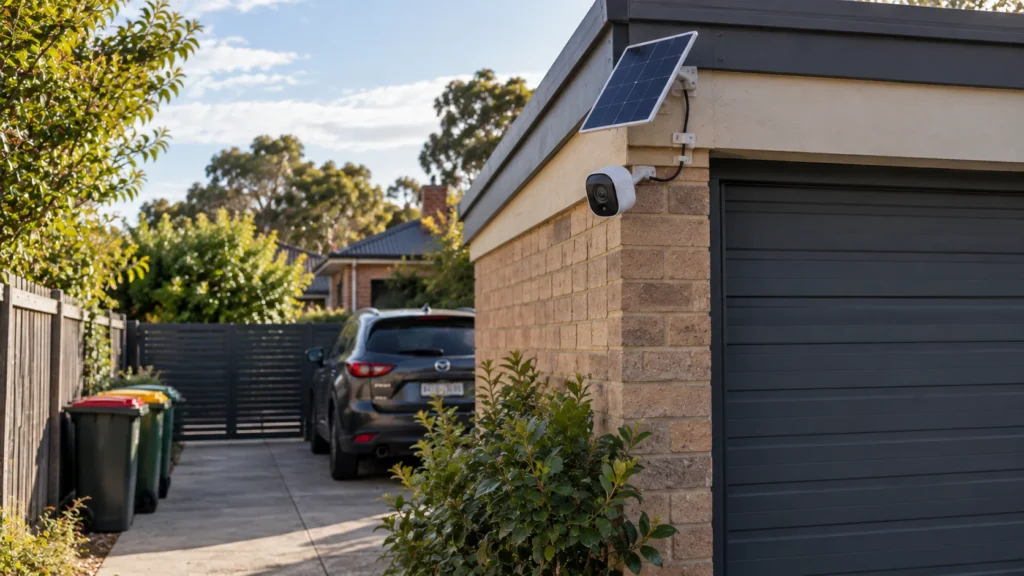
A solar security camera has five parts working together: the camera itself, a rechargeable battery, a solar panel (either built into the camera or connected separately by cable), local or cloud recording/storage, and a network path — usually Wi-Fi or cellular — that carries footage and alerts to your phone. The panel’s only job is replenishing the battery; it’s the battery that actually powers the camera moment to moment. Whether the panel is integrated into the camera body or mounted separately mostly matters for flexibility — a separate panel can be positioned for better sun exposure even if the camera itself needs to sit in a shadier spot for the right field of view.
Solar panel → replenishes battery → battery powers camera. Recording capability and network connectivity remain separate parts of the system.
Case Study — How Recording Mode Changes the Energy Budget
The clearest way to see how much recording mode matters is to look at one camera across its different modes. Reolink’s Altas — a current solar-compatible battery camera — publishes figures for exactly this:
This is the same camera, the same 20,000mAh (72Wh) battery, with the runtime changing purely because of what recording mode is switched on. The manufacturer’s own solar requirements shift accordingly too — with a 6W solar panel, roughly 10 minutes of daily sunlight is enough to sustain motion-triggered mode, while sustaining continuous or pre-recording mode calls for closer to an hour of direct sunlight daily, or a larger 12W panel to bring that down to around 45 minutes.
None of this makes the Altas the “best” solar camera — it’s simply a clear, manufacturer-documented illustration of a mechanism that applies to solar/battery cameras generally: the recording mode you choose can change the energy requirement dramatically, even when the camera, battery and solar setup remain the same.
Recording Modes — What a Solar Camera Can and Can’t Do
Solar and battery cameras typically offer some combination of motion/event-triggered recording, pre-recording (capturing a short buffer just before an event), and, on some models, continuous recording. It’s worth being precise about one thing: a solar panel does not give a camera a recording mode its hardware or firmware doesn’t support. If a specific camera isn’t built to record continuously, adding a bigger panel or more sunlight won’t unlock that capability — the panel can only replenish what the camera is actually capable of using.
Power Availability Isn’t the Same as Network Availability
A fully charged, sun-topped-up camera can still lose some of the functions you rely on if its network connection drops. It helps to separate what the camera does locally from what requires connectivity:
- Local recording — can continue without Wi-Fi on models with supported onboard storage.
- Live view — requires an active network connection to reach the camera remotely.
- Push notifications — depend on connectivity between the camera and the remote service/app.
- Cloud-dependent features — availability depends on the specific camera and service architecture.
The Altas is a useful example: it supports up to 512GB of local microSD storage, so footage can continue recording locally even when remote live view and notifications are unavailable for that model. The broader point is that local recording and remote connectivity are separate functions — this is a general architectural distinction, not a claim that every solar camera behaves identically during an outage; the specific storage and connectivity behaviour still depends on the individual model.
Solar Conditions in Melbourne
Solar exposure varies meaningfully by season everywhere, and Melbourne is no exception. The Bureau of Meteorology’s own solar exposure data shows this is driven by two main factors: the position of the sun in the sky (lower and weaker through winter, higher and stronger in summer) and cloud cover, which is genuinely variable day to day. The practical question for a solar camera isn’t a single seasonal number — it’s whether a specific panel location will receive enough usable sunlight for that camera’s actual recording pattern, across the full year, not just on a clear day. A camera set to motion-triggered recording with a well-placed panel has a very different margin for error than the same setup running continuously through a cloudy Melbourne July.
Solar Panel Placement
Getting placement right matters more for solar cameras than for a mains-powered one, since the panel’s exposure directly determines how much margin the battery has:
- Shading — check for trees, eaves, or structures that block sun at different times of day and different seasons, not just the moment of installation.
- Seasonal sun path — the sun sits lower in the sky through Melbourne’s winter months, which can shade a spot that gets full sun in summer.
- Panel orientation — a north-facing panel generally captures more consistent sun across the year in the Southern Hemisphere, but this is a general orientation preference, not a fixed manufacturer requirement — real roof lines, obstructions and mounting options often mean the practical answer is “the best available orientation,” not literally due north.
- Camera view vs. panel exposure — the camera needs to see the area you actually want covered; the panel needs sun. Where a separate panel is supported, it’s worth using that flexibility rather than compromising the camera’s field of view to chase better sun exposure.
- Cable-length constraints — where camera and panel are separate, check the specific manufacturer’s supported cable length before planning the layout.
- Mounting height — this should follow the specific camera’s own detection and field-of-view guidance rather than a universal figure; what suits one model’s PIR range and lens won’t necessarily suit another’s.
Getting the camera’s own positioning right matters just as much as the panel — our CCTV camera placement guide covers field of view, distance and lighting in more depth.
Solar/Battery vs Conventional CCTV
Solar is one architecture among several. If you’re weighing this against wired, wireless and hybrid options more broadly, our guide to choosing a CCTV system covers the wider decision.
Where Solar Cameras Make Sense — and Where They Don’t
Detached garage or shed. Often a strong fit — exactly where running new cable is impractical and event-triggered coverage is usually enough.
Gate or driveway with difficult cabling. A common, genuinely good use case, provided the panel location gets reliable sun.
Temporary site. Solar’s lack of wiring is a real advantage here, and event-triggered recording usually suits a temporary monitoring need.
Rental property. Avoiding permanent cable runs can be useful when you don’t own the property, provided the installation is permitted and the location suits a solar/battery setup.
Remote part of a larger property. Where extending cabling would be costly, solar can extend coverage a wired system wouldn’t easily reach — network coverage at that location still needs checking separately.
Location requiring continuous, high-volume recording. A harder fit — continuous recording is exactly the mode that drains a solar/battery camera fastest, so this needs a model genuinely built for it, a well-sized panel, and realistic sun exposure, or a mains-powered alternative may be the more straightforward answer.
Critical commercial surveillance point. Worth careful matching between recording mode, battery capacity and panel exposure rather than assuming any solar camera will do. Where continuous recording is a firm requirement, a conventionally powered system removes dependence on the camera’s solar-charging cycle.
Heavily shaded or poor-network location. A genuine limitation on both fronts — check both sun exposure and connectivity before assuming solar is the answer just because cabling is hard.
Choosing the Right Setup for Your Property
Working through the decision in order:
- Decide whether this location needs event-triggered or continuous recording — this single choice affects almost everything else.
- Check whether the panel location can realistically get reliable sun exposure for that recording pattern across the whole year, not just on a good day.
- Confirm the network path — Wi-Fi or cellular — and whether local recording continues if that connection drops.
- Establish where footage actually needs to be accessible from, and whether local storage alone is enough or remote access matters.
For a home where cameras are only one part of the security plan, a professionally installed alarm system in South Yarra may also need to be considered separately.
Frequently Asked Questions
Can solar security cameras record 24/7?
Not automatically. Whether continuous recording is possible depends on the specific camera’s hardware and firmware, and even where it’s supported, continuous recording draws far more power than event-triggered recording — as the Altas example above shows, the same camera and battery can last 540 days in motion-triggered mode but only 8 days in continuous mode on a full charge.
Do solar security cameras work in Melbourne winter?
They can, but winter solar exposure is genuinely lower than summer, driven by both a lower sun position and more variable cloud cover. Whether a specific setup keeps up depends on the panel’s exposure and the camera’s recording mode — a motion-triggered camera with good panel placement has far more margin through winter than one set to continuous recording.
Will a solar security camera still record if Wi-Fi goes down?
It depends on the camera. Models with supported onboard storage may continue recording locally even when their network connection is unavailable. The Reolink Altas, for example, supports up to 512GB microSD storage. Remote live view and notifications depend on the specific camera’s connectivity and service architecture.
Does a solar panel need to face north?
North-facing is generally a good default for consistent sun exposure in the Southern Hemisphere, but it isn’t a strict requirement — real roof lines, shading and available mounting points often mean the best practical orientation isn’t exactly due north. What matters more is genuinely unobstructed sun exposure across the seasons, not hitting an exact compass bearing.
Sources