
Best Alarm System for Luxury Homes: What Actually Changes in a Large, Complex Property?
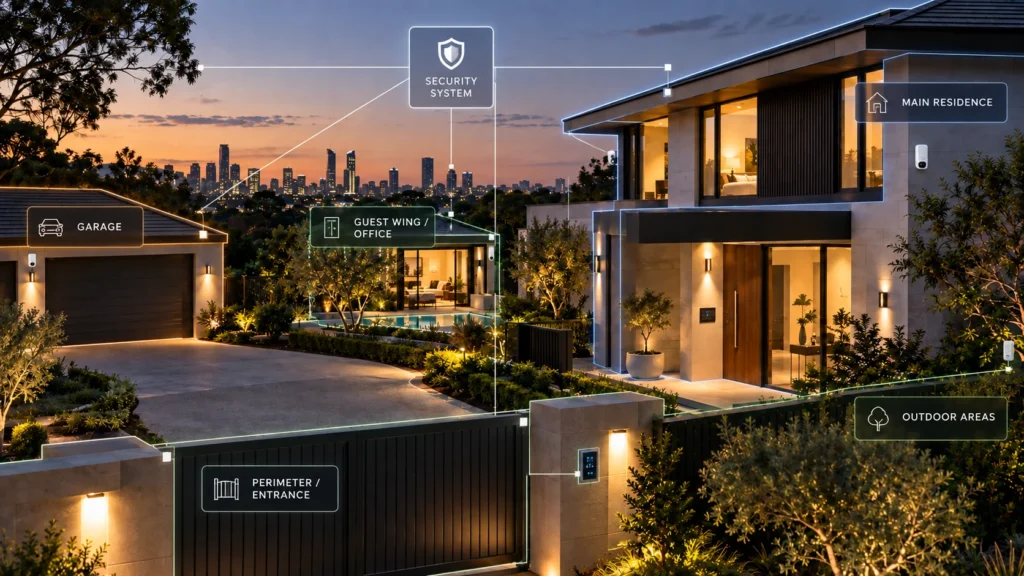
A large home might include a main residence, a garage, a guest wing, outdoor areas, and several people who each need a different level of access to different parts of the property. Simply adding more detectors to a standard alarm layout doesn’t automatically turn it into a system that’s actually designed for that property.
That’s the real problem this article is about: luxury security ≠ more devices.
The right question isn’t “which brand is best?” It’s how the property itself — its size, layout, independently controlled areas, construction and day-to-day use — should shape the system before any platform is chosen.
For a large or complex home, that usually means working through five questions first:
- Zoning: which parts of the property need to operate independently?
- Scale: how much detection, control and future expansion does the system need to support?
- Infrastructure: does wired, wireless or hybrid architecture best fit the building?
- Coverage: does protection need to extend to detached structures or outdoor areas?
- Communication and response: how will an alarm event leave the property, be verified and ultimately acted on?
Only after those questions are answered does platform fit become useful.
Why a Luxury Home Is Not Just a Bigger Standard Alarm Job
It’s tempting to think of a large or high-value home as a standard alarm job, just with a longer shopping list — a few extra motion sensors, a bigger siren, maybe a second keypad. In practice, the difference usually isn’t about quantity at all.
Property complexity ≠ device count.
What actually changes is how the property is used. A simpler residential installation may be designed around the property operating largely as one unit, with most users needing similar access. A more complex property may not work that way. There may be a garage that a tradesperson needs to access without triggering an alert in the main house. A guest wing that should be able to stay disarmed while the main residence is secured overnight. A detached studio or home office that operates on its own schedule.
None of that is solved by bolting more sensors onto a single, undifferentiated alarm zone. If everything is treated as one area, then arming the property means arming all of it — which quickly becomes impractical once different parts of a home are used differently by different people at different times.
This doesn’t mean every large or expensive property has these characteristics. Plenty of high-value homes are still a single, straightforwardly used residence, and a standard layout suits them fine. The point isn’t that price creates a new technical category — it’s that when a property genuinely does have independently used spaces, the alarm system needs to be designed around that fact, not around simply having “more.”
Start With the Property: What Needs to Be Controlled Separately?
Before any discussion of hardware, the first real design question is: which parts of the property need to operate independently?
Many professional alarm platforms support dividing a larger installation into independently controlled areas — sometimes called groups, partitions or areas depending on the platform. Depending on how the system is configured, this can allow:
- one part of the property to stay armed while another is actively in use;
- different users to be given control over different areas, where the platform and configuration support area-specific permissions;
- detached or functionally separate spaces — a garage, a guest wing, a studio — to be armed and disarmed on their own schedule.
This is a genuine, documented architectural capability, not a luxury add-on. A few concrete examples, each scoped to a specific platform:
- Ajax Hub 2 Plus supports up to 25 security groups and up to 50 rooms per hub, according to Ajax’s own documentation.
- Hikvision’s AX PRO DS-PWA96-M-WB panel supports up to 32 areas, per Hikvision’s official datasheet.
- Bosch’s Solution 6000-IP supports up to 8 separately controllable areas, and Bosch’s own documentation notes that user permissions can be set so that a person can only arm or disarm the areas they’ve been given access to — not the rest of the system.
It’s worth being precise about what these numbers do and don’t tell you. Ajax’s “groups,” Hikvision’s “areas” and Bosch’s “areas” aren’t identical, interchangeable units, and a higher number on one platform doesn’t mean it’s a “better” system than one with a lower number on another. What these examples demonstrate is that multi-area control is a documented capability across several professional alarm platforms — which is the point that matters for a property with genuinely separate areas.
Scale Is About Architecture, Not Just Device Count
Once a property’s areas are mapped out, the next question is how the system scales to actually cover them. A larger installation typically needs capacity for more detection points, keypads, sirens and — depending on the platform — repeaters or wired expansion modules to extend coverage across a bigger footprint.
How each platform handles that expansion differs:
- Ajax Hub 2 Plus supports up to 200 wireless devices per hub, with up to 5 ReX range extenders available to extend wireless coverage across a larger site.
- Hikvision’s AX PRO DS-PWA96-M-WB supports up to 96 wireless zones/outputs, with up to 4 repeaters for range extension.
- Bosch’s Solution 6000 starts at 16 onboard zones and is documented as expandable to 144 zones, using named wired or wireless expansion modules.
These aren’t competing scores on the same scale — they’re different architectural approaches to the same underlying problem. Ajax and Hikvision extend a wireless network with repeaters; Bosch uses wired and wireless expansion modules to increase the system’s total zone capacity beyond its 16 onboard zones. A large property doesn’t automatically require the platform with the largest number here — it requires a platform whose expansion method actually matches the property’s construction, existing infrastructure and layout.
The practical takeaway: system capacity has to match the design, not the other way around. Deciding how many areas the property needs (see above) comes first; the expansion method that gets you there comes second.
Wired, Wireless or Hybrid: Why There Is No Universal Luxury Answer
This is one of the more common points of confusion in alarm buying generally, and it doesn’t have a universal answer for large or high-value homes specifically. Each approach makes sense in different circumstances.
Wired can make sense when:
- suitable cabling already exists in the property, or is being run as part of a renovation or new build;
- the platform’s wired expansion architecture suits a large, multi-zone installation;
- there’s value in an infrastructure that doesn’t depend on battery-powered devices at every point.
Wireless can make sense when:
- the interior is finished, and running new cable routes would mean cutting into walls, ceilings or period detailing;
- flexibility in device placement or future expansion is a priority;
- the selected platform’s wireless range and capacity genuinely suit the site.
Hybrid can make sense when:
- existing wiring in part of the property is worth retaining;
- other areas — such as a newer extension or detached building — may suit wireless devices where coverage and site conditions have been assessed as suitable;
- different parts of a larger property simply have different existing infrastructure.
None of this supports a blanket rule. Wired isn’t obsolete, wireless isn’t inherently more secure or more reliable, and hybrid isn’t automatically the right answer for the majority of large homes — it depends on what’s already in the walls, what’s being built, and how the property is laid out. For a deeper look at how wired and wireless architectures actually compare, see our wired vs wireless alarm systems guide.
Coverage Changes When the Property Extends Beyond the House
For some larger properties, the area that needs protecting doesn’t stop at the front door. Detached garages, outbuildings, outdoor areas and approach paths can all be part of the picture — though not every large or high-value property needs this, and it’s worth treating as a design question rather than an assumption.
Where outdoor or perimeter coverage is relevant, a few platform-specific capabilities are worth knowing about:
- Ajax’s MotionCam and MotionCam Outdoor detectors support photo verification when paired with compatible hub configurations — meaning an alarm event can come with an image, not just a trigger. That’s a device-level capability, not a guarantee about how quickly any given installation will respond to an event.
- Hikvision’s AX PRO family includes PIRCAM devices for photo-based detection, alongside dedicated outdoor detector models within the same product range. The relevant capability depends on the selected platform, compatible devices and the way the property is designed.
Where and how outdoor devices are actually placed on a given property is a site-specific design decision that should be made with an installer looking at the property itself — not a generic checklist, and not something to work out from published spec sheets alone.
Communication Architecture Matters as Much as Detection
A detector sensing something is only the first step. What happens next depends on how the alarm event actually leaves the property:
DETECTION → PANEL/HUB → COMMUNICATION PATH → APP/MONITORING CENTRE → HUMAN RESPONSE
Each link in that chain matters, and the communication path is often the part people think about least — until it’s the one that fails.
- Ajax Hub 2 Plus documents Ethernet, Wi-Fi and two SIM card slots as communication paths, and Ajax’s own material states the hub can maintain communication using an available channel when other configured communication channels are unavailable — while recommending all channels be connected for redundancy. Its backup battery is documented at up to 15 hours, specific to this hub model.
- Hikvision’s AX PRO DS-PWA96-M-WB documents TCP/IP, Wi-Fi and 3G/4G connectivity with dual-SIM support, and specifies a backup battery of up to 12 hours at normal temperature — noting that runtime can be significantly reduced at low temperatures. These figures apply to this specific panel, not to Hikvision alarms generally.
- Bosch’s Solution 6000 documents Ethernet and GSM/GPRS communication options.
It’s worth being clear about what “redundancy” actually means in this context: having more than one communication path gives the system an alternative route if one fails — it isn’t a guarantee of uninterrupted operation under all conditions. Redundancy is not the same thing as guaranteed uptime.
Monitoring, Verification and Response Are Separate Decisions
These three ideas get blended together a lot in alarm marketing, but they’re genuinely separate decisions, and it’s worth keeping them apart:
- Detection — the sensor identifies an event.
- App or remote alert — a notification reaches the property owner’s phone.
- Photo or visual verification — where the platform and device support it, an image accompanies the alert.
- Professional monitoring — a monitoring centre receives the alarm signal, separately from any app notification.
- An agreed response procedure — what the monitoring centre actually does when an alarm is received, as set out in the service agreement.
- Physical response — if part of the selected monitoring service, and subject to that service’s own terms.
Detection ≠ verification ≠ response. Each of these can exist without the others, and a system having one doesn’t guarantee any of the rest. Professional monitoring doesn’t by itself mean guaranteed police or patrol attendance, and there is no single response time that should be assumed across different services or incidents. Response depends on the specific arrangement, the nature of the alert, and factors outside the alarm system itself.
On insurance: requirements can vary by policy and underwriting conditions, particularly for high-value contents, so any specific alarm or monitoring requirement for a property’s insurance should be confirmed directly with the insurer rather than assumed from general advice.
How Different Professional Platforms Approach Complex Homes
With the design questions above answered — areas, scale, wired/wireless/hybrid, coverage and communication — platform choice becomes a question of which architecture actually fits. This isn’t a ranking, and there’s no scorecard here: the platforms below illustrate different ways of solving the same underlying design problems, not competing scores.
Ajax Hub 2 Plus
Ajax Hub 2 Plus is built around a wireless-first architecture: security groups for zoning, a wireless device capacity suited to larger installations, ReX repeaters for range extension, and Ethernet/Wi-Fi/cellular communication paths together with compatible photo-verification detectors.
Hikvision AX PRO DS-PWA96-M-WB
Hikvision’s AX PRO DS-PWA96-M-WB takes a similar wireless-first approach with its own architecture: multiple areas for zoning, a documented wireless zone/output capacity, repeaters for extending coverage, TCP/IP/Wi-Fi/cellular communication with dual-SIM support, and related PIRCAM and outdoor devices within the same product family.
Bosch Solution 6000
Bosch’s Solution 6000 takes a different path, built around wired/hybrid depth: separately controllable areas with access-based user permissions, zone expansion into the low hundreds, integrated intrusion and access-control functions, and Ethernet/GSM-GPRS communication.
The lesson here isn’t that one of these is objectively superior. It’s that different professional platforms solve zoning, scale, communication and integration in genuinely different ways, and the right one for a given property depends on the design questions worked through earlier in this article — not on which platform has the longest feature list. For a broader look at how these and other residential alarm platforms compare across a wider range of Australian homes, see our comparison of the best home security systems in Australia.
So, What Is the Best Alarm System for a Luxury Home?
There’s no universal best system based on a property’s price tag or prestige. The right platform is the one that fits the property’s actual design requirements — which means working through those requirements before choosing a platform, not after.
Working through a table like this with a property in mind — rather than starting from a brand name — is what actually determines the right system for a large or complex home.
For a large or complex residence, platform selection should follow an assessment of the property’s actual areas, coverage, existing infrastructure and communication requirements, rather than come before it. If you’re planning a system for a larger or more complex Melbourne home, SIPKO Security provides residential alarm system installation in Melbourne, with the system selected around the requirements of the property.
FAQ
Does a luxury home need a different type of alarm system?
Not because of its price. What can change the design is genuine property complexity — multiple independently used areas, detached buildings, or a larger scale than a standard installation — and that applies to any property with those characteristics, regardless of value.
Is wired or wireless better for a large home?
Neither is universally better. It depends on existing cabling, whether interiors are finished, and how the property is laid out — which is why a hybrid approach combining both can also be appropriate.
Can one alarm system control a main house, garage and other areas separately?
Yes, on platforms that support independently controlled areas or groups — though the exact capacity and terminology differ by platform, and the right configuration depends on how many genuinely separate areas the property actually has.
Does professional monitoring automatically mean police will attend?
No. Professional monitoring means a monitoring centre receives and acts on the alarm signal according to an agreed response procedure. What that procedure actually involves — and whether it includes any physical response — depends on the specific monitoring service and agreement, not on the alarm system itself.
Sources



