
Ajax Alarm Repair Melbourne
SIPKO Security provides Ajax alarm fault diagnosis, repair, system takeover assistance and preventive health checks for Melbourne homes, townhouses, shops, offices and small commercial sites. We help with offline devices, Hub connection faults, low battery alerts, false alarms, siren issues, missing notifications and unclear access left by a previous owner or installer.
Book an Ajax Repair Visit
Call 0406 432 691 or send the fault details below.
How SIPKO Approaches an Ajax Alarm Fault
A warning is only the starting point. The technician checks the system path relevant to the reported problem, including Hub communication, connected devices, user access, notifications and final operation.
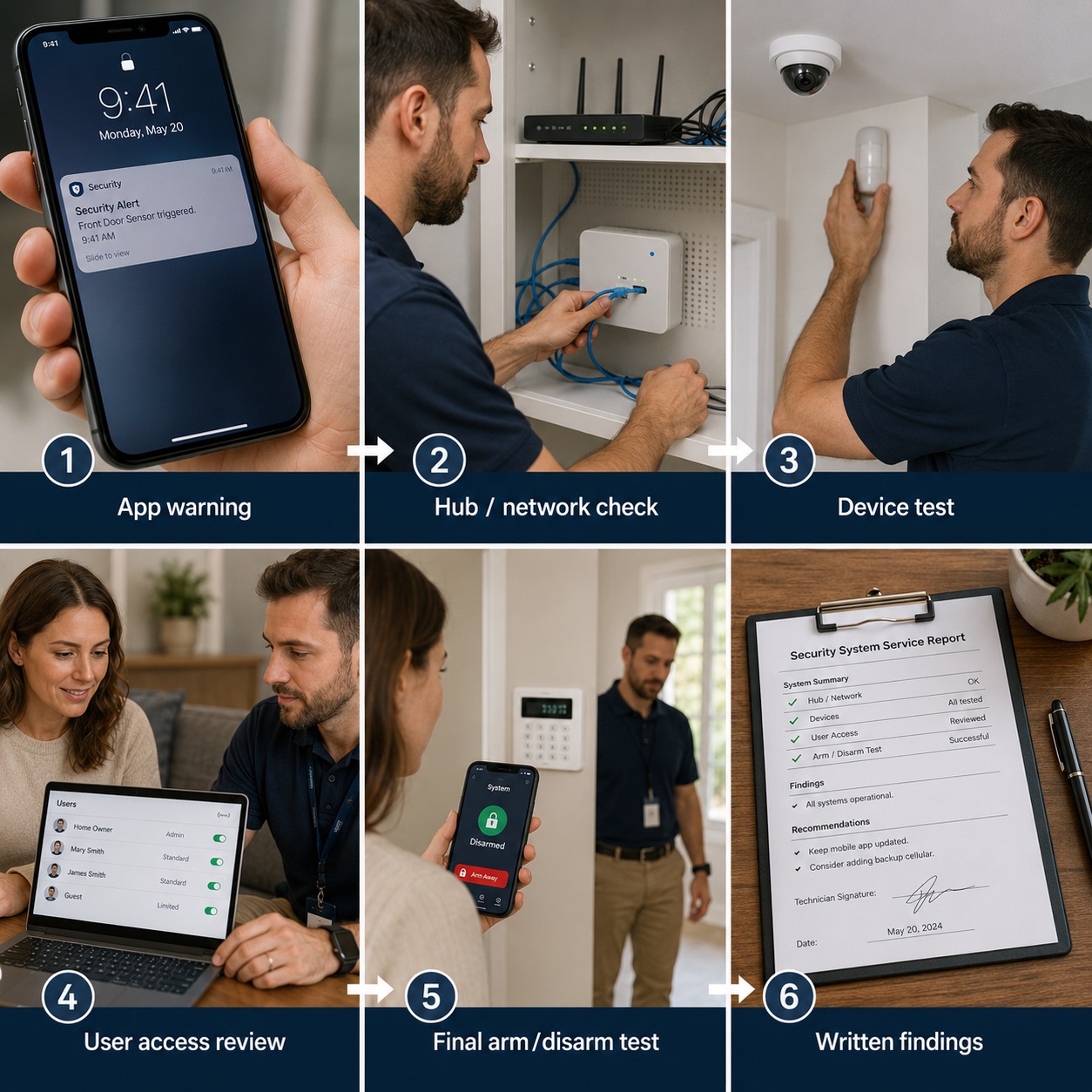
What the Repair Visit Checks
The aim is to identify why the fault appeared, confirm whether the system still operates correctly and determine whether the cause is configuration, communication, placement, power or a failed device.
Network changes, weak radio signal, battery condition, detector position and outdated user access can create warnings that resemble hardware failure. Testing is therefore completed before parts are recommended.
- ✓Review of the warning and relevant event history
- ✓Hub, device, battery, tamper and signal checks where relevant
- ✓Testing of access, alerts, arming and siren operation
- ✓Explanation of the fault, completed work and remaining risks
Repair Flow Used on Site
What to Check Before an Ajax Repair Visit
You do not need to troubleshoot the alarm yourself. These details help identify the likely fault area and prepare for the visit.
What Does the App Show?
Note the exact wording, such as device offline, low battery, Hub offline, tamper alarm, failed arming, siren fault or notification problem.
Which Device Is Affected?
Identify whether the warning relates to a door contact, motion detector, siren, keypad, remote, ReX, outdoor detector or the Hub.
What Changed Recently?
Router replacement, NBN work, cellular service changes, renovation, moved furniture, battery work and user changes can help explain a new fault.
Who Carries Out the Repair
SIPKO provides fault-led visits for existing Ajax installations. The purpose is to identify the cause, complete practical testing and give the owner clear next steps rather than treating every warning as a reason to replace equipment.

Security Technician Visit
SIPKO Security is Brighton based and services residential and small commercial properties across Melbourne. The visit is completed by a technician familiar with alarm diagnostics, device testing, app access and system handover.
Fault-Led Assessment
Checks are selected according to the reported fault, installed Hub model and connected devices. Not every system requires the same tests or replacement parts.
Clear Repair Notes
You are told what was found, what was corrected, what remains unresolved and whether a replacement part is required. Parts are discussed before supply.
Common Ajax Alarm Problems We Fix
A fault can originate from communication, signal, placement, power, user access or alarm configuration. A warning does not automatically mean that the affected device has failed.
Offline Devices
Offline detectors can be linked to distance, building materials, radio signal, Hub position, battery condition or a device moved during renovation.
- ✓Signal strength and event history
- ✓Device pairing and placement review
- ✓Hub, ReX and distance assessment
Ajax Hub Offline
A Hub may go offline after router, NBN, cellular service or internet provider changes. Available communication paths are tested before the Hub is treated as faulty.
- ✓Available Ethernet, Wi-Fi and cellular paths, depending on Hub model
- ✓Power and Ajax Cloud connection shown in the app
- ✓Push notification confirmation
Battery and Power Faults
Low battery warnings, unusually fast battery drain, poor contacts, loose housings and Hub power faults require testing rather than automatic replacement.
- ✓Battery status and contact inspection
- ✓Device power behaviour review
- ✓Post-replacement trigger test
False Alarms
False alarms can result from pets, heat sources, curtains, roller doors, detector angle, outdoor movement or entry and exit delay settings.
- ✓Detector angle and sensitivity review
- ✓Walk-test and trigger testing
- ✓Night Mode and delay review
App and User Problems
Missing notifications can be caused by outdated users, incorrect roles, muted alerts, phone permissions or staff changes rather than an alarm hardware fault.
- ✓App status and available Hub or device information
- ✓User permissions and administrator review
- ✓Notification and role testing
Existing System Takeover
SIPKO can assist when the original installer is unavailable, administrator access is unclear or a property has changed owners, tenants or staff.
- ✓Administrator access and ownership review
- ✓User list cleanup
- ✓System condition notes
Fault Diagnosis Before Parts Replacement
Diagnosis follows the reported symptoms through the Hub, connected devices, radio signal, power, users and alarm settings. The checks used depend on the installed Hub model, device types and fault history.
System and App Review
The exact warning, affected device, event history, alert recipients and recent internet, power, user or property changes are reviewed.
Device-Level Testing
Relevant devices are tested for battery condition, tamper state, signal quality, placement issues and repeated events.
Repair and Reconfiguration
The correction may involve connection recovery, re-pairing, delay changes, detector adjustment, user cleanup or replacement of a confirmed faulty component.
Final Test and Findings
Relevant zones, alerts, arming, disarming and siren operation are tested again after the correction.
When Ajax Replacement May Not Be Needed
Some faults can be corrected through communication recovery, placement changes, access cleanup or configuration adjustments.
Hub Offline After Internet Work
If the problem started after NBN, router or cellular service changes, the communication path may be the cause rather than a failed Hub.
False Alarm from Placement
A detector facing heat, moving curtains, pets, a roller door or outdoor activity may need adjustment rather than replacement.
Alerts Not Reaching the Owner
Missing notifications can result from phone settings, muted alerts, user permissions or outdated roles.
Battery Warning Still Showing
After battery replacement, the device may still require a trigger test, contact inspection and confirmation in the app.
Night Mode Does Not Match the Home
Night Mode may need adjustment when overnight movement paths were not configured correctly.
Inherited System with Old Users
Administrator access review and user cleanup may resolve control and notification issues without hardware changes.
Ajax Repair vs Ajax Health Check
Choose repair when the system has an active fault. Choose a health check when the alarm still operates but has not been tested recently or the property, users or internet setup has changed.
Book Ajax Repair
Suitable for offline devices, recurring false alarms, Hub connection faults, missing notifications, battery warnings or problems arming and disarming the system.
Book an Ajax Health Check
Suitable for a working system that needs battery, signal, siren, user access and communication testing before faults become disruptive.
Troubleshooting Mistakes to Avoid
Replacing Detectors Too Early
Signal strength, battery condition, tamper state, placement and repeated events should be reviewed before a detector is replaced.
Ignoring Router or NBN Changes
When a Hub goes offline after internet work, the communication path and power should be checked first.
Leaving Old Users in the App
Outdated users and unclear administrator rights can create access risks.
Changing Batteries Without Testing
After battery replacement, the device should be triggered and checked in the app.
Using Night Mode Without a Walk-Test
Night Mode should be tested against actual movement through the property.
Assuming Every False Alarm Means Failure
Detector angle, pets, heat, curtains and delay settings can create alarms even when the device works correctly.
What May Be Covered During the Visit
Hub and Communication
Internet and cellular paths, router changes, Hub power and connection to Ajax Cloud.
Devices and Protected Areas
Motion detectors, contacts, sirens, keypads, remotes and outdoor devices.
Battery and Tamper Status
Battery warnings, tamper errors, loose housings and repeated events.
False Alarm Causes
Detector angle, pet movement, heat sources, delays and Night Mode.
Users and Permissions
Administrator access, outdated users, notification rights and app roles.
Final Functional Test
Arming, disarming, siren, notification and device trigger tests.
Typical Ajax Faults in Melbourne Properties
Townhouse Garage Entry Fault
If a device near the garage entry or rear sliding door drops offline, the radio path, Hub position, building materials and device condition are reviewed.
Retail Shop False Alarms
At a shop, faults may relate to detector angle, temperature changes, roller doors or closing-time delay settings.
Existing System After Moving In
Old users, missing administrator access and unclear notification roles may require attention after a change of owner or tenant.
Why the Fault Should Be Checked
An unresolved warning can affect a protected opening, notification path or user’s ability to operate the alarm.
- ✓An offline detector may leave an intended protected area without coverage.
- ✓Repeated false alarms can reduce confidence in the system.
- ✓Communication faults may affect app alerts or monitoring.
- ✓Incorrect permissions can create control problems.
- ✓Repair notes provide a record of completed work.
Repair Cost and Visit Scope
Cost depends on the fault type, device count, site access, testing required and whether replacement parts are needed.
Fault Type
A single battery warning usually requires less testing than repeated Hub disconnections or several false alarm zones.
Device Count and Access
The number and location of detectors, sirens, keypads and outdoor devices can affect testing time.
Replacement Parts
If testing identifies a failed component, the reason and expected cost are explained before approval.
Ajax Alarm Repair Questions
How much does an Ajax alarm repair visit cost?
Can you fix an Ajax Hub that is showing offline?
Can false alarms be fixed without replacing a detector?
Can you take over an Ajax system from another installer?
Do I need Ajax repair or an Ajax health check?
Need Ajax Alarm Repair in Melbourne?
Send the warning details or call SIPKO Security for help with offline devices, Hub connection faults, battery alerts, false alarms, siren problems, notifications or user access.