Ness Security Alarm Keeps Beeping: The Ultimate Diagnostic & Fixing Guide (2026 Edition)
A beeping Ness alarm at 3am is infuriating, but it is almost always communicating a precise fault condition. From reading the Memory icon on a D8x to dealing with absolute battery failure on a Navigator keypad, this exhaustive guide covers every possible beep trigger and exactly how to fix it permanently. Before you consider a new alarm installation, let’s try to silence the one you have.
Introduction: Stop The Alarm System Beeping and Decode the Warning
A Ness alarm is designed to warn and protect. What most homeowners don’t know is that the periodic “chirp” or “beep” every 30 to 60 seconds is actually a safety mechanism called a Trouble condition. It is your alarm’s way of saying: “Before an intruder attempts to break in, you should know that my internal systems are compromised.”
We receive hundreds of calls from across Melbourne each year from frustrated homeowners dealing with a Ness D8x, D16x, R16, or the touchscreen Ness Navigator that refuses to stay silent. Let’s break down exactly what the keypad is trying to tell you, the specific codes involved, and the precise steps you need to take to restore complete peace of mind to your residential alarm system.
If you just need to sleep right now: Try pressing the ‘E’ (Enter) button, the ‘Memory’ button, or entering your user code and pressing ‘E’. On many Ness systems, accessing the memory log or arming/disarming will temporarily silence the trouble beep for a few hours. Warning: this does not fix the fault; the beep will return until the core issue is resolved via proper system maintenance!
Decoding the Beeps: What the Keypad is Showing You
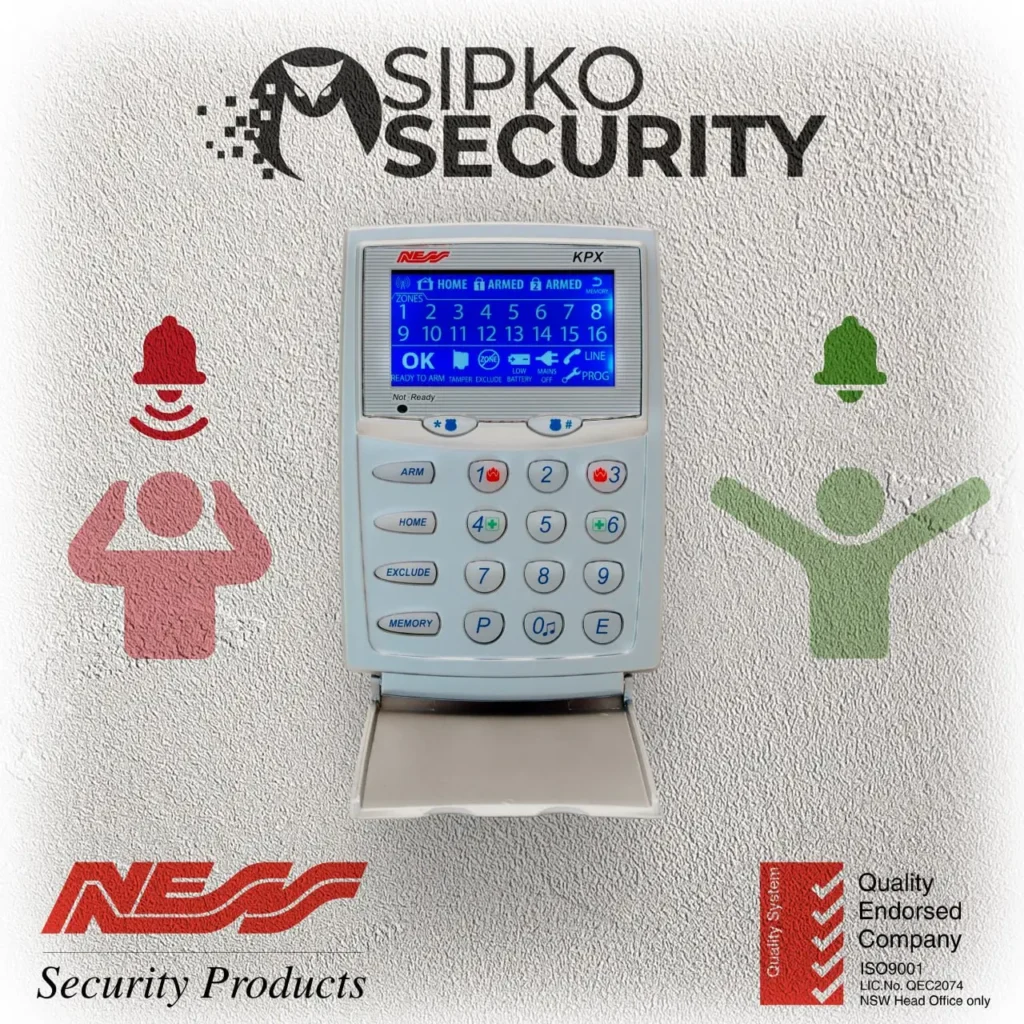
Your Ness keypad (whether it’s a standard LED, an LCD, or a Navigator Touchscreen) is your diagnostic tool when you need to trace the alarm system beeping. Do not ignore the flashing lights on the keypad. Instead, check the keypad display for any messages displayed or error messages that identify the cause of the beeping, then press the Memory button (or ‘E’ depending on your model) to read what fault condition is present.
This denotes a Low System Battery. The large 12V 7Ah battery in the main panel box needs immediate replacement. The most frequent cause of random beeping.
This means Mains Power Failure. The panel transformer is disconnected, a fuse has blown, or your home has lost AC power.
A Tamper switch is open. Somebody bumped the panel box, accessed an external siren, or a sensor cover is loose.
Depending on the model, a flashing line means Telephone Line Failure (common after NBN upgrades) or low battery on a wireless Ness radio component.
Beeping While Armed vs Disarmed
When does the beeping occur? The armed state of the panel provides critical clues on what happens when your alarm triggers.
Disarmed State Beeping
If the system is turned OFF (disarmed) and begins chirping every minute, it is almost entirely a Trouble Fault (battery, tampering, power cut) — a warning signal from the control panel about a fault while the system is disarmed. The system is designed to alert you of these faults before you leave the house and try to arm it.
Beeping During the Arming Process
If you press ARM, and the keypad immediately throws a long, solid error beep, it means a zone is open. This is not a panel fault—it’s user error or an environmental issue. You cannot arm a Ness system while a door is open or a motion detector actively sees you swinging your arms.
Is It a Fault, or Just “Chime Mode”?
We receive an astounding number of service calls from homeowners complaining of “random beeping when we walk around”, and one of the common causes is that they accidentally activated Chime Mode.
The Accidental Chime Mode Trick
Chime mode allows the keypad to beep briefly every time a specific door is opened or a motion sensor is triggered while the alarm is unarmed. It’s meant for retail shopfronts to hear customers walk in.
- The Symptom: A short “beep beep” every time you walk past a specific detector or open the front door; the sound is usually just a brief entry chime rather than a fault beep.
- How to Turn it Off on a D8/D16: To disable the chime, you usually just need to press the CHIME button or enter your code and hit a specific sequence (often pressing “7” then “E” twice depending on the installer setup). Note: some keypads confirm the command with two beeps. Look at your manual for the exact toggle command!
Root Cause 1: Low Battery and System Backup Battery Failure (The 90% Issue)
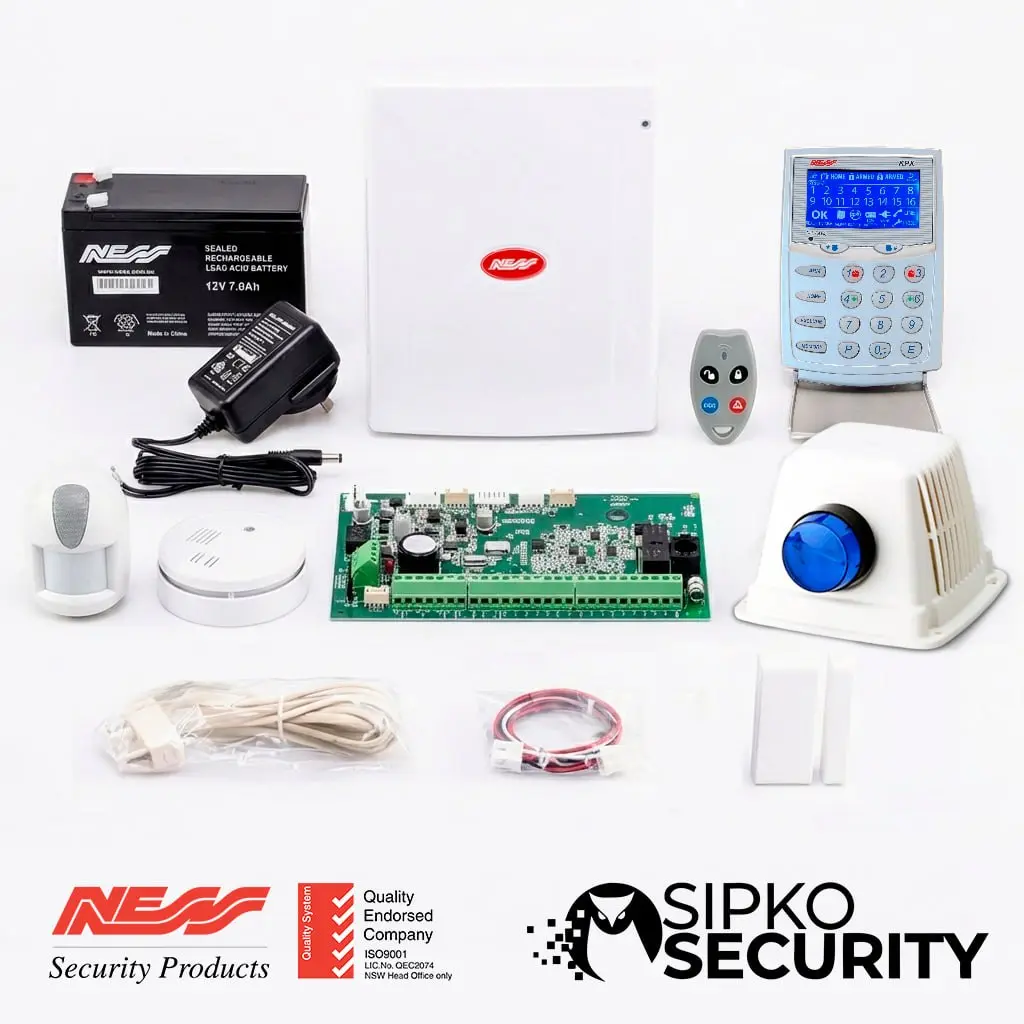
If your Ness panel is beeping every minute, the absolute most common culprit is a depleted 12V SLA alarm battery located inside the main control cabinet. Replacing backup batteries every 3–5 years helps prevent recurring beeping. Once the internal resistance of the battery rises, the Ness panel continuously tests it and throws a low-voltage trouble fault.
Deep Dive: How the Ness Battery Check Works
- The Dynamic Load Test: A Ness panel performs a “dynamic load test” every 24 hours or when mains power is removed. It literally applies a heavy load to the battery. If the voltage drops below roughly 11.5V, the system throws a trouble fault.
- Siren Current Draw: If you try to trigger your alarm during a low battery state, the voltage might collapse so hard that it causes the entire Ness panel to restart.
Step-by-Step Replacement Instructions
- Identify the Panel: Find the large metal or plastic Ness control box. Use a key or screwdriver to open the lid.
- Disconnect: Pull the RED and BLACK terminal connectors off.
- Check Size: Purchase a high-quality 12 Volt, 7 Amp-Hour (12V 7Ah) SLA Battery.
- Reconnect: Secure the corresponding wires. Be careful not to cross them.
- Reset: Close the panel lid securely. Go to the keypad, enter your code to reset everything.
If you don’t feel comfortable handling exposed wires, our Ness alarm specialists covering Bayside to Hawthorn can supply, test, and install the battery safely.
Root Cause 2: AC Mains Power Fail & Transformer Issues
A Ness alarm relies on a continuous 16V AC power supply. When this power is interrupted, the alarm instantly kicks over to the backup battery. To notify you of this hazard, the alarm begins to beep periodically.
If mains power has returned and the beeping continues, reset the alarm from the keypad.
Troubleshooting AC Power Loss
- Did a breaker trip? Check your home switchboard.
- Has the plug pack burnt out? Over time, transformers fail. You may need an alarm technician to replace it.
- Why does it beep after a blackout? Sometimes the system goes fully flat. It can take 24-48 hours to trickle charge.
Power Surges and Lightning strikes
Melbourne experiences ferocious summer electrical storms. A nearby lightning strike can push hundreds of volts through telecommunications cables, instantly requiring you to evaluate your home security.
Signs Your Panel Was Fried
If the alarm keypad has a burnt-plastic smell, is blank but emitting a high-pitched squeal, or has every single zone light flashing erratically, that points to an internal fault—the main PCB is destroyed. This usually means service needed rather than a DIY repair, especially if fault indications keep returning after a surge, and may require a total system replacement or expert removal.
Root Cause 3: Tamper Alerts (TAMP) on Panel or Sirens
Ness alarms, like many Bosch alarm system setups, boast robust tamper protection. Physical interference triggers a specific tamper sequence that initiates beeping.
The Invisible Tamper: Why is ‘TAMP’ Flashing?
A flashing or steady ‘TAMP’ icon typically means one of three things: The Control Box Lid is loose, the External Siren Bell-Box has cracked due to UV exposure, or a Sensor cover was bumped during cleaning.
Diagnosing Faulty PIR Motion Sensors
Not all beeping comes from the main panel hardware; persistent open-zone beeping can also point to a faulty sensor. If a motion sensor goes bad, it will throw an ‘Open Zone’ fault, and the same kind of zone issue can appear on a Bosch alarm when a detector or sensor circuit is faulty. If you are experiencing spiders nesting on external cameras, they are likely inside your PIR sensors as well. If it seems like more than a minor issue, have a technician inspect the zone hardware.
Immediate Fix: How to Use the EXCLUDE Function
If a specific sensor acts up (e.g., Zone 3 is permanently broken) and you need to leave the house, you can Exclude that zone to arm the rest of the property.
Excluding a Zone on Ness
Press EXCLUDE -> Press the zone number (e.g., 3) -> Press ENTER. You can now arm the house! A perfect temporary measure to secure your home while travelling.
Root Cause 4: Communication Failure, Telephone Line / Communication Fail & Wireless Devices
The NBN rollout disabled traditional copper phone lines, so a communication failure warning can make the keypad beep when the system cannot connect to the monitoring center. On older Ness setups, as with some Bosch alarm keypad alerts, this may involve the main control panel dialer or another communication module continuously reporting a “Line Fail” warning. On systems using cellular paths, a GSM unit with poor signal can trigger the same warning.
The NBN Telco Comm-Fail
To fix this, you must enter programming mode in installer programming (P62E, P63E menus) to disable the dialer function on older systems after phone-line changes so it stops looking for a phone line, or upgrade to a modern IP/4G monitoring solution.
Radio Key & Wireless Sensor Batteries
Wireless components such as wireless sensors use CR123A or CR2 lithium batteries, and when they show a low battery warning the keypad can also beep. If you see a “Radio Low Battery” fault, replace these cells immediately to ensure your wireless security perimeter remains active.
How to Perform a Hard Power Cycle (If The Keypad is Frozen)
The Ultimate Manual Restart
Disconnect BOTH the 16V AC transformer from the wall AND the 12V SLA Battery. Leave the system dead for 3 minutes, then reconnect. This clears latent software glitches.
The Cost of Servicing vs Upgrading in Melbourne
A standard service callout to replace a battery is affordable. However, if your panel is failing at the component level, that repair-versus-upgrade decision often comes up with older Bosch models too, especially when repeated beeping and recurring fault codes keep returning, so check out the 5 signs your alarm system is outdated. Knowing when to quit on old tech is crucial. If repeated error codes keep appearing, the fastest way to resolve the fault is to book a technician rather than keep spending on old hardware.
Why the Reactive Legacy Architecture is Holding You Back
The Upgrade Path: Smart Integration
If you are tired of mysterious chirps, upgrading to a modern Grade-2 wireless system like the Ajax Security System fundamentally changes how you protect your property:
- Zero keypad beeps; all notifications go to your phone.
- Advanced outdoor MotionCam detectors for perimeter protection.
The Final Diagnostic Checklist
Before calling a licensed security expert, run through this definitive list:
- 🔋 Read the memory log (Press ‘E’ or ‘Memory’)
- 🔋 Look for ‘BAT’ -> Replace 12V 7Ah SLA Battery.
- 🛡️ Look for ‘TAMP’ -> Check the main panel lid and sensors.
- 🔌 Look for ‘Mains’ -> Check your breakers.
- 💻 Look for ‘Line’ -> NBN failure.
- 🔄 Enter your master code and verify if the fault clears.
Professional Ness Support Across Melbourne
Avoid midnight frustrations. Sipko Security provides specialized repair services for Ness alarms across Melbourne, from Brighton to Hampton. We handle extreme tamper faults, service calls for a beeping Bosch alarm keypad, battery resets, NBN comm-fail reprogramming, and full system overhauls. If beeping persists after basic battery, power, or line checks, a security technician should inspect the system. Also looking for video? Check out our expert CCTV installation options!
Further Reading & Authoritative Sources
- Ness alarm service & repair Melbourne Hub – Direct booking and pricing for Ness interventions and SLA battery replacement services.
- Is Your Home an Easy Target for Burglars? – Why faulty alarms attract exactly the wrong type of attention.
- The Ultimate CCTV Placement Guide – Discover how placing cameras correctly removes ambiguity regarding whether an alarm trigger was real.
- What Makes Ajax Alarms So Powerful? – Deep dive into the cutting-edge wireless architecture that replaced Ness.