What Should You Automate Around a Home Security System?
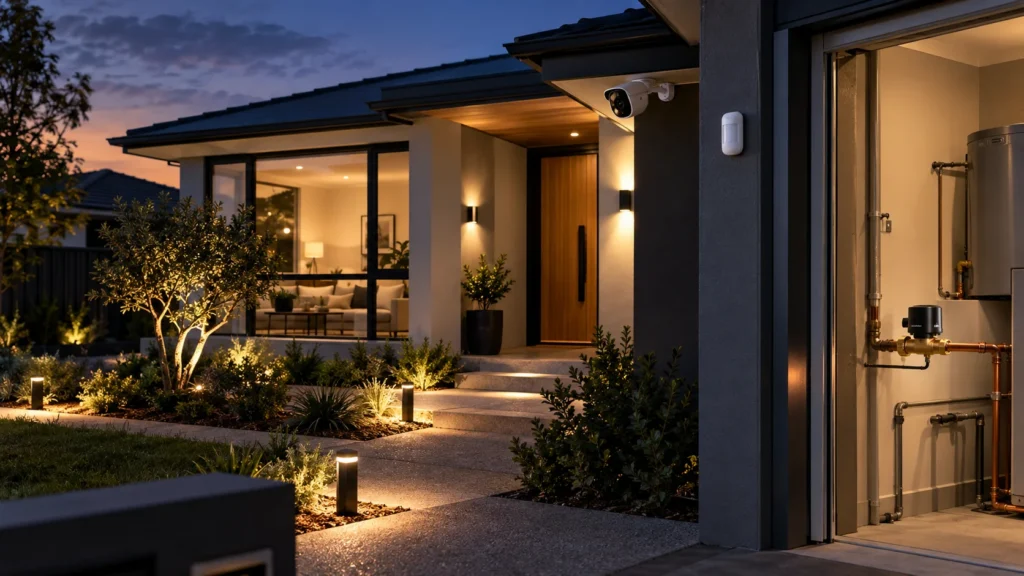
A modern alarm system can be configured to trigger certain actions automatically — turn on selected lighting, switch off a connected load or start recording when a defined event occurs. Whether that’s worth setting up for any given task is a separate question, and it’s one worth asking before switching anything on: what actually triggers the automation, what the system does in response, what you can actually confirm afterwards, and what happens if the device or connection it depends on isn’t there when it’s needed.
Start With the Job, Not the Smart-Home Feature
Not every automation is doing the same kind of work. Some respond to an intrusion. Some protect the property from damage that has nothing to do with a break-in. Some are just convenient.
None of these are automatically better than the others — they’re solving different problems. A convenience automation doesn’t become a security feature just because it’s connected to the same app, and a property-protection scenario like a leak shutoff isn’t really about intruders at all. Working out which job an automation is actually doing comes before deciding whether it’s worth setting up — and it’s a decision that only really makes sense once a home security system is actually in place to build automation around.
Automations That Solve a Clear Job
A handful of scenarios cover most of what’s genuinely useful to automate around a home security system. Each one is worth understanding on its own terms — what sets it off, what happens, and what it doesn’t tell you.
When an Alarm Turns On Selected Lighting
An alarm event — a door opening, motion where it shouldn’t be — can be set to switch on selected lighting through a connected automation device. Ajax documents this directly: a DoorProtect alarm can trigger a connected socket or switch to turn lights on. What this actually confirms is narrow: the light came on because the alarm fired. It doesn’t confirm what caused the alarm, and it isn’t a substitute for checking. Whether this is worth setting up also depends on whether the automation device it needs — a compatible relay, socket or switch — is actually part of the system.
Turning Off a Selected Connected Load When You Arm the System
Ajax’s own documentation gives a specific, repeated example: an iron connected through a smart socket can be set to switch off automatically when the system is armed. This is a real, well-documented scenario — not “your alarm can switch off your appliances” in general, but a selected load, connected through a compatible device, with its own electrical limits. Not every appliance is suitable, and this isn’t a DIY electrical project — it’s one narrow, useful automation for anyone who’s ever left the house wondering whether the iron is still on.
Before relying on any of these automated actions, it’s worth checking:
- what actually triggers it;
- which device performs the action;
- whether the result itself can be confirmed, or only that a command was sent;
- what it depends on to work — power, a specific device, a communication path.
Shutting Off Water After a Leak Is Detected
This one sits outside intrusion security entirely — it’s property protection.
- Trigger: a leak detector picks up water where it shouldn’t be.
- Action: a configured scenario closes a connected valve.
- Still needs attention: whatever caused the leak in the first place — the valve closing limits the damage, it doesn’t fix the problem.
For this to work, both the detector and the valve need to be part of the system and functioning.
Starting Video Recording After an Alarm Event
Ajax supports linking a security detector to a camera, so that when the detector triggers, the camera records and sends a short clip to the app.
- The alarm event starts the configured recording.
- Footage becomes available for review shortly afterwards.
- The recording itself doesn’t establish what caused the alarm — someone still has to watch it.
The value is in having footage available quickly, at the moment it matters, rather than discovering afterwards that nothing was captured.
Closing an Electric Lock When the System Is Armed
Ajax documents this scenario specifically: an electric lock can be configured to close automatically when the system is armed. That’s the confirmed scope — not smart locks generally, not remote unlocking, not voice control. It requires a compatible electrical lock interface, and like the other automation-device scenarios, it depends on that specific hardware actually being connected and working. It’s also a good example of a question worth asking about any automation involving a physical mechanism: did the system send the command, or did the lock actually close?
Every scenario above assumes the devices involved are already talking to each other. Whether that’s actually the case — whether a specific alarm, camera or smart-home platform can technically connect in the first place — is a separate question from what’s worth automating once they do, and one worth answering on its own.
A Command Is Not Always Confirmation
That question matters more broadly than just locks. A relay changing its contact state tells you what the relay did. Whether the connected gate, lock or other device physically completed the intended movement may require its own status or feedback mechanism — and that’s not something every setup has.
Put simply: the system can tell you it sent an instruction. Whether the instruction was carried out by the physical hardware on the other end is a separate fact, and one worth checking for any automation where the outcome actually matters — locking something, shutting off a valve, cutting power — rather than assuming a successful command always means a successful result.
What Happens When Part of the Automation Is Unavailable?
Automations depend on things that can, themselves, become unavailable. These are different situations, worth understanding separately:
- Automation device unavailable. Ajax’s own documentation is direct about this: a deactivated automation device simply doesn’t run its scenarios. The same practical problem applies to a device that’s out of range or has a depleted battery — if it can’t communicate, it can’t act, whatever the reason.
- Internet/Cloud unavailable. The hub needs an internet connection to reach Ajax Cloud, which handles remote app control, notifications and software updates. What that means for a specific automation during an outage isn’t something to assume either way — it depends on the hub and the scenario involved, not a blanket rule.
- Mains power unavailable. The hub carries a backup battery, so it can keep operating for a period after the power goes out — but that backup isn’t indefinite, and other components in the automation chain, like the connected devices being controlled, may have their own separate power requirements that don’t run off the hub’s battery at all.
If an automation matters — a valve closing, a lock engaging — it’s worth having a clear answer for what happens manually when one of these pieces isn’t available, rather than discovering the gap the first time it matters.
Questions to Ask Before You Rely on an Automation
Before setting one up, or trusting one that’s already running:
- What event actually triggers this automation?
- What device performs the action, and is it the right one for the job?
- Does the system confirm the command was sent, the physical result, or both?
- What power or communication path does it depend on?
- What happens if that device or connection isn’t available?
- Is there a practical way to do this manually if the automation doesn’t run?
- Is this actually a security response, property protection, or mostly convenience?
These questions work for any automation, not just the five covered here — a useful way to check something new before assuming it’ll behave the way it’s supposed to.
Planning Automation Around Your Security System
None of this means automation isn’t worth using — the scenarios above are genuinely useful, well-documented, and solve real problems. The point is that a good automation setup starts with a clear job and an honest understanding of what it depends on, not with connecting as many devices as possible. Getting that right is really a planning question specific to the property and the system involved, which is where professional installation makes the difference between something that works reliably and something that looks impressive until the one time it doesn’t.
Frequently Asked Questions
Can a home security system turn lights on automatically when an alarm goes off?
Yes, if the system and a compatible automation device support that scenario — Ajax documents this specifically for connected sockets, relays and switches. It’s worth being clear about what this does and doesn’t achieve: it’s a configured response, not a guaranteed deterrent.
Will security automations still work if the internet goes down?
It depends on the system, hub and scenario involved. An Ajax hub uses an internet connection to reach Ajax Cloud for functions such as remote app control, notifications and software updates, so you shouldn’t assume that every function will behave the same way during an outage. Check the requirements of the specific automation you’re relying on.
Can an alarm system automatically turn off appliances?
Only selected, compatible loads connected through the right automation device — not any household appliance. Electrical limits apply, and this isn’t a substitute for proper electrical work.
How do I know an automated lock or gate actually closed?
A sent command and a confirmed physical result aren’t automatically the same thing. Knowing the final position of a lock or gate usually needs its own status or feedback mechanism, separate from the automation device that sent the instruction.
Sources