Ajax Alarm Systems Review 2026: Melbourne Installer Guide
Ajax is a professional security ecosystem built around wireless and wired intrusion detection, app control, automation, photo verification and optional professional monitoring. For Melbourne properties, one of its main advantages is that a capable alarm can often be retrofitted without the extensive cabling required by a traditional wired installation.
This review is written from an installer perspective. SIPKO Security installs and supports Ajax systems in Melbourne, so Ajax is one of the products we work with commercially. The purpose of this guide is not to present Ajax as the right answer for every property, but to explain where it works well, where its limitations matter and what should be checked before choosing a system.
We cover current hub options, Jeweller and Fibra communication, detectors, the Ajax app, CCTV integration, self-monitoring, professional monitoring, installation, pricing and comparisons with other alarm platforms commonly encountered in Australia.
If you are still deciding which Ajax route fits your property, use the Ajax Security Hub to compare installation, monitoring, CCTV, upgrades and pricing before choosing a specific service.
1. Ajax Alarm Systems Review: Introduction & Overview
Ajax Systems was founded in Kyiv, Ukraine, in 2011. The platform has developed from a wireless intrusion alarm into a broader security ecosystem covering intrusion detection, fire and life-safety devices, water-leak protection, automation, access-related controls, photo verification, IP video and professional monitoring integration.
For many Melbourne retrofits, the practical attraction is the wireless architecture. Door contacts, motion detectors, sirens and controls can often be positioned without chasing alarm cable through finished walls. Ajax also offers Fibra wired devices and hybrid control panels where a wired or mixed design is more appropriate.
Wireless does not remove the need for planning. Brick, reinforced concrete, foil-backed insulation, metal structures and the location of the hub can affect radio performance. Detector choice also needs to account for pets, air movement, windows, heating, outdoor vegetation and how occupants actually use the property.
The Australian Bureau of Statistics reported that 1.8% of Australian households, approximately 196,600 households, experienced a break-in in 2024–25. This was lower than the 2.1% reported for 2023–24, so the latest national survey does not support a claim that the household break-in rate increased year on year. See the latest ABS Crime Victimisation release .
Ajax Systems was founded in Kyiv, Ukraine, in 2011.
Selected devices can communicate up to 2,000 metres in open space; buildings reduce practical range.
Ajax supports wireless Jeweller devices as well as wired Fibra devices on compatible hubs.
Some devices, including DoorProtect, have calculated battery life of up to seven years under specified conditions.
2. What Is Ajax Systems? Brand & Platform Overview
Ajax Systems develops security and automation equipment around its own hubs, radio protocols, wired Fibra technology, Ajax Cloud services and mobile and desktop applications. Devices are configured as a system rather than as unrelated standalone sensors.
A typical alarm installation has a hub at its centre. The hub communicates with detectors and controls, maintains connections to Ajax Cloud, sends events to authorised users and, where configured, transmits events to a professional central monitoring station.
Ajax is best known for Jeweller, its proprietary two-way wireless protocol. Communication is supervised: devices exchange status information with the hub, while alarm events are acknowledged rather than simply being broadcast in one direction. Ajax provides configurable polling intervals so the installer can balance supervision speed with radio activity and battery consumption.
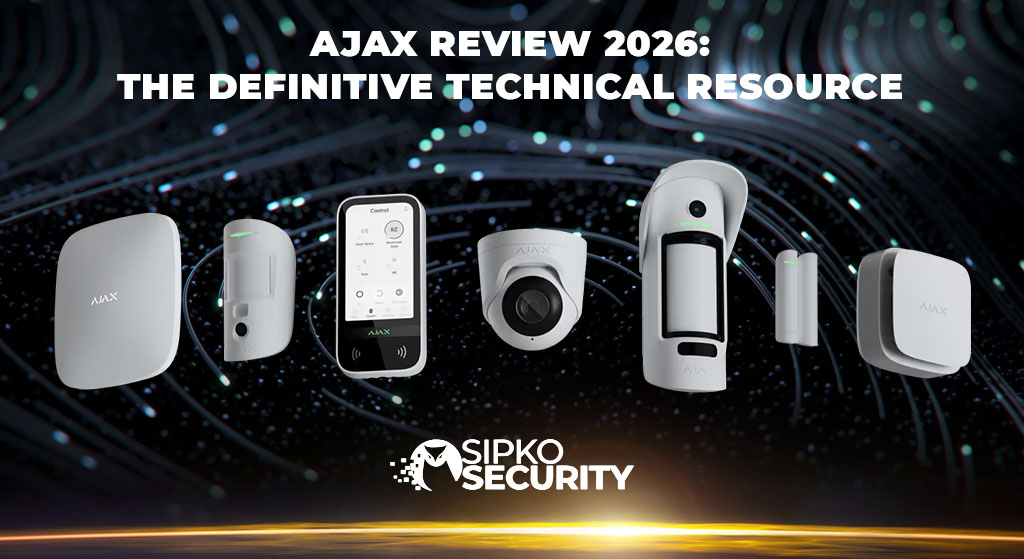
The product range is no longer limited to the original Hub and a few wireless PIR detectors. Current Ajax systems can include wireless and wired intrusion devices, MotionCam detectors with photo verification, keypads, sirens, automation relays, leak detectors, fire devices, cameras, NVRs and newer Superior product lines intended for more demanding installations.
3. How Ajax Works: Jeweller, Wings and Fibra
Different Technologies for Different Functions
Ajax uses several communication technologies, and they should not be treated as interchangeable.
Jeweller is Ajax’s proprietary two-way wireless protocol for alarms, events, commands and device status. Ajax specifies communication of up to 2,000 metres for compatible devices in open space. Actual range inside a Melbourne property depends on the devices involved, wall construction, floors, metal, insulation, interference and hub position.
Ajax documents different authorised radio-frequency bands because the operating band depends on the sales region. Australian installations should therefore use equipment intended for the Australian market rather than assuming that every Ajax device operates on one universal 868 MHz frequency.
Wings and TurboWings are used alongside Jeweller by compatible wireless detectors with built-in cameras. Jeweller carries alarms and events; Wings or TurboWings carries images used for photo verification. Wings should not be confused with the network transport used by Ajax IP surveillance cameras.
Fibra is Ajax’s wired communication technology. Fibra devices use a four-wire connection that carries communication and power. This makes Fibra suitable for new builds, commercial projects and sites where wired devices are preferred or existing cable pathways can be used.
Jeweller incorporates delivery confirmation, device authentication, encrypted communication and radio-interference supervision. When comparing radio-security claims, it is better to refer to the capabilities documented for the particular Ajax generation rather than reducing the whole ecosystem to one encryption label or one radio-frequency claim.
Maximum Jeweller range for compatible equipment under suitable open-space conditions.
Jeweller provides two-way communication between compatible Ajax devices and the hub.
Fibra devices connect through a four-wire line carrying power and communication.
For protocol specifications, see the Ajax Jeweller technical documentation and Ajax radio communication guidance .
4. Ajax Hub Options: Choosing the Control Panel
The hub coordinates devices, users, communication paths and monitoring. Ajax’s 2026 range is broader than the four models commonly shown in older comparisons, so hub selection should be based on the actual project rather than an outdated basic/good/best hierarchy.
The following comparison covers representative hubs relevant to many residential and commercial installations. Ajax also offers additional models and newer Superior options for larger or more demanding projects.
| Hub | Device Capacity | Communication Paths | Typical Use |
|---|---|---|---|
| Hub | Up to 100 devices | Ethernet + cellular | Straightforward smaller intrusion systems |
| Hub 2 | Up to 100 devices | Ethernet + dual cellular | Homes and small businesses using MotionCam photo verification |
| Hub 2 Plus | Up to 200 devices | Ethernet + Wi-Fi + dual cellular | Larger homes and commercial systems requiring more users, groups or devices |
| Superior Hub Hybrid 2 | Up to 250 Fibra and Jeweller devices | Multiple wired and cellular communication options | Medium and larger hybrid projects using wired Fibra and wireless devices |
Hub and Hub 2
The original Hub remains suitable for straightforward intrusion systems, while Hub 2 is more relevant where MotionCam photo verification is required. Hub 2 also provides additional cellular communication options compared with earlier configurations.
Hub 2 Plus
Hub 2 Plus supports up to 200 Ajax devices and up to 200 users, as well as up to 25 security groups. Its Internet connection options include Ethernet, Wi-Fi and cellular communication. That combination makes it useful for larger homes, offices and other sites with more users or more complex zoning.
Superior Hybrid Options
Ajax’s current Superior range is relevant to commercial design. Superior hybrid hubs support both Fibra and Jeweller equipment, allowing wired and wireless devices to be combined rather than forcing the whole project into one transmission method.
5. Ajax Detectors & Sensors: What Each Device Actually Does
Ajax has a broad detector range, but more devices do not automatically make a better alarm. Good system design starts with entry routes, movement paths, windows, pets, environmental conditions and the response required when each zone activates.
MotionProtect: Indoor PIR Detection
MotionProtect is an indoor passive infrared motion detector. Compatible versions are designed to reduce alarms caused by pets within the manufacturer’s specified limits when installed and configured correctly. Ajax documentation for relevant MotionProtect models specifies pet immunity for animals below 50 cm and up to 20 kg.
Pet immunity is not an unconditional guarantee. Detector height, angle, nearby furniture and the way an animal moves through the protected area can affect performance.
MotionProtect Plus: PIR + Microwave Verification
MotionProtect Plus adds a microwave sensor to PIR detection. The additional sensing method helps the detector distinguish genuine movement from some forms of thermal interference. It can be useful in spaces where fireplaces, air-conditioning, changing air temperatures or other environmental factors make a standard PIR more difficult to position.
DoorProtect: Opening Detection
DoorProtect is a magnetic opening detector for doors and windows. Its primary purpose is to report opening when the magnet moves away from the detector. It also includes tamper supervision and an input for a compatible external detector.
The standard DoorProtect should not be confused with DoorProtect Plus. The standard model does not provide the integrated shock-and-tilt functions of the Plus model.
DoorProtect Plus: Opening, Shock and Tilt
DoorProtect Plus adds shock and tilt detection. This can be useful where the system should react to an attempted impact or a change in window position as well as a conventional open/closed state.
Shock detection is not the same as acoustic glass-break detection. Where the requirement is to detect the sound pattern associated with breaking glass, a dedicated GlassProtect-type detector should be considered.
GlassProtect: Acoustic Glass-Break Detection
GlassProtect listens for the characteristic acoustic sequence associated with breaking glass. Ajax specifies a glass-break detection distance of up to 9 metres for applicable models. Correct positioning remains important because curtains, room acoustics, distance and other obstructions affect what the microphone can hear.
MotionCam: Motion Detection with Photo Verification
MotionCam combines motion detection with a built-in camera for photo verification. When configured for the relevant verification mode, the event feed can include photos or an animated image series so the user or monitoring operator has visual context for the alarm.
MotionCam should not be described as an ordinary CCTV camera recording continuous video. For live view, continuous recording and searchable video archive, Ajax provides dedicated IP cameras and NVRs.
Relevant MotionProtect models are designed for pets up to 20 kg and below 50 cm when correctly installed.
Maximum specified acoustic detection distance for applicable GlassProtect models.
MotionCam adds visual context to selected intrusion alarms through photo verification.
Calculated battery life varies by Ajax detector model and operating conditions.
6. Overall Ajax Assessment for Melbourne Properties
Ajax is one of the stronger options for a Melbourne property that needs a modern wireless or hybrid alarm, especially where clean retrofit installation, app control and professional monitoring compatibility are important. It is not automatically the best choice for every industrial project, every existing wired alarm or every budget.
| Area | Assessment | Why |
|---|---|---|
| Wireless Architecture | Excellent | Two-way supervised communication, long open-space range and range-extender options |
| Retrofit Installation | Excellent | Can reduce cable runs in finished homes and occupied commercial premises |
| App & User Management | Excellent | Individual users, event history, Night Mode, groups and remote control |
| Photo Verification | Very Good | MotionCam can provide visual context without requiring continuous CCTV recording |
| Professional Monitoring | Very Good | CMS integration allows monitoring staff to process configured events even when the owner misses an app notification |
| Hybrid / Wired Projects | Very Good | Fibra and Superior hybrid hubs expand Ajax beyond wireless-only installations |
| Lowest-Cost Projects | Not Its Main Strength | Professional Ajax installations compete on capability and usability rather than minimum hardware cost |
7. Ajax CCTV Integration: Cameras, NVR and Verification
Ajax now has a dedicated IP video range as well as intrusion products. Current devices include Ajax cameras, doorbell products and network video recorders designed to bring alarms and video into the same application environment.
Selected Ajax cameras are available at resolutions up to 8 MP / 4K and can provide object-recognition functions such as classification of people, vehicles and pets. Exact functions depend on the camera model, firmware and configuration.
Ajax NVR can record Ajax video devices and compatible third-party IP cameras. Current integrations support ONVIF and RTSP workflows. Storage capacity depends on the NVR generation and supported drive configuration.
Existing third-party cameras do not necessarily need to be replaced simply because an Ajax alarm is installed. Compatible camera streams can be integrated into the Ajax environment, while Ajax NVR can work with supported third-party cameras. The exact functions available depend on the camera and integration method.
MotionCam Is Not the Same as CCTV
MotionCam provides event-driven photo verification. A dedicated security camera provides live and recorded video. These solve different problems: MotionCam helps explain an alarm event, while CCTV provides continuous visual coverage and recorded evidence.
Current Ajax video options include models with up to 8 MP / 4K resolution.
Ajax NVR provides local video recording and archive management for compatible cameras.
Ajax video equipment supports current ONVIF workflows subject to model and firmware requirements.
Compatible third-party IP video streams can also be integrated through RTSP.
See the official Ajax NVR documentation for current model and storage specifications.
8. Ajax App & Remote Control: Everyday Use
The Ajax app is one of the platform’s practical strengths because the alarm does not rely on a keypad as the owner’s only interface. Depending on permissions and system configuration, users can view system status, arm or disarm permitted areas, use Night Mode, receive events and inspect device states from a phone.
Ajax also supports individual user accounts rather than requiring everyone to share one alarm code. This is useful in homes where family members need separate access and in businesses where managers need to identify who armed or disarmed a site.
Capacity depends on the hub. Hub 2 Plus, for example, supports up to 200 users and up to 25 groups. Smaller hubs have lower limits, so a business should not assume every Ajax hub has identical user-management capacity.
Geofence functions can provide reminders when the user leaves or approaches a defined area. They should be treated as configurable location-based reminders rather than as a guarantee that the alarm will automatically arm every time the owner leaves.
What the Event History Is Useful For
The event feed can help identify who armed or disarmed the system, which device generated an alarm, whether a detector lost connection, whether a battery is low and whether communication or power problems need attention. That is useful both for household troubleshooting and for opening and closing accountability in a business.
Up to 200 users can be added to Hub 2 Plus.
Group mode can divide a compatible system into separately controlled areas.
Selected perimeter and internal devices can remain armed while occupants stay inside.
Users can review security events and system-state changes according to their permissions.
9. Ajax Professional Monitoring in Melbourne: What Actually Happens
Professional Monitoring Is More Than a Push Notification
Self-monitoring and professional monitoring are different response models. With self-monitoring, the Ajax system sends information to authorised users and the owner decides what to do. With professional monitoring, configured events are also delivered to a central monitoring station where trained staff can follow the site’s agreed response instructions.
What Happens After an Ajax Alarm
- Detection: an Ajax detector identifies a configured event such as intrusion, door opening, panic, tamper, fire, flooding or a relevant system fault.
- Hub communication: the detector reports the event to the Ajax hub over the appropriate Ajax communication protocol.
- Transmission: the hub sends the event through its available communication paths to authorised services and users.
- Monitoring reception: where professional monitoring is configured, the central monitoring station receives the event together with the site and zone information supported by the monitoring integration.
- Operator assessment: monitoring staff follow the response plan agreed for the site. Where suitable photo or video verification is available, that information can provide additional context.
- Escalation: nominated contacts, patrol services or emergency services may be contacted where the agreed response instructions and circumstances call for that action.
Ajax supports central monitoring integrations so relevant events can be delivered to a monitoring provider rather than remaining only in the user’s smartphone. The exact information available to the monitoring operator depends on the hub, devices, communication protocol, monitoring provider and service configuration.
SIPKO and Intelligent Monitoring Solutions
SIPKO can configure Ajax systems for professional monitoring through Intelligent Monitoring Solutions . IMS describes itself as a national electronic monitoring provider and states that it operates two A1/R1A graded control rooms in Australia, with 24/7 alarm-monitoring capability.
For a Melbourne property, the important point is the monitoring service and response arrangement rather than the physical state in which a particular control room is located. The system can be monitored nationally while SIPKO remains the Melbourne installer responsible for the onsite Ajax installation and configuration.
SIPKO and the monitoring provider therefore perform different roles. SIPKO assesses the site, installs and positions Ajax equipment, configures the hub, app, users and monitoring connection, tests the event path and hands the system over. The monitoring provider receives configured events and follows the agreed response procedure.
What Can Be Monitored?
Depending on the installed equipment and monitoring configuration, events can include intrusion alarms, door or window activation, panic or duress events, tamper events, communication faults, mains-power loss and compatible fire, flood or other safety events.
What Does the Owner Still Receive?
Professional monitoring does not make the Ajax app unnecessary. Authorised users can continue receiving configured notifications, checking system status, arming or disarming permitted areas and reviewing event history.
Monitoring adds another response layer for situations where the owner is asleep, travelling, in a meeting, has poor mobile coverage or simply does not see a push notification.
Photo and Video Verification
MotionCam can provide alarm-related photos that help explain an activation. Where suitable Ajax cameras and monitoring access are configured, video can provide additional context. Verification can assist the response decision, but it should not be described as guaranteeing a particular police or patrol response.
Current SIPKO Monitoring Cost
SIPKO offers professional Ajax monitoring from AUD $49/month including GST. See the current Ajax monitoring plans for pricing and verification details. Equipment and installation are separate.
Configured security events can be processed by the monitoring service around the clock.
IMS states that it operates two A1/R1A graded control rooms in Australia.
Starting monthly price for alarm monitoring. Equipment and installation are separate.
The owner keeps Ajax app access while the monitoring centre processes configured events.
Learn more about Ajax monitoring through Intelligent Monitoring Solutions and SIPKO 24/7 Ajax monitoring and video verification in Melbourne .
10. Ajax vs Bosch, Hikvision AX Pro, Ness & Legacy Hills Systems
An alarm comparison is useful only when it considers the property and required architecture. Calling one brand universally “best” ignores the difference between a finished home, a warehouse with existing alarm cable and a site already built around another manufacturer’s ecosystem.
Ajax vs Bosch
Bosch Solution systems remain common in Australia and can make sense where there is usable existing alarm cabling or where a conventional wired architecture suits the project. Ajax is usually more attractive where a clean wireless retrofit, contemporary app control and a broad wireless detector ecosystem are priorities.
Ajax vs Hikvision AX Pro
Hikvision AX Pro is another professional wireless alarm option. It can be attractive where the property already uses Hikvision video products and the installer wants to keep more of the project inside one manufacturer ecosystem. Ajax has its own alarm-focused app, detector range, photo-verification products and increasingly complete native CCTV platform.
Ajax vs Ness and Existing Hills Systems
Ness and older Hills systems are still encountered throughout Melbourne. An existing wired alarm should not automatically be removed just because it lacks a modern app. If the panel, cabling, detectors and keypads remain reliable and supported, repair may be reasonable.
Replacement becomes more attractive when faults repeat, parts become difficult to obtain, daily operation is inconvenient or the owner needs functionality the older platform cannot provide economically.
| Consideration | Ajax | Bosch Solution | Hikvision AX Pro | Ness / Legacy Hills |
|---|---|---|---|---|
| Wireless Retrofit | Major strength | Depends on model and wireless expansion | Major strength | Depends on panel and add-ons |
| Existing Wired Cabling | Fibra / hybrid options available | Strong fit | Hybrid options available | Often strong on existing wired sites |
| Modern App Control | Core platform feature | Configuration depends on panel and modules | Integrated through the Hikvision ecosystem | Varies by system and available add-ons |
| Alarm Photo Verification | MotionCam ecosystem | Depends on external integration | Available within AX Pro ecosystem | Typically requires separate technology |
| Best Decision Basis | Retrofit + app + scalable ecosystem | Wired architecture / existing infrastructure | Hikvision-centric security ecosystem | Repairable existing system or simple wired requirement |
11. Ajax Alarm Systems for Melbourne Homes
Single-Storey Homes
A single-storey home can often be protected with a relatively simple combination of entry contacts, internal motion detection, sirens, a keypad and app users. The important part is deciding whether protection should focus only on internal movement or also detect entry at doors and accessible windows before an intruder reaches the centre of the house.
Double-Storey and Renovated Homes
This is one of the situations where wireless Ajax equipment can have a practical installation advantage. Retrofitting alarm cable between floors may involve difficult cable routes, ceiling access or visible conduit. Wireless detectors can reduce that disruption, provided signal testing confirms reliable communication.
Apartments and Units
Apartments often need fewer devices, but access conditions matter. A typical design may focus on the apartment entry, balcony or accessible doors and internal movement. Work affecting common property may require owners corporation approval, so wireless equipment does not remove the need to check building rules.
Rental Properties
Ajax can also suit rental properties because the equipment can be comparatively straightforward to remove or relocate. However, tenants should still obtain any permissions required for drilling, mounting or alterations to the property. Wireless does not mean every device can or should be installed without secure fixing.
SIPKO also provides alarm system rental with professional installation for situations where purchasing a complete system is not the preferred option.
Wireless devices can reduce wall chasing and long cable routes in completed properties.
Night Mode can keep selected doors, windows or areas protected while occupants remain home.
Individual app users reduce the need for one shared household alarm identity.
Compatible range extenders can be used where the property requires additional radio coverage.
12. Ajax Alarm Systems for Melbourne Businesses
Business alarm design is less about the number of rooms and more about people, opening and closing procedures, high-value areas, rear access, stock, contractors and what should happen after an event.
Retail and Offices
Ajax can assign separate users and record arming and disarming events. Compatible hubs also support security groups, allowing areas such as a stockroom, office or rear section to be managed separately where the workflow requires it.
Warehouses and Industrial Units
Large metal buildings require more careful radio planning. A wireless-only design is not automatically correct. Superior hybrid hubs and Fibra devices make it possible to combine wired and wireless equipment where metal structure, distance or existing cable pathways favour a mixed system.
Staff Access and Closing Responsibility
Individual users make it easier to identify who armed or disarmed the site. This is useful for staff opening and closing procedures because managers can review events without everyone sharing the same code.
Useful Commercial Functions
- Groups: separate selected areas where the hub model supports the required number of groups.
- Schedules: use configured schedules and scenarios where appropriate rather than relying only on staff memory.
- Panic devices: compatible Ajax buttons can provide a deliberate duress or panic input when designed into the response process.
- Monitoring: configured events can be transmitted to a professional monitoring centre.
- Event history: review system activity and user actions according to account permissions.
Useful for sites that need separately controlled security areas.
Supports larger staff lists without relying on one shared alarm identity.
Fibra and Jeweller can be combined on compatible hybrid Ajax hubs.
Professional monitoring adds operator response to configured after-hours events.
13. Ajax Alarm Installation in Melbourne: What Professional Commissioning Adds
Ajax hardware is designed to simplify installation, but a professional alarm still needs correct detector placement, radio testing, user setup, communication planning and commissioning. A wireless detector in the wrong position can be just as ineffective as a poorly placed wired detector.
Victorian licensing rules also need to be described accurately. Victoria Police states that a property owner does not need a private security licence to install a security system at their own property. However, a person who is employed or retained to install, repair, service or maintain security equipment must hold the appropriate private security authority for that activity.
Current requirements can be checked through the Victoria Police private security guidance .
SIPKO Installation Process
- Site assessment: identify practical entry points, movement routes, garage and rear access, pets, outdoor risks and user requirements.
- Device selection: choose the detector type based on what needs to be detected rather than using the same PIR everywhere.
- Placement: position the hub, detectors, sirens and controls around both detection performance and radio communication.
- Signal testing: run Ajax communication tests at the final device locations and correct weak areas before handover.
- Configuration: set users, groups, delays, Night Mode, notifications, scenarios and monitoring connection where required.
- Testing: trigger relevant zones and check the event path, sirens, app notifications and monitoring transmission.
- Handover: show users how to arm, disarm, use Night Mode, review events and respond to faults or low-battery warnings.
Applicable MotionProtect manuals specify approximately 2.4 m installation height.
Jeweller and Wings performance should be checked at actual detector locations.
Individual access and permissions should be set before the system is handed over.
A monitored system should have its alarm transmission and response instructions confirmed.
14. Ajax Reliability, Backup and Tamper Protection
Wireless reliability should be assessed as a system rather than by asking whether radio is simply better or worse than cable. Ajax addresses common wireless risks through supervised two-way communication, multiple hub communication paths on selected models, battery backup, tamper detection and radio-interference monitoring.
- Hub backup battery: Ajax hubs include rechargeable backup power. Actual operating time depends on hub model, battery condition and active communication interfaces.
- Multiple communication paths: compatible hubs can use more than one Internet or cellular path, reducing dependence on a single broadband connection.
- Tamper detection: Ajax security devices commonly include tamper supervision that reports attempts to open or remove the device where supported by the mounting design.
- Interference monitoring: Jeweller supervises radio conditions and can report abnormal interference or jamming conditions.
- Current-generation radio protection: newer Superior products provide additional radio-security capabilities beyond those available on earlier generations.
Ajax hubs continue operating from internal backup power when mains power is lost.
Selected hubs support multiple network paths for better communication resilience.
Compatible devices report attempts to open or detach them.
Radio conditions are supervised rather than leaving detector loss invisible.
15. Ajax False Alarms: How Nuisance Triggers Are Reduced
There Is No Credible “Zero False Alarm” Guarantee
False alarms can be reduced, but no professional installer should promise that an alarm system will never generate one. Nuisance alarms usually come from a combination of detector choice, placement, environmental conditions, pets, maintenance and user behaviour.
Pet-Aware Motion Detection
Applicable MotionProtect devices are designed to reduce pet-related alarms within documented size limits when correctly installed and configured. Furniture or stairs that allow an animal to move very close to a PIR can undermine that assumption, which is why placement matters.
Dual-Technology Detection
MotionProtect Plus combines PIR and microwave sensing. In suitable locations, this provides additional confirmation and can help reduce nuisance triggers associated with some environmental effects.
Outdoor Detection
Compatible Ajax outdoor detectors use multiple sensing elements and algorithms designed for more complex outdoor environments. Trees, vegetation, reflective surfaces, animals and public movement should still be considered during positioning.
Verification Before Escalation
MotionCam photos or associated CCTV can provide context after an event. That does not prevent the detector from activating, but it can help the owner or monitoring operator distinguish a genuine intrusion from an event that does not require escalation.
Applies to relevant detectors when installation follows manufacturer requirements.
MotionProtect Plus combines PIR and microwave sensing.
MotionCam can add visual context to selected alarm events.
Placement and sensitivity should be adjusted to the actual room or outdoor zone.
16. Ajax Alarm System Pricing in Melbourne
Ajax pricing should be compared on an installed-system basis rather than by looking only at the cheapest hub or sensor available online. The final price includes the selected hardware, installation, programming, testing, app setup and any monitoring or integration work.
SIPKO currently lists professional Ajax installation from AUD 2,880 including GST. The starting installation price covers the agreed Ajax equipment, onsite installation, hub and app setup, user configuration, system testing and handover. Final cost depends on the property, equipment and installation scope.
See current Ajax alarm installation information and pricing .
What Changes the Installation Price?
- hub model and communication requirements;
- number of doors and windows requiring protection;
- number and type of motion detectors;
- MotionCam or outdoor photo verification;
- internal and external sirens;
- keypads and user controls;
- range extenders;
- Ajax cameras and NVR equipment;
- Fibra cabling or hybrid equipment;
- removal, takeover or integration of an existing alarm;
- professional monitoring requirements.
Professional Monitoring Cost
SIPKO offers professional Ajax monitoring from AUD $49/month including GST. This is a separate recurring service and is not included in the Ajax equipment or installation price.
Professional monitoring remains optional. Customers who do not require a monitoring centre can continue using authorised Ajax app access and configured system notifications without adding the professional monitoring service.
Current SIPKO starting price including GST; final scope remains property-specific.
Starting price for optional professional Ajax alarm monitoring.
Detector count and device type should follow the property layout and security requirements.
Allow for future doors, outdoor areas, cameras, users or business zones when selecting the hub.
17. Common Ajax Alarm Problems & Practical Fixes
1. Device Offline or Lost Jeweller Connection
A detector can lose communication because of distance, metal, reinforced construction, foil-backed insulation, interference, poor hub position or a change in the environment.
Moving a device even a short distance can change radio performance, but the correct solution should be based on an Ajax signal-strength test. Where repositioning is not sufficient, a compatible range extender or different hub/device layout may be required.
2. Battery Life Is Shorter Than Expected
Ajax publishes calculated battery-life figures under defined conditions. Real battery life changes with temperature, signal strength, polling interval, alarm frequency and device settings. A detector with poor radio communication may operate differently from the same device installed under favourable conditions.
Battery replacement should follow the individual Ajax device manual and use the specified battery chemistry and type. Not every Ajax detector uses the same battery.
3. SIM or Cellular Connection Problems
Cellular faults can be caused by SIM status, mobile coverage, configuration, carrier issues or physical SIM problems. A hub supporting multiple cellular paths can use separate network options where appropriate, but backup communication should still be tested at the actual property.
4. Repeated Motion Alarms
Repeated alarms from one zone should trigger a placement and environment review. Check detector height, sensitivity, pets, heating or cooling, direct sunlight, curtains and moving objects before concluding that the detector itself has failed.
Use Ajax signal tools before adding hardware simply because a device reports communication problems.
Battery type and calculated battery life vary across Ajax devices.
Cellular backup should be commissioned and checked at the actual property.
A configuration or placement problem does not automatically require replacing the alarm.
For faults in an existing system, see Ajax alarm repair in Melbourne .
18. Who Ajax Is Best For: And When Another Option May Be Better
Ajax Is a Strong Fit When:
- The property is finished: extensive new alarm cabling would cause unnecessary disruption.
- The owner wants app control: remote status, individual users, event notifications and Night Mode are important.
- There are multiple users: family members, managers or staff should not all share one alarm identity.
- Photo verification is valuable: the owner or monitoring operator needs more context after an intrusion alarm.
- The system may expand: more detectors, cameras, outdoor protection or automation may be added later.
- Professional monitoring is required: the owner wants a monitoring-centre response layer in addition to smartphone notifications.
Another Approach May Be Better When:
- A reliable wired alarm already exists: a repair or targeted upgrade may be more economical than replacing everything.
- The only requirement is minimum upfront cost: Ajax may not be the cheapest route to basic siren-and-sensor protection.
- The site needs specialist enterprise integration: large industrial or institutional sites may require capabilities better served by a dedicated enterprise security platform.
- Radio conditions are unusually difficult: a wired or hybrid design may be more appropriate than forcing an all-wireless layout.
Wireless devices can reduce invasive cable work in completed properties.
Individual accounts and event history suit families and staff-based sites.
A reliable wired system may still be worth repairing rather than replacing.
Fibra allows Ajax to move beyond an all-wireless design where the project requires it.
19. SIPKO Security: Ajax Alarm Installer in Melbourne
SIPKO Security is based in Melbourne and installs Ajax alarm systems for homes and businesses. The service includes system planning, installation, app setup, user configuration, testing, handover and optional professional monitoring setup.
SIPKO publishes the following business and installation credentials:
- Security Adviser & Equipment Installer Licence: Z47-808-30S.
- Cable Registration: T58117.
- ABN: 59 562 030 481.
- Service area: Melbourne, Mornington Peninsula and surrounding areas, subject to project location.
Relevant security licence details can also be checked through the Victoria Police public register .
What SIPKO Configures
- hub and communication paths;
- motion, door, window and perimeter detectors;
- sirens and keypads;
- Night Mode and security groups;
- individual app users and permissions;
- MotionCam photo verification;
- Ajax cameras and NVR where required;
- professional monitoring connection;
- testing and client handover.
For a new system, see Ajax alarm system installation in Melbourne . For an existing Ajax system with faults or communication problems, see Ajax alarm repair in Melbourne .
SIPKO publishes Security Adviser & Equipment Installer Licence Z47-808-30S.
Published SIPKO cable registration for relevant installation work.
Installation and support for Melbourne homes and businesses.
Professional monitoring can be configured through SIPKO’s monitoring partner.
20. FAQ: Ajax Alarm Systems in Melbourne
1. Can I install an Ajax alarm myself in Victoria?
Victoria Police states that you do not need a private security licence to install a security system at your own property. If another person is engaged to perform security-equipment installation, repair, servicing or maintenance, that person must hold the appropriate private security authority for the activity. See the current Victoria Police guidance .
2. Does the Ajax alarm system have a monthly fee?
Professional monitoring is optional. SIPKO offers professional Ajax monitoring from AUD $49/month including GST. This recurring service is separate from the Ajax equipment and installation price. Customers who do not require professional monitoring can continue using authorised Ajax app access and configured notifications.
3. What happens if mains power fails?
Ajax hubs include rechargeable backup batteries. The hub can report mains power loss and continue operating from backup power. Runtime varies by hub, battery condition and active communication interfaces, so the specification for the installed hub should be used rather than quoting one battery figure for every Ajax model.
4. How long do Ajax detector batteries last?
It depends on the device. Ajax specifies calculated life of up to seven years for DoorProtect and up to five years for DoorProtect Plus under defined conditions. Other detectors have different specifications. Temperature, radio signal, polling interval and the number of activations all affect real battery life.
5. Will pets trigger Ajax motion detectors?
Compatible motion detectors are designed to reduce pet-related alarms when correctly installed and configured. Relevant MotionProtect documentation specifies animals below 50 cm and up to 20 kg. Room layout, furniture and the animal’s ability to approach the detector still matter.
6. What is the wireless range of Ajax Jeweller?
Compatible Ajax devices can provide up to 2,000 metres of communication in open space. That is not an indoor guarantee. Walls, floors, metal, insulation and interference reduce practical range, so SIPKO tests actual device locations during commissioning.
7. How much does an Ajax alarm cost in Melbourne?
SIPKO currently lists Ajax alarm installation from AUD 2,880 including GST. Final cost depends on the equipment, property size, communication conditions, existing alarm work and agreed scope. See the current Ajax installation page for published pricing and inclusions.
8. Can Ajax work with existing CCTV cameras?
Yes, where the camera and integration method are compatible. Third-party IP cameras can be connected through supported RTSP workflows, while Ajax NVR can integrate compatible cameras using ONVIF or RTSP. Functions differ between native Ajax cameras, Ajax NVR integrations and direct third-party streams.
Ajax can be used without mandatory professional alarm monitoring.
Starting price for optional professional Ajax alarm monitoring.
Hub backup batteries support operation when mains power is unavailable.
Ajax supports native video devices and selected third-party IP camera workflows.
Planning an Ajax Alarm for Your Melbourne Property?
SIPKO can assess the property, recommend the appropriate Ajax hub and detectors, configure users and app control, and connect professional monitoring where required. The system is planned around the property rather than a fixed device bundle.
SIPKO Security · Security Adviser & Equipment Installer Licence Z47-808-30S · Cable Registration T58117 · Melbourne