Home Security Cameras in Melbourne: Planning CCTV Around Your Property
A home CCTV plan can look complete on paper and still leave individual cameras without a clear job. A front entrance, driveway and backyard create different viewing requirements, even when all three are part of the same system.
Start With the Property, Not the Camera Count
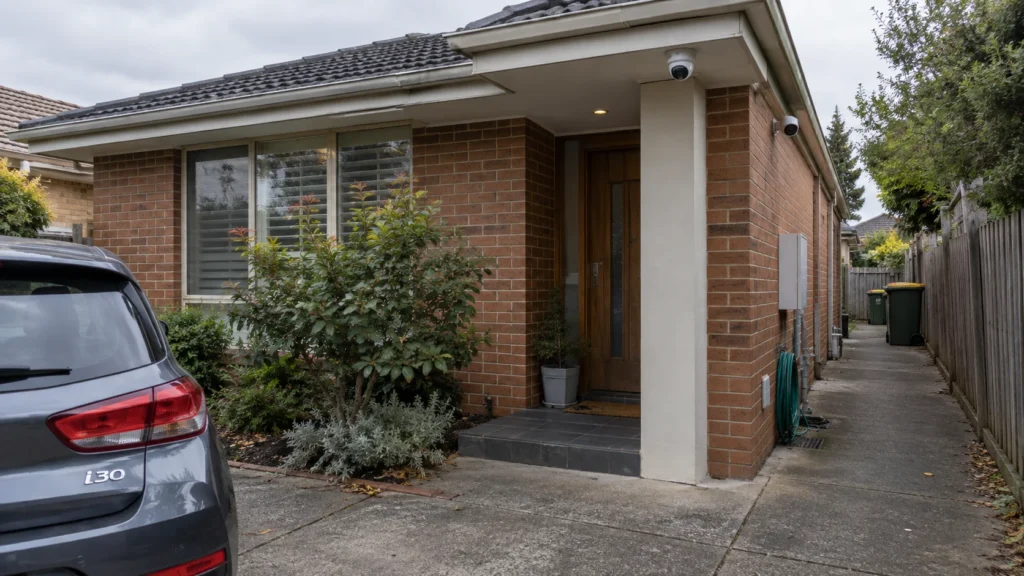
Break the property down into distinct areas — not a fixed checklist, but the places where a real security task actually exists. Common examples include the front entrance, the driveway, side access paths, the backyard, and any garage or secondary access point. Not every property has all of these, and some have areas that don’t fit neatly into any of them.
For each area:
- What needs to be seen here?
- Is the goal general awareness that something happened, or useful detail about who or what?
- When does this area realistically need coverage — all day, certain hours, only when armed?
- What could obstruct the view — a car, a gate, seasonal foliage?
- What should happen to the footage if something occurs here?
This isn’t about camera height, angle, lens choice or field of view — those are physical placement decisions that belong to a more detailed discussion elsewhere. Here, the job is simply identifying which areas have a genuine task attached to them.
Give Every Camera One Primary Job
Not every camera needs to see everything. Trying to make one camera cover multiple unrelated goals — such as a wide overview and fine detail at a specific point — creates conflicting requirements. Giving each camera a clear primary purpose makes it easier to judge whether its view actually does the job.
This isn’t a layout to copy. The number and arrangement of cameras depends on how a specific property is laid out. There’s no fixed answer like “a small home needs four cameras” or “a large home needs eight” — the right count comes from how many genuine camera tasks the property has, not the other way around.
Decide What “Useful Detail” Means Before Choosing a Camera
Seeing that something happened and capturing enough detail for what you actually need are different things. A wide view of a driveway might tell you a car came and went, without telling you anything more specific unless that was the goal for that camera.
CCTV planning distinguishes between different levels of usable image detail rather than treating resolution alone as the answer — different cameras in the same home can reasonably need different levels of detail, because they have different jobs. A camera meant to confirm general activity and a camera meant to support closer identification of a person or vehicle are solving different problems, even when they’re pointed at similar-looking areas.
Our CCTV camera placement guide covers how field of view, distance and lighting affect what a camera can actually capture.
Plan for Day, Night and the Actual Scene
A camera position that works well at 2pm doesn’t automatically work the same way at night. Victoria Police’s guidance on installing CCTV specifically recommends checking image quality during the day and at night, alongside positioning around actual entry and exit points.
Several things change how a scene looks between day and night:
- Changing natural light through the day.
- Headlights sweeping across a driveway or entrance at night.
- Porch or exterior lighting creating strong contrast rather than even illumination.
- Shadows that shift with the time of day and season.
- Vegetation that changes coverage seasonally.
- Parked vehicles or other temporary obstructions that weren’t there when the camera was first planned.
A camera task defined only from a daytime walk-through of the property may not hold up once conditions change.
Decide What Happens After the Camera Records an Event
Planning a camera position is only half the job. Once an event is recorded, a few questions determine whether that footage is actually useful:
- Was the event recorded, or only detected?
- Can the relevant footage be found without searching through hours of video?
- Can the clip be exported or shared when needed?
- Does recording depend on something else — a network connection, a subscription, a separate device — staying available?
Recorded footage is only useful if you can find and retrieve it when you need it. Storage capacity and retention are separate questions, covered in our CCTV storage guide.
Turn Individual Camera Tasks Into One System
Once you’ve worked out what each camera needs to do, check how those cameras work together as a system:
- How many genuine camera tasks did the planning produce?
- Which tasks need different levels of detail from each other?
- Which areas need to stay usable at night, not just during the day?
- Which recordings need to be readily accessible after an event, and which don’t?
- Is there overlapping coverage anywhere, and is that overlap doing something useful?
- Does the resulting set of cameras still work as one system, or has it become a pile of separate decisions?
Once these requirements are clear, the system architecture can be chosen around them rather than the other way around.
Common Planning Mistakes
- Choosing a camera count before defining what each camera is actually for.
- Assuming a higher megapixel count alone determines useful detail.
- Asking one camera to provide both a wide overview and task-specific detail without checking whether it can do both.
- Planning coverage only for daytime conditions.
- Leaving recording and retrieval decisions until after installation is finished.
- Covering the obvious areas while missing how people actually move between them.
- Choosing hardware before deciding what the footage is meant to achieve.
A Practical Pre-Installation Check
- Have you identified the areas that actually need coverage?
- Does each planned camera have a clear primary job?
- Do you know what level of detail that job requires?
- Has the view been checked in both day and night conditions?
- Do you know how the relevant footage will be recorded and retrieved?
- Do the individual camera tasks add up to a sensible system, rather than a set of separate decisions?
Plan the Job Before You Choose the Cameras
A home CCTV system shouldn’t begin with a camera count or a megapixel spec. It should begin with the jobs the cameras need to perform around the property — what needs to be seen, in what detail, under what conditions, and what happens to the footage afterwards. Get that right first, and camera type, positioning, storage and system architecture all become much easier decisions.
If you’re planning a system for a property in Richmond, our CCTV installation guidance for Richmond homes covers what that looks like in practice.
Frequently Asked Questions
Can one security camera cover more than one area?
Sometimes, but the question isn’t really how many areas fit in the frame — it’s whether that single view can still do the job required. A wide angle covering two areas at once often trades away the detail either area actually needs, so it’s worth checking that a combined view still meets the purpose before relying on it.
Does a higher-resolution camera always give more useful CCTV footage?
No. Useful detail also depends on the scene, distance, field of view and lighting, not resolution alone. A high-resolution camera aimed too wide or from too far away can still miss the detail a specific task requires.
Do all cameras in a home CCTV system need the same settings?
Not necessarily. Cameras doing different jobs may need different settings, because the scene, lighting and level of detail required can vary from one position to another.
Should home CCTV cameras be tested at night?
Yes. Victoria Police’s guidance on installing CCTV recommends checking image quality during the day and at night, since a position that works well in daylight doesn’t automatically perform the same way after dark.
Sources