Unbiased Technical Comparison
Full Deep-Dive
Sipko Professional Verification
Licensed Security Installer
Aug 20, 2026
Last updated: · SIPKO Security
Hikvision Alternatives 2026: Complete Comparison Guide
If you’re looking for Hikvision alternatives, you’re probably asking one of these questions: “Is Hikvision too expensive?” “Are there better CCTV options for my budget?” or “What security camera system should I switch to?”
This Hikvision alternatives guide is written by the team at SIPKO Security — a licensed security installer that installs and maintains Hikvision, Reolink, Dahua, Eufy, and other major security camera brands every week. We’ve deployed Hikvision systems in commercial properties, troubleshot them when they fail, and helped clients decide whether to stay or switch to an alternative. We understand the real strengths and weaknesses of each platform.
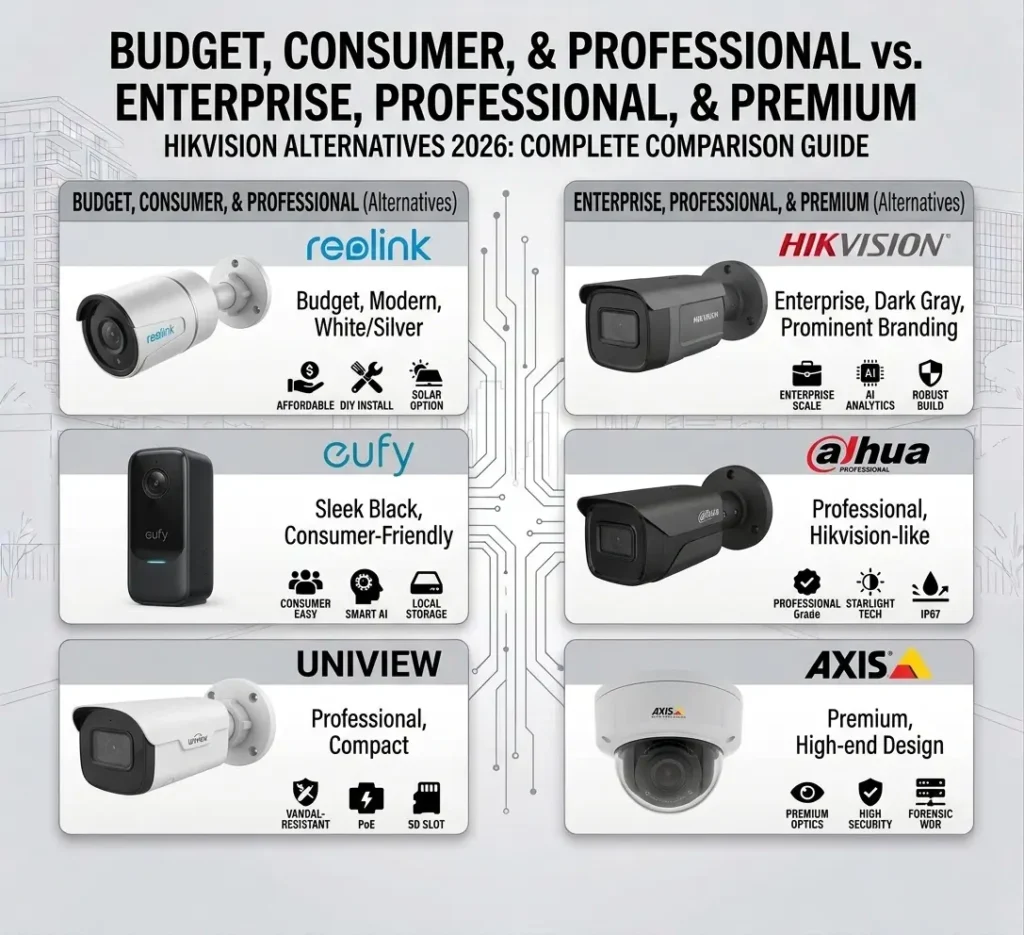
This guide covers the five best alternatives to Hikvision: Reolink, Dahua, Eufy, Uniview, and Axis. We’ll compare pricing, features, AI detection capabilities, installation complexity, and which system works best for your specific needs.
Reolink is the best Hikvision alternative for most Melbourne homes: no mandatory subscription, local storage by default, and a 4-camera system for under $1,000 versus $2,500–$4,000 for Hikvision. Businesses that want Hikvision-level AI detection without the licensing costs are usually better served by Dahua, typically 20–40% cheaper for comparable features. Eufy is the simplest option for renters and small homes. Axis is the premium pick when support and build quality matter more than price. Hikvision itself still makes sense for large or already-invested deployments — it isn’t a bad system, it’s just the wrong one for a lot of the properties asking about alternatives.
1. Introduction & Overview
The Context
Hikvision has dominated the security camera market for years. They’re the world’s largest video surveillance manufacturer, with enterprise-grade systems deployed in airports, shopping centers, and government facilities. But being the market leader doesn’t mean Hikvision is the right choice for every property.
Over the past 3–4 years, the security camera landscape has shifted dramatically. Reolink, Dahua, Eufy, and other manufacturers have caught up on features while undercutting Hikvision on price. More importantly, they’ve solved problems that Hikvision users have complained about for years: expensive cloud storage subscriptions, complex setup processes, poor mobile app experiences, and licensing costs that add up quickly.
This guide answers the question: “Should I stay with Hikvision, or is there a better security camera alternative?” We’ll be honest about what Hikvision does well, where it falls short, and which alternative CCTV system is actually right for your situation.
The best security camera system isn’t the one with the most features — it’s the one that solves your specific problem at a price you can justify. A $5,000 Hikvision enterprise system is overkill for a 4-camera residential setup. A $200 Reolink battery camera won’t work if you need 24/7 PoE recording with advanced AI analytics.
Key Terms Explained
Plain-English Definitions
These are the terms used throughout this guide, explained in plain English:
- NVR (Network Video Recorder)
- A dedicated device that records footage from IP cameras over your local network and stores it on a hard drive you own, with no ongoing subscription required. Reolink, Eufy, Dahua, Uniview, and Hikvision all support NVR-based local storage.
- PoE (Power over Ethernet)
- A single Ethernet cable that supplies both power and a data connection to a camera, removing the need for a separate power cable. Most professional-grade systems (Hikvision, Dahua, Axis, Uniview) use PoE cameras.
- ONVIF
- An open industry standard maintained by the ONVIF forum that lets cameras and NVRs from different manufacturers work together. A camera advertised as “ONVIF-compliant” can typically be added to an existing NVR from a different brand, which matters if you’re migrating away from Hikvision without replacing your whole system.
- Two-way audio
- A built-in speaker and microphone on the camera that lets you talk to whoever is in view through the camera’s companion app, commonly used to deter porch pirates or greet visitors remotely.
- AI/smart detection
- Software running on the camera or NVR that distinguishes people, vehicles, and animals from irrelevant motion (tree branches, headlights, shadows), reducing false-alert notifications. Detection quality varies by brand — see the AI & Detection Features comparison below.
- Total cost of ownership (TCO)
- The full cost of running a security system over a set period (typically 5 years), including hardware, installation, licensing, and any mandatory or optional subscription fees — not just the upfront purchase price.
2. Why Switch from Hikvision? Common Reasons
The Pain Points
Not everyone should switch from Hikvision. But if you’re considering a Hikvision alternative, here are the most common reasons people make the change:
High Total Cost of Ownership
Based on SIPKO Security’s 2026 Melbourne installer pricing, a Hikvision system’s true 5-year cost runs 40–60% higher than its sticker price once licensing and cloud fees are added. Advanced AI analytics licensing runs $50–$500+ per camera per year, and Hikvision’s own Hik-Connect cloud storage plans add $5–$20 per camera monthly on top of that. Professional installation is typically required for PoE camera systems, and commercial deployments often carry $500–$2,000+ in annual maintenance contracts. For a typical 4-camera home system, that ongoing cost stack adds $1,200–$4,800 over five years on top of the $2,500–$4,000 hardware price — pushing total 5-year cost to roughly $8,000–$15,000. Reolink and Eufy avoid this entirely with free local NVR/HomeBase storage, bringing the same 5-year coverage down to $2,000–$4,000. See our guide on how much a CCTV system really costs in Melbourne.
- Licensing fees: $50–$500+ per camera annually for advanced features
- Cloud storage subscriptions: $5–$20/month per camera for cloud backup
- Professional installation: Often required for PoE camera systems
- Maintenance contracts: $500–$2,000+ annually for commercial CCTV systems
Complex Setup & Configuration
Hikvision security systems are built for IT professionals and integrators, not homeowners. Setting up a PoE camera system requires:
- Running Ethernet cables through walls
- Configuring network settings and VLAN isolation
- Managing user accounts and permissions
- Understanding RTSP streams and codec settings
Reolink and Eufy are designed for DIY installation. Battery-powered cameras work out of the box with minimal configuration.
Poor Mobile App Experience
Hikvision’s mobile app is functional but clunky. It’s slow, unintuitive, and feels outdated. Reolink and Eufy have modern, responsive apps that actually feel good to use on your phone.
Limited Local Storage Options
Hikvision pushes cloud storage hard. Local storage (on an NVR) is possible but requires more technical knowledge. Reolink and Dahua make local storage the default, with cloud backup as an optional add-on.
3. Quick Comparison Matrix: Hikvision vs Alternatives
Here’s how the top Hikvision alternatives stack up against each other. This comparison covers the key factors most people consider when choosing a security camera system.
| Feature | Hikvision | Reolink | Dahua | Eufy | Uniview | Axis |
|---|---|---|---|---|---|---|
| Price Range | $300–$5,000+ | $80–$2,000 | $200–$3,000 | $100–$1,500 | $250–$2,500 | $500–$8,000+ |
| Mandatory Subscription | Yes (licensing) | No | No | No | No | No |
| Local Storage | Yes (NVR) | Yes (NVR/microSD) | Yes (NVR) | Yes (HomeBase) | Yes (NVR) | Yes (NVR) |
| DIY Installation | Difficult | Easy | Moderate | Very Easy | Moderate | Difficult |
| AI Detection | Excellent | Good | Excellent | Good | Good | Excellent |
| Mobile App | Functional | Excellent | Good | Excellent | Good | Good |
| Best For | Enterprise | Budget Homes | SMB/Enterprise | Consumer | SMB | Premium Enterprise |
If you want the cheapest option with no subscriptions, choose Reolink. If you need enterprise-grade AI and don’t mind paying more, stay with Hikvision or choose Dahua. If you want the easiest setup, choose Eufy.
4. Reolink vs Hikvision: The Best Budget Alternative
Best Value
Reolink is the most popular Hikvision alternative for residential users. It’s cheaper, easier to install, and doesn’t require mandatory subscriptions. But it’s not a perfect replacement for every use case.
Why Choose Reolink Over Hikvision
- No mandatory subscriptions: Reolink’s own local storage plans are completely free. Cloud storage is optional at $3–5/month per camera.
- Battery cameras: Reolink’s battery models last 3–12 month battery life depending on activity.
- DIY-friendly: Setup takes 15–30 minutes. No networking knowledge required.
- Excellent mobile app: Fast, intuitive, and actually enjoyable to use.
- Affordable: 4-camera systems start at $300–$500. Hikvision starts at $1,500+.
- Local storage by default: Your footage stays on your devices. No forced cloud uploads.
Reolink Limitations
- AI detection is good, not excellent: Reolink’s person/vehicle detection works well, but it’s not as sophisticated as Hikvision’s or Dahua’s advanced analytics.
- Limited integration options: Reolink doesn’t integrate with enterprise systems like Hikvision does.
- Smaller integration library: Fewer third-party integrations and add-ons compared to Hikvision.
- Not suitable for large deployments: Reolink maxes out at 16 cameras per NVR. Hikvision can handle 64+.
- Limited analytics: No heatmaps, crowd counting, or advanced behavioral analytics.
When to Choose Reolink Over Hikvision
- You’re setting up a residential system (1–8 cameras)
- You want to avoid monthly subscriptions
- You prefer DIY installation
- You have a tight budget ($500–$2,000 total)
- You want a modern, easy-to-use mobile app
When to Stay with Hikvision
- You need advanced AI analytics (heatmaps, crowd counting, behavior analysis)
- You’re deploying 16+ cameras
- You need enterprise integrations (access control, alarm systems, etc.)
- You require professional support and SLAs
- You’re in a commercial or government environment
Homeowners switching a 4-camera Hikvision setup to Reolink typically move from roughly $2,500 upfront plus ongoing cloud fees to around $800 upfront with no monthly cost — the 5-year totals in the pricing table below hold up across the residential jobs we quote regularly.
Want the full brand-by-brand breakdown? See our dedicated Hikvision vs Reolink comparison.
5. Dahua vs Hikvision: The Enterprise Alternative
Enterprise Grade
Dahua is Hikvision’s closest competitor. It’s also a Chinese manufacturer with enterprise-grade systems, but it’s often 20–40% cheaper than Hikvision while offering comparable features.
Dahua Strengths
- Excellent AI detection: Dahua’s AI is on par with Hikvision’s. Person, vehicle, face recognition all work well.
- Lower pricing: Similar features to Hikvision at 20–40% lower cost.
- Enterprise features: Supports large deployments, integrations, and advanced analytics.
- No mandatory subscriptions: Dahua’s own NVR product line stores locally for free. Cloud is optional.
- Good documentation: Dahua has solid technical documentation and support.
- Deployment range: Works for small businesses to large enterprises.
Dahua Weaknesses
- Steeper learning curve: More complex than Reolink or Eufy. Requires some technical knowledge.
- Mobile app is functional but not great: Not as polished as Reolink or Eufy.
- Less consumer-friendly: Dahua targets integrators and businesses, not homeowners.
- Smaller Western presence: Fewer local support options in Australia, US, UK.
When to Choose Dahua Over Hikvision
- You need enterprise-grade AI and analytics
- You want to save 20–40% on hardware costs
- You’re deploying 8–32 cameras
- You need local storage without mandatory cloud
- You have some technical knowledge or can hire an integrator
When to Stay with Hikvision
- You need the absolute best AI accuracy (Hikvision is marginally better)
- You require premium support and SLAs
- You’re in a government or highly regulated environment
- You need specific integrations that only work with Hikvision
- You prefer Western-based support and documentation
A 16-camera PoE system with NVR: Hikvision costs ~$8,000–$12,000. Dahua costs ~$5,000–$8,000. Same features, 30% cheaper. Over 5 years, that’s $15,000–$20,000 in savings. Learn more about Dahua vs Hikvision.
6. Eufy vs Hikvision: The Consumer-Friendly Alternative
Easiest Setup
Eufy (owned by Anker) is the most consumer-friendly security camera brand. It’s designed for people who want security without complexity. It’s not as powerful as Hikvision, but it’s significantly easier to use.
Eufy Strengths
- Easiest setup in the industry: Unbox, plug in, open app. Done in 10 minutes.
- Excellent mobile app: Beautiful, fast, intuitive. Better than Reolink and Hikvision.
- No subscriptions required: Eufy’s own local storage program on HomeBase is completely free.
- Battery cameras with great battery life: 6–12 months depending on activity.
- Affordable: 2-camera systems start at $200–$300.
- HomeBase local storage: All footage stays on your device. No cloud required.
- Good AI detection: Person and vehicle detection works well for residential use.
Eufy Weaknesses
- Limited to residential use: Not suitable for commercial or enterprise deployments.
- Smaller lineup: Fewer camera models and add-ons compared to Hikvision.
- AI is good but not excellent: Not as sophisticated as Hikvision or Dahua for advanced analytics.
- Limited integration options: Doesn’t integrate with enterprise systems.
- Max 16 cameras per HomeBase: Can’t scale beyond small residential systems.
- Newer brand: Less proven track record than Hikvision (though Anker is solid).
When to Choose Eufy Over Hikvision
- You’re a homeowner with 1–4 cameras
- You want the easiest possible setup
- You prefer a beautiful, modern mobile app
- You want to avoid subscriptions
- You have a tight budget ($300–$1,000 total)
- You’re not tech-savvy and want something that “just works”
When to Stay with Hikvision
- You need commercial-grade features
- You need advanced AI analytics
- You’re deploying more than 16 cameras
- You need enterprise integrations
- You require professional support
Eufy is perfect for renters because it requires no installation. Battery cameras mount with adhesive strips. HomeBase plugs into any outlet. You can take it with you when you move. Hikvision requires permanent installation.
7. Uniview vs Hikvision: The SMB Alternative
Small Business
Uniview is a Chinese manufacturer that specializes in small-to-medium business (SMB) security systems. It’s less well-known than Hikvision but offers solid features at competitive prices.
Uniview Strengths
- Good value for SMBs: Balanced features and pricing for small businesses.
- Decent AI detection: Person and vehicle detection work well.
- No mandatory subscriptions: Uniview’s own NVR range stores locally for free.
- Deployment range: 4–32 cameras.
- Good documentation: Solid technical support for integrators.
- Competitive pricing: 15–25% cheaper than Hikvision.
Uniview Weaknesses
- Less well-known: Smaller brand with less market presence.
- Limited consumer app: Mobile app is functional but not as polished as Reolink or Eufy.
- Fewer camera models: Less variety than Hikvision or Dahua.
- Steeper learning curve: Requires more technical knowledge than Reolink or Eufy.
- Limited Western support: Fewer local support options in Australia, US, UK.
When to Choose Uniview Over Hikvision
- You’re a small business with 4–16 cameras
- You want to save 15–25% on hardware
- You need decent AI detection without paying for premium
- You have an integrator who knows Uniview
When to Stay with Hikvision
- You need the most recognized brand in the market
- You require premium support and SLAs
- You need advanced analytics and integrations
- You’re deploying 32+ cameras
8. Axis vs Hikvision: The Premium Alternative
Premium Enterprise
Axis is a Swedish manufacturer known for premium, high-end security systems. It’s more expensive than Hikvision but offers superior build quality and support.
Axis Strengths
- Premium build quality: Axis cameras are built to last. Used in airports, government buildings, etc.
- Excellent support: Premium technical support and SLAs.
- Advanced AI: Sophisticated analytics and behavioral detection.
- Cybersecurity focus: Axis’s own cybersecurity program includes up to 15 years of guaranteed firmware support on select product lines.
- Integrations: Works with enterprise systems and third-party platforms.
- Swedish-based: Manufactured and headquartered in Sweden.
Axis Weaknesses
- Very expensive: 2–3x the cost of Hikvision for similar features.
- Overkill for residential use: Designed for enterprise, not homeowners.
- Steeper learning curve: Complex setup and configuration.
- Limited battery camera options: Axis focuses on PoE, not battery.
- Smaller lineup: Fewer camera models than Hikvision.
When to Choose Axis Over Hikvision
- You need the absolute best build quality and reliability
- You require premium support and SLAs
- You’re in a government or highly regulated environment
- You prefer a Swedish-manufactured system
- You need advanced cybersecurity features
When to Stay with Hikvision
- You want to save 50–60% on hardware costs
- You need a wider range of camera models
- You’re deploying 32+ cameras
- You don’t need premium support
A 16-camera enterprise system: Hikvision costs ~$10,000–$15,000. Axis costs ~$25,000–$35,000. Axis is premium, but you’re paying for build quality, support, and cybersecurity. For most businesses, Hikvision or Dahua is the better value.
Want the full brand-by-brand breakdown? See our dedicated Hikvision vs Axis comparison.
9. Pricing & Total Cost of Ownership
Cost Analysis
The upfront hardware cost is only part of the story. Total cost of ownership (TCO) includes subscriptions, cloud storage, maintenance, and support over 5 years.
4-Camera Residential System (5-Year TCO)
| System | Hardware | Cloud Storage | Subscriptions | Installation | Total 5-Year |
|---|---|---|---|---|---|
| Reolink | $800 | $0 | $0 | $0 (DIY) | $800 |
| Eufy | $600 | $0 | $0 | $0 (DIY) | $600 |
| Dahua | $1,200 | $0 | $0 | $400 (Pro) | $1,600 |
| Hikvision | $2,000 | $900 (5yr) | $600 (licensing) | $500 (Pro) | $4,000 |
| Axis | $4,000 | $0 | $0 | $800 (Pro) | $4,800 |
16-Camera Commercial System (5-Year TCO)
| System | Hardware | Cloud Storage | Subscriptions | Installation | Support | Total 5-Year |
|---|---|---|---|---|---|---|
| Dahua | $4,000 | $0 | $0 | $1,500 | $500 | $6,000 |
| Hikvision | $6,000 | $2,400 (5yr) | $2,000 (licensing) | $1,500 | $1,000 | $12,900 |
| Uniview | $3,500 | $0 | $0 | $1,200 | $400 | $5,100 |
| Axis | $12,000 | $0 | $0 | $2,000 | $2,000 | $16,000 |
For residential use, Eufy and Reolink are 5–7x cheaper than Hikvision over 5 years. For commercial use, Dahua and Uniview are 50–60% cheaper than Hikvision. The savings add up fast.
10. AI & Detection Features Comparison
Smart Detection
Based on SIPKO Security’s hands-on installation experience across all six platforms, AI detection quality splits into two clear tiers: Hikvision, Dahua, and Axis deliver excellent person/vehicle classification with low false-positive rates, while Reolink, Eufy, and Uniview deliver good, reliable detection that suits most residential and small-business use without the premium price tag. None of the six brands’ AI detection is “bad” in 2026 — the practical difference is in edge cases like distinguishing a delivery driver from a loiterer at night, where the excellent-tier systems still pull ahead. Here’s how each platform compares feature by feature:
Person Detection
- Hikvision: Excellent. Distinguishes between adults and children.
- Dahua: Excellent. On par with Hikvision.
- Axis: Excellent. Premium accuracy with advanced behavioral analysis.
- Reolink: Good. Works well for most residential use.
- Eufy: Good. Reliable for home security.
- Uniview: Good. Solid for SMB use.
Vehicle Detection
- Hikvision: Excellent. Detects vehicles, distinguishes between cars, trucks, motorcycles.
- Dahua: Excellent. Similar to Hikvision.
- Axis: Excellent. Premium accuracy.
- Reolink: Good. Detects vehicles but less sophisticated classification.
- Eufy: Good. Basic vehicle detection.
- Uniview: Good. Solid vehicle detection.
Face Recognition
- Hikvision: Excellent. Can identify known faces and create watchlists.
- Dahua: Excellent. Similar capabilities to Hikvision.
- Axis: Excellent. Premium face recognition.
- Reolink: Limited. Basic face detection, no recognition.
- Eufy: Limited. Basic face detection.
- Uniview: Good. Face detection and basic recognition.
Advanced Analytics
- Hikvision: Heatmaps, crowd counting, loitering detection, line crossing, intrusion detection.
- Dahua: Similar to Hikvision. Comprehensive analytics suite.
- Axis: Premium analytics. Behavioral analysis, trajectory tracking.
- Reolink: Basic. Person/vehicle detection only.
- Eufy: Basic. Person/vehicle detection only.
- Uniview: Moderate. Basic analytics, some advanced features.
Reolink and Eufy’s AI is more than sufficient. You don’t need face recognition or heatmaps for a home. Person and vehicle detection is all you need. Save the money and buy more cameras instead.
11. App & User Experience Comparison
Mobile Experience
You’ll use the mobile app every day. Here’s how each platform compares:
Eufy App
- Design: Beautiful, modern, intuitive UI.
- Speed: Fast and responsive. Live view loads in 1–2 seconds.
- Features: All essential features are easy to find and use.
- Notifications: Smart, customizable, not spammy.
Reolink App
- Design: Clean, modern, well-organized.
- Speed: Fast. Live view loads in 1–2 seconds.
- Features: All features are accessible and easy to use.
- Notifications: Customizable and reliable.
Hikvision App
- Design: Functional but dated. Feels like it was designed in 2015.
- Speed: Slow. Live view can take 3–5 seconds to load.
- Features: All features are there, but they’re hard to find.
- Notifications: Can be spammy and unreliable.
Dahua App
- Design: Functional. Not as polished as Reolink or Eufy.
- Speed: Moderate. Live view loads in 2–3 seconds.
- Features: All features available, but interface is less intuitive.
- Notifications: Reliable but can be overwhelming.
Uniview App
- Design: Functional. Targets integrators, not consumers.
- Speed: Moderate. Live view loads in 2–3 seconds.
- Features: All features available.
- Notifications: Reliable.
Axis App
- Design: Professional, clean. Targets enterprises.
- Speed: Fast. Live view loads quickly.
- Features: Comprehensive. All advanced features available.
- Notifications: Customizable and reliable.
Eufy has the best mobile app experience. If you use your phone to check cameras daily, Eufy’s app will make you happier than Hikvision’s. Reolink is a close second.
12. Installation Complexity
Setup Guide
Installation difficulty varies dramatically between systems. Here’s what to expect:
Eufy: Easiest (DIY-Friendly)
- Time to setup: 10–15 minutes
- Technical knowledge required: None
- Tools needed: Screwdriver (optional)
- Process: Unbox → Mount camera → Open app → Scan QR code → Done
- Professional installation: Not needed
Reolink: Easy (DIY-Friendly)
- Time to setup: 30–60 minutes
- Technical knowledge required: Minimal
- Tools needed: Drill, screwdriver, ladder
- Process: Mount cameras → Connect to WiFi → Add to app → Configure settings
- Professional installation: Optional but helpful for PoE systems
Dahua: Moderate (Professional Recommended)
- Time to setup: 2–4 hours
- Technical knowledge required: Moderate
- Tools needed: Drill, screwdriver, ladder, Ethernet cable, PoE injector
- Process: Run cables → Mount cameras → Configure NVR → Set up network → Configure app
- Professional installation: Recommended ($400–$800)
Hikvision: Difficult (Professional Required)
- Time to setup: 4–8 hours
- Technical knowledge required: Advanced
- Tools needed: Drill, screwdriver, ladder, Ethernet cable, PoE injector, network tools
- Process: Run cables → Mount cameras → Configure NVR → Set up network → Configure VLAN → Set up cloud → Configure app
- Professional installation: Strongly recommended ($500–$1,500)
Uniview: Moderate (Professional Recommended)
- Time to setup: 2–4 hours
- Technical knowledge required: Moderate
- Tools needed: Drill, screwdriver, ladder, Ethernet cable, PoE injector
- Process: Similar to Dahua
- Professional installation: Recommended ($400–$800)
Axis: Difficult (Professional Required)
- Time to setup: 4–8 hours
- Technical knowledge required: Advanced
- Tools needed: Drill, screwdriver, ladder, Ethernet cable, PoE injector, network tools
- Process: Similar to Hikvision, but with more security configuration
- Professional installation: Strongly recommended ($800–$2,000)
If you’re comfortable with basic tools and WiFi setup, Reolink and Eufy are DIY-friendly. If you need PoE (wired) cameras, hire a professional. It’s worth the $500–$1,000 to avoid networking headaches.
13. Best for Residential Properties
Home Security
For residential use, you want something easy to install, affordable, and reliable. Here’s the ranking:
Best Overall: Reolink
- Perfect balance of price, features, and ease of use
- Battery cameras last 3-12 months per charge
- No subscriptions required
- Excellent mobile app
- DIY-friendly installation
- Typical cost: $800–$1,500 for 4 cameras
Best for Renters: Eufy
- Easiest setup in the industry
- No permanent installation required
- Beautiful mobile app
- No subscriptions
- Can take it with you when you move
- Typical cost: $600–$1,000 for 2–3 cameras
Best for Tech-Savvy Users: Dahua
- Better AI detection than Reolink
- More camera options
- Lower cost than Hikvision
- Requires more technical knowledge
- Typical cost: $1,200–$2,000 for 4 cameras
Not Recommended: Hikvision
- Too expensive for residential use
- Overkill features you won’t use
- Poor mobile app experience
- Requires professional installation
- Typical cost: $2,500–$4,000 for 4 cameras
Start with Reolink or Eufy. Both are excellent for homes. If you want the absolute easiest setup, choose Eufy. If you want the best value and more camera options, choose Reolink. See our guide on the best CCTV systems for Melbourne homes.
14. Best for Commercial & Enterprise
Business Security
For commercial use, you need reliability, scalability, and support. Here’s the ranking:
Best Overall: Dahua
- Enterprise-grade features at 30–40% lower cost than Hikvision
- Excellent AI detection and analytics
- Handles 32+ cameras
- Good technical support
- No mandatory subscriptions
- Typical cost: $5,000–$8,000 for 16 cameras
Best for SMBs: Uniview
- Good balance of features and price
- Solid AI detection
- Handles 16–32 cameras
- Reliable support
- Typical cost: $3,500–$5,000 for 16 cameras
Best for Premium Enterprise: Axis
- Premium build quality and support
- Advanced analytics and integrations
- Best cybersecurity practices
- Swedish-manufactured hardware
- Typical cost: $12,000–$16,000 for 16 cameras
Still Competitive: Hikvision
- Market leader with proven track record
- Excellent AI and analytics
- Largest library of integrations
- Premium support available
- Typical cost: $6,000–$12,000 for 16 cameras
For most small-to-medium businesses, Dahua offers the best value. For large enterprises or government, Hikvision or Axis. For budget-conscious SMBs, Uniview is solid. Learn more about commercial security solutions.
15. Subscription & Cloud Costs
Hidden Costs
Cloud storage and subscriptions can add up fast. Here’s what each platform charges:
Hikvision
- Cloud storage: $5–$20/month per camera
- Licensing fees: $50–$500/year per camera (for advanced features)
- Mandatory? Cloud storage is optional, but licensing is required for some features
- 5-year cost for 4 cameras: $1,500–$3,000
Reolink
- Cloud storage: $3–$5/month per camera (optional)
- Licensing fees: None
- Mandatory? No. Local storage is completely free.
- 5-year cost for 4 cameras: $0 (if using local storage)
Eufy
- Cloud storage: $2.99–$9.99/month (optional)
- Licensing fees: None
- Mandatory? No. Local storage on HomeBase is free.
- 5-year cost for 4 cameras: $0 (if using local storage)
Dahua
- Cloud storage: $3–$10/month per camera (optional)
- Licensing fees: None
- Mandatory? No. Local storage is free.
- 5-year cost for 4 cameras: $0 (if using local storage)
Uniview
- Cloud storage: $3–$8/month per camera (optional)
- Licensing fees: None
- Mandatory? No. Local storage is free.
- 5-year cost for 4 cameras: $0 (if using local storage)
Axis
- Cloud storage: Varies by partner (optional)
- Licensing fees: None
- Mandatory? No. Local storage is free.
- 5-year cost for 4 cameras: $0 (if using local storage)
All alternatives offer free local storage. Use it. Cloud storage is a backup, not a requirement. By using local storage, you save $1,500–$3,000 over 5 years compared to Hikvision.
16. Support & Documentation
Help & Resources
When things go wrong, support matters. Here’s how each platform compares:
Hikvision
- Support channels: Email, phone, online portal
- Response time: 24–48 hours
- Documentation: Comprehensive but technical
- Community: Active forums and integrator network
- SLA available: Yes (for commercial customers)
- Rating: Good for enterprise, poor for residential
Reolink
- Support channels: Email, live chat, phone
- Response time: 12–24 hours
- Documentation: Good. Clear guides and videos.
- Community: Active Reddit community and forums
- SLA available: No
- Rating: Excellent for residential
Eufy
- Support channels: Email, live chat, phone
- Response time: 12–24 hours
- Documentation: Good. Clear guides and videos.
- Community: Active community forums
- SLA available: No
- Rating: Excellent for residential
Dahua
- Support channels: Email, phone, online portal
- Response time: 24–48 hours
- Documentation: Comprehensive but technical
- Community: Integrator-focused forums
- SLA available: Yes (for commercial customers)
- Rating: Good for enterprise, moderate for residential
Uniview
- Support channels: Email, phone, online portal
- Response time: 24–48 hours
- Documentation: Good. Integrator-focused.
- Community: Smaller community
- SLA available: Yes (for commercial customers)
- Rating: Good for SMB
Axis
- Support channels: Email, phone, online portal, dedicated account manager
- Response time: 4–8 hours (premium support)
- Documentation: Excellent. Comprehensive and well-organized.
- Community: Active developer community
- SLA available: Yes (standard for all customers)
- Rating: Excellent for enterprise
For residential use, Reolink and Eufy have excellent support. For commercial use, Dahua and Uniview are solid. For premium support, Axis is unmatched.
17. How to Migrate from Hikvision
Switch Guide
Switching from Hikvision to an alternative is easier than you think. Here’s the process:
Step 1: Assess Your Current System
- How many cameras do you have?
- Are they PoE (wired) or WiFi?
- What features do you actually use?
- What problems are you trying to solve?
Step 2: Choose Your Alternative
- Use the decision matrix below to pick the right system
- Consider your budget, technical skill, and use case
- Read reviews and watch setup videos
Step 3: Plan Your Installation
- Decide if you’ll DIY or hire a professional
- Order equipment and allow 1–2 weeks for delivery
- Schedule installation during a convenient time
Step 4: Install New System
- Install new cameras and NVR/HomeBase
- Configure network and app access
- Test all features before removing old system
Step 5: Decommission Old System
- Export any footage you need to keep
- Remove old cameras and NVR
- Cancel Hikvision subscriptions
Step 6: Optimize New System
- Fine-tune AI detection settings
- Set up notifications and alerts
- Configure backup storage if needed
Run both systems in parallel for 1–2 weeks. This lets you verify the new system works before removing the old one. It’s worth the extra cost to confirm the new system works before you’re relying on it alone.
18. Decision Matrix: Which to Choose
Choose Wisely
Use this matrix to find the right system for your situation:
I’m a Homeowner with 1–4 Cameras
- Best choice: Reolink or Eufy
- Why: Affordable, easy to install, no subscriptions
- Budget: $600–$1,500
- Installation: DIY (15–60 minutes)
I’m a Renter
- Best choice: Eufy
- Why: No permanent installation, can take it with you
- Budget: $600–$1,000
- Installation: DIY (10–15 minutes)
I’m a Tech-Savvy Homeowner
- Best choice: Reolink or Dahua
- Why: More features, better AI, more customization
- Budget: $1,200–$2,500
- Installation: DIY or professional
I’m a Small Business (1–8 Cameras)
- Best choice: Reolink or Dahua
- Why: Good balance of features and cost
- Budget: $1,500–$3,000
- Installation: Professional recommended
I’m a Medium Business (8–16 Cameras)
- Best choice: Dahua or Uniview
- Why: Enterprise features at reasonable cost
- Budget: $4,000–$8,000
- Installation: Professional required
I’m a Large Enterprise (16+ Cameras)
- Best choice: Dahua, Hikvision, or Axis
- Why: Scalability, support, integrations
- Budget: $8,000–$50,000+
- Installation: Professional integrator required
I Want the Cheapest Option
- Best choice: Eufy or Reolink
- Why: Lowest upfront and ongoing costs
- Budget: $600–$1,500
I Want the Best AI Detection
- Best choice: Hikvision, Dahua, or Axis
- Why: Most advanced analytics and recognition
- Budget: $3,000–$15,000+
I Want the Easiest Setup
- Best choice: Eufy
- Why: Plug-and-play, no technical knowledge needed
- Budget: $600–$1,000
I Want No Subscriptions
- Best choice: Reolink, Eufy, Dahua, Uniview, or Axis
- Why: All offer free local storage
- Note: Hikvision requires licensing for some features
I Want Premium Support
- Best choice: Axis or Hikvision
- Why: Best SLAs and dedicated support
- Budget: $10,000–$50,000+
If you’re a homeowner, start with Reolink. If you’re a business, start with Dahua. Both are excellent, affordable, and easy to expand later.
19. Final Verdict: Which Hikvision Alternative Should You Choose?
The Bottom Line
Hikvision is a solid security camera system, but it’s not the best choice for most people anymore. The alternatives have caught up on features while undercutting on price. Here’s our honest assessment:
For Residential Users
Choose Reolink or Eufy. Both are cheaper, easier to install, and have better mobile apps than Hikvision. You’ll save $2,000–$3,000 over 5 years and get a better user experience. Hikvision is overkill for a home security camera system.
For Small Businesses
Choose Dahua or Uniview. Both offer enterprise-grade features at 30–50% lower cost than Hikvision. If you need premium support, Hikvision is still competitive, but Dahua is the better value for most SMBs.
For Large Enterprises
Dahua, Hikvision, or Axis. All three are solid commercial security camera systems. Dahua is the best value. Hikvision is the market leader. Axis is premium. Choose based on your specific needs and budget.
Should You Stay with Hikvision?
Only if you’re already heavily invested in the Hikvision platform and need specific integrations. If you’re starting fresh, there’s a better Hikvision alternative for your use case.
Our Recommendation
Reolink for homes. Dahua for businesses. Both are excellent, affordable, and reliable security camera systems. We install them every week and recommend them to clients regularly. You won’t regret switching from Hikvision.
20. Frequently Asked Questions
Can I use Hikvision cameras with a Reolink NVR?
No. Hikvision and Reolink use different protocols and are not compatible. You need to use cameras and NVRs from the same brand.
Will I lose my footage if I switch systems?
No. Your old Hikvision system will continue recording until you remove it. Export any important footage before decommissioning. The new system will start recording immediately.
Can I expand my Reolink system later?
Yes. Reolink NVRs support up to 16 cameras. You can add cameras one at a time. If you need more than 16, you’ll need a second NVR.
Is Dahua as good as Hikvision?
For most use cases, yes. Dahua’s AI detection is on par with Hikvision’s. The main difference is price — Dahua is 30–40% cheaper. Hikvision has a larger library of enterprise integrations and support options.
Do I need a subscription for Reolink?
No. Local storage is completely free. Cloud storage is optional at $3–5/month per camera. Most users don’t need cloud storage if they have a local NVR.
Can I install Reolink cameras myself?
Yes. Reolink battery and WiFi cameras are DIY-friendly. PoE cameras require running Ethernet cables, which is more complex but still manageable for tech-savvy users. Professional installation is optional.
What’s the difference between Reolink and Eufy?
Eufy is easier to set up (plug-and-play). Reolink has more camera options and better battery life. Both are excellent for homes. Choose Eufy if you want the easiest setup. Choose Reolink if you want more features and options.
Is Axis worth the extra cost?
For most users, no. Axis is 2–3x more expensive than Hikvision. It’s worth it only if you need premium support, advanced cybersecurity, or are in a government/regulated environment.
Can I use Hikvision cameras with Reolink software?
No. Hikvision and Reolink use different software and protocols. You need to use the same brand for cameras and NVR/software.
What if I need more than 16 cameras?
Reolink and Eufy max out at 16 cameras per NVR/HomeBase. If you need more, choose Dahua, Hikvision, Uniview, or Axis. All support 32+ cameras.
Is Reolink secure?
Yes. Reolink uses 256-bit encryption for all data. Local storage is never uploaded unless you enable cloud backup. Your footage stays on your devices by default. For more information on privacy and compliance, see CCTV permits and privacy requirements in Victoria.
Can I access my cameras remotely?
Yes. All systems support remote access via mobile app. You can view live video and recordings from anywhere with an internet connection. Learn more about securing your home while travelling.
What happens if my internet goes down?
PoE cameras continue recording to the NVR. Battery cameras continue recording to microSD cards. Your security is independent of the internet — a major advantage over cloud-dependent systems. See our guide on CCTV storage and retention.
Can I integrate Reolink with my smart home?
Limited integration. Reolink works with some smart home platforms like Home Assistant and IFTTT, but not as well as Hikvision or Axis. If smart home integration is critical, choose Hikvision or Axis. Learn more about smart home security integration.
How long do Reolink batteries last?
Battery life ranges from 3–12 months depending on motion frequency, weather, and settings. High-activity areas drain batteries faster. Optional solar panels provide indefinite runtime in sunny climates.
Ready to Switch from Hikvision?
We install Reolink, Dahua, Eufy, and other alternatives every week. If you need help choosing the right system or professional installation, contact us.
About This Guide
This guide is written by Serhii Sipko, founder of SIPKO Security and a licensed Security Adviser & Equipment Installer in Melbourne (Licence Z47-808-30S). We’ve installed thousands of security systems across residential and commercial properties, including regular Hikvision, Reolink, Dahua, Eufy, and Axis deployments. Our recommendations are based on real-world installation experience, not marketing claims.
For information on CCTV compliance and privacy requirements in Victoria, see the Office of the Victorian Information Commissioner and our guide on CCTV permits in Victoria.
For crime statistics and security information, see the Victoria Police Crime Statistics and our guide on home security in Melbourne.