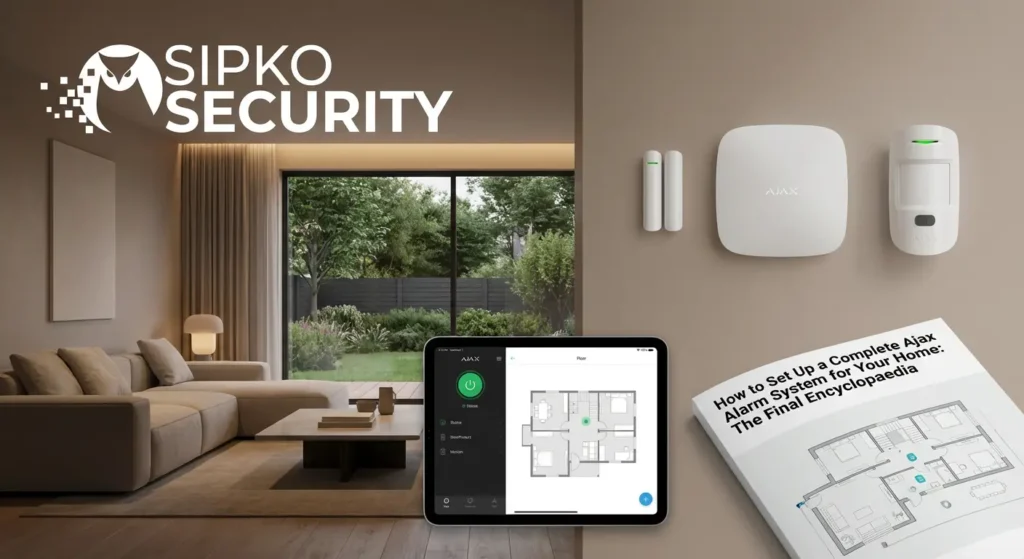
How to Set Up a Complete Ajax Alarm System: The Final 2026 Encyclopaedia
Choosing the right security system can feel overwhelming, especially when the safety of your family and property is on the line. Traditional, hardwired systems are rapidly being swept aside by a new era of smart, wireless technology—and at the absolute forefront of this shift is the European-engineered Ajax ecosystem.
Whether you are securing a Brighton Bayside estate against sophisticated perimeter probing or outfitting a Melbourne CBD loft, understanding how to properly structure your protection is crucial. We’ll explore the science behind the Jeweller radio protocol, the highly encrypted OS Malevich software layer, and even the brilliant home-automation logic that can instantly shut off your water main to prevent a devastating flood.
You’ll see exactly why EN 50131 Grade 2 wireless hardware has become the trusted standard for modern properties, and how you can seamlessly architect a flawless, proactive shield around the people you care about most.
Why Home Security Matters More Than Ever (The 2026 Shift)
In 2026, the local Melbourne security landscape has undergone a radical transformation. Traditional burglary methods have been replaced by sophisticated technical probing. Entry points are no longer limited to the front door; digital vulnerabilities and perimeter breeches are the new frontiers. For luxury homeowners in Brighton, Toorak, and Richmond, the risk isn’t just physical loss—it’s the breach of privacy and the safety of your family’s data. Ajax provides a deterrent that active-response teams (like Sipko’s Rapid Squad) can rely on with 100% confidence.
Beyond theft, modern security in 2026 includes Critical Infrastructure Monitoring. We now worry about lithium battery fires, dishwasher leaks causing $100k in water damage to engineered oak floors, and CO leaks from old heating units. A professional Ajax system is the sentinel that watches for all these threats simultaneously.
What Is an Ajax Alarm System? (The Grade 2 Engineering Standard)
Forget the plasticky, cheap sensors found at big-box retailers. Ajax is a professional EN 50131 Grade 2 security ecosystem. It exists as a software-first platform that happens to have world-class hardware attached. It doesn’t just “detect motion”; it analyzes infrared pulses using the SmartDetect algorithm to ignore pets, curtains, and sunlight while identifying human heat signatures in under 0.15 seconds. It is the gold standard for wireless security in Europe and Australia.
What makes Ajax truly unique is its Scalable Intelligence. You can start with a basic Hub and three sensors, and over five years, expand it into a 200-device ecosystem that controls your lights, locks, water, and fire suppression. Everything is unified in a single, high-speed mobile app that responds with the speed of a local LAN connection, even when you’re on a different continent.
| Feature | Ajax Professional | Generic Smart Home Kits |
|---|---|---|
| Response Time | 0.15 Seconds | 3.5 – 10 Seconds |
| Signal Range | 2,000 Meters (Jeweller) | 25 – 50 Meters (WiFi) |
| Encryption | AES-128 Dynamic Key | None / Static SSL / Zigbee |
| Battery Depth | Self-Regulating Power | Constant Drain (12-month max) |
| Failover Paths | 4 (Ethernet, Wifi, 2x 4G) | 1 (WiFi Only) |
Who Should Use Ajax Systems? (Specialized Scenarios)
Ajax is versatile enough for almost any property, but it excels in these 2026 high-priority cases where “consumer grade” systems fail:
- Luxury Apartments: Ideal for Melbourne CBD lofts where drilling is prohibited.
- The Mornington Estate: For villas in Mornington Peninsula, ReX 2 cover massive acreage.
- High-Frequency Rentals: Managing access for dog walkers and guests via encrypted RFID tags.
- Commercial Storage: Perfect for Richmond boutiques that need insurance-compliant Grade 2 protection.
Furthermore, Ajax is the only choice for Remote Properties. If you have a weekend home with flakey NBN, the dual 4G SIM cards in the Hub 2 Plus ensure you are never disconnected from the monitoring center.
Wired vs Wireless: Why Ajax Wins the Battle of 2026
In the old days (pre-2020), legacy installers hated wireless. They were wrong. Wireless Ajax is actually safer because it has no wires to cut. A physical cable can be sniped with a $5 clipper. To kill an Ajax signal, you need a $10,000 jammer—and even then, Ajax’s Frequency Hopping will detect the interference and sound the alarm before the jammer even finishes its first pulse.
The “Anti-Sabotage” features of Ajax are extreme. If a sensors is ripped off the wall, it triggers a tamper alarm. If a sensor is opened, it triggers a tamper alarm. If the internal battery is dying, you get a notification 3 months in advance. Every signal is a “handshake”—if the Hub sends a command and the sensor doesn’t acknowledge it in 0.15 seconds, the Hub retries instantly. This is “Reliability Engineering” at its peak.
Core Components: The 2026 Hardware Master-Lineup
Every piece of Ajax hardware is a masterpiece of industrial design. The core 2026 lineup has been refreshed with smarter processors and longer radio range:
Hub 2 Plus
Supports up to 200 devices, 100 cameras, and has 4 independent communication paths. It is the only choice for the Brighton master-home.
MotionCam
Not just a sensor—a photographer. Delivers visual proof of why the alarm went off. No more guessing if it was a cat or a burglar.
FireProtect 2
Detects smoke, heat, and CO. Its bi-spectral sensor ignores vape clouds but catches smoldering fabric instantly.
LeaksProtect
A tiny 20mm tall sensor that stops $50k water damage claims. It detects water on its 4 sides and notifies you in seconds.
The Hub: Designing the Technical Backbone
The Hub is not just a router; it is a proprietary operating system (OS Malevich). It is immune to viruses and handles 50 separate users with individual access rights. For professional monitoring, the Hub coordinates with the Sipko Rapid Dispatch server. It sends an alarm in 0.15 seconds and a photo in 9 seconds. It features a backup battery that keeps it alive for 16 hours during a blackout—more than enough for most Melbourne power outages.
When designing your system, the Hub placement is critical. Even though it has a 2km range, thick concrete and steel beams in CBD luxury apartments can degrade signals. We always recommend placing the Hub at a height of 1.5 to 2.0 meters, away from other high-frequency interference like microwave ovens or large NAS servers.
Comprehensive Sensor Guide: Choosing the Right Protection
Selection is as important as placement. Here is the massive list of specialed sensors for 2026:
- MotionProtect Plus: Includes a microwave sensor to avoid false triggers in rooms with fireplaces or AC.
- MotionProtect Curtain: Creates a narrow beam. Ideal for the “Balcony Shield” in Brighton homes.
- DoorProtect Plus: Features an Accelerometer to detect pre-entry vibration on glass frames.
- GlassProtect: Acoustic glass-break detector that ignores dogs barking but catches window smashes.
- HeatDetector: Garage-specific sensor that only trips at fixed thresholds (+54°C) to ignore car exhaust.
Sirens, Keypads, and Control: The Human Experience
Physical interaction with your system should be frictionless. The KeyPad Plus is the 2026 standout. It supports encrypted Tag (keyfob) and Pass (card) access. This is essential for housekeepers, cleaners, or elderely relatives who struggle with numerical codes. One touch and the system is disarmed.
The StreetSiren isn’t just a speaker; it’s a visual communicator. Its bright LED frame will pulse in different colors to show the arming status, so you can check if you’ve secured the house just by glancing at it from your driveway. At 113 decibels, it is painful for an intruder to stay in the room once it’s triggered.
Jeweller & Wings: The Science of Reliable Wireless
Ajax uses Jeweller, a low-frequency radio protocol (868.0–868.6 MHz). These long waves penetrate walls much better than WiFi or Bluetooth. Jeweller uses Time Division Multiple Access (TDMA)—the Hub gives each sensor a specific “time slot” to talk, preventing data collisions. It also uses Automatic Power Adjustment—if a sensor is close to the Hub, it reduces its transmit power to save battery, pushing life to 7 years.
Wings is the separate high-bandwidth protocol used exclusively for photos. This ensures that while a large image file is being sent, the “Intrusion Alarm” signal has a clear, un-clogged lane to reach your phone. This “dual-lane” approach is why Ajax is the only system professionals trust for remote visual verification.
Layout Planning: Designing Your 3-Ring Fortress
Planning is the difference between an alarm and a fortress. At Sipko, we follow the “3-Ring Perimeter” logic for all our Brighton master-builds:
- The Perimeter (Ring 1): Every external door and ground-floor window. Use DoorProtect Plus for shock detection.
- The Interior (Ring 2): High-traffic hallways and ground-floor living areas. Use MotionCam for visual verification.
- The Critical Assets (Ring 3): Master bedrooms, home offices, and safe rooms. Use MotionProtect Curtain for focused entry paths.
In 2026, we also add a “Tech Shell” for our Toorak estates. This includes LeaksProtect in the laundry and FireProtect in the kitchen—guarding the assets as much as the people.
Precision Placement: The Motion Detector Bible
Incorrect placement is the #1 cause of “Alarm Anxiety.” Follow these strict rules to ensure 100% reliability:
- Rule 1: Height (2.4m). This is where the PIR lens “sees” best. If you mount it at 3m, you create blind spots. If you mount it at 2m, a large dog will trigger it.
- Rule 2: The Sun Angle. Never point a sensor directly at a window. The heat from solar rays will overwhelm the IR sensor and cause a false trigger. Angle it 90 degrees away from the window.
- Rule 3: Air Movement. Don’t point at high-speed heat vents or fireplaces. Rapid temperature changes look like “blood moving” to an old-school sensor. Ajax is good at ignoring this, but why take the risk?
- Rule 4: Corner Mounting. A sensor in a corner has a 110-degree field of view. A sensor on a flat wall has a 180-degree blind spot behind it. Corner is king.
Perimeter Guard: Advanced Door & Window Strategy
The front door is the most common entry point, but the “laundry door” is the most vulnerable. Use DoorProtect Plus on every ground floor entrance. This model includes a built-in accelerometer that detects tilt (great for awning windows) and shock. If someone starts hammering at your glass, the alarm sounds *before* the glass breaks. In Brighton homes with large sliding panes, this is the only way to get a pre-entry alert.
For windows that you like to leave “slightly open” for air, DoorProtect allows you to set a “Maget Offset.” The system stays armed while the window is ajar by 2 inches, but sounds the alarm the second it’s opened further.
Indoor vs Outdoor: The Battle for the Yard
The goal of outdoor security is DETERRENCE. Use the MotionCam Outdoor with its specialized hood. It ignore pets, swaying trees, and shadows using a dual-PIR setup—both must trigger simultaneously to sound the alarm. If an intruder puts a foot on your lawn, the StreetSiren flashes its LED ring red. They usually run before even touching the house. Indoor security is for CONFIRMATION. If an intruder isn’t deterred, your indoor MotionCams provide the face-shots needed for prosecution.
How Many Devices? (The Sipko “Standard” Audit)
Use our 2026 logic for a standard 3-bedroom Melbourne home:
4x MotionProtect
Living, Kitchen/Dining, Hallway, and Master Bedroom coverage.
3x DoorProtect
Front door, Back door, and Laundry/Garage internal door.
1x StreetSiren
External high-decibel deterrent plus visual LED status ring.
Unboxing & Preparation: The Professional Way
Don’t just rip the boxes open in a chaotic pile. Professional security technicians follow the strict “Clean Table” provisioning method. This ensures that every node in the ecosystem is mapped, assigned, and pre-configured before a single ladder is climbed or a drill is plugged in.
First, lay out all devices on a large, flat surface. Group them physically by their final geographical “Room” (e.g., all 4 sensors for the Kitchen in one pile, the 2 sensors for the Garage in another). Use a soft pencil or masking tape to physically mark the room name on the backplate of each sensor. This absolutely prevents the classic DIY nightmare of trying to trigger the “Hallway” sensor while you are actually holding the “Garage” sensor in your hand.
Next, meticulously check the battery pull-tab on the back of each device. CRITICAL WARNING: Do NOT pull the tabs yet. If you pull the tab before the Hub is actively scanning for devices, the sensor wakes up, fails to find a host network, and goes back to sleep, requiring a hard reset. You must only pull the tab precisely when the Ajax mobile app instructs you to “Turn on the Device.”
Hub Activation: The Heartbeat Protocol
The Hub is the sovereign brain of your ecosystem. Ignition sequence matters. First, connect the hardwired Ethernet cable directly to your modem or primary gigabit switch. Then connect the 240V power cable last. The backlit Ajax logo will instantly glow red for approximately 30-60 seconds as it boots OS Malevich. When it secures an active connection to the Ajax Cloud, the logo will gracefully pulse Mint Green (or white, depending on your model).
Physical Placement Rules: Never mount the Hub inside a metal server cabinet or switchboard box. Metal acts as a Faraday cage—it will literally smother your Jeweller radio signals, cutting your 2,000-meter range down to 5 meters. Keep the Hub visible, high on a wall, or hidden inside a wooden or plasterboard cupboard. Finally, ensure your dual 4G SIM cards are inserted before you power the unit up; hot-swapping SIM cards can sometimes force unnecessary restart cycles.
Connecting to the Mobile App (Account Hardening)
Your physical security is now entirely dependent on your digital hygiene. Download the official “Ajax Security System” app from the Apple App Store or Google Play Store. Create your account, verify your email, and IMMEDIATELY enable Two-Factor Authentication (2FA) in the app settings.
In 2026, operating a security application without secondary authentication is an unacceptable vulnerability. If a malicious actor guesses your password, 2FA ensures they still hit a cryptographic brick wall. For high-net-worth clients in Brighton and Toorak, we mandate enabling Biometric Screen Lock (FaceID or Fingerprint) within the Ajax app itself. If you lose your smartphone at a café, the thief cannot open the app to disarm your home without your literal face or fingerprint.
Once your account is fortified, click “Add Hub,” scan the QR code under the Hub’s backplate, and instantly claim ownership of the system.
Adding Devices: The 2-Second Pairing Sync
Once the Hub is online, you are ready to onboard your peripheral devices. On the app dashboard, tap “Add Device.” You will be prompted to name the device (e.g., “Dining Room Window”) and assign it to a logical Room. Next, scan the unique QR code located on the back of the sensor (or its packaging). You now have a 30-second window to flick the tiny physical switch on the back of the device from “Off” to “On” (or pull the battery tab).
The LED indicator on the front of the sensor will flash bright green once. In that fraction of a second, the Hub and the sensor have established cryptographic keys, exchanged firmware handshakes, and locked onto a specific Jeweller radio frequency. It is now paired for life.
Workflow Secret: Pair everything at the kitchen table first while sitting 2 meters from the Hub. Ensure they all appear in the app dashboard. Only then move them to their final mounting locations across your property. This isolates pairing issues from range issues.
Mounting Mastery: The SmartBracket Standard
Ajax incorporates an ingenious mounting system called the SmartBracket. You do not need to disassemble the delicate internal electronics of the sensor to mount it. Instead, simply slide the rear plastic bracket off the sensor, screw the bracket directly into the wall using the provided anchors, and then slide the sensor chassis back onto the bracket until it solidly “clicks” into place.
For outdoor devices facing Melbourne’s aggressive weather cycle, always use the included stainless-steel screws to mount your StreetSiren and MotionCam Outdoor. Never rely purely on double-sided 3M tape for outdoor mounts—the blistering 40°C January sun will rapidly degrade the adhesive, resulting in your $500 siren smashing onto the concrete pavement.
Testing: The Final Signal Audit
Installation is only 50% of the job; rigorous testing validates the architecture. Before you declare the system “Live,” you must execute the built-in diagnostic tools via the app. First, run the Jeweller Signal Strength Test for every single sensor. Anything returning less than 2 bars of signal strength must be physically relocated closer to the Hub, or you must deploy an Ajax ReX 2 range extender to boost that specific sector’s coverage.
Second, initiate the Detection Zone Test for all motion detectors. Walk across the room attempting to mimic a burglar’s typical lateral entry path. The LED on the sensor should glow red the precise millisecond you take two steps into its field of view. Be sure to test the extreme edges of the room to identify any blind spots.
Finally, test the Sirens. Note: An Ajax StreetSiren at 100% volume outputs 113 decibels. It is legally, painfully loud and will agitate dogs across the entire street in Richmond. Send a text to your immediate neighbors warning them of a “30-second siren test” before you trigger it via the app.
Notification Logic: Quelling the Digital Noise
Notification fatigue is a massive security risk. If your phone pings loudly every time your partner arms the system to leave for work, your brain will eventually be conditioned to ignore those pings—even when it’s a real intrusion alert. You must practice strict Alert Hygiene.
Configure your 2026 app notification channels precisely like this:
- Alarms (Intrusion/Fire/Water): Set to Critical Alerts with maximum siren sound. This overrides your phone’s “Do Not Disturb” mode.
- System State (Arm/Disarm): Set to Silent Push or disable entirely if you trust your family members’ routines.
- Power & Hardware Faults: Set to Silent Push. You need to know if the power went out, but it doesn’t need to wake you up at 3:00 AM.
For estates utilizing professional monitoring, refining your push notifications ensures that if your phone actually screams, you know with absolute certainty that it is an actionable emergency.
Automation Scenarios: The Advanced Setup
This is the inflection point where a standard burglar alarm evolves into an active “Smart Guardian.” Ajax allows you to build complex logic scenarios that execute automatically based on triggers (alarms, time of day, or system arming). Here are the standard configurations Sipko integrates into premium estates:
- Auto-Arming Protocol: Program the system to arm the “Night Mode” perimeter at exactly 11:30 PM every night, regardless of human input, ensuring your family sleeps safely even if you forget to arm the system.
- Intruder Disorientation (The Flash): Using Ajax LightScript panels or smart relays, configure a scenario where a triggered alarm forces every smart LED bulb in the house to flash intense RED at 100% brightness. This induces severe panic and disorientation in intruders.
- Flood Prevention Core: Place LeaksProtect sensors under your washing machine and dishwasher. If they detect even 1mm of water, an automated scenario instantly triggers the Ajax WaterStop motorized valve, severing the main water supply to the house in under 5 seconds. This prevents a $50 part failure from causing $100,000 in water damage to specialized timber floors.
- Vacation Presence Masking: When the system is armed to “Away” mode for more than 48 hours, a scenario activates key living room and bedside lights on randomized schedules between 7:00 PM and 11:00 PM, perfectly simulating human presence to surveilling scouts outside your Brighton villa.
Smart Home Integration (The Unified Ecosystem)
Security should not exist in an isolated silo. Ajax integrates fluidly with major smart home architectures like Apple HomeKit, Google Home, and Amazon Alexa. By simply syncing your Ajax account to your preferred voice assistant, you can issue commands like “Hey Siri, Arm the house for the night” while lying in bed.
Moving into the high-end custom integrator space, Ajax fully supports native bridging with Lutron, Savant, and Control4 systems. This allows for deep ecosystem synergy. For example, in a Toorak residence, we tie the Ajax “Armed (Away)” status to the Control4 master off script. The moment you leave and arm the Ajax system, your security hub instructs the house to close all motorized blinds, shut off all HVAC heating zones, and power down any lingering AV equipment. The security status becomes the master trigger for massive energy conservation.
Managing Permissions: Staff, Guests, & Family
Never share your Master Administrator account login credentials with anyone—not your partner, not your children, and absolutely never your contractors. Instead, utilize the sophisticated User Management tab. Invite your spouse as an independent “Admin,” and invite your children as “Standard Users” who can arm/disarm but cannot delete sensors or change settings.
For staff, such as cleaners or dog-walkers, issue them Restricted Rights. You can restrict their Ajax app or KeyPad PIN access to specific time windows—for example, they can only disarm the system on Wednesdays between 9:00 AM and 1:00 PM. If they try to enter at 2:00 PM, their PIN is rejected, and the system logs the failed attempt.
Avoiding False Alarms: Expert Maintenance
The single greatest threat to your home security is not a burglar—it is the false alarm. If your system cries wolf too many times, cognitive dissonance sets in; you will eventually stop arming it altogether, rendering your investment practically useless.
Prevent false alarms by adhering to a strict 6-month preventative maintenance routine. First, wipe down all PIR motion sensor lenses with a dry, static-free microfiber cloth. Spiders love the imperceptible warmth emitted by infrared lenses and will weave webs directly over them, causing erratic midnight triggers. Second, routinely check the Ajax app’s diagnostic logs for any “Signal Interference” warnings that might indicate a failing battery or a new heavy metal object blocking a signal path.
Finally, understand your Pet Immunity thresholds. If you adopt a new 35kg Golden Retriever, a sensor calibrated for a 15kg cat will suddenly start triggering. You must adjust the software sensitivity slider in the “Devices” settings tab. “High” sensitivity is strictly for empty, pet-free rooms. “Medium” is the standard for most homes, while “Low” sensitivity relies on advanced weight-and-height algorithms to successfully ignore large roaming pets without compromising human detection.
Backup Power & Internet Failover (The Triple-Path Rule)
The Hub 2 Plus is a tank. It has a Li-ion battery that keeps the system alive during a 16-hour blackout. More importantly, it features Triple Path Monitoring. It monitors your Ethernet, your WiFi, and two 4G SIM cards simultaneously. If an intruder cuts your NBN cable, the Hub switches to the 4G SIM in 0.15 seconds. If the first cell tower fails, it jumps to the second. This prevents burglars from using “service disruption” as a way into your Mornington Peninsula property.
How Secure Is Ajax? (The Cryptography Section)
Proprietary Encryption & Sabotage Resistance
We are asked this daily: “Can it be hacked?” In 2026, the answer is “Mathematically, No.” Ajax uses a proprietary protocol (not Zigbee/WiFi) with AES-128 bit dynamic encryption.
Keys to Ajax Security:
- OS Malevich: A real-time proprietary OS immune to traditional viruses and malware.
- Dynamic Keys: Encryption keys change with every single data pulse between device and Hub.
- Anti-Spoofing: The Hub verifies each sensor’s unique serial number every few seconds.
It is the most secure wireless consumer system in history, trusted by high-risk Richmond boutiques and Toorak estates alike.
Common Setup Mistakes: The “Expert Fail” List
Why Amateur Setups Compromise Encryption
Avoid these classic amateur errors we see in Melbourne service calls:
- Mistake 1: Mounting the Hub behind the TV. The TV’s metal chassis blocks the radio signal like a shield.
- Mistake 2: Points PIRs directly at windows. Sunlight reflection causes thermal noise that confuses even Grade 2 sensors.
- Mistake 3: Skipping the “Signal Strength” test. A sensor with 1-bar signal will drain its battery in 6 months instead of 7 years.
- Mistake 4: Leaving the “Default Room” names. If your app says “MotionProtect 1” triggered, you won’t know where to look during an emergency.
DIY vs Professional Installation (Insurance Validity)
Can you install it yourself? Yes. Should you? Maybe not. In Australia, insurance companies are becoming incredibly strict. For high-value estates in Brighton, a claim for stolen high-end vehicles or jewelry can be denied if the security system was not “Professionally Installed and Maintained” by a licensed technician. Sipko Security provides a Certificate of Compliance (Form 11) upon completion, which often triggers a significant reduction in your annual insurance premium—frequently paying for the installation cost itself within two years.
Maintenance Secrets: The Longevity Plan
Ajax sensors last a long time, but they need love. Follow this Sipko-Certified annual plan:
- Battery Load Test: Run the Battery Life Test in the app every 12 months. Replace at 10%.
- Firmware Audit: Check for Malevich OS updates every quarter to unlock new radio range and pet immunity.
- Walk-Test Protocol: Physically trigger each sensor once every 6 months to verify radio paths.
- Emergency Registry: Ensure “Emergency Contacts” in the app are up to date and 2FA is active.
The 2026 Cost & Value Breakdown
Setting up a 2026 shield involves an investment in your safety. A basic Sipko Starter Kit (Hub, 2 Motion, 2 Door, 1 Siren) averages $1,699 professionally installed. A more advanced “Villa Setup” with photo verification and fire detection averages $2,800. In Brighton, most homeowners opt for the “Platinum Shield” (averaging $4,500) which covers every window, the roof space, and perimeter flood-prevention. Remember: A single burglary in Melbourne costs an average of $12,000 in lost items and infinite emotional stress. The ROI is immediate.
| Package | Investment | Primary Coverage |
|---|---|---|
| Essential Starter | $1,699 | Front/Back Entrances & Main Living |
| Standard Villa | $2,800 | Photo-Verification & Full Lower Perimeter |
| Platinum Shield | $4,500+ | Full Perimeter, Fire, Flood & Automation |
Secure Your Melbourne Legacy with the 2026 Gold Standard.
Don’t let your home be the weak link. Partner with Sipko Security – the master integrators of the Ajax Ecosystem in Victoria.
Direct Technical Hotline
0406 432 691Architectural & Sales Design
Sipkosecure@gmail.com