
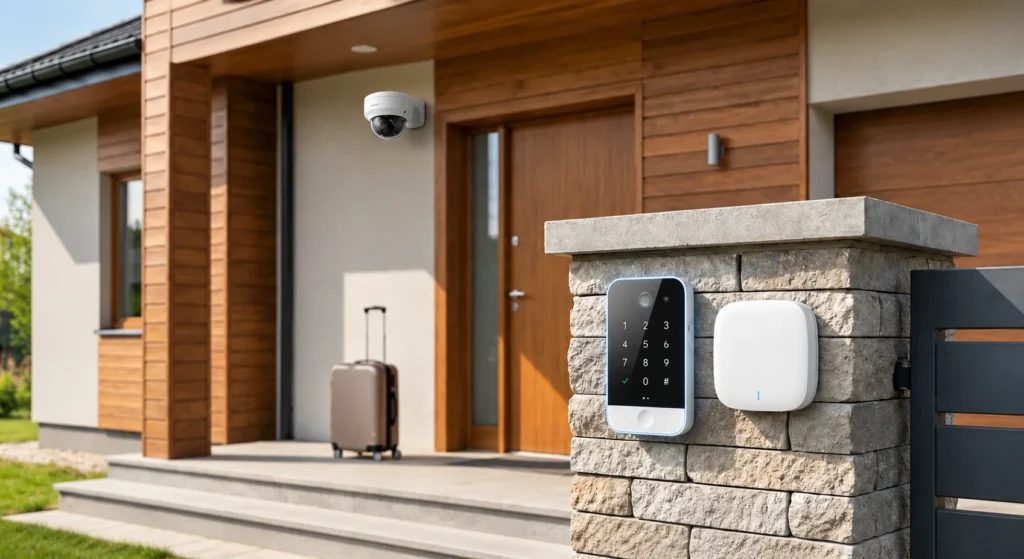
How to Secure Your Home While Travelling: CCTV, Alarms and a Response Plan
You’re overseas, you get a notification, and you open the app. There’s someone at your front door on camera. Now what? Most home-security advice stops at “install cameras and an alarm” — but a camera that shows you something is only useful if you also know what to do next. This guide works through securing your home while travelling as a complete sequence: what to check before you leave, what your system needs to detect, how you actually verify what’s happening, and — the part most guides skip — who can respond locally when you’re hundreds or thousands of kilometres away.
Before You Leave — What Actually Needs Checking
Before any technology comes into it, Victoria Police’s own guidance on preventing home burglaries centres on a few practical categories:
- Secure the property — lock all doors, windows, the garage, sheds, and any other access points; remove hidden spare keys.
- Secure valuables — keep them away from windows, store what you can in a safe.
- Make it look occupied — a neighbour collecting mail and moving bins, a car occasionally in the driveway, lighting on a timer.
- Confirm system readiness — before you go, check that your alarm and cameras are actually armed, connected, and recording, not assumed to be working.
This is the foundation everything else in this guide sits on top of.
Detection — What Your Security System Needs to Notice
Once you’re away, the system’s first job is simple: notice when something happens. This covers door and window contacts, motion sensors, and camera-triggered events at entry points — the basic sensing layer that everything downstream depends on. It’s worth being specific about what “detection” actually means here: it’s the system recognising an event occurred, not yet telling you what that event was or whether it matters.
If CCTV forms part of that detection layer, our CCTV installation in Melbourne service covers professionally installed camera systems for Melbourne homes.
Verification — What CCTV and Alarm Photos Actually Tell You
Detecting that something happened and knowing what happened are two different steps, and they happen on two very different timescales. An alarm trigger itself is close to instantaneous — with Ajax’s Jeweller protocol, for example, the alarm signal reaches the hub in around 0.15 seconds. But if the system also sends photo verification — such as Ajax’s MotionCam, which takes a photo when motion is detected — that image takes measurably longer to actually reach you: up to 9 seconds, and only under specific conditions (default resolution, good signal strength, and the hub connected via Ethernet). Weaker signal, a higher resolution setting, or a Wi-Fi/cellular connection instead of Ethernet all push that time out further.
Modern systems can handle detection and remote verification well, but response is where travel-security planning often becomes less clear — which is exactly the gap the next section addresses.
Remote viewing is only useful if the camera actually covers the area you need to verify in the first place. Our CCTV camera placement guide explains how positioning affects whether you get useful coverage or just a wide, low-detail view.
What Happens When You Get an Alert While Away?
Receiving an alert is not the same as having someone available to respond to it. Once you see something on camera or get an alarm notification, what actually happens next depends on who — or what — is positioned to act:
- You, the homeowner — but you’re not physically there, and depending on what you’re seeing, there may be very little you can do remotely beyond watching.
- A trusted neighbour or keyholder — someone who can actually go and check, if you’ve arranged this in advance.
- A monitoring arrangement, where one is in place — a service that reviews the alert and follows an agreed process.
- Emergency services, where genuinely warranted — but only through an appropriate channel, not assumed automatically.
The system’s job is to detect and verify. Deciding who’s actually available to respond, and making sure that’s arranged before you leave, is the part that turns a notification into something useful.
Will Your Alarm and CCTV Still Work During an Outage?
A multi-day or multi-week absence is exactly the scenario where a power or connectivity outage is most likely to go unnoticed for a while — nobody’s there to see the lights are off. System resilience matters more here than it does day to day.
The practical point is that “the internet is down” and “the power is out” are two different failures. An internet-only outage may interrupt remote access without stopping local recording, while a mains outage can stop the recorder itself unless it also has backup power. Check the actual hub and CCTV setup before relying on either while you’re away.
For more on how local recording and retention work, see our CCTV storage guide.
Extra Steps for a Longer Absence
Register Your Absence with Victoria Police
If you’re leaving for an extended period, Victoria Police lets you register your absence — online, via the Police Assistance Line, or in person at a station — providing your contact details, the dates you’ll be away, and an emergency contact. According to Victoria Police, this information can be used to contact you or your emergency contact if there’s an incident at your home, and your address can be kept in mind during patrols of the area. It’s worth being precise about what this does and doesn’t guarantee: Victoria Police is explicit that there is no guarantee police will attend your property during your absence. It’s a genuinely useful extra layer, not a substitute for the rest of this checklist.
Give Cleaners, Pet Sitters or House Sitters Scoped Access
If someone needs to get into the house while you’re away, the common instinct is to just remotely disarm the whole system for them — but that’s more access than the situation usually calls for. Ajax’s own documentation uses almost exactly this scenario as its example for a better approach: scheduled access that only works during specific days and times, tied to a particular credential — for instance, a cleaning company granted access only on Sunday afternoons, with no access at any other time. It’s a safer default than handing over full remote control of the system.
Use Automation Without Assuming It Does Everything
Lighting on a timer is a simple way to help make the property look occupied while you’re away. Automation can also be used for things such as blinds, but the exact options depend on the installed equipment and configuration. Treat automation as an extra layer, not a replacement for physical security, detection and a response plan.
Home Security Checklist Before You Travel
- Secure doors, windows and other access points; remove hidden spare keys.
- Arrange mail collection, bin movement, and general signs of occupancy.
- Confirm your alarm and cameras are armed, connected and actually recording.
- Check what your system can verify remotely, and how quickly, under real conditions.
- Decide in advance who can respond locally if you receive an alert — not just who receives the notification.
- For longer absences, register with Victoria Police and check your system’s backup power model.
- Set up scoped access for anyone who needs to enter the property, rather than sharing full remote control.
Frequently Asked Questions
Can I monitor my CCTV while travelling overseas?
Many current CCTV systems support remote viewing through a mobile app, provided the recorder or camera system has a working internet connection and remote access has been configured. What matters more than access itself is what you can actually verify from that footage, and how quickly — which depends on the specific system and conditions.
What happens to my alarm if the power or internet goes down?
Whether an alarm continues operating during a power outage depends on its backup-power design and the specific hub or control panel. Whether footage keeps recording locally during an internet-only outage depends on whether the system uses local storage and whether the recorder itself stays powered; either way, it’s worth checking this before you rely on it while away.
Should I register my absence with Victoria Police?
It’s a genuinely useful extra step for longer absences — police can use the information to contact you or keep your address in mind during patrols. It doesn’t guarantee attendance at your property, so it’s worth treating as an addition to physical security measures, not a replacement for them.
How can a cleaner or pet sitter access the house without sharing full alarm access?
With Ajax, scheduled access can be configured for specific days and times, so someone like a cleaner or pet sitter only has access during set windows rather than being able to disarm the whole system whenever they like.
Getting the System Right Before You Go
Modern systems can provide detection, remote verification and backup-power options, but those features are only useful while you’re away if the plan around them is already in place: who responds locally, how access is shared, and whether the system is ready to be relied on for the length of the trip.
If you’re planning a new alarm system or reviewing an existing one before a longer absence, our residential alarm installation service covers alarm solutions for Melbourne homes.
Sources


