Hikvision AcuSeek Explained: Does AI Video Search Actually Work?
There is always noise around anything labelled “AI.” Some people expect magic; others are sceptical before they have seen it work. Hikvision’s AcuSeek sits right in the middle of that debate — a feature that promises to let you search hours of CCTV footage just by typing what you are looking for. This guide cuts through the marketing and answers the questions people actually ask: what it is, where it genuinely helps, where it falls short, and whether it is worth having on your system.
In this article
What AcuSeek actually is
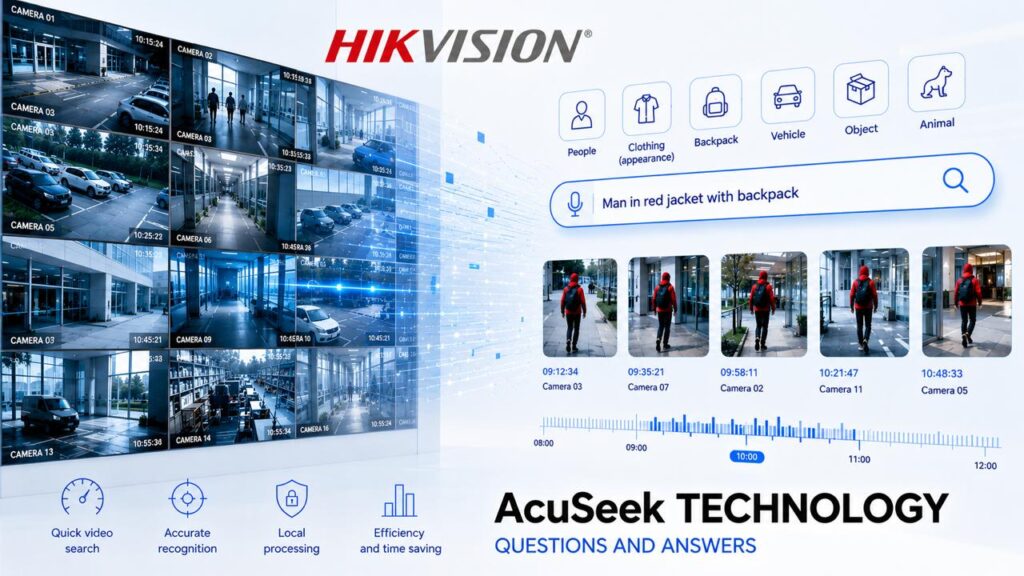
AcuSeek is a smart video-search feature built directly into Hikvision’s VPro and DeepinMind Pro series recorders. Instead of scrubbing through hours of recordings, you describe what you are looking for in plain words — “man in a red jacket with a backpack” or “white van” — and the system returns every matching clip in seconds.
Two things make this different from ordinary CCTV playback. First, there is no cloud upload and no subscription — the processing happens locally, on your own recorder, which matters for both privacy and running costs. Second, you are not filling in a form of fixed filters; you are describing a scene in everyday language.
For the best results, Hikvision recommends cameras from its AcuSense, ColorVu or DeepinView ranges. That said, the more powerful DeepinMind recorders can work even with standard third-party IP cameras.
“You are not filling in a form of fixed filters — you are describing a scene in everyday language, and it is all processed locally on your own recorder.”
How it works under the hood
It helps to understand what is really happening, because it explains both the strengths and the limits. AcuSeek runs on a multimodal AI model that combines computer vision with natural-language understanding. In practice, that means three steps:
You can even speak the query aloud rather than type it — the Hik-Connect app accepts voice input, and the search works in more than thirty languages. Queries are short and descriptive (up to 64 characters), so you are writing a phrase like “white van at the side gate,” not a paragraph. Understanding this “describe-then-match” process is the key to setting realistic expectations, which we will come back to.
Where it genuinely earns its place
AcuSeek is not a gimmick when it is matched to the right situation. These are the cases where it makes a real, measurable difference:
What it can and can’t do, at a glance
Before the detailed concerns, here is the honest summary. AcuSeek is strong on clear visual attributes and weak wherever image quality drops:
| Handles well |
|---|
| Clothing colour & type (“blue jacket”) |
| Object type (bag, box, umbrella) |
| Vehicle type & colour (“white van”) |
| Simple actions (carrying, no hard hat) |
| Tracing a route across many cameras |
| Struggles with |
| Very low or no light |
| Heavily compressed footage |
| Low-resolution cameras |
| Partially blocked or distant objects |
| Vague or conversational queries |
Accuracy tracks image quality — cameras, lighting and configuration all matter.
A real-world example: how it works in practice
Picture a retail store that has had a theft at some point during a busy Saturday. The owner knows roughly what the person looked like — a man in a grey hoodie carrying a backpack — but the store was open for nine hours and has six cameras. Reviewing that footage manually means more than fifty hours of video across all angles.
With AcuSeek, the owner types “man in a grey hoodie with a backpack” and the system returns a short list of matching clips within seconds. From there, AcuSearch builds a timeline showing every camera that person passed, from the moment they entered to the moment they left. What was a full day of manual review becomes a five-minute task — and the owner has a clear sequence of footage to hand to police. That is the practical difference: not science fiction, just hours of work removed.
Do you actually need AcuSeek? An honest checklist
This is the question the marketing never answers directly. AcuSeek is genuinely valuable for some sites and barely worth it for others. Here is how to tell which group you are in.
AcuSeek is worth it if…
- You have many cameras and hours of daily footage
- You regularly need to find specific people or events
- Your site is busy — retail, warehouse, office, car park
- Staff time spent reviewing footage is a real cost
- You want fast evidence for police or insurance
It’s probably overkill if…
- You have a small home system with a few cameras
- Incidents are rare and easy to locate by time
- Your budget is better spent on better cameras first
- You’d never realistically learn or use the feature
- Poor lighting would limit the results anyway
In short: the more footage you have and the more often you need to search it, the more AcuSeek pays for itself. A large or busy site benefits enormously. A typical home with a few cameras and rare incidents will get far less from it — and the money is usually better spent on better cameras and good lighting, which improve every part of the system.
What you need to make it work well
AcuSeek is only as good as the footage it analyses. If you are considering it, these are the practical requirements that determine whether it delivers or disappoints:
Get these right and AcuSeek works as advertised. Skimp on cameras or lighting and no amount of AI will rescue poor footage — a point worth remembering before the technology, not after.
The seven honest concerns — answered
This is where most articles go quiet. Here are the real objections people raise, and a straight answer to each.
Essentially, yes — and that is exactly how it works. The system analyses video, assigns attributes to objects, and searches by those attributes. There is no “understanding” of the scene in any deeper sense. But the value is not that an AI thinks like a person; it is that hours of manual review become an instant search. That is a genuine difference in speed for whoever operates the system.
The most common question, and a fair one. AI demonstrations are usually shown in near-perfect conditions, so it is reasonable to doubt the accuracy in the real world. The honest answer: results depend on image quality. Poor lighting, heavy compression, low resolution and partially blocked objects all reduce accuracy. That is true of every computer-vision system, and AcuSeek is no exception. A well-designed system — the right cameras, decent lighting, sensible camera angles — will deliver good results. A poorly specified one will not.
Partly true. “Natural language” here does not mean a free-flowing chatbot. You cannot type “find that suspicious guy who kept circling the till yesterday” and expect it to work. But “person in a blue jacket with a backpack” works. “White van” works. “Man with a dog” works. The system deals in concrete visual attributes — gender, clothing colour, object type, vehicle type. It is not ChatGPT, but it is also not a dropdown menu. You describe what you want, rather than build a filter.
When a system returns results confidently, it is tempting to treat them as the whole picture — “it found nothing, so there was nothing.” In reality the algorithm can occasionally misread an attribute, miss an object in hard conditions, or return an incomplete set. AcuSeek speeds up the work; it does not replace judgement. It gets an operator to the relevant footage faster, but the final call on what is on screen stays with a person.
A legitimate concern, especially now that monitoring is a sensitive subject. A tool that can find “a man in a blue jacket” across thousands of hours understandably raises questions about profiling. The key point: AcuSeek processes data locally, without sending it to the cloud or third parties, and Hikvision states it is built to comply with data-protection rules such as GDPR. Retention periods, access controls and signage remain the owner’s responsibility. The tool is neutral; how it is used is a matter of policy. In Australia, anyone installing surveillance should also know their state laws — in Victoria, the Surveillance Devices Act 1999 sets out what may and may not be recorded.
When core features are tied to one ecosystem, changing brands stops being a simple hardware swap and becomes a partial loss of capability. With AcuSeek this is real: the full functionality lives inside the Hikvision ecosystem, and some AI metadata is not passed through standard ONVIF protocols, so a migration would lose part of it. This is typical of the video-analytics market and worth planning for at the design stage — though it is offset by how widely available and well-supported Hikvision equipment is.
A very real criticism. AI features often win the argument when a system is chosen, then fade after installation — there is rarely time to learn the interface, so operators fall back on scrubbing the timeline. But that is an implementation problem, not a technology one. AcuSeek changes the workflow where the archive is large, incidents are hard to locate in time, and staff are stretched. On a small site with three cameras and rare incidents, the benefit is modest. Match the technology to the use case, and it gets used.
“AcuSeek speeds up the work — it does not replace judgement. The final call on what is on screen stays with a person.”
The verdict: is AcuSeek worth it?
AcuSeek will not give you a magic “show me everything” button, and it will not replace a competent operator. But with the right equipment and realistic expectations, it cuts archive work from hours to seconds, makes searching by visual description genuinely practical, and takes real pressure off staff.
The deciding factor is rarely the technology itself — it is whether your site actually fits the use case, and whether the system is specified properly around it. A large site with heavy footage and frequent searches will get enormous value. A small home with a handful of cameras will see far less. That judgement, made before you buy, is what separates an AI feature that earns its keep from one that sits unused in a menu.
The short version
- AcuSeek lets you search CCTV footage by plain description, locally, with no subscription.
- It is excellent for large, busy sites with lots of footage — and modest for small homes.
- Accuracy depends on camera and image quality; good design is everything.
- It speeds up searching but does not replace a human operator’s judgement.
- Specify it around a real use case, or it will go unused.
Frequently asked questions
No. AcuSeek processes everything locally on the recorder. An internet connection is only needed if you want to search remotely through the Hik-Connect app, but the AI itself does not rely on the cloud.
No. Unlike many cloud-based AI analytics, AcuSeek runs on hardware you own, so there is no ongoing subscription for the search feature itself.
Only if you have a compatible Hikvision recorder (VPro or DeepinMind Pro series). If your current recorder doesn’t support it, you would need to upgrade the recorder, and ideally pair it with suitable cameras for the best results.
The more powerful DeepinMind recorders can analyse footage from standard third-party IP cameras, but you get the most accurate results from Hikvision’s own AcuSense, ColorVu or DeepinView cameras.
For most homes, the benefit is modest — a few cameras and rare incidents don’t generate the volume of footage that makes AI search valuable. It comes into its own on larger or busier sites. For a home, investing in better cameras and lighting usually delivers more value than AI search.
Yes, but the same rules apply as for any CCTV. You are responsible for lawful recording, signage and data handling. In Victoria, the Surveillance Devices Act 1999 governs what may and may not be recorded; similar laws exist in other states.
Considering an AI-capable CCTV system in Melbourne? Sipko Security advises on whether smart search and analytics genuinely suit your property — and designs each system around how you will really use it, not around a feature list.
Request a Free Site Assessment Call 0406 432 691Source
- Surveillance Devices Act 1999 (Victoria) legislation.vic.gov.au — Surveillance Devices Act 1999 The Victorian Government legislation governing what may and may not be recorded with surveillance devices — the basis for the lawful-recording obligations referenced in this article.
Legal obligations are summarised from Victorian legislation and are general information only, not legal advice.