
Self Monitored Alarm Systems in Melbourne
Alarm installation with app alerts and camera verification
This type of alarm sends security alerts straight to your phone and lets you arm, disarm and check events through an app. SIPKO Security installs these systems for Melbourne homes, apartments, shops, offices and small commercial sites.
How a self monitored alarm works
The alarm sends alerts to the owner, family, manager or keyholder instead of sending every event through a standard back-to-base monitoring contract. SIPKO Security can install the hardware, set up app users, name each zone clearly, add camera verification and test the alert path before handover.
Checked before handover, not just installed
The setup is only useful if the owner understands what each alert means and what to do next. SIPKO Security configures the system, tests the alert path and walks you through daily use before the job is complete.
- ✓Zone walk-through: front entry, rear door, garage, hallway, stock area or staff-only zones are named clearly in the app.
- ✓Notification test: selected users receive real test alerts during handover, not just a verbal explanation.
- ✓False-alarm review: sensor placement, pets, air movement, cleaners, deliveries and night modes are considered before final setup.
App-Based Alarm Alerts
Receive alarm notifications on your phone with clear zone names, user activity and event history.
Remote Arming and User Control
Arm or disarm your system remotely and manage access for family, staff, cleaners or trusted keyholders.
CCTV Alarm Verification
Pair alarm alerts with cameras so you can check entrances, driveways or internal areas before responding.
Professional Monitoring Upgrade Path
Start with phone alerts and keep the option to add professional monitoring if your risk changes.
Schedule Your Free Site Visit
Call 0406 432 691 or complete the form and we will contact you.
What phone-based alarm monitoring should mean for a Melbourne property
Phone-based monitoring is not just a siren and a notification. A useful system must show where the event happened, who received the alert and whether cameras can confirm the cause. The main limit is simple: someone still has to notice the alert and act on it.
- ✓Useful alerts: SIPKO names zones clearly, such as rear door, garage motion, staff entry or hallway sensor.
- ✓Layout-based setup: sensors are planned around entry points, side access, garages, stock areas and real movement paths.
- ✓Handover testing: app users, sirens, detectors and alert paths are checked before the installer leaves.
- ✓Add cameras or monitoring later: cameras, extra sensors, keypads or professional monitoring can be added later if the system is planned for it.
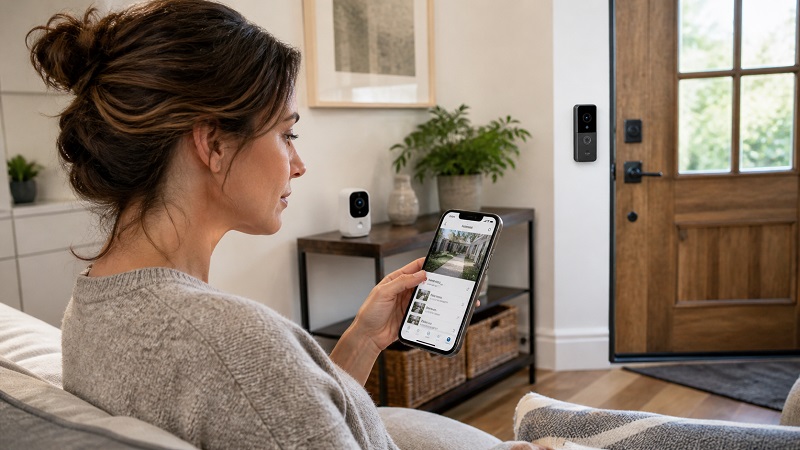
Phone alerts vs professional monitoring: which is right?
The first question is practical: who will respond when the alarm goes off? SIPKO can set up app-only alerts, professional monitoring, or an alarm that starts with phone alerts and can add a monitored response later.
Direct control from your phone
Best when you, your family, manager or keyholder can respond quickly to alerts. It is practical for homes, townhouses, apartments, shops and offices where the owner wants direct control without a standard monitoring contract.
- ✓Phone alerts: know which sensor triggered and when.
- ✓No standard monitoring subscription: alerts can go directly to selected phone users in a standard app-alert setup.
- ✓Simple control: arm, disarm and manage users in the app.
Structured response when risk is higher
Better for sites with valuable stock, vacant periods, late-night events, staff safety concerns or owners who cannot reliably check every alert. Monitoring adds a more formal escalation pathway.
- ✓Escalation process: alerts can be handled beyond one phone user.
- ✓Commercial fit: useful for offices, warehouses, shops and higher-risk sites.
- ✓Upgrade option: the system can be planned with this pathway in mind.
Why CCTV verification improves self monitored alarm alerts
Without camera footage, an alarm alert can leave you guessing. With CCTV, you can check the driveway, entrance, shopfront, rear door or hallway before deciding whether to call a keyholder, visit the site or escalate the event.
- ✓Front and rear entries: confirm whether the event looks like forced entry, staff access, delivery activity or a false alarm.
- ✓Side access and garages: cover common blind spots where basic indoor-only alarms are weak.
- ✓Commercial zones: monitor storerooms, counters, delivery doors and restricted staff areas.
- ✓Less guesswork: check the cause of the alert before calling a keyholder or visiting the site.
Alarm triggered
Rear entry sensor opened • Camera verification available • Keyholders notified
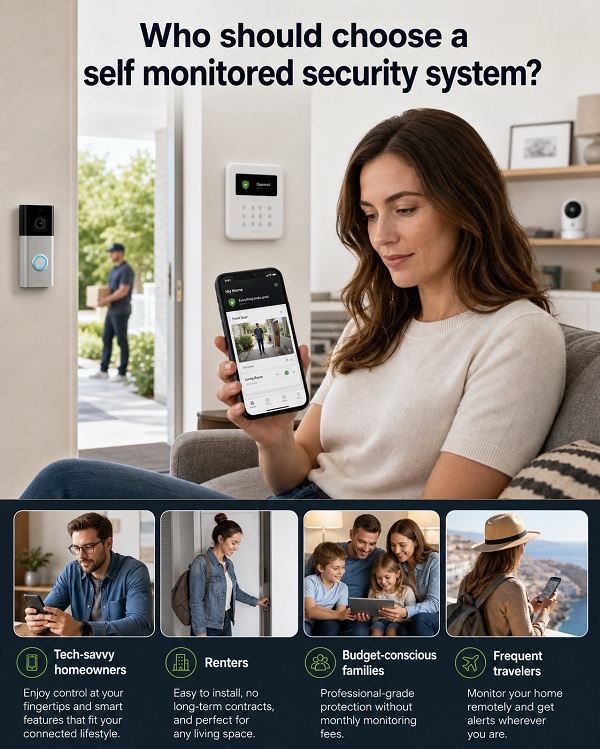
Who should choose phone-based alarm alerts?
This setup suits owners who want phone alerts first and do not want a standard monitoring plan at the start. It works best when a trusted person can check the alert and respond without delay.
- ✓Homes and townhouses: doors, garages, hallways and night modes can be covered around normal family routines.
- ✓Apartments and units: compact wireless coverage can protect key entry points without overcomplicated cabling.
- ✓Shops and offices: owners and managers can receive clear alerts for doors, stock areas, back rooms and after-hours activity.
- ✓Storage and smaller commercial sites: alarms and cameras can help check roller shutters, cages, loading areas and restricted spaces.
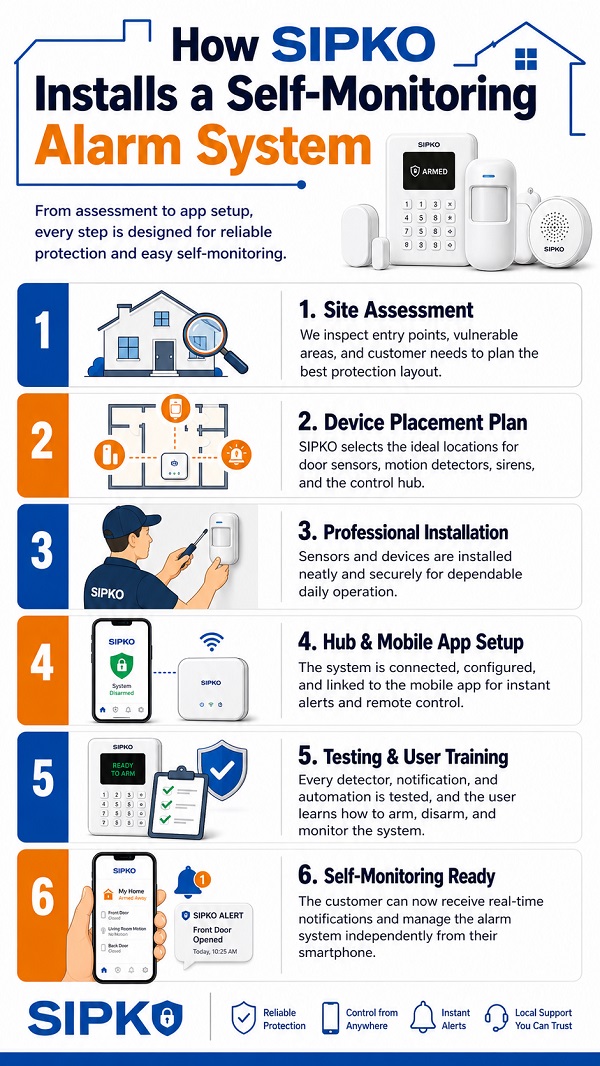
How SIPKO installs and configures the system
SIPKO first checks how the property is used, where people enter, who needs app access and who will respond to alerts. The installer then configures the alarm so the owner can use it confidently after handover.
- 1Site assessment: entry points, blind spots, movement paths, Wi-Fi or mobile signal, existing cameras and false-alarm risks are checked.
- 2Device planning: door contacts, motion detectors, keypads, sirens, panic options, cameras and hub placement are selected for the layout.
- 3App configuration: users, permissions, zone names, arming modes, notifications, schedules and alert logic are set up.
- 4Testing and handover: alert paths are tested with selected users, and the owner is shown how to arm, disarm, check events and respond.
What can be included in an app-based alarm setup?
For a small apartment, the setup may be a hub, door contacts, motion sensors and a siren. For a shop, office or storage site, SIPKO may add cameras, keypads, user permissions, restricted zones and a path to professional monitoring later.
Alarm core
- ✓Smart alarm hub with app control and event history.
- ✓Door and window contacts for likely entry points.
- ✓Motion detectors for hallways, rooms, stock areas and movement paths.
- ✓Indoor or outdoor sirens for immediate deterrence.
User control
- ✓App users for owners, family members, managers or keyholders.
- ✓Keypads, remotes or app-based arming for daily routines.
- ✓Partial arming modes for night, away, staff or restricted areas.
- ✓Event logs to review who armed, disarmed or triggered the system.
CCTV and verification
- ✓Cameras for entrances, driveways, rear doors and commercial risk zones.
- ✓Live view and playback setup for practical remote checking.
- ✓Camera positions planned around real access routes.
- ✓Verification logic to reduce guesswork during alarm events.
Add monitoring later
- ✓Equipment and configuration planned so professional monitoring can be added later if the property needs it.
- ✓Clear next-step advice for commercial or higher-risk properties.
- ✓Advice on when phone alerts are enough and when they are not.
- ✓Add users, sensors, cameras or monitoring later if the property use changes.
Alarm installation across Melbourne
SIPKO Security works with residential and small commercial properties across Melbourne. During a site visit, the installer checks the suburb, property type, entry points, camera angles, Wi-Fi or mobile signal and who should receive alarm alerts.
- ✓Residential properties: houses, townhouses, apartments, garages and side access points.
- ✓Small business sites: shops, offices, stock rooms, counters and restricted areas.
- ✓Alarm and CCTV planning: sensors and cameras positioned around real access routes.
- ✓Future upgrades: extra users, cameras, sensors or professional monitoring if the property needs it.
Alarm Monitoring FAQ
Common questions before installing an app-connected alarm in Melbourne.
What is a self monitored alarm system?
Does app-based monitoring mean no monthly monitoring fees?
Are phone alerts suitable for a business?
What happens if my internet goes down?
Can more than one person receive alarm alerts?
Can CCTV be added to the alarm?
Can renters install this type of alarm?
Can I upgrade to professional monitoring later?
Do app alerts work with CCTV cameras?
Book an alarm assessment in Melbourne
Book a site visit and SIPKO will check the layout, alert users and camera needs before recommending a setup. The installer can then install the alarm, configure the app, test the alerts and explain the system before handover.
Melbourne Local Service • Alarm Installation • Camera Verification • Practical Handover