
Ajax Perimeter Security Melbourne
Stop Intrusions Before They Reach the Door
Most alarms react after a door or window has already been opened. A properly planned Ajax perimeter security system watches the approach first, giving Melbourne homeowners and businesses earlier warning around side paths, rear yards, driveways, gates, garages, sheds and commercial access areas.
Designed Around Real Access Points
On a townhouse, the rear sliding door and side gate may matter more than the front entry. On a warehouse, the loading dock, bins, roller doors and parked vehicles often need separate zones. SIPKO plans the layout around how people can actually approach the property.
Alerts You Can Understand
Ajax outdoor sensors, MotionCam photo verification, sirens and app notifications are named and tested so the owner can see which area triggered, what type of event occurred and whether it needs action.
SIPKO checks sensor height, angle, pets, trees, lighting, wind exposure, public paths, camera views and user permissions before handover. The goal is a system the owner can trust every day, not a noisy alarm that gets ignored.
Schedule Your Free Site Visit
Call 0406 432 691 or complete the form and we will contact you.
What Is Ajax Perimeter Protection?
Ajax perimeter protection is a layered wireless alarm design that moves detection outside the building. Instead of relying only on indoor motion sensors or door contacts, the system can use outdoor detectors, curtain sensors, door and window contacts, glass-break detection, sirens, app alerts and photo verification around the property boundary.
The strongest result comes from planning the detection pattern before devices are installed. A driveway, rear yard, side gate, warehouse loading area, detached garage or construction site may each need a different sensor type and response rule.
- Jeweller wireless communication: encrypted radio communication between the hub and devices for fast alarm delivery.
- Outdoor detection logic: placement can be tuned around pets, trees, wind, public paths, lighting and reflective surfaces.
- Photo verification: selected MotionCam devices can send image sequences to help confirm what caused an alert.
Not One Product, But a Planned Layout
Ajax perimeter security is not simply “adding an outdoor sensor”. Each device should have a job: detect an approach, protect an opening, verify the event, trigger a deterrent or notify the right user.
A site assessment is important because the same device can work well on one property and create nuisance alerts on another if the angle, background movement or lighting is wrong.
Where Ajax Perimeter Security Adds Value
Perimeter security is most useful where the risk starts before someone reaches the main door. SIPKO normally checks hidden approach routes first: side access, rear yards, garage entries, sheds, gates, fence-line movement and commercial yards.
The aim is not to create an alert for every movement outside. The aim is to create useful alerts from the areas that matter.
Homes and Detached Areas
For many Melbourne homes, the most important points are not visible from the street. Garages, side gates, back doors, sheds, carports and rear garden access are often reviewed before adding extra devices near the front entry.
Fence Lines and Side Paths
Focused detection can monitor narrow routes without covering neighbouring properties, public footpaths or busy road movement. This is where curtain-style detection often works better than a wide outdoor detector.
Pets, Weather and Lighting
Outdoor alarms fail when they are aimed at moving branches, reflective surfaces, heat sources, animal routes or strong sunlight. SIPKO checks these risks before final sensor placement.
Monitoring and Verification
Where monitoring or camera integration is required, the alarm zone and camera view should support the same decision. The alert should tell you where to look and what response is appropriate.
Why Choose Ajax Perimeter Protection?
A useful perimeter system does three things well: it detects movement in the right place, gives enough context to make a decision and avoids nuisance alerts that make people stop trusting the alarm.
Outdoor Curtain Detection
Focused curtain-style detection can protect walls, window lines, gates and side passages where wide-angle sensors would capture too much background movement.
MotionCam Outdoor
MotionCam Outdoor can add photo verification to selected perimeter events so the user or monitoring team can see what caused the alert before escalating.
Wireless Installation
Wireless Ajax devices reduce the need for visible cabling and suit finished homes, rentals, small businesses and sites where trenching is not practical.
Outdoor-Rated Hardware
Outdoor sensors need to be selected and positioned for exposure, cover, rain direction, sunlight, mounting height and real movement patterns around the property.
Tamper and Fault Alerts
Ajax devices can report tamper events and communication issues, helping users identify device interference, removal from mounting or maintenance problems.
Mobile App Control
Users can arm, disarm, review events, manage permissions and receive alerts through the Ajax app, with access levels configured during handover.
CCTV Integration
Ajax perimeter events can be planned alongside cameras so the alarm zone and camera view support the same response workflow.
Night Mode Protection
Night Mode can keep selected perimeter and entry sensors armed while allowing normal movement inside the home, office or warehouse.
Smart Intrusion Detection Before Entry
Perimeter detection changes the timing of a security event. The system can identify movement around outdoor access routes while the person is still outside, instead of waiting until the building is already breached.
Detection Distance and Direction
A sensor should match the space. Wide outdoor detection may suit a driveway or yard, while curtain detection may suit a side wall, gate or narrow walkway. Direction of travel matters as much as distance.
Clearer Decisions
Useful alerts are specific. “Rear Gate” or “Warehouse Yard” is easier to act on than “Sensor 1”. SIPKO names zones clearly and tests them during commissioning.
False-Alarm Reduction
Most false alarms come from poor placement, moving branches, pets, heat sources, loose gates or street activity. These risks should be mapped before installation, not fixed after repeated nuisance alerts.
Tamper and Sabotage Awareness
Movement, masking, tamper and communication faults should not be treated the same way. Different event types help the owner understand whether the issue is intrusion, interference or maintenance.
Early Detection vs Traditional Alarms
The main difference is not the brand name. It is where the system starts paying attention. Traditional alarm logic usually begins at the door, window or room. Perimeter design starts around the approach paths.
Where Detection Happens
A traditional alarm normally triggers when a door contact opens, a window contact changes state or an indoor PIR detects movement. Perimeter protection can extend awareness to driveways, rear yards, gates and hidden side access.
How Outdoor Sensor Logic Works
Outdoor sensors must ignore movement that is not a security threat. Height, angle, masking, sensitivity, pets, trees, reflective surfaces, public paths and lighting all affect reliability.
The SIPKO Installation Advantage
SIPKO Security assesses real entry vectors before installation: side gates, rear access, carports, sheds, balcony approaches, shopfronts, loading areas and zones with poor lighting.
- Zone names are set up clearly in the app.
- Sensor angle and sensitivity are tested on site.
- Night Mode and user permissions are configured during handover.
Better Response Workflow
A good perimeter system should not create panic from every movement. It should help the user understand which zone triggered, whether visual context is available and who should be notified.
- Named perimeter zones for clear alerts.
- Optional photo verification and monitoring.
- Sirens, lighting or camera recording where required.
What SIPKO Checks Before Installing Ajax Perimeter Security
Perimeter security depends on planning. A device can be high quality and still perform poorly if it is aimed at the wrong background, mounted at the wrong height or named badly in the app.
Site Assessment
SIPKO reviews the property layout, likely approach routes, existing alarm equipment, internet or cellular requirements, pets, gates, lighting, trees and camera visibility before confirming the device plan.
Installation and Commissioning
Each device is mounted, connected to the hub, named by location and walk-tested. Outdoor detection is checked from the expected approach direction, not only from a standing position near the sensor.
App Setup and User Permissions
The system is configured so owners, family members, managers, cleaners or staff have appropriate access. Shared codes and generic user names are avoided where accountability matters.
Support Scope and Warranty
Before work is approved, SIPKO can confirm what is included in the installation, what product or workmanship support applies and what monitoring or maintenance options are available for the property.
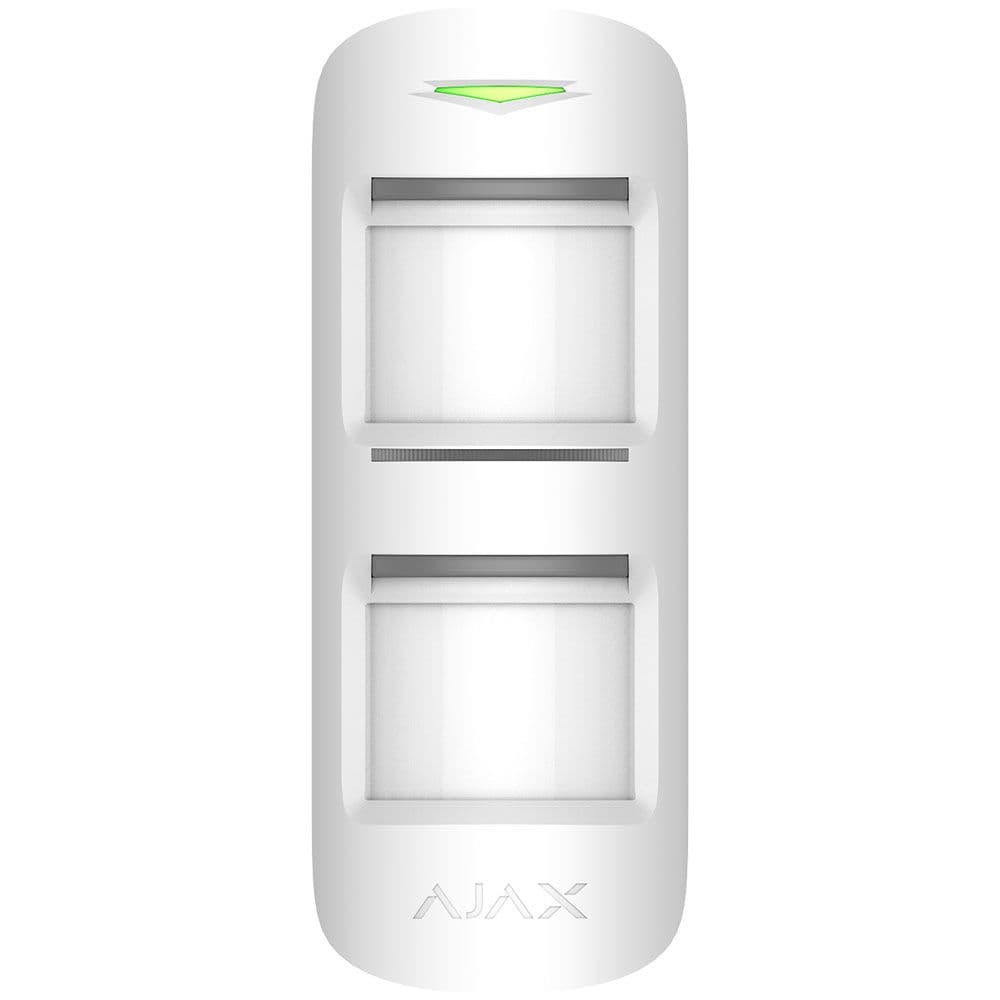
Ajax MotionProtect Outdoor Jeweller
MotionProtect Outdoor is suited to open outdoor areas where a person may cross a driveway, yard, side passage or storage zone before reaching the building. It should be used only after checking background movement, pets, trees, sunlight and expected approach angles.
Placement Notes
- Position the sensor so it reads cross-movement instead of only direct approach.
- Avoid aiming into moving trees, reflective surfaces, busy roads or strong sunlight.
- Consider pets and wildlife before finalising detection height and sensitivity.
- Walk-test the zone after installation and confirm the alert name in the Ajax app.
Recommended Use
MotionProtect Outdoor is a strong choice for general perimeter coverage where the detection area is open enough to control. For narrow spaces beside walls, a curtain-style detector may be more suitable.
Door and Window Protection with Ajax DoorProtect
Perimeter sensors protect the space around the building, but a complete alarm design still needs the physical entry points covered. Ajax DoorProtect sensors monitor doors, windows, skylights, garage access points and other openings.
Opening Detection
DoorProtect uses a magnetic contact to report when a door or window opens. Clear sensor naming helps users see exactly which entry point changed state.
Shock and Tilt Options
DoorProtect Plus can detect vibration and tilt, making it suitable for selected doors, windows, gates or roller-style openings where forced movement is a concern.
Named Mobile Alerts
When a sensor triggers, the Ajax app can show the device name, zone and event type, reducing confusion during an alarm or after-hours notification.
Tamper Protection
Ajax devices can report case opening or removal from the mounting surface, helping identify interference before it becomes a larger security problem.
Glass Break Detection with Ajax GlassProtect
Doors and motion sensors do not cover every entry method. Ajax GlassProtect adds another layer by listening for acoustic patterns associated with breaking glass, helping detect forced entry through glazing before interior movement occurs.
Acoustic Pattern Recognition
GlassProtect is designed to analyse sound patterns rather than react to every loud noise. Correct room placement, distance and background-noise assessment are important for reliable operation.
Multiple Windows in One Room
One properly placed device can often cover several glass surfaces within the same room, making it useful for living areas, shopfronts, sliding doors and open-plan spaces.
Complements Door Contacts
A contact sensor reports when a window opens. A glass-break detector helps cover the scenario where glass is broken without the window or door being opened normally.
Useful Melbourne Applications
GlassProtect can be considered for ground-floor windows, rear sliding doors, shopfront glazing, office entrances and exposed glass panels near door locks.
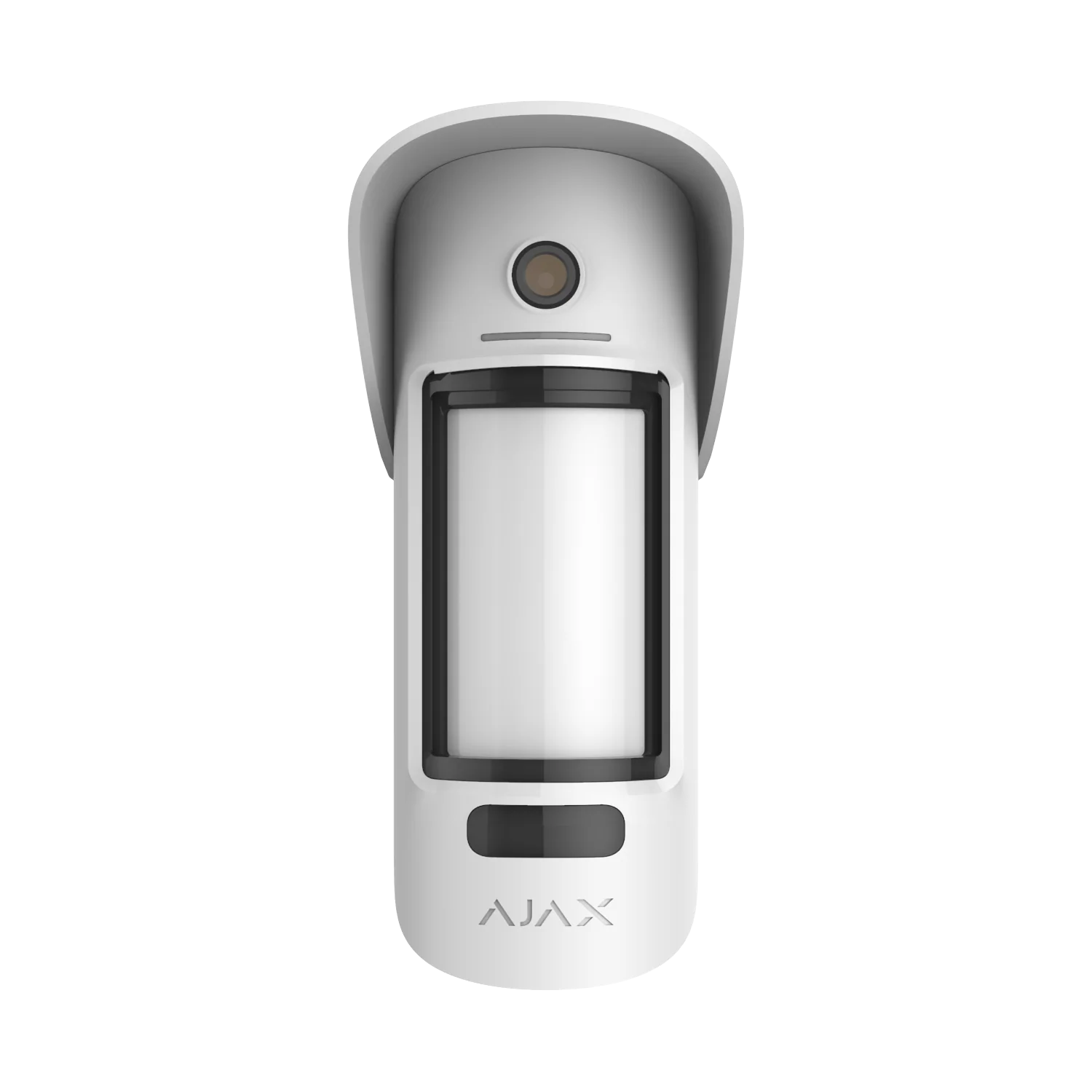
Ajax MotionCam Outdoor Jeweller
MotionCam Outdoor adds photo verification to outdoor motion detection. It is best used where the owner or monitoring team needs visual context before deciding whether an alert is a delivery, a pet, a visitor or a possible intrusion attempt.
Installation Planning
- Avoid aiming the photo view at public areas where privacy or nuisance triggers may become an issue.
- Check night-time lighting before relying on image verification.
- Match the camera view with the sensor zone name in the Ajax app.
- Use with sirens, monitoring or CCTV where a stronger response workflow is required.
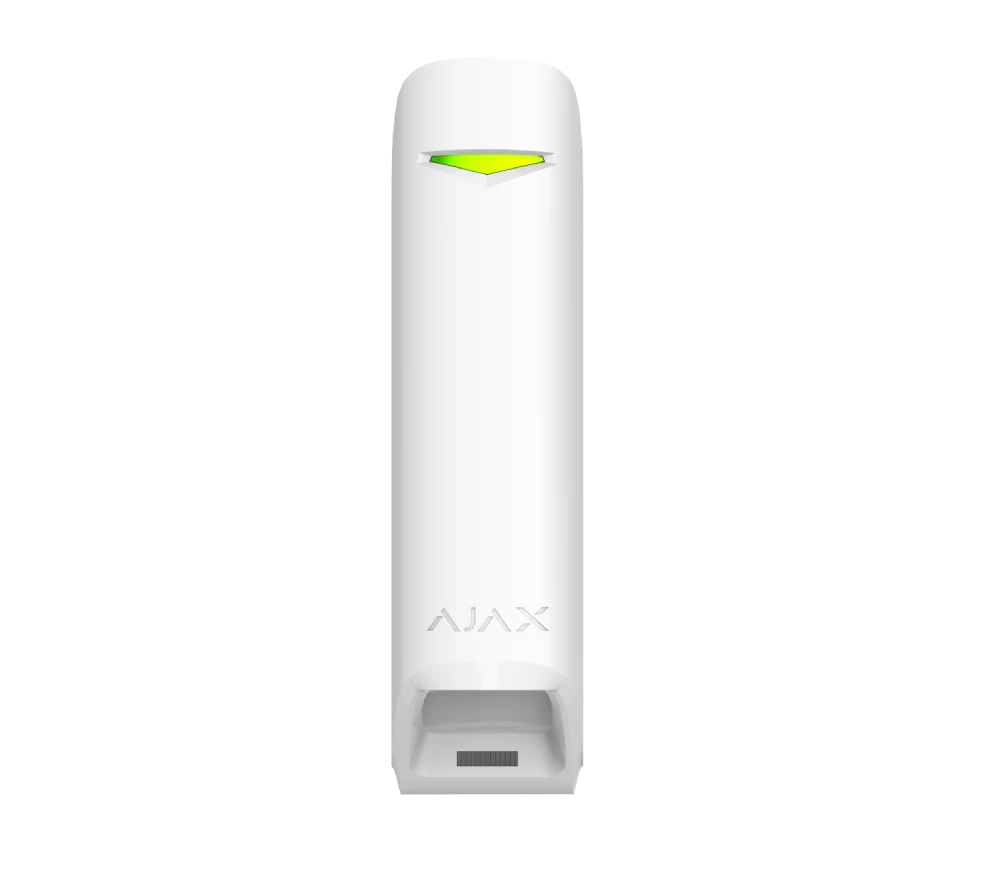
Ajax MotionProtect Curtain
A curtain detector is useful when a wide sensor would capture too much background activity. It creates a focused detection line along a wall, gate, window run, balcony edge or narrow side path.
Where It Works Best
- Side passages where neighbours, pets or public movement should not be detected.
- Window lines where the sensor needs to watch the approach, not the entire yard.
- Garage entry lines, gates, verandas and covered outdoor paths.
- Night Mode layouts where internal movement must remain unrestricted.
Setup Considerations
Alignment is critical. The detector should be mounted and tested so the detection plane protects the intended route without overlapping street movement, trees, loose gates or shared access areas.
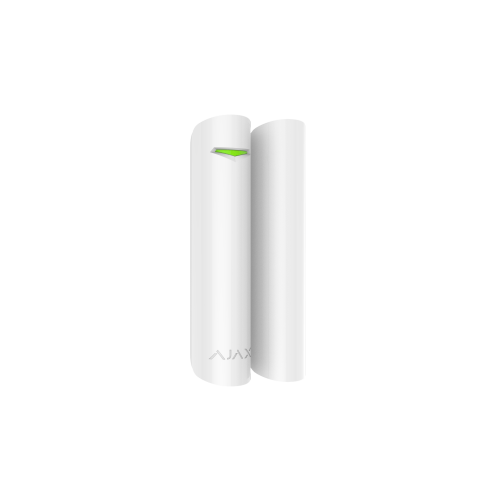
Ajax DoorProtect Plus
DoorProtect Plus extends standard open-close monitoring by adding shock and tilt detection. It is useful where forced movement, vibration or partial lifting of an entry point needs to be detected before the opening is fully breached.
Installation Planning
- Measure magnet gap carefully on timber, aluminium and steel frames.
- Tune shock sensitivity to avoid false alerts from wind, slamming or traffic vibration.
- Use clear device names such as Rear Sliding Door or Garage Side Entry.
- Configure entry and exit delays only where they are genuinely needed.
Stay Protected at Night Without Locking Yourself Inside
Ajax Night Mode can arm selected perimeter and entry-point sensors while leaving internal movement free. This is useful for families, pets, warehouses, offices and homes where people may move inside after the alarm is set.
Perimeter Armed
Outdoor detectors, selected door contacts and side-path sensors can remain active while the household or staff move freely indoors.
Internal Freedom
Interior PIR sensors can be excluded from Night Mode, reducing accidental alarms when someone walks to the kitchen, bathroom or office area.
Simple App Control
Night Mode can be controlled from the Ajax app, keypad or configured routines, depending on the property and user permissions.
Useful for Commercial Sites
Selected zones can remain active after hours while cleaners, managers or authorised users access specific internal areas.
From Detection to Deterrence
A perimeter alert is more useful when it is connected to a clear response. Sirens, app alerts, photo verification, lighting and camera recording can be configured so the system does more than quietly log movement.
Outdoor Sirens
StreetSiren devices can draw attention to the property and help discourage a person from continuing toward the building.
Visual Deterrence
Visible sirens, camera coverage and external lighting can make a perimeter alert harder to ignore and easier to verify.
Video Verification
When monitoring or CCTV is integrated, alerts can be reviewed with visual context instead of relying only on a sensor name.
Zone-Based Response
Not every zone needs the same response. A driveway chime, rear-gate siren and warehouse-yard camera trigger can all be configured differently.
CCTV Integration with Ajax Systems
When Ajax sensors and CCTV cameras are planned together, alerts are easier to verify. The sensor identifies the zone, while the camera provides visual context for the same area.
Alarm-Triggered Review
- Sensor events can be matched to the camera covering the same zone.
- Camera footage helps review what happened before and after the alert.
- Named zones reduce confusion during after-hours events.
- MotionCam photos can support a second visual reference where available.
SIPKO Design Method
- We map sensors and camera views before installation.
- Each trigger relationship is tested during commissioning.
- Camera angle, lighting and privacy are checked on site.
- The handover includes app access and basic event review guidance.
Real-Time Alerts and Mobile App Control
The Ajax app gives users control over arming, disarming, alerts, permissions and event history. A professional setup makes the app easier to use because every device is named and grouped clearly.
Alerts and Arming
- Push notifications can identify the zone, device and event type.
- Users can switch between full arming, disarmed mode and selected Night Mode layouts.
- MotionCam devices can add images for supported events.
- Manual siren activation can be useful when visual verification shows a clear threat.
Logs and Permissions
- Event history helps review who armed or disarmed the system and when.
- Separate user profiles can be created for family, staff, tenants or contractors.
- Admin permissions should be limited to trusted users.
- Temporary access can be considered for trades, cleaners and property managers.
Accountability for Every User Interaction
In homes, offices, warehouses and shared sites, it is important to know who can arm, disarm or change the system. Ajax user permissions allow the owner or administrator to manage access without sharing one common code.
Master Admin and User Control
The main account holder can grant, limit or remove access. This is useful when staff change, tenants move, contractors finish a job or a property manager needs temporary access.
- Named users instead of shared codes.
- Access levels based on role and responsibility.
- Event history linked to user actions.
- Cleaner handover for families and businesses.
Recommended Permission Structure
- Owner or Master Administrator: full control over hub, users and settings.
- Administrator: high-level control for trusted family or management staff.
- Standard User: arm and disarm access without system redesign rights.
- Restricted Guest: limited access for cleaners, trades or short-term staff.
- Keypad Code User: practical access where app access is not required.
Use clear user names such as Cleaner John or Warehouse Manager rather than generic labels. This makes event history easier to understand after an incident.
Perimeter Protection for Warehouses and Commercial Sites
Commercial losses often begin outside the main building: loading docks, storage yards, bins, roller doors, side lanes and parked vehicles. Ajax perimeter security can help identify movement before stock, tools or vehicles are reached.
Stock and Equipment Yards
Outdoor detection can be planned around pallets, trailers, plant equipment, containers and high-value storage areas where after-hours movement should be reviewed quickly.
Wireless Coverage Planning
Wireless Ajax devices can reduce the need for trenching and cabling across yards, provided signal strength and range are tested properly on site.
Loading Docks and Roller Doors
Door contacts, shock detection, cameras and perimeter sensors can be combined around roller doors, dock entries and rear-access lanes.
Staff and Contractor Access
User permissions and event logs are valuable for sites with managers, cleaners, delivery staff, contractors and after-hours access requirements.
Property-Specific Ajax Perimeter Design
Perimeter security is not one-size-fits-all. A compact townhouse, family home, bayside property, gated residence or acreage site can all require different sensor types and zone logic.
Townhouses and Villas
For townhouses, the most important areas are often the rear sliding door, garage access and narrow side path, not the front door. Focused detection helps avoid neighbour and street movement.
- Curtain-style detection along side walls.
- Door contacts on high-risk rear and side entries.
Family Homes
Standard Melbourne homes often need coverage for driveways, rear yards, garage entries, side gates and living-area glass doors. Night Mode is usually important for overnight protection.
- Outdoor motion detection for driveways and yards.
- Perimeter protection while people move indoors.
Premium and Gated Properties
Larger homes may need multiple independent perimeter zones, camera verification and careful permission setup for family, staff, cleaners and contractors.
- Zone mapping for gates, garages and service access.
- Monitoring and video verification where required.
Bayside and Exposed Sites
Wind, trees, salt exposure, storms and open rear yards should be considered before choosing sensor position and outdoor coverage.
- Weather-aware sensor placement.
- False-alarm reduction through testing and tuning.
Security Is a Layered System, Not One Device
A single camera or sensor can leave blind spots. SIPKO designs Ajax perimeter systems as layers: outdoor detection, visual verification, entry-point protection and mobile response.
The goal is to make the property harder to approach quietly, easier to verify during an event and simpler to manage for everyday users.
Typical Layer Structure
- Outer layer: driveway, gate, fence-line, side path and rear-yard detection.
- Verification layer: MotionCam photos or CCTV views matched to sensor zones.
- Entry layer: DoorProtect, DoorProtect Plus and GlassProtect around doors and glazing.
- Response layer: sirens, app alerts, monitoring and user permissions.
How SIPKO Avoids Blind Spots
Instead of placing devices by guesswork, SIPKO checks the likely path of movement, the background behind the detection zone and whether the app alert will make sense to the person receiving it.
- Approach routes are checked before device placement.
- Camera views are matched to important alarm zones.
- Handover includes app and zone review.
Precision Zoning: Divide and Protect
A property is not one single risk zone. Ajax allows perimeter areas to be divided into logical sections with different alert behaviour, device names and response rules.
Zone A: Entrance and Driveway
This zone can support visitor, delivery and after-hours awareness where public land meets private property.
- Daytime notification or chime logic.
- Different after-hours response.
- Camera view matched to driveway or front gate.
Zone B: Side Paths and Rear Access
Side gates and rear access routes are often hidden from the street. These areas usually need higher-priority alerts and careful false-alarm control.
- Curtain detection along narrow paths.
- Door contacts on rear and side entries.
- Night Mode coverage for sleeping hours.
Zone C: Garages, Sheds and Detached Areas
Detached areas often store tools, bikes, vehicles and equipment. They should not be treated as secondary if the contents are valuable.
- DoorProtect or DoorProtect Plus on access points.
- Outdoor sensor coverage before the structure is reached.
- Optional camera verification for the approach.
Zone D: Commercial Yard or Loading Area
Commercial sites may need separate rules for loading docks, staff entrances, roller doors and storage yards.
- After-hours alerts for movement in restricted zones.
- Staff-specific permissions and event logs.
- CCTV recording matched to alarm triggers.
Reinforcing the Perimeter: Physical and Digital Fusion
Perimeter design should not stop at outdoor movement. Doors, gates, windows and glazing need their own protection so the system can detect both approach and forced entry attempts.
Driveway and Side Gates
Gate contacts and tilt-sensitive devices can help monitor whether a gate has opened, shifted or been tampered with.
Primary Entrance Doors
Door contacts and shock detection can support front, side and rear entrances where forced entry is a realistic risk.
Windows and Glass Areas
GlassProtect and DoorProtect devices can be combined to cover both window opening and glass-break scenarios.
Garages and Sheds
Detached spaces often require their own sensor logic because they may be targeted before the main building.
Temporary Perimeter Security for Construction Sites
Vacant sites and high-value materials require a security layout that can change as the build progresses. Ajax wireless devices are useful where temporary protection is needed without permanent cabling.
Mobile Deployment Hubs
Ajax hubs with cellular connectivity can support sites without fixed internet, depending on signal availability and final system design.
- Useful for temporary or changing sites.
- Supports rapid staged installation.
- Can be reviewed as the site layout changes.
Materials and Machinery
Outdoor sensors and cameras can be planned around containers, tools, building materials, machinery and access points.
- After-hours detection around high-value areas.
- Photo or video verification where appropriate.
- Sirens to discourage continued movement on site.
Changing Site Layouts
Construction sites change quickly. Sensor zones should be reviewed when fences move, materials are relocated or new access points appear.
Staff and Contractor Access
Named users and event logs help site managers understand who armed, disarmed or accessed the alarm system.
Common Perimeter Security Mistakes We See
Most problems with outdoor alarms are not caused by the Ajax platform itself. They come from rushed placement, vague zone names or a system that has not been tested from real approach paths.
Sensor Pointed at the Wrong Background
Outdoor detectors should not be aimed into moving trees, public footpaths, loose gates, reflective walls or busy roads. The background matters as much as the device.
Wide Detector Used in a Narrow Space
A narrow side path often needs curtain detection. Using a wide sensor in that space can capture neighbours, pets, street movement or vegetation.
Bad Device Names in the App
Names like “Sensor 1” or “Outdoor Motion” are not useful during an alarm. Names such as “Rear Gate” or “Warehouse Roller Door” help the owner respond faster.
No Walk-Test Before Handover
Every outdoor zone should be tested after installation. The test should confirm detection direction, app alert name, siren logic and camera view where relevant.
Ajax Perimeter Security FAQ
Answers for Melbourne homeowners and businesses considering Ajax outdoor protection, video verification, app control and monitoring.
How much does Ajax perimeter security installation cost?
Pricing depends on the property layout, number of outdoor zones, sensor types, hub requirements, sirens, camera integration and monitoring needs. SIPKO confirms the quote after checking the site instead of recommending a generic kit.
What happens during the free site visit?
SIPKO reviews access points, outdoor movement risks, pets, trees, lighting, existing equipment, internet or cellular requirements, app users and whether cameras or monitoring should be included.
Does Ajax perimeter security work with pets?
It can, but the result depends on device choice and placement. Sensor height, angle, pet size, movement direction and outdoor conditions must be considered during installation.
Can Ajax distinguish trees from people?
Outdoor devices are designed to reduce nuisance triggers, but no outdoor sensor should be aimed into moving branches or uncontrolled background movement. Proper placement is essential.
Do I need professional installation?
Professional installation is strongly recommended for perimeter protection because most problems come from poor angle, height, zone overlap or false-alarm sources.
Can I use Ajax with CCTV?
Yes. Ajax alarm zones can be planned alongside CCTV views so alerts and footage support the same response workflow.
Can the system be monitored?
Ajax can support monitoring and video verification options depending on the setup. SIPKO can help plan a system for app-only use, self-monitoring or 24/7 monitoring.
Can I arm only the outside at night?
Yes. Night Mode can be configured so selected perimeter and entry sensors stay active while internal movement remains unrestricted.
Can SIPKO upgrade an existing Ajax alarm?
In many cases, yes. SIPKO can review the current hub, devices, app setup, signal strength and zone naming before recommending outdoor sensors or camera integration.
What areas of Melbourne do you service?
SIPKO Security installs Ajax systems across Melbourne, including Bayside, inner suburbs, eastern suburbs, commercial areas and surrounding residential locations.
Get in Touch with SIPKO
Speak with a Melbourne security specialist about Ajax perimeter protection, outdoor sensors, app control, CCTV integration and 24/7 monitoring with video verification.
Melbourne and surrounding suburbs
Ajax alarm and perimeter security installation
Homes, businesses, warehouses and construction sites
