Whether you live in Glen Waverley, Point Cook, Brighton, or anywhere across Melbourne’s sprawling suburbs, protecting your family and property has never been more straightforward. Video surveillance security cameras capture, process, and transmit visual data, giving you a reliable way to monitor your home around the clock. This guide walks you through everything you need to know about choosing, installing, and maintaining a home security camera system in 2026.

Quick Guide: How to Choose and Install Security Cameras Today

If you are a Melbourne homeowner looking to install security cameras in 2026, you have three main categories to consider: wired, wireless, and wire-free. Each suits different properties, budgets, and levels of technical confidence. The good news is that technology has matured enough that even entry-level systems deliver genuinely useful footage.

🔌

Wired (PoE) Cameras

Connect via cables to a DVR or NVR, drawing power and transmitting data over a single Ethernet cable. The most reliable option for permanent outdoor setups — no wi-fi dependency, no battery concerns.

📶

Wireless Cameras

Plug into mains power but use wi-fi to send video to your network. Easier to position but depend on signal strength — and Melbourne’s thick brick walls can be a real challenge for wi-fi reliability.

🔋

Wire-Free (Battery) Cameras

No power cable needed at all — popular with renters and for temporary setups. Typical real-world battery life sits around 45–60 days under motion-triggered use. Solar-powered options extend that significantly.

Step-by-Step Installation Overview

  1. 1
    Walk through your property and note all entry points, blind spots, and existing power or network access.
  2. 2
    Define coverage zones — install cameras near entrances and high-traffic areas first.
  3. 3
    Choose camera type and power method based on each location’s constraints.
  4. 4
    Mount cameras, run cables (or connect to wi-fi), and orient the field of view.
  5. 5
    Connect cameras to an NVR or cloud storage and configure your mobile app.
  6. 6
    Set up motion detection zones, push alerts, and human or vehicle classification filters.
  7. 7
    Test live streaming and push notifications from inside and outside the house.
  8. 8
    Monitor over the first fortnight and adjust angles, sensitivity, and lighting as needed.

Essential Features to Prioritise

High resolution of at least 1080p (4MP or higher for driveways), night vision to 30 metres, remote access via a secure app, and reliable local storage through an NVR or cloud backup. Don’t compromise on these four.

DIY or professional? DIY works well for one or two indoor wi-fi cameras — watching kids or pets. For multi-camera outdoor systems, double-storey homes, or shops, professional installation is strongly recommended. Sipko Security specialises in designing and installing camera systems across Melbourne, with same-week installs where feasible.

Understanding Video Surveillance Security Cameras

A modern home security camera system in 2026 consists of IP cameras, a Network Video Recorder, a mobile app, and a secure network tying it all together. Video surveillance cameras convert optical images into digital data, replacing the grainy analogue CCTV of the past with sharp, searchable footage that you can review from your phone in seconds.

Core Camera Types

🏠

Indoor Cameras

Compact wide-angle devices for living rooms, offices, or nurseries. No weatherproofing needed.

🌧️

Outdoor Cameras

Weatherproof bullet or turret models built for Melbourne’s rain, heat, and dust. IP66 minimum.

🔔

Video Doorbells

Wide-angle door cameras with two-way audio for greeting visitors and screening deliveries.

🔄

PTZ Cameras

Pan-tilt-zoom units for large yards or commercial areas — remotely steerable from your app.

💡

Deterrence Cameras

Built-in white light floodlights and sirens that actively warn intruders on approach.

🧠

AI-Enabled Cameras

Distinguish humans from vehicles, animals, and shadows — dramatically reducing false alerts.

Wired IP cameras are preferred for long-term home security in Melbourne because they resist signal dropouts through masonry and operate without battery concerns. For driveways and fence lines, 4MP to 8MP sensors are increasingly affordable and deliver the detail needed to read licence plates clearly.

Key Features to Look for in Home Security Cameras

Not all home security cameras are equal. The features you choose directly affect image quality, storage cost, and everyday usability. Here is what to prioritise when comparing models.

Feature Minimum Standard (2026) Why It Matters
Resolution 1080p at 25–30 fps 4MP–8MP for driveways and licence plate capture
Night Vision IR to 20–30 metres Starlight sensors give full colour in low light
Field of View 100–110° (2.8mm lens) Wider coverage but trade-off with detail at distance
Audio Built-in mic + two-way Talk to visitors, warn intruders — note Victorian audio laws
Connectivity PoE (Ethernet) preferred More stable than wi-fi through Melbourne brick walls
Smart Analytics Human / vehicle detection Reduces false alerts from pets, trees, wind
Weather Rating IP66 minimum outdoors Handles Melbourne’s 40°C+ summers and wet winters

Sipko Security usually recommends at least Cat6 cabling to future-proof bandwidth for 4K cameras. AI features such as facial recognition, intrusion zone triggers, and vehicle classification add a meaningful extra layer of protection beyond basic motion detection.


Storage Options: Local vs Cloud

Melbourne homeowners should plan for at least two to four weeks of recorded video retention — enough for insurance claims and police reports if something goes wrong after a weekend or holiday period.

💾

Local Storage (NVR)

NVRs with 2TB–8TB surveillance-grade drives handle loop recording automatically. No ongoing subscription fees. Works even when internet goes down. Footage stays in Australia on your property.

☁️

Cloud Storage

Footage uploads to remote servers automatically. If your NVR is stolen, the evidence is still there. Australian plans typically cost AU$5–20/month for 500GB–2TB. Great off-site backup for critical events.

Sipko Security’s Recommended Approach

We typically configure local NVR recording for continuous capture combined with cloud storage for event clips and alerts. This gives Melbourne clients reliable on-site storage with off-site backup for the moments that matter most.

Indoor vs Outdoor Cameras and Weather Protection

Indoor and outdoor cameras are engineered for different environments. Outdoor cameras must handle Melbourne’s unpredictable weather — from 40°C-plus summer heatwaves to cold, wet winters and everything in between.

Indoor Uses

  • Monitoring kids’ rooms and living areas while you’re away
  • Watching pets during the day from your phone
  • Keeping an eye on elderly family members
  • Covering home offices and entry hallways

Outdoor Requirements

  • IP66 rating minimum for dust and heavy rain resistance
  • Metal or robust UV-stable housings for Melbourne’s harsh summer sun
  • Vandal-resistant dome housings near public footpaths
  • Temperature ratings of −20°C to +50°C to suit Melbourne’s range
  • Cable management that prevents tampering and water ingress

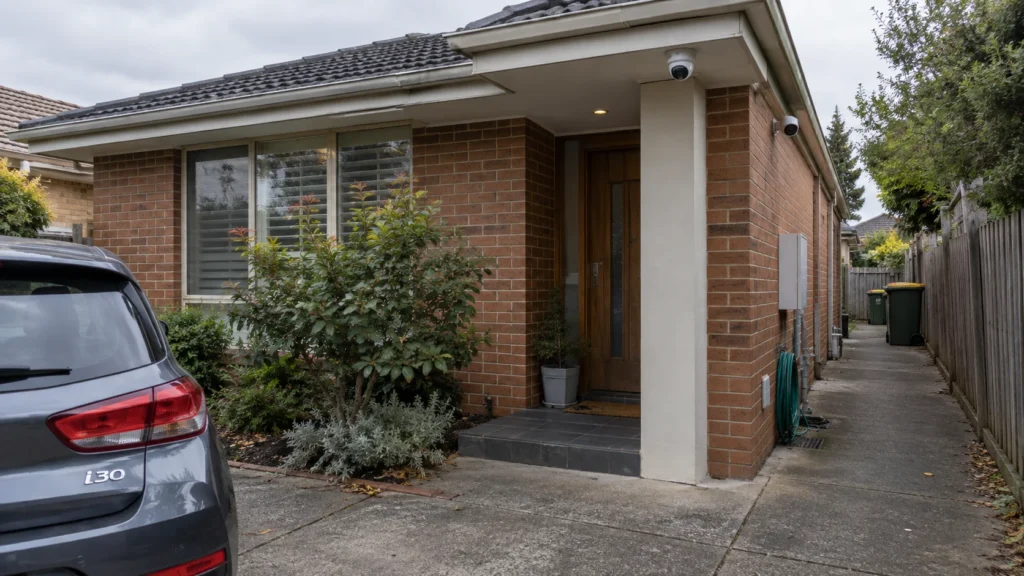
Best mounting locations: Under eaves for weather protection, above garages, at front entrances, along side paths, and covering backyard gates. Angle cameras away from neighbours’ windows and private areas to meet Victorian privacy expectations.

Connectivity, Remote Access, and Live Streaming

Remote access allows viewing live feeds from smartphones or computers, and setup in 2026 is genuinely straightforward. Cameras connect to your NVR or router over a local network, which securely publishes video to your phone app via encrypted connections.

  • Wired vs wireless: Ethernet provides stable, high-bandwidth connections. Wi-fi cameras allow flexibility but may suffer dropouts through thick brick walls common in Melbourne’s older suburbs
  • Live streaming: View multiple feeds simultaneously, switching between high-res main streams and lower-res sub-streams to save mobile data. Smooth remote access typically requires 10–20 Mbps upload speed for four or more cameras
  • App features: Push notifications for motion events, playback timeline, quick clip download, and easy sharing with Victoria Police or insurers
  • Cybersecurity: Use unique passwords, enable two-factor authentication, update firmware regularly, and isolate camera traffic on a separate network VLAN

Sipko Security configures secure remote access for clients using encrypted connections and Australian-hosted servers where supported by leading brands.

DIY vs Professional Installation in Melbourne

When DIY Works

One or two plug-in wi-fi cameras for indoor monitoring — watching pets, checking on kids, or covering a single room. Wire-free cameras are the easiest to install for these simple scenarios.

Common DIY Pitfalls

  • Poor camera placement that misses side gates or front paths entirely
  • Weak wi-fi coverage causing dropped connections and missed recordings
  • Exposed cabling that degrades in UV sunlight or invites tampering
  • Incorrect NVR or app configuration leaving the system technically on but not recording properly
  • Failure to set up motion detection zones — too many false alerts, or important zones missed

In Victoria, running permanent cabling for security cameras and alarms should be done by appropriately licensed technicians to meet regulations and safety standards. Always check your installer’s licence.

Sipko Security Advantages

  • Up-front, transparent quotes with no hidden charges
  • Coverage across Melbourne from inner city to outer growth corridors
  • Genuine equipment from leading brands with full Australian warranty
  • After-install support including app setup, system training, and remote troubleshooting
  • Neat, discrete cabling and secure mounting for a clean finish

How Sipko Security Designs Systems for Melbourne Homes

Sipko Security is a specialist in Melbourne residential video surveillance, with hands-on experience across apartments, townhouses, and large family homes. Designing the right system starts with understanding each property’s unique layout — not fitting a generic package.

1

Phone or Email Consultation

We understand your concerns, property type, and what areas you want to protect before making any recommendations.

2

On-Site Risk Assessment

We assess entry points, blind spots, cable routes, and existing infrastructure. Cameras are planned around your actual property, not a floor plan assumption.

3

Written Quote

A clear quote listing specific camera models, NVR capacity, cabling requirements, and labour — no surprises on installation day.

4

Installation & Handover

Professional mounting and cabling, full configuration, on-site testing, and a walkthrough so you know exactly how to use the system before we leave.

Sipko Security prefers well-supported brands with Australian warranty and local distribution, ensuring firmware updates and replacement parts are available for years. Discrete mounting and optimised angles focus on capturing faces and number plates rather than generic wide shots.

Choosing the Right System: Melbourne Property Scenarios

Security needs vary by property type. Here are four practical scenarios as starting points — then contact Sipko Security for a design built around your actual floorplan and budget.

🏢 Small Inner-City Apartment

e.g. Southbank, St Kilda

  • 1 indoor camera for the living area
  • Video doorbell at the front door
  • Cloud storage only — no NVR required
  • Remote app access for travel monitoring

🏡 Standard 3-Bedroom Suburban Home

e.g. Werribee, Cranbourne

  • 4-camera 6MP turret kit (door, driveway, side, backyard)
  • NVR with 2–4TB local storage
  • Motion alerts for human and vehicle detection
  • Visible deterrence placement

🏠 Larger Double-Storey Home

e.g. Templestowe, Berwick

  • 6–8 cameras mixing wide-angle and longer-lens outdoor
  • 4TB+ local storage with cloud backup for clips
  • AI analytics for facial recognition and vehicle ID
  • Full perimeter coverage with indoor

🏪 Home-Based Business or Small Shop

Retail, office, mixed-use

  • Internal cameras over counters, stock rooms, POS
  • 30+ day retention for compliance requirements
  • Staff access codes and separate monitoring zones
  • Integration with alarm system where applicable

Legal and Privacy Considerations in Victoria

This information is not legal advice. It reflects current Victorian and Australian privacy expectations as of 2026.

Sipko Security advises clients on ethical and practical camera placement to balance security needs with privacy obligations.

Future-Proofing Your System

Choosing quality equipment from established brands matters for long-term reliability. Firmware updates, AI feature rollouts, and new app capabilities arrive regularly on supported models — something cheap no-name imports rarely offer.

  • Modern IP cameras support over-the-air firmware upgrades that improve performance and security over time
  • Run extra Cat6 cable to likely future camera spots even if you don’t use them today
  • Select an 8-channel NVR even if you’re starting with 4 cameras — expansion is inevitable
  • Integration with alarms, smart home lighting, and access control systems can be planned at the design stage
  • All equipment sourced through Australian channels carries local warranty — repairs and replacements are handled quickly

Cost and What to Expect

For a professionally installed four-camera hard-wired outdoor PoE system in Melbourne, typical prices in 2026 range between AU$1,700 and AU$8,500 depending on camera resolution, cable run distance, NVR capacity, and brand.

What Influences Price What Sipko Quotes Include
Number and resolution of cameras On-site inspection where needed
Cable run difficulty (single vs double-storey brick) Detailed equipment list with specific models
NVR storage capacity and size Labour and full installation
Integration with existing alarms or network Warranty terms and optional maintenance packages

Value matters more than the lowest sticker price. A secure, reliable system with clear footage and strong after-sales support from a dedicated local installer delivers genuine peace of mind.

Frequently Asked Questions

How many cameras does a typical Melbourne home need?
Most three-bedroom homes suit four to six cameras covering the front door, driveway, side paths, and backyard. Larger properties or those with multiple entry points may need eight or more. The real answer is the number needed to eliminate useful blind spots on your specific property.
Can I view my cameras remotely when travelling overseas?
Yes. With a stable wi-fi connection at home and the app on your mobile phone, you can connect and view live feeds from anywhere in the world. Sipko Security sets this up during installation so it works before you leave.
Do I really need 4K cameras or is 1080p enough?
For close-range indoor cameras, 1080p is sufficient. For driveways and fence lines where you need to read licence plates clearly, 4MP or 4K provides noticeably better detail. Sipko recommends 4MP as the minimum for all outdoor positions.
What happens if my internet goes down?
Local storage on your NVR continues recording without interruption. You lose remote access temporarily but no footage is lost. This is one of the main reasons Sipko recommends a local NVR rather than cloud-only storage.
How long will my NVR store footage?
A 4TB drive with four 4MP cameras typically retains around two to three weeks of continuous footage before loop recording overwrites the oldest files. Motion-triggered recording significantly extends this.
Can you install cameras on my double-storey brick home?
Absolutely. Sipko Security regularly works with double-storey brick homes across Melbourne, routing cables through roof spaces and wall cavities for a clean finish. It takes more time but the result is neat, permanent, and tamper-resistant.
How secure is remote access to my cameras?
Encrypted connections, unique passwords, firmware updates, and Australian-hosted servers keep your system secure. Sipko Security configures all of this during testing and handover — you don’t need to do it yourself.

Ready to Secure Your Melbourne Home?

Call us or request a quote online. We’ll assess your property, design a system that actually fits your needs, and install it — often within the same week.

Book a Free Consultation →