

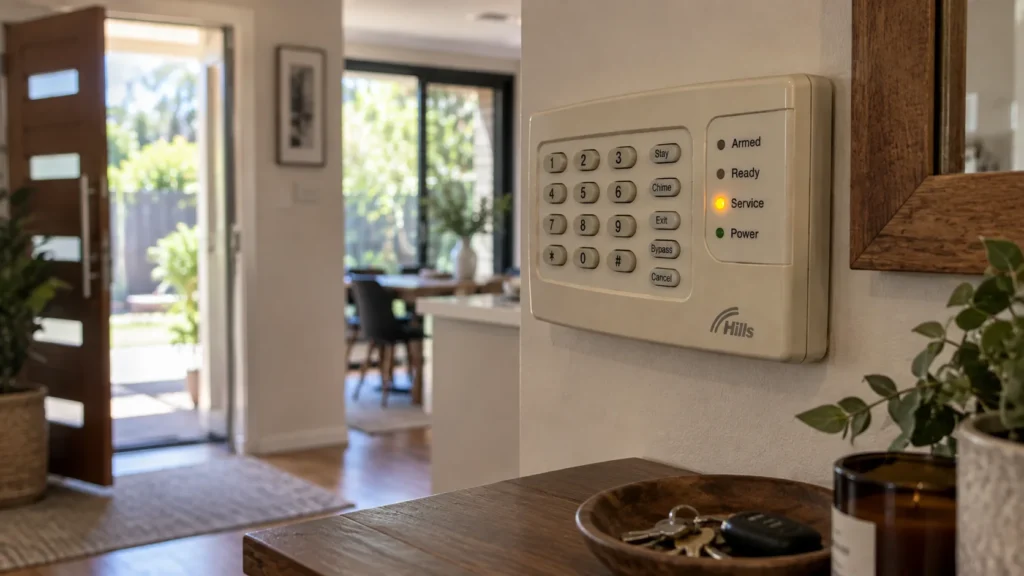
The alarm isn’t sounding. Nothing obvious appears to have failed. But the Service Light on the Hills LED code pad is on.
Does that tell you what’s actually wrong? Not on its own. According to Hills’ own documentation for this keypad, the Service Light means the system is reporting that it requires service — and the specific condition behind it needs to be identified before anything is assumed.
What Does the Service Light Actually Tell You?
What you know:
- the system is reporting that it requires service;
- there’s a documented way for the panel to indicate which category of condition is involved;
- the exact keypad and system matter when interpreting that information.
What you do not know yet:
- which specific condition is responsible;
- which component, if any, has failed;
- whether repair or replacement is required.
The light tells you the system needs attention. It doesn’t, by itself, tell you what kind.
What Categories Can a Service Light Indication Represent?
On the documented Hills LED Code Pad, a Service condition falls into one of several categories, each covering a different part of the system:
- System Fault — a broader category that breaks down further into specific fault types, including things like siren trouble, box tamper, and expander-related faults.
- Zone Tamper — a tamper condition associated with a specific zone.
- Zone Low Battery — a low battery condition, specifically on a wireless zone.
- Zone Loss of Supervision — a wireless zone that’s stopped reporting in as expected.
- Zone Trouble — a general trouble condition associated with a specific zone.
- Telephone Line Trouble — a documented telephone-line trouble or line-cut condition.
- Failure to Communicate — a documented communication failure condition.
- Loss of System Time — the system has lost its time setting.
These are documented categories, not a list to diagnose yourself from. The point of listing them is to show why “the Service Light is on” isn’t precise enough to act on — it could genuinely be any one of these, and they point to very different parts of the system.
Why Doesn’t Knowing the Category Settle It?
Even one of these categories doesn’t necessarily end the question. System Fault, for example, is documented as covering several distinct fault types underneath it — things like siren trouble and box tamper aren’t the same problem, even though both fall under System Fault.
ONE INDICATOR → CATEGORY → MORE INFORMATION REQUIRED → DIAGNOSIS
Knowing the category narrows things down. It doesn’t identify the specific fault, and it doesn’t tell you what needs to be repaired.
First, Identify Which Hills Keypad You Have
This guide is based on the documented Hills LED Code Pad. Hills has used more than one keypad type over the years, and a different keypad may present service information differently. Before relying on anything here, it’s worth confirming what’s actually installed:
- the keypad’s physical style — this guide covers the LED/button-based code pad specifically;
- any visible model or family identification;
- whether documentation exists for that specific keypad, from a previous owner, installer, or service records.
If the installed system uses a different Hills keypad, its own documentation should be used instead of assuming this one applies.
What Else Can You Observe Before Changing Anything?
Before deciding anything needs fixing, it’s worth gathering a clear picture of what’s actually being shown — observation only, nothing that changes system state:
- Which indicator is illuminated?
- Is any additional zone information visible alongside it?
- Is there an audible warning as well as the visual indication?
- Does the alarm otherwise appear to be operating normally?
- When was the Service Light first noticed?
- Did anything obvious change immediately beforehand?
- What keypad or system model can be identified without changing any settings?
Observe and record — don’t treat every observation as a diagnosis in itself.
Why Silencing the Keypad Isn’t the Same as Fixing It
Hills’ own documentation for this keypad draws a specific distinction here: entering a valid code can silence the keypad’s sounder when it’s pulsing — but that’s described as a separate action from the trouble condition itself being resolved.
A quiet keypad tells you the sound has stopped. It doesn’t tell you the underlying condition has cleared. If the Service Light is still on, the system is still reporting that it needs service, regardless of whether the sounder has gone quiet.
What If the Alarm Is Beeping as Well?
Beeping is another observable symptom worth recording alongside the Service Light — but it doesn’t establish the root cause any more than the light does on its own. If both are present, note that combination when you come to describe the issue.
What Information Is Useful Before Calling for Service?
When it’s time to get the system properly assessed, having this on hand helps:
- the keypad model, if identifiable;
- which category of Service condition, if you’ve been able to determine one;
- any additional zone information visible;
- whether an audible warning was present;
- when the indication first appeared;
- whether the system otherwise seemed to be operating normally;
- any relevant recent event you’re already aware of.
If the issue turns out to be part of a wider problem with an ageing or unreliable alarm system, that broader assessment is different from interpreting one Service Light. SIPKO’s security alarm installation in Melbourne service covers the wider question of whether an existing system still suits the property or whether a modern system should be considered.
When Does a Hills Reliance Service Light Need Professional Diagnosis?
If the indication remains unexplained after identifying the keypad and recording what it’s displaying, the next step is diagnosing the underlying condition — not continuing to guess from the light alone.
Interpreting the Service Light is different from diagnosing the underlying fault. If an older system is becoming unreliable, consider alarm upgrade or takeover options in Melbourne.
FAQ
What does the Service Light mean on a Hills Reliance alarm?
On the documented Hills LED Code Pad, it means the system is reporting that it requires service. The specific reason falls into one of several documented categories — from zone-level issues to communication or timing faults — which is why the light alone isn’t enough to identify the cause.
Does the Hills Service Light always mean the battery is low?
No. Zone Low Battery is one documented Service category, and the manual states that this category applies only to wireless zones. The Service Light can also represent several other documented conditions, so the light alone should not be treated as proof of a battery problem.
Can I silence the keypad if the Service Light is on?
Silencing the sounder and resolving the underlying condition are different things, according to Hills’ own documentation. A quiet keypad doesn’t mean the Service Light’s cause has been addressed — if the light is still on, the condition is still being reported.
Are all Hills Reliance keypads the same?
No. This guide is based on the documented Hills LED Code Pad specifically. A different Hills keypad type may present service information differently, so it’s worth confirming what’s actually installed before relying on this guide.
Sources
- Hills — LED Code Pad User Manual (Hills LED Keypad User Manual, 2006-12-01) — Service Light section and Code Pad Control Tones, hosted via ADT Australia.



