

CCTV Night Vision Not Working Melbourne
Night vision problems can be caused by poor lighting, dirty lenses, IR reflection, spiders, wrong camera placement, failed infrared LEDs or incorrect camera settings. SIPKO Security diagnoses infrared failures fast and restores your 24/7 security coverage with professional CCTV installation and repair services.
Dark Image Problems
Diagnosing why your night vision appears completely black, grainy, or shows only a faint outline in darkness.
IR LED Failures
Testing infrared LED arrays and fixing complete IR light failures that leave cameras blind at night.
Lens & Sensor Issues
Cleaning and repairing infrared-blocking filters, sensor contamination, and camera lens problems.
Camera Settings Optimization
Adjusting exposure, gain, infrared intensity, and night mode configuration for clear night vision.
Schedule Your Service
Call +61 406 432 691 or complete the form and we will contact you.
Common Night Vision Symptoms
Recognizing the problem is the first step to fixing it. Here are the most common night vision issues we diagnose in Melbourne. Understanding these issues helps prevent future problems.
Black Image at Night
Camera displays completely black footage or only faint outlines. Usually caused by failed IR LEDs, infrared filter issues, or sensor contamination.
Blurry Night Footage
Night vision image appears out of focus or has poor sharpness. Often caused by lens contamination, incorrect focus settings, or dirty camera optics.
White Glare or Overexposure
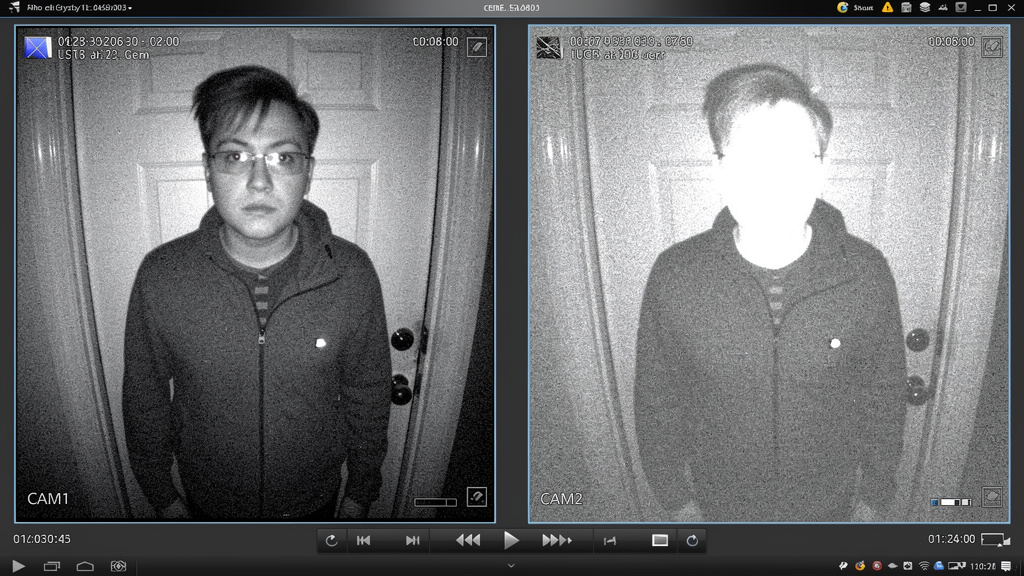
Night image washed out or completely white. Caused by excessive IR reflection, gain settings too high, or nearby reflective surfaces.
Reflections from Walls or Eaves
IR light bounces off nearby surfaces back into the camera lens, creating bright spots or washout. Solution is camera repositioning or angle adjustment.
Insects or Spider Webs Near IR
Spiders build webs directly over the IR LED array, blocking infrared light. Insects are attracted to the heat and become shadows on footage.
Image Too Dark
Night vision is visible but extremely dim or barely usable. Caused by low exposure settings, weak IR output, or improper infrared intensity configuration.
Day/Night Mode Switching Issues
Camera switches between day and night mode incorrectly, creating flickering or delayed transitions. Usually a sensor problem or faulty day/night filter.
Incorrect Camera Placement
Camera mounted too high, too low, or aimed at wrong angle. IR LEDs can’t illuminate the target area effectively, resulting in poor night vision coverage.
Failed Infrared LEDs
No infrared light being emitted at all. Complete hardware failure of the IR LED array requiring replacement of the camera or LED module.
DIY Quick Checks
Before you call us, try these quick checks. Most night vision problems are simple fixes you can do yourself in minutes.
Check Lens for Dust & Condensation
Look at the camera lens from the outside. If you see dust, spider webs, or condensation, gently clean it with a soft, dry cloth. This fixes most night vision problems.
Restart the Camera & NVR
Turn off the camera and NVR/DVR for 30 seconds, then turn them back on. This often resets glitchy settings and restores night vision function.
Verify Camera Power Connection
Check that the camera is properly powered. Loose power connections can cause the IR LEDs to work intermittently or not at all.
Check Day/Night Mode Settings
Make sure the camera is set to “night mode” or “automatic” mode in settings. Manual day mode will show black footage at night.
Inspect for Spiders & Insects
Spiders love the warmth of IR LEDs and build webs directly over them. Check the IR dome and gently remove any webs or insects.
Check for Nearby Reflective Surfaces
Look at what’s around the camera—walls, fences, or water features. If there’s something close by that IR light can bounce off, reposition the camera slightly.
What SIPKO Checks
When you call us about night vision problems, we perform a systematic diagnostic to identify the exact cause. Here’s everything we evaluate. We service all Melbourne suburbs and offer camera repair for all major brands.
Lens Condition
Inspecting for dust, dirt, condensation, water droplets, or scratches that block infrared light. Dirty lenses are one of the most common causes of night vision failure.
IR LEDs
Testing the infrared LED array to confirm it’s emitting light. We check LED brightness, array distribution, and detect any failed diodes.
Camera Angle
Evaluating camera positioning, tilt, and pan. Poor angles prevent IR light from reaching the intended coverage area effectively.
Nearby Wall Reflection
Checking if IR light is bouncing off walls, eaves, or nearby surfaces back into the lens. This creates white glare or washed-out images.
Lighting
Assessing ambient light levels at the camera location. Minimal ambient light combined with poor IR output results in dark footage.
Camera Settings
Reviewing exposure settings, gain levels, infrared intensity, WDR (Wide Dynamic Range), and night mode configuration for optimization.
Exposure
Checking exposure time and shutter speed settings. Incorrect exposure settings can make night vision too dark or too bright.
WDR Settings
Testing Wide Dynamic Range features that improve night vision in mixed lighting. Incorrect WDR can cause night vision problems.
Mounting Position
Evaluating where the camera is mounted. Too high, too low, or incorrectly positioned cameras fail to illuminate target areas with infrared.
Alternative Camera Type
Assessing if a different camera type is needed. Some locations benefit from specialized camera solutions for optimal performance.
Repair or Reposition
Your camera isn’t always faulty. We diagnose the actual problem and recommend the most cost-effective solution. Most night vision problems are fixed with cleaning, adjustment, or repositioning—not replacement.
Causes vs Solutions
Don’t assume your camera is broken. Most night vision problems have simple causes and quick fixes. Here’s what to look for and how to fix it.
Black Image at Night
- • Dirty or dusty lens
- • Infrared LEDs have failed
- • Camera powered off or disconnected
- • IR filter stuck in closed position
Black Image – Solutions
- Clean the lens with a soft, dry cloth
- Restart the camera and NVR
- Verify camera power connection
- Check camera day/night mode setting
- Call us if LEDs or filter need replacement
Blurry Night Vision
- • Condensation on lens
- • Camera out of focus
- • Dirty sensor
- • Incorrect focus distance setting
Blurry – Solutions
- Gently wipe condensation from lens
- Manually adjust camera focus
- Clean the sensor carefully
- Check focus distance in settings
- Install anti-condensation measures
Glare & Washout
- • IR bouncing off nearby walls
- • IR bouncing off water/reflective surfaces
- • IR intensity too high
- • Camera too close to light-colored surfaces
Glare – Solutions
- Reposition camera angle away from walls
- Reduce IR intensity in settings
- Install IR reflection shield
- Move camera further from reflective surfaces
- Add lens hood or shade
Low Quality Footage
- • Poor camera angle or mounting
- • Not enough ambient light
- • Incorrect exposure settings
- • WDR settings too aggressive
Low Quality – Solutions
- Reposition camera to better angle
- Add external lighting if possible
- Adjust exposure and gain settings
- Fine-tune WDR settings
- Ensure camera is mounted at correct height
No Night Vision at All
- • Infrared LEDs completely failed
- • Camera powered down or offline
- • IR block filter permanently engaged
- • Camera hardware failure
No Night Vision – Solutions
- Check camera power and connections
- Restart camera and NVR system
- Verify camera online status
- Check for IR block filter setting
- Call us for hardware assessment
Why This Happens
Understanding how infrared night vision works helps you know why problems occur and what to do about them. Here’s the technology behind your camera’s night vision.
How Infrared LEDs Work
Your camera has infrared LEDs that emit invisible light invisible to the human eye. The camera’s sensor detects this light bouncing off objects, creating a night vision image. When LEDs fail or get blocked by dust, the camera goes dark.
Why Camera Angles Matter
Infrared light travels in straight lines, just like visible light. If your camera is mounted too high, too low, or pointed the wrong direction, the IR light won’t reach the area you’re trying to monitor. Proper angle is critical for effective coverage.
Environmental Impact
Salt air in coastal areas corrodes equipment faster. Wind can trigger false alarms if sensors aren’t properly tuned. Moisture and humidity cause condensation on lenses, blocking infrared light. We spec equipment and settings specifically for Melbourne’s climate and location conditions.
How IR Reflection Creates Glare
Infrared light bounces off walls, water, and reflective surfaces just like visible light. When IR light bounces back into the camera lens, it creates white glare and washes out the image. This is why camera positioning and nearby surfaces matter so much.
Common Misconceptions
Many people think night vision should work like movie scenes with perfectly clear footage. Reality: Night vision quality depends on IR light available, camera settings, and environment. A camera pointing at a blank white wall will have poor night vision because there’s nothing to reflect the IR light back to the sensor.
What Our Customers Say
Melbourne homeowners and businesses trust Sipko Security for night vision repair.




Night Vision Repair Questions
Got questions about your night vision problems? Here are the ones we get most often from Melbourne customers. Learn more about CCTV repair pricing and solutions.
Why is my CCTV night vision completely black?
A black night vision image usually means the infrared LEDs have failed, the sensor is contaminated, or there’s an infrared-blocking filter issue. We test the IR LED array first and check for sensor problems. If it’s just a dirty lens or blocked filter, cleaning fixes it. If the LEDs are dead, the camera module needs replacement.
Can spider webs really block night vision?
Yes. Spiders build webs directly over IR LED arrays because they’re attracted to the heat. Insects get stuck in the web and show up as shadows on your footage. We clean the IR dome regularly and can install protective covers to stop this.
How much does night vision repair usually cost?
A diagnostic visit is usually under $150. If it’s just cleaning or settings adjustment, repair costs $100-300. If the IR LED module or camera needs replacement, expect $400-900 depending on the camera type. We’ll give you a quote before any work begins.
Is it better to repair or replace the camera?
We’ll diagnose first and tell you honestly. If the IR LEDs are failed and the camera is older than 5 years, replacement may be better value. If the camera is newer or only the lens needs cleaning, repair is the smart choice. Either way, we show you the costs before deciding.
Why is my night vision blurry or out of focus?
Blurry night vision is often caused by dust or condensation on the lens, incorrect focus settings, or a contaminated sensor. We clean the optics, adjust the focus manually, and check the sensor. Sometimes it’s a faulty lens needing replacement, but cleaning usually fixes it.
Can you fix white glare in night vision?
White glare usually means IR light is bouncing off nearby walls or surfaces back into the camera. We reposition the camera or angle, reduce the IR intensity, or add a hood to block reflections. Repositioning solves most glare issues without any equipment costs.
Fix CCTV Night Vision in Melbourne
Black images, failed IR LEDs, or blurry footage — we diagnose and repair CCTV night vision problems fast. Get clear night vision again with expert Melbourne service. We offer complete 24/7 monitoring as well.
