

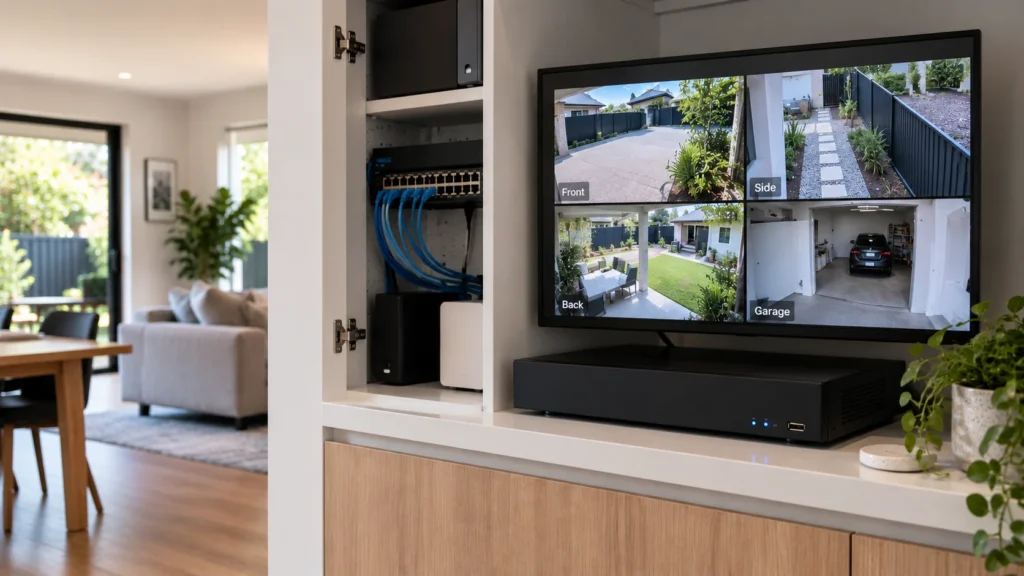
A homeowner comparing CCTV systems will quickly run into different brands, resolutions, apps, recording methods and camera types, often all claiming to be the best option available. The useful question isn’t which logo is universally “best” — it’s which architecture actually fits the property and the way you want to use the system day to day. This guide works through the decisions that matter before brand names enter the picture at all.
There’s No Single “Best” CCTV System
Two genuinely good CCTV systems can be the right choice for two different homes, because they’re solving different problems. A compact apartment with one entry point has different requirements from a large property with several access points and a shed at the back of the yard. What matters is whether a system’s architecture — how it’s powered, how it records, what detail it captures, and how you interact with it — actually fits your property and your recording needs, not which brand has the strongest reputation.
Before comparing brands, it helps to define what the property actually needs:
- how cameras can realistically be powered and connected;
- whether footage needs continuous or event-based recording;
- what level of usable detail is required at key areas;
- how footage and alerts need to be accessed day to day;
- how much the system may need to expand later.
The rest of this guide works through each of these in turn, before circling back to specific brands and examples.
Wired PoE vs Wireless or Battery-Powered Cameras
The first major fork is how a camera gets power and connects to the network.
Wired Power over Ethernet (PoE) cameras use a single cable for both power and data, run back to a network switch or recorder. For standard copper Ethernet, the maximum channel length is typically 100 metres — a genuinely useful figure to keep in mind on a larger property, since it affects where a switch or recorder needs to sit relative to the cameras it serves. This generally means no battery to manage and continuous power available, though the actual recording behaviour still depends on how the specific camera and recorder are configured — a PoE system isn’t automatically set to record continuously, and a wireless or battery camera isn’t automatically limited to event-only recording either. Wireless cameras reduce how much cabling is needed and are genuinely useful for retrofits, rentals, or spots where running a cable isn’t practical, but “wireless” only removes the data cable — most still need power from somewhere (mains, battery, or solar), and it’s worth being clear that wireless connectivity and battery power are two separate characteristics: a wireless camera can still run on mains power, and a battery camera introduces a charging or replacement cycle that a mains-powered wireless camera doesn’t have.
Local NVR Recording vs Cloud and App-Led Systems
Where your footage actually lives is a separate question from how you access it, and it’s worth treating the two separately rather than assuming they’re the same thing.
A locally recording system stores footage on a network video recorder (NVR) or similar device on-site, which typically means retention is limited by the size of the hard drive installed rather than an ongoing subscription. Cloud-based or hybrid systems store some or all footage off-site, which can simplify access and protect footage if the on-site hardware is damaged or stolen — cloud storage may come with a subscription cost, though this depends on the specific system and plan, and a hybrid setup doesn’t automatically mean you’re paying for both local hardware and a subscription. Remote access is not the same thing as recording location — a system that records entirely to a local NVR can still give you full live view and playback through an app from anywhere; having an app doesn’t mean your footage only exists in the cloud.
- How long do you actually need footage retained, and does that match what local storage or a subscription plan offers?
- What happens to recording if the internet connection drops — does the system keep recording locally, or does it depend on connectivity to record at all?
- Are you comfortable with an ongoing subscription cost if one applies, or would you prefer a one-off hardware cost with no recurring fee?
- If the on-site hardware were damaged or stolen, would your footage survive that?
For a detailed breakdown of how retention length relates to storage size, see our CCTV storage guide.
Image Quality: More Megapixels Don’t Automatically Mean Better Footage
A higher resolution number on a spec sheet doesn’t guarantee useful footage. More pixels give the camera more image data to work with, but the result still depends on how those pixels are distributed across the scene.
The distinction matters because total resolution and useful subject detail are not the same thing. A higher-resolution camera can help reach identification-level detail at a greater distance, but a camera aimed too wide, too far away or through the wrong lens can still spread those pixels across too much of the scene. A lower-resolution camera positioned for the specific target area can sometimes provide more useful footage than a higher-resolution one that isn’t.
This is why camera selection and camera placement can’t really be treated as separate decisions. Our CCTV camera placement guide explains in more detail how field of view, distance and lighting affect usable footage.
Detection and Analytics: Decide What You Actually Need
Most current CCTV systems offer some form of motion, person or vehicle detection, and increasingly, more specific object classification — but these capabilities vary genuinely by camera model and system, even within the same brand, so it’s worth being specific about what you actually need rather than assuming every camera does the same thing.
Before treating analytics as a deciding factor, it helps to ask:
- Do you mainly need footage recorded for later review, or do you want to be notified about events as they happen?
- If you want notifications, do you need them to be reasonably selective (person/vehicle detection) rather than triggering on every moving leaf or passing car?
- Do you need to search through footage quickly by event type, or is scrubbing through a timeline manually acceptable?
- Is a specific detection type (e.g. package detection, line-crossing) actually relevant to how the camera will be used, or is it a feature you’d never use?
Detection features can genuinely reduce irrelevant notifications, but no system eliminates false alerts entirely — how well it performs depends on the specific camera, its placement, and the scene it’s covering.
Think About How You’ll Use the CCTV System Every Day
Beyond what the camera captures, it’s worth thinking about how you’ll actually interact with the system — live view, reviewing playback, getting notified about events, and whether more than one person in the household needs access.
Some systems keep cameras within the same app as other security devices — Ajax is one example, where its cameras (TurretCam, BulletCam, DomeCam Mini) sit in the same app as its alarm system, so supported cameras and other security devices can be managed through the same platform, with an alarm event and the relevant camera footage reviewed together rather than switching between separate apps. This is relevant specifically if you already have, or are planning, an alarm system from the same ecosystem and want that integration. Other brands take a more standalone approach, where the CCTV system operates independently of any alarm system. Neither approach is inherently better; it depends on whether unified control matters to you and what else is already installed at the property.
Property Size, Camera Count and Budget Change the Decision
Everything above interacts with the physical property. A small home with one or two genuinely important areas to cover has different requirements from a larger property with several access points, a driveway, and a shed or garage that also needs coverage. A property needing several cameras recording continuously at high detail will need more storage and bandwidth than one relying on a couple of event-triggered cameras. A retrofit where running new cable is difficult may make wireless options more practical, even if a wired system would otherwise be preferable, and on a larger property the standard 100-metre copper Ethernet limit mentioned earlier can genuinely affect where a recorder needs to be located relative to the cameras it serves.
There’s no universal “right” camera count — it depends entirely on the layout and priorities of the specific property. If you want help estimating how many cameras a property might need, our CCTV Camera Number Calculator is a tool built for exactly that question, separate from the system-architecture decisions covered here.
Budget is best thought of in terms of scope and trade-offs — how many cameras, what level of detail where it matters, and whether ongoing costs (subscriptions, monitoring) are part of the plan — rather than a fixed price band, since the cost of a system depends entirely on the scope decided above it.
CCTV System Options at a Glance
These are representative examples of each approach, not an exhaustive brand list — SIPKO installs and services a broader range of brands within these categories.
So Which CCTV System Should You Choose?
A practical way to work through the decision, in order:
- Decide whether permanent cabling is realistic for your property, or whether a wireless/battery approach makes more sense.
- Decide how you need footage recorded and retained — local storage, cloud, or a hybrid of both.
- Work out the level of image detail you actually need at the specific areas that matter most.
- Decide which notifications or analytics genuinely add value for your situation, rather than defaulting to “more is better.”
- Consider how you want to access and manage the system day to day, including whether integration with an existing alarm system matters.
- Only then compare specific products or brands within the architecture that fits — at that point, the choice becomes much more concrete.
Professional CCTV Installation in Melbourne
Working through system architecture is only part of the decision — the right choice still depends on the specific property, existing cabling, coverage requirements and how footage needs to be recorded and retained. A professional CCTV installation is where these factors get assessed together for your property, rather than guessed from a spec sheet.
Frequently Asked Questions
Does CCTV need internet access to record?
Not necessarily. Systems that record to a local NVR can typically keep recording without an internet connection — internet access is usually needed for remote viewing and notifications, not for the recording itself. Cloud-dependent systems are the exception, since they need a working connection to upload footage.
Is PoE better than Wi-Fi for CCTV?
It depends on the property. PoE provides a wired data connection and power over the same Ethernet cable, so it doesn’t depend on Wi-Fi signal quality — that can make it a strong fit where permanent cabling is practical. Wi-Fi cameras avoid the wired data connection, but their power source still varies — some use mains power, while others use batteries or solar charging. Which suits you better usually comes down to whether cabling is practical for the property, particularly for a retrofit.
Can I mix camera brands in one system?
Sometimes, but it depends on the specific hardware and protocols involved rather than being a general rule. Some NVRs support third-party cameras that conform to ONVIF, an open industry standard for interoperability between IP-based security products from different manufacturers. Ecosystem-based systems (where cameras integrate with an alarm platform) are typically built around that platform’s own devices instead. Check compatibility for your specific hardware before assuming brands can be mixed.
Can an existing CCTV system be expanded later?
Often, but it depends on whether the existing recorder and network infrastructure have spare capacity, and whether the new cameras are compatible with the existing system. A wired NVR system with unused channels and cabling headroom is usually easier to expand than one already at capacity.
Sources
- Cisco — Catalyst 9100AX Access Points Deployment Guide — official documentation confirming the standard 100-metre (328 ft) maximum Ethernet cable run referenced in this guide.
- IEEE 802.3 Working Group — archived technical discussion on the 100-metre distance objective — primary-source context on the origin and basis of the 100-metre standard within IEEE 802.3.
- Axis Communications — Pixel density based on IEC 62676-4:2014 — the detection/identification pixel-density figures referenced in the Image Quality section.
- Ajax Systems — Explore Ajax cameras — official reference for Ajax camera/ecosystem integration claims used in this guide.
- ONVIF — Profile S — official reference for the ONVIF interoperability standard mentioned in the FAQ.



