

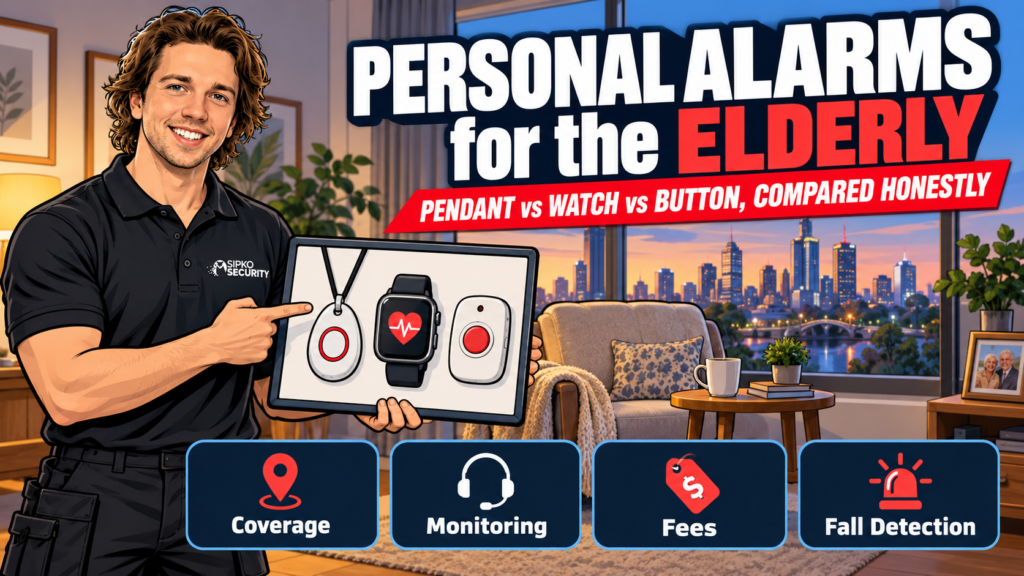
We install and monitor home alarm systems across Melbourne, not personal alarms, but the question comes up in almost every conversation about setting up security for someone’s parents, usually right after someone mentions a fall. So here’s a straight, no-sales comparison of the three types on the things families actually need to decide: does it work outside the house, does it need charging, is there a monthly fee, and who actually answers when the button gets pressed.
Short answer: a pendant suits someone who’s mostly home-based and wants the simplest device; a watch or mobile pendant suits someone still out and about who needs GPS coverage away from the house; a family-call-only button is the cheapest option but only as reliable as whoever’s on the contact list. None of the three is universally “best”. The right one depends on how far from home the person actually goes.
- What's the difference between a pendant, a watch and a button alarm?
- Does it work outside the house, or only indoors?
- What actually happens when the button is pressed?
- Monitored 24/7 or family-call-only: who actually answers?
- Fees and lock-in contracts: what's normal in Australia
- Fall detection: what it catches, and what it misses
- Government funding: Support at Home, CHSP, NDIS and DVA
- Which type suits which situation
- If a home alarm is also on the cards
- FAQ
What’s the difference between a pendant, a watch and a button alarm?
All three send an alert when the button is pressed, but they differ on where they work and what they cost to keep running.
| Type | Worn | Works away from home? | Charging | Ongoing cost |
|---|---|---|---|---|
| Pendant (base-unit style) | Neck or wrist | Usually no (landline/Wi-Fi base unit with a fixed range) | Base unit stays plugged in; pendant battery lasts months to years | Device (buy or rent) + monthly monitoring fee |
| Pendant or watch (4G/GPS mobile) | Neck, wrist or clipped on | Yes, works anywhere there’s mobile coverage | Daily to weekly, like a phone or smartwatch | Device + monitoring fee, sometimes a SIM/data fee |
| Family-call button (app-based) | Wrist or pocket | Depends on the device (check if it’s Wi-Fi-only or has its own SIM) | Varies by device | Usually device only, or a smaller ongoing fee than a monitored service |
The base-unit pendant is the cheapest and simplest to learn, which matters for someone who finds new technology stressful. The trade-off is real: if they fall in the garden or at the shops, a base-unit pendant with no mobile connection can’t help.
Does it work outside the house, or only indoors?
This is the single biggest thing families get wrong when they buy the cheapest option online. A traditional base-unit pendant is built for in-home use. It talks to a base station plugged into the landline or Wi-Fi, and the pendant itself usually only has a working range of a room or two beyond that unit. Step outside the yard and it’s just jewellery.
If the person is driving, gardening, walking to the shops or visiting the local RSL on their own, a 4G or GPS-enabled pendant or watch is the only category that actually covers them there. It’s a genuine trade-off: mobile coverage costs more and needs charging more often, but a device that only works in the lounge room is the one that ends up sitting in a drawer.
What actually happens when the button is pressed?

The mechanics are close to identical across all three types:
- The button sends a signal to the base unit (landline/Wi-Fi pendants) or directly over mobile network (4G pendants, watches, app-based buttons).
- The base unit or app automatically dials, either a monitoring centre or a pre-set list of contacts, depending on the plan.
- Two-way voice opens through a speaker in the base unit, the pendant itself, or the app, so the responder can hear what’s happening before anyone leaves the house.
- The responder, a trained call-centre operator or a family member, decides whether to call the person back, send someone around, or dial emergency services.
The difference that actually matters is step 2: who’s on the other end.
Monitored 24/7 or family-call-only: who actually answers?
A monitored alarm connects to a professional response centre, not a person’s phone. For example, Australian provider APERS says its monitoring centre is graded to AS 2201.2, the Australian Standard covering alarm and electronic security monitoring centres. A trained operator is on the line within moments of the button being pressed, day or night, and can dispatch help even if no family member is reachable.
A family-call-only device skips the monitoring centre and dials down a list of numbers instead: a son, a daughter, a neighbour. It’s cheaper because there’s no call-centre subscription, but it’s only as reliable as whoever’s on that list. If the first two contacts are asleep, driving, or overseas, the alarm keeps ringing down the list while nobody answers.
Neither option is automatically the right one. A monitored service makes sense for someone living alone with no close family nearby; a family-call button can be enough where someone’s children live five minutes away and check in daily anyway.
Fees and lock-in contracts: what’s normal in Australia
Most providers split pricing into two parts: the device itself (buy outright or pay a rental fee) and an ongoing monitoring fee, billed monthly. Month-to-month, no-lock-in plans are increasingly the norm rather than the exception, but not universal: some providers still tie buyers into 12- or 24-month terms, so it’s worth asking directly before signing rather than assuming. As one example of how this plays out in practice, APERS offers a 30-day money-back guarantee if the device turns out not to suit.
We’re not going to publish specific dollar figures here, because we don’t sell or monitor these devices and pricing genuinely varies by provider, device tier and whether monitoring is bundled in. Anyone quoting a single “from $X” number for the whole market is rounding. Get an actual quote from two or three providers before deciding, and ask what happens to the price after any introductory period ends.
Fall detection: what it catches, and what it misses
Automatic fall detection sounds like it solves the biggest risk: someone falling and being unable to reach the button. In practice, it’s less reliable than the marketing suggests. A study of a pendant-style fall-detection device tested on older adults in real-world conditions over six months recorded 89 actual falls, of which the device automatically detected only 17 — and flagged 128 events as falls in total, meaning 111 were false alarms.
That’s not a reason to dismiss the feature. It’s a reason to treat it as a backup, not a replacement for pressing the button. Every provider that sells fall detection will say the same thing in the fine print: press the button if you’re able to, even with fall detection switched on.
Government funding: Support at Home, CHSP, NDIS and DVA
Several Australian schemes can cover some or all of the cost, and it’s worth checking eligibility before paying full price.
- Support at Home’s Assistive Technology and Home Modifications (AT-HM) scheme. For eligible participants, the Australian Government confirms AT-HM funding covers the alarm device plus 12 months of monitoring, after which a reassessment is needed to keep it going.
- Commonwealth Home Support Programme (CHSP). Entry-level support for people aged 65 and over, or 50 and over for Aboriginal and Torres Strait Islander people, or 50 and over if homeless or at risk of homelessness, which can include a personal alarm subject to a contribution fee.
- NDIS. For people under 65 with a permanent, significant disability, where a personal alarm aligns with plan goals.
- DVA Rehabilitation Appliances Program. For eligible veterans and war widows/widowers.
Access starts with an assessment through My Aged Care (1800 200 422).
Victorians have an extra option worth knowing about: Personal Alert Victoria (PAV) is a Victorian Government pendant-monitoring service that’s provided free of charge to eligible frail, isolated older people and people with disabilities. Eligibility is assessed in the person’s own home, and it’s a genuinely different pathway from the aged care federal schemes above. It’s worth ruling in or out before paying for a private provider.
Which type suits which situation

- Mostly home-based, budget matters most: a base-unit pendant with monitoring, or check Personal Alert Victoria / CHSP eligibility first if you’re in Victoria and might qualify for free.
- Still active and out of the house daily: a 4G or GPS pendant or watch. The mobile coverage is the entire point.
- Family lives close by and checks in often: a family-call-only button keeps costs down, as long as someone’s realistically always reachable.
- Memory issues or a diagnosed fall risk: a monitored service with fall detection as backup, not instead of, a pressable button, and worth raising with a GP or occupational therapist, since a referral can also unlock AT-HM funding.
If a home alarm is also on the cards
Personal alarms are a different product from a home security or intruder alarm, and this guide doesn’t cover the latter. If what you’re actually trying to solve is an outdated home alarm panel that’s getting hard for a parent to use, we’ve written about that separately in our guide to modernising an elderly parent’s alarm without confusing them.
Where the two do overlap: if a parent already has, or is getting, an Ajax home alarm system, the Ajax & SilverShield Elder Kit we install adds a wearable panic button that ties into that same system and our monitoring service, rather than running as a separate standalone device. It’s not a substitute for a dedicated personal alarm service if there’s no home alarm involved. It’s worth knowing about specifically if a home alarm install is already happening anyway.
FAQ
Do personal alarms work if someone lives alone with no family nearby?
Yes. That’s the main case for a monitored service over a family-call-only device. A monitored alarm connects to a 24/7 response centre rather than relying on a specific person answering, so it still works even when no family member is reachable at that moment.
Is fall detection on a personal alarm reliable?
It helps, but it isn’t foolproof. Real-world testing on a pendant-style device found it missed most actual falls and also triggered false alarms more often than genuine ones. Treat automatic fall detection as a backup to pressing the button, not a replacement for it.
How much do personal alarms cost in Australia?
Pricing varies by device, provider and whether monitoring is bundled in, so there’s no single accurate figure to quote. Most providers charge a device cost (buy or rent) plus a monthly monitoring fee. Get quotes from two or three providers and check what happens to the price after any introductory period.
Can I get a free personal alarm in Victoria?
Possibly. Personal Alert Victoria (PAV) is a Victorian Government service that provides a monitored pendant free of charge to eligible frail, isolated older people and people with disabilities, assessed in the person’s own home. It’s separate from the federal aged care schemes and worth checking first.
What’s the difference between a monitored alarm and a family-call alarm?
A monitored alarm connects the button press to a professional response centre staffed 24/7. A family-call alarm dials down a list of personal contacts instead, which is cheaper but only as reliable as whoever actually picks up.
Setting up a home alarm for a parent as well? Get in touch and we’ll talk through what actually makes sense for the property.



