

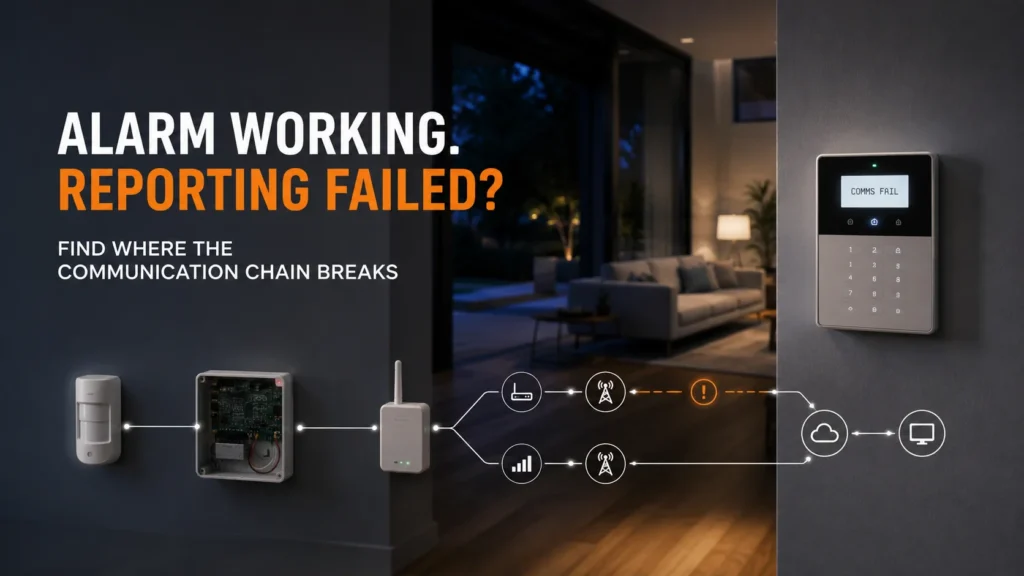
The alarm has worked the same way for years. You can still arm it, still disarm it, still see the usual lights on the keypad. Then one day there’s a new message: “Comms Fail.” Or maybe it’s “Line Fault.” Nothing else around the house has changed, so the natural question is simple: is the alarm still working?
That question doesn’t have a single yes-or-no answer, and that’s the point of this message rather than a gap in it. An alarm system does several different jobs — detecting movement, controlling arming and disarming, sounding a local siren, and reporting events to somewhere outside the property — and a communication fault message points you towards the communication side of that system rather than diagnosing the system as a whole. Before deciding whether to reset it, repair it, or replace anything, it helps to understand exactly what the system was trying to do when it found the fault.
“Comms Fail” Does Not Necessarily Mean the Whole Alarm Has Failed
It’s easy to read “Comms Fail” as shorthand for “the alarm is broken.” But an alarm system is really a stack of separate functions: something detects an intrusion, the panel processes and controls that response, a local siren or strobe may activate, and — separately — the system attempts to report the event to somewhere outside the property.
A Comms Fail message identifies a reporting problem; by itself, it does not tell you whether the alarm’s other functions are working correctly. That’s not the same as saying they are working correctly. It simply means this one message, on its own, doesn’t answer that question one way or the other.
To understand what a communication fault actually implies, it helps to look at what has to happen for a report to succeed in the first place — and where that process can break down.
Where the Alarm’s Communication Chain Can Break
A security alarm’s reporting process generally follows the same basic sequence: an alarm event occurs, the control panel processes it, a communicator attempts to transmit a report, that transmission needs a working communication path, and the report needs to arrive at a configured destination.
Not every system uses every type of path — some rely on a telephone line, some on a cellular connection, some on an IP/network connection, and some on more than one as a backup. Which path (or paths) apply depends entirely on how that particular system was set up.
Two keypads can show communication-related faults for different reasons, because the break can occur at different points in this chain. That’s why the exact wording of the message matters more than the general idea of “a comms problem.”
“Comms Fail” and “Line Fault” Are Not the Same Message
Bosch’s Solution Series panels are a useful concrete example, because the manufacturer documents this distinction directly rather than leaving it to guesswork.
On Bosch Solution systems, Comms Fail Route 1, Route 2, or Route 3 means the panel attempted to send pending reports to a specific configured destination and, after all its programmed attempts, was unable to complete that delivery. Telco Line Fail is a different condition: it means the panel detected that the telephone line itself had failed or been disconnected for at least 30 seconds.
And a third message, Comms BUSS Trouble, is unrelated to external reporting altogether — it means the panel lost communication with a device on its own internal system bus, such as a keypad, not with anything outside the property.
In other words, the word “Comms” appearing in a fault message doesn’t automatically mean the external monitoring connection is down.
Other alarm manufacturers use different wording and different fault logic for the same underlying ideas, so the exact message always needs to be read against the specific panel it appeared on. Ness’s D8x/D16x panels, for example, use their own Line Fault Monitor setting and a keypad status line rather than Bosch’s Route 1/2/3 structure — the concept of “something in the reporting chain isn’t right” carries across brands, but the exact terminology doesn’t.
Can the Alarm Still Work When Communication Has Failed?
This is really two separate questions, and it’s worth keeping them apart.
Can the alarm still detect and respond locally? A communication fault message, on its own, doesn’t answer this. It’s not evidence that detection has stopped working, and it’s not evidence that it hasn’t — the message simply isn’t about that part of the system.
Can the alarm still report externally? For a genuine reporting or line fault, this is the critical question. To work out how serious the fault actually is, you need to know:
- Whether the alarm is professionally monitored.
- Which communication method it normally uses to report.
- Which specific route or path has faulted.
- Whether another configured reporting path still exists as a backup.
- Whether test reports are actually reaching their intended destination.
A keypad that still arms is not proof that reporting is working. A communication fault is also not proof that every local alarm function has failed. Both of those statements can be true about the same system at the same time, and neither one substitutes for actually checking.
Acknowledging a Comms Fault Isn’t the Same as Fixing It
Acknowledging a fault and correcting its cause are two different things. On Bosch Solution panels, pressing the away or # key will stop the indicator flashing and silence the beeping — but, as Bosch’s own support documentation notes, this may start again after the next arm/disarm cycle, because acknowledging the message doesn’t remove the underlying cause. To clear the fault altogether, the actual issue behind it needs to be diagnosed and corrected.
That’s worth keeping in mind before assuming a quiet keypad means a resolved problem. Silencing or acknowledging the warning isn’t evidence that the communication path has been restored — it’s just evidence that you’ve told the panel you’ve seen the message.
Why Can a Communication Fault Appear When the Alarm Itself Hasn’t Changed?
It’s a fair question. If nothing was touched, why did a new fault suddenly show up? The answer often sits somewhere in the communication environment around the panel — and that environment can change even when the alarm hardware itself hasn’t been touched.
Telephone-line or legacy dialler systems. Some older panels report through a telephone line dialler. The panel itself may not have changed at all, but the telecommunications environment around it can. NBN Co’s own guidance on security monitoring systems recommends checking directly with your alarm provider about compatibility before or after moving to the nbn network, since compatibility varies by device and setup — nbn doesn’t issue a general statement that alarms will or won’t work, because it depends on the specific equipment involved.
Cellular communicators. Some systems report using a cellular module, and older modules were sometimes built around network generations that no longer exist. The Australian Government’s official guidance on the 3G network switch-off confirms that security systems were among the non-handset and IoT devices that lost functionality if they depended on the 3G networks that have now been shut down nationally. That’s a genuine, documented possibility for the right hardware — but it’s a diagnostic branch to check, not a default explanation for every Comms Fail message.
IP or network-based reporting. Where a system actually uses an IP or network path to report, the availability of that network becomes part of the reporting chain too. This only applies if the specific system is configured that way — it’s not a universal cause, and there’s no reliable, evidence-based list of “the” network issues that cause this across all systems.
What Should You Check Before Resetting or Replacing Anything?
Before assuming the worst — or assuming nothing’s wrong — a few things are worth establishing:
- The exact wording of the fault message, written down rather than remembered.
- The make and model of the alarm panel.
- Roughly when the message first appeared.
- Whether anything changed around that time with the phone line, internet, router, or nbn connection.
- Whether the system is professionally monitored, and if so, how.
- Whether the monitoring provider can confirm test reports are actually being received.
Don’t try to diagnose the fault from the word “Comms” alone. And this isn’t the point to start reprogramming the communicator, adjusting installer-level settings, or disabling line supervision to make the message stop — none of that addresses the actual cause, and suppressing supervision or changing installer-level settings can hide the warning without establishing whether the underlying communication problem has been resolved.
Does a Comms Fail Mean the Alarm Needs Replacing?
No — not by itself. Once the fault has actually been diagnosed, there are three realistic outcomes, and which one applies depends on what’s actually broken.
Repair — diagnosis finds a specific fault in the existing communication setup that can reasonably be corrected without replacing the wider system.
Communication modernisation — assessment shows the existing system remains worth retaining, but its reporting path needs updating.
Broader replacement — the communication fault turns out to be one part of a wider legacy, compatibility or support problem.
The age of the panel or the appearance of a single Comms Fail message isn’t, by itself, enough to choose between these paths — that’s a decision that follows the diagnosis, not the fault message.
Sometimes the fault turns out to be one symptom of that last category — where the communication path is only one of several ageing or unsupported parts, and continuing to patch the reporting side doesn’t really address what’s going on. If that’s genuinely the case, moving to a modern platform can make more sense than continuing to rebuild an old reporting path piece by piece. Where that broader replacement is actually the right call, SIPKO can design a current system — such as an Ajax-based setup — around what the property actually needs, rather than assuming any single brand is the automatic answer.
If the fault message keeps returning, or you can’t confirm that alarm reports are actually reaching their intended destination, SIPKO can assess options for taking over and upgrading an older alarm to work out what has actually failed before recommending repair, communication modernisation, or broader replacement.
FAQ
What does Comms Fail mean on an alarm system?
A Comms Fail message generally points to a problem with the alarm’s reporting or communication process. On systems such as Bosch Solution, it can specifically mean that an attempted report to a configured destination did not complete successfully — but the exact meaning depends on the specific panel and how it’s configured, not a single, universal fault across all alarm brands.
Is my alarm still working if it says Comms Fail?
Not a simple yes or no. The message doesn’t tell you, by itself, whether local functions such as detection and the siren are working correctly — it’s specifically about the reporting side of the system, not the whole thing.
What is the difference between Comms Fail and Line Fault?
On Bosch Solution panels, Comms Fail means a report attempt to a configured destination didn’t complete; Telco Line Fail means the telephone line itself was detected as disconnected. They’re related but distinct conditions, and other manufacturers may describe the same underlying ideas differently.
Can I just clear the Comms Fail message?
You can acknowledge it to stop the beeping, but that isn’t the same as fixing what caused it — the message can return after the next arm or disarm cycle if the underlying issue hasn’t actually been resolved.
Does a communication fault mean I need a new alarm?
No, not automatically. Depending on what the diagnosis actually finds, the right response might be a straightforward repair, an update to just the communication path, or — only where the fault turns out to be part of a wider legacy-system issue — broader replacement.



