

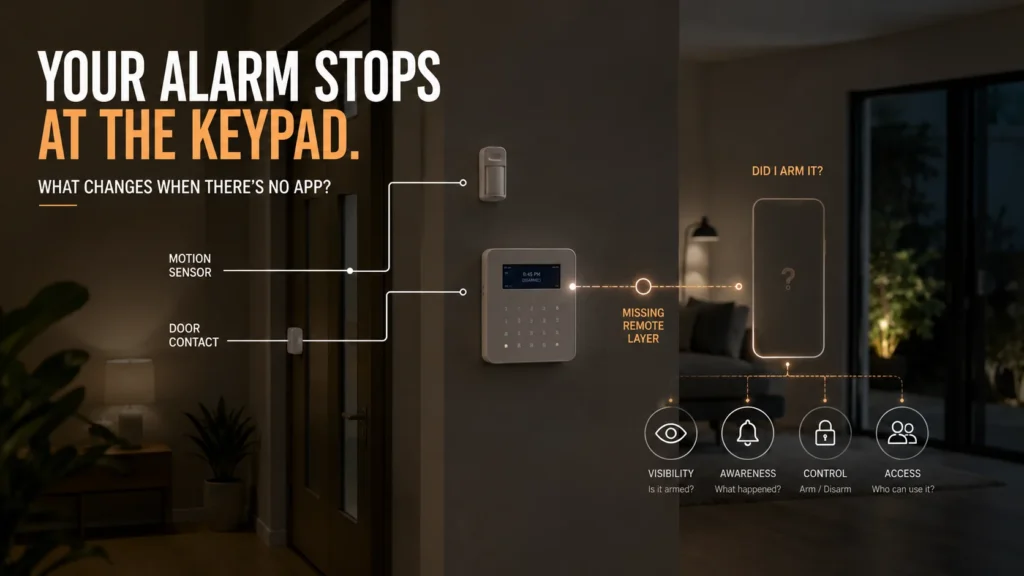
You leave home, drive ten minutes, and suddenly wonder: did I actually arm the alarm? The keypad is back at the house. You aren’t. There’s no way to check from where you’re sitting — you either turn the car around, or you spend the rest of the day not quite sure.
That gap is real, but by itself it doesn’t mean your alarm isn’t working, doesn’t detect intrusion properly, or can’t be monitored. What changes is your ability to interact with the system once you’re no longer standing in front of the keypad. So the real question isn’t whether your alarm has an app. It’s what you actually need to see or do when you’re away from it — and whether your existing system can support that.
What Actually Changes When the Keypad Is Your Only Interface?
A keypad is a local interface. It works because you’re standing next to it. An app-supported system can extend some of that interaction beyond the property — but only some, and only where the system and its configuration actually support it.
No app tells you something about how you interact with the system. It doesn’t automatically tell you how well the underlying alarm detects an intrusion. Those are two different questions, and it’s easy to conflate them.
In practical terms, the missing remote layer usually shows up as questions like:
- Can I check whether the alarm is armed when I’m away?
- Can I receive supported alarm or fault notifications on my phone?
- Can I arm or disarm the system remotely?
- Can different authorised users have their own access or notification settings?
The answers depend on the panel, its communication setup and the app capabilities it actually supports.
To understand what’s actually missing without an app, it helps to look past the app itself and at four types of capability it can provide.
What Does an Alarm App Actually Add?
Visibility. The most immediate one. Depending on the system, an app can show whether the alarm is currently armed, the status of supported inputs or devices, and live state information — answering the exact “did I arm it?” question a keypad-only system can’t answer remotely. Bosch’s RSC+ app, for example, documents input status and live events as standard features for compatible Solution 2000/3000 panels. Not every app shows every sensor in real time — what’s actually visible depends on the specific system and how it’s set up.
Awareness. Where configured, an app can also deliver push notifications for alarm events, faults, or malfunctions, along with a history of what’s happened. Ajax’s platform, for example, documents a full set of configurable notification categories — alarms, malfunctions, armed-mode changes and more — each of which can be individually switched on or off per user. This is a meaningfully different thing from hearing a siren while you’re home — it’s supported event information reaching you while you’re somewhere else. It’s worth being precise here: an alarm event isn’t the same as a confirmed intrusion, and push notifications aren’t guaranteed to arrive the instant something happens — delivery depends on the app, your phone’s settings, and your connection.
Control. Most obviously, remote arm and disarm, and on some systems, control of supported outputs. Bosch RSC+ documents both. This doesn’t mean controlling the entire property from anywhere — it means the specific, supported remote actions the system is configured to allow.
Access. On systems that support it, individual users can have their own permissions and notification settings. Ajax also allows an admin to configure exactly which notification categories each user receives. This is genuinely useful for households or properties with more than one person interacting with the system — but it’s a feature of the specific platform, not something every alarm app offers.
These capabilities change what you can know and do remotely. They do not, by themselves, prove that the alarm detects an intrusion any better than it did without them.
An App and Professional Monitoring Do Different Jobs
This is worth separating clearly, because the two get conflated constantly.
A system can have any combination of these: an app with professional monitoring, an app without it, professional monitoring without a consumer-facing app at all, or neither. Getting an alert on your phone and having a monitoring centre receive and act on an alarm report are not the same thing — what a monitoring centre actually does with a report depends on the service and the instructions configured for it, not on whether you also happen to have an app.
And the reverse matters just as much: no app doesn’t mean no external reporting. A system can be professionally monitored, sending reports through its own communication path, without offering the homeowner an app at all.
The App Itself Needs a Communication Path
Installing an app on your phone doesn’t create a remote connection to your alarm by itself. Something has to carry information between the panel and that app: panel → communicator → network → remote service → app.
Bosch’s RSC+ app is explicit about this — it’s documented as requiring the panel to have a compatible, cloud-connected communication module fitted before the app can connect to it at all. The app being available and the app actually working are two different states, and the difference comes down to hardware and configuration, not the App Store.
Which is really the point: “Can I get an app for my alarm?” is a compatibility and communications question, not an App Store question.
Why an Alarm App That Once Worked May Stop Working
Here’s a scenario worth understanding on its own: the panel hasn’t changed. Your phone still has the app installed. But the remote connection no longer works.
The panel and the app can both stay exactly the same while the communication path between them changes underneath them. Bosch Security Australia’s own documentation covers a real, current Australian example: the B443 module — one of the modules that supported RSC+ connectivity — relied on 3G. When Australia’s 3G networks closed, that module needed to be replaced with a 4G-capable equivalent (B444-G), alongside the required firmware updates, to maintain supported app connectivity after the shutdown.
The app itself hadn’t necessarily become obsolete. The communication technology connecting the alarm to it had.
App compatibility can depend on the panel’s generation, its fitted communication hardware, its firmware, and the network technology that hardware actually relies on — not just on whether the app itself is up to date. It’s a genuinely useful thing to check if a connection that used to work has quietly stopped: before assuming the app or the panel is at fault, it’s worth confirming which communication module is fitted and whether it’s still supported on a current network.
Can You Add an App to an Existing Alarm System?
Sometimes — but not by downloading an app alone. It generally comes down to one of three situations.
For the three routes to phone control on an older alarm, and what Bosch and MyAlarm require as examples, read our guide can you control an old security alarm from your phone.
Existing supported capability. The panel already supports app connectivity, and the question is really about configuration and whether the right communication hardware is already fitted.
A supported upgrade path. The manufacturer has a defined route — a compatible module, firmware update, or both — to bring an existing panel up to current app-connected standard.
No sensible supported path. The remote capabilities you actually want aren’t realistically achievable on the existing architecture.
None of this is a function of how old the alarm looks. A panel doesn’t lose app compatibility on a schedule — it depends on the specific model, its fitted hardware, and what the manufacturer actually supports for it.
What Should You Check Before Replacing an Alarm Just to Get an App?
Before deciding an upgrade is the answer, it’s worth establishing a few things:
- The exact make and model of the existing panel.
- What communication hardware is already fitted.
- Any supported firmware or module requirements for that model.
- What you actually want to do remotely — this matters more than it sounds.
- Whether professional monitoring is needed as well as, or instead of, an app.
- How many people need their own authorised access.
- Whether the manufacturer has a defined, supported upgrade path.
- Whether the rest of the system is otherwise worth keeping.
That fourth point deserves particular attention. “I want an app” isn’t really a technical requirement — it’s a starting point. What’s usually meant is something more specific: I want to check whether it’s armed. I want a notification if it goes off. Another person in the household needs their own access. Defining that clearly is what actually determines the right solution — not the word “app” itself. Two people can both say “I want an app” and mean entirely different things: one wants a single status check before bed, the other wants five household members each with their own login and a full event history. Those point toward very different answers.
When Does Broader Replacement Make More Sense?
Scoped specifically to the app question — not a general verdict on whether an older alarm should be replaced — there are three realistic outcomes.
Keep it as-is — if the remote capability isn’t actually needed enough to justify changing anything.
Modernise the communication layer — if the rest of the system is worth keeping and a supported path exists to add the capability you actually want.
Broader replacement — if the capabilities you want aren’t realistically achievable on the existing architecture, or the missing app is really one symptom of a wider compatibility or support limitation.
Age on its own doesn’t decide which of these applies. Where broader replacement genuinely is the right outcome, a modern app-centric platform such as Ajax is one option SIPKO can design around the property’s actual requirements. Ajax’s own app listing describes one-tap arm/disarm and real-time system status alongside its configurable notifications and per-user permissions — a broader version of the same visibility, awareness and access capabilities discussed above. That’s a decision that follows from what the existing system can and can’t reasonably do, not a starting assumption.
If the lack of app control turns out to be only one of several issues with an older system, our guide to the signs an alarm system is genuinely outdated covers that broader question separately.
Before replacing an alarm just to get an app, SIPKO can assess the existing panel, its fitted communication hardware, and what’s actually achievable through a supported upgrade path — and work out from there whether the right move is to keep the system, modernise its communication layer, or move to a current platform that’s built around this from the start.
FAQ
Can I add an app to my existing alarm system?
Sometimes. It depends on the panel, whether compatible communication hardware is fitted or available, and whether the manufacturer supports an upgrade path for that specific model.
Can I control an old alarm system from my phone?
The age of the alarm isn’t what determines this — what matters is the exact model and its communication architecture. Some older panels have a supported path to app control; others don’t, regardless of how old they look.
Does an alarm app replace professional monitoring?
No. They’re different layers doing different jobs — an app gives you supported remote information and control, while professional monitoring is a separate service that receives configured alarm reports and follows its own response workflow.
Can an alarm still be monitored if it doesn’t have an app?
Yes, if the system and its reporting setup support professional monitoring. A consumer-facing app isn’t a requirement for external reporting to work.



