
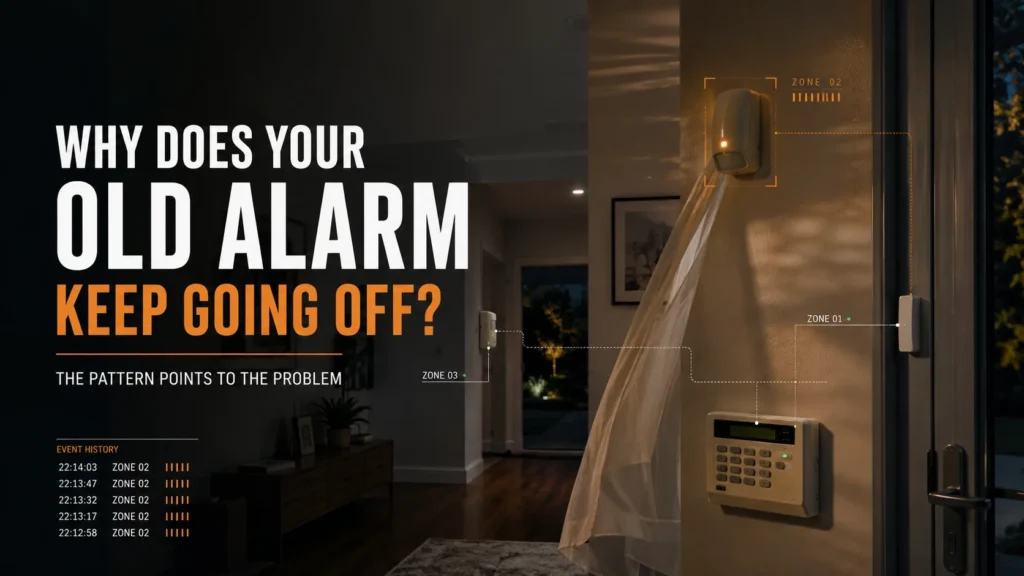
Your alarm worked normally for years. Now it’s setting off at night, or one particular zone keeps tripping, or the problem only seems to happen under certain conditions. It’s tempting to assume the system is simply old and wearing out. But the useful question isn’t “how old is the alarm?” It’s “what exactly keeps triggering?”
Age alone doesn’t diagnose the problem. Repeated false alarms usually need to be narrowed down by pattern: one zone points to a local issue worth inspecting, several unrelated zones call for a broader look, a repeatable condition points somewhere else again, and some “alarm problems” turn out to be communication faults rather than intrusion false alarms at all.
A homeowner might describe all of this as “the alarm going off,” but a detector picking up motion, the system logging an alarm event, that event being reported to a monitoring company, and a possible response from that report are four different links in a chain — and the fix depends on which link the problem is actually in.
Why Age Isn’t the Diagnosis
An alarm doesn’t become faulty because it crosses a birthday. What actually happens is that, over the years an older system has been in place, more things around it have had time to change:
- Detector condition, contamination or obstruction.
- Door and window contact alignment.
- Battery condition in wireless devices.
- Wiring and connections.
- Room layout and furniture.
- Pets and daily household routines.
- Heat, sunlight and airflow around a detector.
- The communication infrastructure the system reports through.
None of these is guaranteed to happen, and none of them is caused by age itself — age is simply the amount of time available for any of them to happen. As our guide on how long a home alarm actually lasts covers in more depth, different components and dependencies reach their own limits on their own timelines — there’s no single clock the whole system runs on. Queensland Police’s guidance on electronic security alarm systems lists old equipment alongside a long run of other possible causes — insects, pests and pets, power failure or surges, telecommunications failure, poor or incorrect installation, storms, inadequate maintenance, objects hanging in front of a sensor, drafts, and user error. Old equipment is one item on that list, not the determining one, and it isn’t ranked above the others.
The Pattern Tells You Where to Look
This is the part that actually narrows things down. What matters isn’t the alarm’s age — it’s which zone is triggering, and under what conditions.
The Same Zone Keeps Triggering
If the same zone triggers repeatedly, that’s a reasonable place to start checking — not a confirmed diagnosis. Worth looking at:
- The condition of that specific detector, and whether it’s contaminated or obstructed.
- Whether a door or window contact has drifted out of alignment.
- A local environmental trigger specific to that spot.
- The connection or wiring at that point.
- Battery status, where relevant.
The alarm itself may not have changed — the door, the room, or the environment around that one sensor may have. A door that’s swung and closed the same way for a decade can still shift out of tolerance as the frame moves with the seasons, without the alarm doing anything differently at all.
Different Zones Trigger at Different Times
When unrelated zones are setting off the alarm at different times, the sensible response is to widen the diagnosis — not to jump to a conclusion about the panel. Worth checking:
- Recent event history across the system.
- Power condition.
- Communication status.
- Wiring, where the system is wired.
- Whether several components are separately showing signs of a fault.
Multiple zones being involved doesn’t mean the panel is failing. It means the problem probably isn’t sitting in one detector, and the check needs to cover more ground before landing on a cause.
It Happens Under the Same Conditions
This is often the most relatable pattern. Sometimes nothing inside the alarm has failed at all — the environment the detector sees has changed. Common repeatable conditions include:
- The same time of day, every time.
- Direct sunlight moving across a detector.
- Heating or cooling turning on.
- Curtains or objects moving in the detection zone.
- A pet’s routine.
- A door or window moving in the wind.
- A recently changed room layout.
If contamination on or around a detector is visible, it’s worth checking as part of the diagnosis. Its effect depends on the detector and the type of contamination, so it should be assessed alongside the other conditions around that zone.
It May Not Be an Intrusion False Alarm at All
Sometimes what’s being described as “the alarm going off” is actually a communication or supervision issue rather than an intrusion trigger. Victoria Police’s official guidance on alarm responses draws a distinction here: it will not respond to alarms caused by power failures or telephone and broadband outages, and it’s the monitoring company’s responsibility to establish whether an infrastructure failure caused the alarm before requesting a police response. If a system is reporting a trouble or fault condition rather than a genuine intrusion alarm, that’s a different problem with a different fix — not something to diagnose the same way as a motion-triggered false alarm, and not something more hardware-swapping will necessarily resolve. This is also the category that covers a system whose reporting path has quietly stopped working after external infrastructure changed underneath it — our guide on whether Australia’s 3G shutdown affected your alarm walks through how to check.
What Actually Fixes Repeated False Alarms?
Once the pattern points somewhere, the level of fix should match what the diagnosis actually shows — not the age of the system.
1. Adjustment or maintenance. Cleaning a detector, correcting its placement, realigning a contact, adjusting configuration, or correcting a household condition that’s been triggering it. Where one of those conditions is the identified cause, adjustment or maintenance may resolve the problem without replacing hardware.
2. One component. Where the diagnosis clearly isolates a specific detector, contact, connection, or — where it’s actually been diagnosed rather than assumed — a battery, the fix is to repair or replace that one part.
3. Partial modernisation. Sometimes one part of the system, or one part of how it communicates, no longer has a practical path forward, while the rest of the system is still perfectly serviceable. In that case, replacing the affected part alone can make more sense than starting over — see our guide on parts availability for discontinued alarm systems for how to check whether that’s realistic before assuming otherwise.
4. Wider replacement. This becomes the sensible option when the pattern is broader than one repair can address — recurring unrelated faults across different parts of the system, several components needing attention at once, a communication path that’s become obsolete, or a parts and support situation that keeps narrowing the options. There’s no fixed rule for when this point is reached — it’s a conclusion the diagnosis leads to, not a threshold tied to a number of years or repairs.
When Another Repair Stops Being the Real Fix
A single failing contact may only need repair or replacement. A contaminated or misaligned detector may only need cleaning, adjustment or repositioning.
But if unrelated faults keep turning up in different parts of the system, or if the same repair keeps needing to be redone because something else behind it hasn’t actually changed, that’s a sign the fault pattern has stopped being local. At that point, the question shifts from “what’s wrong with this one part” to “what does the system as a whole need” — and that’s worth a proper assessment rather than another isolated repair. A residential alarm assessment can look at the panel, detectors, wiring and communication path together, rather than one symptom at a time. If you’re weighing up whether another repair is still the right call, our guide on the hidden costs of keeping an old alarm alive covers what a repair does and doesn’t settle in more detail.
What Changes With a Modern, Correctly Configured System
A newer platform doesn’t guarantee zero false alarms — nothing does. What can genuinely change is how clearly an event is identified, monitored and verified once it happens.
What changes with a modern, professionally installed system:
- You can see which specific device or zone triggered, rather than just “the alarm”.
- Device status and communication can be continuously monitored rather than discovered after the fact.
- A weakening battery can be flagged months in advance instead of surfacing as a surprise fault.
- Some detectors can attach a photo to the alarm event, helping distinguish a pet-triggered event from a possible intrusion.
- Detector settings can be matched more precisely to the property and its pets, rather than left on a generic default.
Ajax is one current example of a platform built around these functions. Its motion detectors combine lens design with a software filtering algorithm — Ajax calls it SmartDetect — to help tell human movement apart from pets and thermal noise, and the system continuously reports device and communication status back to the app, including a warning when a battery is weakening, well before it becomes a fault. Compatible detectors can also attach a short photo sequence to a triggered alarm — Ajax’s Australian distributor documents this as arriving within about nine seconds — so the user or monitoring operator has visual information to help assess what triggered the alarm rather than relying on the event notification alone. Pet immunity on these detectors is rated for animals up to around 20 kg and 50 cm in height, and Ajax is explicit that this depends on the detector being correctly installed and configured — it isn’t an unconditional guarantee, and it isn’t the same as saying the detector won’t ever react to a pet.
None of this means a modern system won’t ever false alarm. It means that when something does trigger, there’s more information available to work out what actually happened, rather than just a siren and a guess.
If a false alarm keeps triggering and the cause isn’t obvious, SIPKO can check the event pattern, the zones involved, detector placement, power and communication status, and the condition of the existing system before recommending a next step. Sometimes the answer is one adjustment or one component. Sometimes broader modernisation genuinely makes more sense. Either way, the point is to diagnose the cause before choosing the scope of the fix.
FAQ
Why does my old house alarm keep going off for no reason?
“For no reason” usually means the cause isn’t obvious yet. The trigger pattern — the same zone, different zones, a repeatable condition or a communication fault — gives you a practical place to start narrowing it down.
Does a false alarm mean the alarm panel is failing?
Not necessarily. A false alarm can originate from a single detector, contact, environmental condition, connection or another part of the system. Even activations across different zones only mean the diagnosis needs to widen — not that the panel has failed.
Can one faulty sensor keep setting off the whole alarm?
Yes. A single detector or contact can be the entire source of a recurring false alarm. Confirming that usually means checking event history and testing the specific zone rather than assuming it from the pattern alone.
Can an old alarm system be repaired instead of replaced?
It can be, where the fault is genuinely localised and parts or support for that system are still available. That’s exactly what a proper diagnosis is for — working out whether repair is realistic before replacement is even on the table.
Will a new alarm system stop false alarms completely?
No. A modern system can improve identification, supervision, verification and configuration — but it doesn’t eliminate every possible cause of an unwanted activation. The honest answer is that better tools help you understand and reduce false alarms, not guarantee none will ever happen.


