Dahua vs Reolink Security Cameras: Professional CCTV vs DIY Budget Systems
Dahua vs Reolink: Choosing the right surveillance infrastructure for your Melbourne property requires clarity on forensic capability and ease of use.
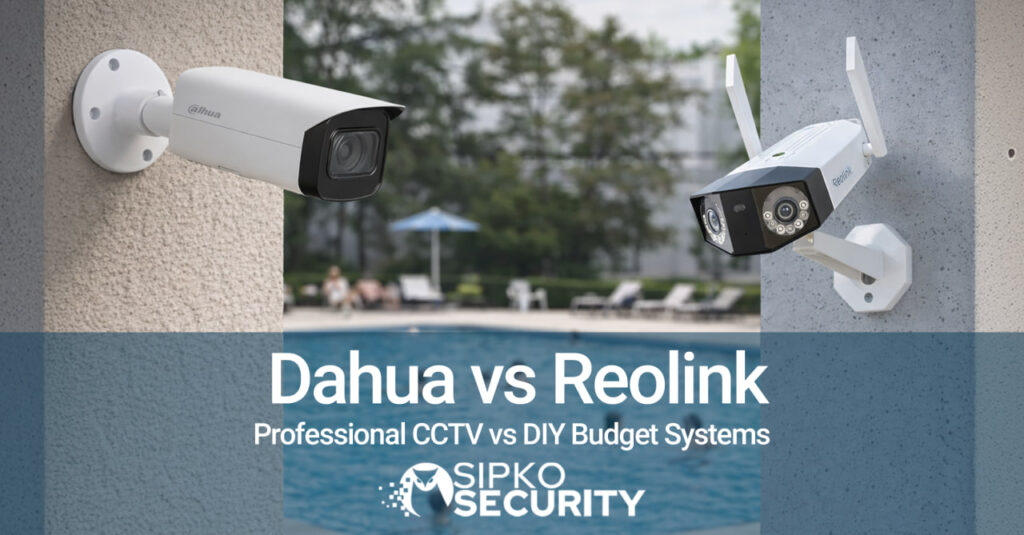
Comparing Dahua vs Reolink: Professional industrial design vs consumer-grade accessibility.
Introduction: The Reality of Dahua vs Reolink
Many of the calls we get start the same way. Typically, someone has watched YouTube reviews and seen five‑star ratings. Consequently, they want a straight answer on Dahua vs Reolink. The specs look similar. However, the prices are a long way apart. Therefore, it is easy to assume they are close substitutes.
In reality, they are not. Dahua and Reolink are built for different jobs. Specifically, Dahua sits in the professional CCTV space. You see these in warehouses and high‑end homes. Reolink, on the other hand, focuses on budget DIY gear for regular households.
At SIPKO Security, we sit in the middle of this question every day. We design systems across Melbourne. Often, we see what happens when cheap cameras are pushed too hard. Furthermore, people often overpay for features they never use. Residential break‑ins in Melbourne rose by 8.2% recently. Thus, your choice in Dahua vs Reolink matters significantly.
“ Security consultants often say, “You cannot protect what you cannot clearly see.” This holds true for the Dahua vs Reolink choice. — SIPKO Security Installation Principle
This guide compares Dahua vs Reolink based on performance. We look at image quality and night vision. Additionally, we cover installation rules and long‑term cost. Our aim is simple. We help you choose the right system for your property.
Head-to-Head Comparison: Dahua vs Reolink
Differences in Use Case for Dahua vs Reolink
The biggest difference is who they are built for. Indeed, Dahua vs Reolink is a professional vs consumer battle. Dahua is a global leader in professional surveillance. Its gear is designed for long hours. Furthermore, it handles harsh weather across complex sites. Think industrial estates or shopping strips.
Alternatively, Reolink targets regular consumers. Specifically, they want something affordable and simple. The focus is easy menus and wireless options. It is not about deep AI menus or advanced networking. Consequently, professional grade does not mean “better for everyone”. It simply means “built for heavier use”.
At SIPKO Security, we use a four‑step process. First, we walk the property. Then, we discuss real risks. Afterward, we design the system. Finally, we quote clearly. This ensures the Dahua vs Reolink outcome matches what the site actually needs. Similarly, check out our guide on Dahua vs Swann for more context.
Image Clarity When Comparing Dahua vs Reolink
When people compare Dahua vs Reolink, they often focus on resolution. Both brands offer 4K. However, resolution is only one piece. Sensor quality and processing matter far more. This is especially true when lighting is less than ideal.
The Dahua Level
Dahua uses higher grade sensors. Specifically, they provide deeper detail and better colour. Consequently, on a dim side alley, Dahua keeps clean edges on faces. This is crucial for forensic evidence.
The Reolink View
Reolink performs well in good daylight. Specifically, watching parcel deliveries is usually fine. However, problems show up at night. Motion “ghosting” is common here. Subjects often look smeared.
Indeed, this gap really matters after an incident. With Dahua footage, you can often pause and read a plate. With cheaper cameras, you sometimes only confirm presence. Therefore, if you need forensic clarity, the Dahua vs Reolink choice leans towards Dahua.
Night Performance: A Dahua vs Reolink Benchmark
Most Melbourne break‑ins happen at night. Thus, night performance is vital for the Dahua vs Reolink comparison. Dahua cameras use advanced infrared lighting. Furthermore, they feature better low-light sensors. Consequently, they produce clear images in near darkness.
In contrast, Reolink offers colour night vision on many models. These look impressive in quiet backyards. However, motion blur is common once someone runs. At SIPKO Security, we often see this frustration. Clients ask us to “clean up” blurry footage. Often, the data was never captured. Therefore, night time is where Dahua vs Reolink quality shows its true value.
Smart AI Features for Dahua vs Reolink Systems
Smart features are another big gap. Dahua’s WizSense range brings serious AI tools. Specifically, they distinguish people and cars accurately. Furthermore, you can set virtual lines for perimeter protection. This is ideal for busy Melbourne settings. You do not want alerts for every passing truck.
Conversely, Reolink takes a simpler path. Most models support basic motion detection. Alerts go to an easy phone app. For a standard home, this is usually enough. Nevertheless, setup for Dahua needs more care. Therefore, we configure only the AI functions you actually use. This keeps the Dahua vs Reolink experience streamlined.
Installation Rules for Dahua vs Reolink Kits
Reolink is built for DIY. Many models are wireless or solar. This makes them attractive for renters. In contrast, Dahua is professional. Most systems use Power over Ethernet. Designing cable paths takes more skill.
⚠️ Important Requirement
In Australia, permanent cabling must be installed by a licensed cabler. This includes Ethernet runs for PoE cameras. Consequently, at SIPKO Security, our technicians are TAFE trained. This ensures your Dahua vs Reolink installation is legal and safe.
A standard Melbourne home install takes most of a day. This ensures protected cables and secure mounts. We also see DIY jobs with exposed cables. Often, these lead to early failures. Therefore, professional setup adds value to the Dahua vs Reolink investment.
Scalability: Why Dahua vs Reolink Matters for Growth
Scalability is a key part of the choice. Dahua NVRs come in different channel counts. Specifically, you can grow from four to eight cameras easily. Reolink can grow to a point. However, it is better suited to fixed‑size setups. Managing separate Reolink systems for several shops becomes messy. Thus, for multi‑site businesses, Dahua vs Reolink favors Dahua.
Calculating Value: Dahua vs Reolink Over Time
Price is the first thing people notice. A typical Reolink kit might cost $400. In contrast, a 4‑camera Dahua system installed often lands between $2,500 and $4,000. Over ten years, the picture changes. Specifically, budget cameras tend to have a shorter life. Many consumer systems last five years. Dahua cameras often run fifteen years. Therefore, the Dahua vs Reolink long-term cost is closer than it looks.
Storage Choice for Your Dahua vs Reolink System
Dahua is built around NVRs with large hard drives. These sit in a safe spot. Furthermore, they record every camera continuously. Reolink offers mix‑and‑match options like SD cards. Local NVR storage gives strong control. Data stays on the property. Additionally, there are no mandatory bills. This is a critical factor in the Dahua vs Reolink decision for businesses.
Suitability for Melbourne: Dahua vs Reolink Durability
Melbourne’s weather is tough. Specifically, salt air and high UV wear down plastics. Dahua cameras use metal housings and higher grade protection. Consequently, they keep dust and water out better. Reolink gear is fine for standard use. However, on beachfront balconies, wear is faster. Thus, Dahua vs Reolink durability differs by environment.
When to Choose Dahua
- Ideal for commercial and industrial sites.
- Best for multi‑site businesses with central control.
- Required for high‑value residential estates.
- Excellent for long-term reliability (15 years).
When to Choose Reolink
- Perfect for standard suburban front doors.
- Great for renters needing portable units.
- Suitable for small shops on tight budgets.
- Useful for off-grid sheds needing solar.
Expert Guidance on Dahua vs Reolink
Our role is not to push one brand. Specifically, we match gear to the site. We work with professional brands like Dahua and Hikvision. Additionally, we use Ajax for alarms. Our process ensures you get what you need. Consequently, all installs are backed by TAFE qualified technicians. This ensures Dahua vs Reolink peace of mind.
Final Evaluation: The Best Dahua vs Reolink Path
Ask yourself: What is the goal? Is it monitoring or identification‑grade evidence? What is your budget? If the site counts high-value stock, professional CCTV is safer. Therefore, the Dahua vs Reolink choice should be strategic, not just financial.
Custom Dahua vs Reolink Security Assessment
Contact SIPKO Security for a site assessment. We will design a customized security blueprint using installer-grade technology. Dahua vs Reolink expertise is our specialty.
📞 Call SIPKO Security: 0406 432 691
Dahua vs Reolink Frequently Asked Questions
Can I Mix Cameras in a Dahua vs Reolink System?
Specifically, both support ONVIF. However, mixed systems are harder to manage. Smart features often do not line up. We recommend sticking to one ecosystem. Alternatively, use a universal NVR like Ajax.
Is Professional Install Needed for Dahua vs Reolink?
Dahua requires professional setup. Specifically, cable management is key. Reolink offers DIY kits. However, permanent cabling in Australia must be licensed. Consequently, we often help with technical setup for both.
Are Dahua Cameras Banned in Australia?
No, they are not banned for private use. In fact, they are a trusted leader. While government policies vary, they remain widely installed. Specifically, they are prized for reliability and AI features.
Sources and References for Dahua vs Reolink
- AU Cyber Security Centre (ACSC) – Guidelines for securing IoT and home devices.
- Victoria Police – Crime prevention resources and safety statistics for Melbourne.