

A cleaner had the code for two years. A nanny used it last summer. Three trades had access during a renovation. The gardener still comes every fortnight. Then one of those relationships ends.
What exactly gets removed?
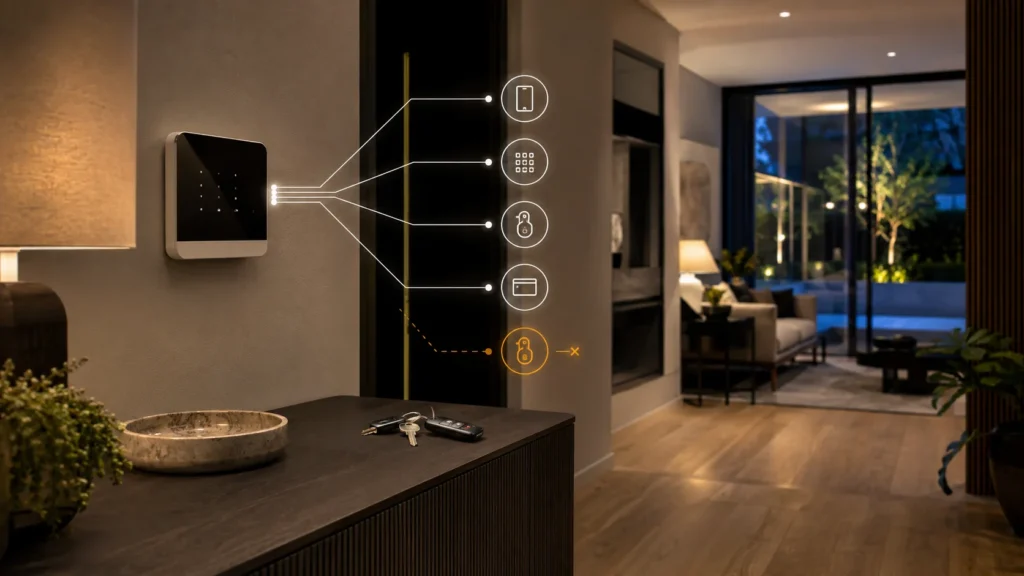
When someone’s role around the home changes, review:
- their alarm code or personal user
- any Pass, Tag or fob they were issued
- app access on their phone
- gate or garage remote
- physical keys
- any shared credential they still know
Access is easy to grant. It only becomes well managed when it’s equally easy to revoke.
Giving Access Is Easy. Removing It Cleanly Is the Hard Part
Most household access starts for a perfectly ordinary reason. A cleaner needs to get in on a set day. A nanny needs to disarm the system without waking anyone. A builder needs the front door open for a few months. None of that is a problem when it’s issued.
The problem shows up later — when the cleaning company rotates staff, the nanny moves on, the renovation finishes, or the house sitter hands the keys back. The relationship changed. The credential they were given doesn’t always change with it.
That raises the real question at the centre of this: can one person’s access disappear without changing everyone else’s?
One Shared Alarm Code Creates Two Separate Problems
If several people use the same keypad code, two distinct issues follow — one about knowing what happened after the fact, and one about undoing access cleanly when it’s no longer needed.
Attribution. With a shared, general keypad code, the system knows the code was used to arm or disarm — not which of the several people who know it actually did it. Individual credential. With a personal user code, or a keypad access code assigned to a specific person, the event feed shows a named identity instead.
Revocation. If one person who knows a shared code no longer needs access, there’s no way to remove just their knowledge of it. If you want to ensure that person no longer knows a valid shared credential, the shared code has to be changed — which means everyone else using it needs the new one too. With an individual credential, one person’s access can be disabled without touching anyone else’s at all.
A shared code is simple to hand out and awkward to unwind. The more people who know it, the more disruptive it becomes to change.
Quick Reference: Shared Code vs. Individual Credential
Personal Access Changes the Offboarding Problem
Ajax systems don’t have to rely on one general keypad code. A registered household member can set their own personal user code, and Ajax also supports a separate “keypad access code” for people who aren’t full system users — Ajax’s own documentation gives creating a code for a cleaning company as a direct example of when this is useful.
That matters here specifically because it maps onto the offboarding problem: a credential issued to one person, for one purpose, can be removed on its own when that purpose ends.
It’s not universal across every Ajax installation, though. Keypad access codes require a hub running OS Malevich 2.13.1 or later, and aren’t supported on the older Hub (2G) Jeweller control panel — worth checking against the specific hub before assuming the feature is available.
Can You See Who Disarmed the Alarm?
With the right individual credential, yes. Ajax’s own keypad documentation confirms that when a personal or access code is used, the name of the user is displayed in the hub’s event feed and notifications. When a general shared code is used instead, no individual name is shown.
That’s worth being precise about. An event feed showing who disarmed the alarm isn’t the same as tracking where someone went inside the house, or monitoring their movements. It’s about distinguishing one authorised access event from another — not surveillance of household staff.
Scheduled Access: Useful When Access Should Only Exist at Certain Times
This is one of the more specific things Ajax supports, and it maps directly onto recurring household roles. Ajax’s own support documentation describes exactly this use case: a cleaning company servicing a private household can be granted access only on, for example, Sundays from 1:00 p.m. to 6:00 p.m.
The scenario can be configured with specific days, start and end times, and up to five separate time ranges. It can be disabled without deleting it entirely, which is useful if a schedule changes temporarily rather than permanently.
Worth being precise here too: this restricts when the alarm credential is valid. It doesn’t physically prevent someone from entering the property outside that window if they hold a key or another way in — that’s a separate layer, covered below.
Different People Need Different Levels of Access
The useful question isn’t “do they get the code?” It’s what this specific person actually needs to control, and for how long.
- Cleaner — recurring access at predictable times.
- Nanny — frequent access, potentially broader control over the alarm.
- Gardener — may only need access to specific external areas, not the whole system.
- Builder or trade — temporary, project-based access.
- House sitter — temporary, but potentially broad access while it lasts.
Ajax’s account structure supports this kind of differentiation: users can be set up as admins with full rights, admins without configuration rights, or standard users, and access can additionally be restricted to specific groups rather than the whole property — so a user’s alarm-control permissions can, where the system is designed around groups, be limited to the relevant group rather than the whole system.
What Should Happen When Someone Leaves?
This is the checklist that matters most. The moment someone’s role ends doesn’t come with an obvious prompt to review what they could still get into, which is exactly why it’s worth making a deliberate step rather than something that happens by chance.
When a cleaner, nanny, contractor or house sitter no longer needs access:
- identify every alarm credential that was assigned to them
- disable or delete their user or access code
- block their Pass or Tag if one was issued
- review their app and user permissions
- check any group-specific permissions they held
- review whether a scheduled access scenario needs to be removed
- separately review physical keys, gate remotes and garage credentials
- confirm that remaining household users are unaffected
None of this needs to feel like an interrogation. It’s the same basic hygiene any organisation applies when someone’s role changes — just applied to a household instead of an office, and worth doing consistently rather than only when something goes wrong.
Alarm Access Is Not the Same as Physical Access
This is worth stating plainly, because it’s easy to assume otherwise. Removing someone’s Ajax credential does not make an old physical key disappear.
Alarm access covers the arm/disarm code, Pass or Tag, app login, event attribution and any schedule attached to it.
Physical access covers keys, gate remotes, garage remotes and anything that opens a door regardless of what the alarm system knows about it.
A clean alarm offboarding process can still leave an old key or gate remote active. Reviewing alarm credentials and reviewing physical access are two separate steps, not one.
The Bigger the Access List, the More This Becomes a System-Design Problem
A household where only two residents ever disarm the alarm can usually get by with a simple setup — one code, one habit, nothing to review. A household with a cleaner, a nanny, a gardener, occasional trades and a family that travels has a genuinely different management problem: more legitimate users, more comings and goings, more moments where access should change but might not without someone actively checking.
That’s not a claim that more staff means more risk, or that a bigger property is inherently less secure. It’s that more legitimate users create a management problem that a single shared code was never designed to handle well, regardless of how trustworthy any individual person is.
What This Looks Like in a Properly Configured Ajax System
Put together, the pieces map fairly directly onto the problem this article opened with.
Individual identity is handled through a personal user code or a keypad access code. Attribution comes from the event feed showing a named user rather than just “keypad.” A recurring need at fixed times can be handled with scheduled access. Different roles can be handled through admin/standard user levels and group-specific permissions. When someone leaves, their specific credential is revoked — not the whole household’s code. A lost Pass or Tag can be blocked individually rather than forcing everyone to learn something new.
None of that happens automatically, though. Ajax only solves this cleanly if the access model is actually configured that way.
One shared household code on a modern Ajax system recreates exactly the same problem a basic panel would have.
Getting the Access Model Right
This article can explain the mechanism — shared versus individual, attribution, scheduling, revocation, physical versus alarm access. What it can’t do is design the actual access model for a specific household: which people need which roles, which hub supports which features, or how alarm access should line up with keys and gate credentials that sit outside the system entirely.
SIPKO Security installs and configures Ajax alarm systems across Melbourne, including designing the user, credential and permission structure around exactly this kind of household — not just fitting the equipment, but setting up individual users, schedules and groups so the system actually manages access the way it’s meant to. If you’re specifically choosing a system because a cleaner, nanny or gardener needs regular access, our guide to picking an alarm for a home with regular household visitors covers that side of the decision.
Frequently Asked Questions
Should my cleaner have their own alarm code?
It’s generally cleaner than a shared code. A personal or access code lets you see when it’s used and revoke it on its own if the arrangement ends, without changing anyone else’s code.
Can Ajax show who disarmed the alarm?
Yes, if a personal user code or a keypad access code was used — the event feed shows the name. A general shared keypad code doesn’t identify which individual entered it.
Can an Ajax access code work only at certain times?
Yes, through scheduled access, which can restrict a credential to specific days and time windows. This applies to the alarm credential specifically, not physical entry to the property.
What should I do when a cleaner, nanny or contractor no longer needs access?
Disable their alarm credential, block any Pass or Tag they held, review their permissions, and separately check whether they still have a physical key or gate remote.
Does removing an Ajax code also remove physical access to the house?
No. Alarm credentials and physical access — keys, gate remotes, garage remotes — are separate. Removing one doesn’t remove the other.



