

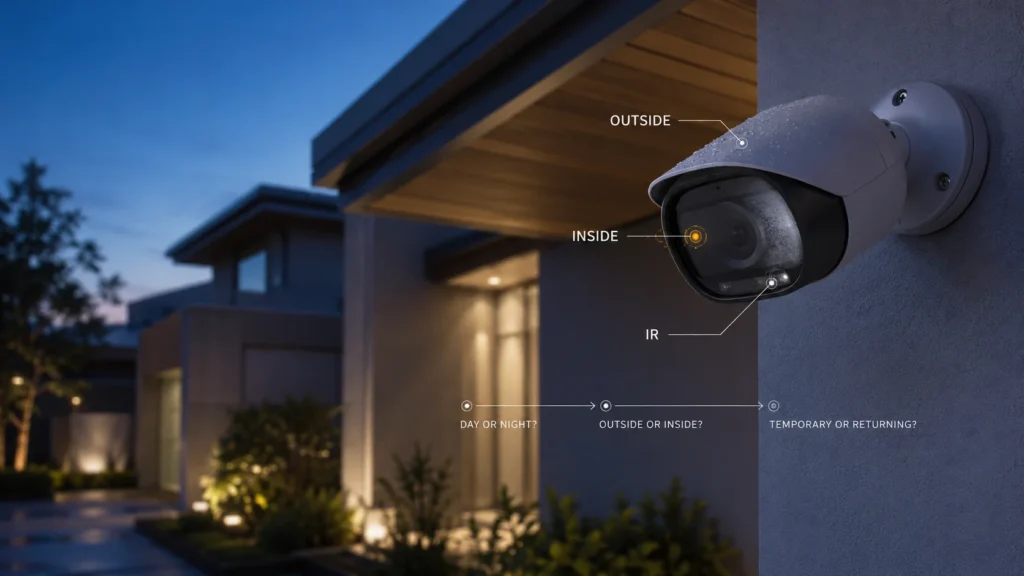
One camera that used to give a clear, sharp image suddenly looks as though someone breathed across the lens. The footage is soft, milky, sometimes almost unusable. Is the lens dirty? Is there moisture inside? Is the camera just getting old?
A cloudy picture tells you what the image looks like. It doesn’t yet tell you what has failed.
External dirt, condensation on the outside of the housing, moisture that has actually got inside the enclosure, and infrared light reflecting back into the lens at night can all produce a similar-looking blur on screen — but they point to different problems and different next steps.
Before assuming the camera needs replacing, check three things:
- Is it cloudy during the day, or only when night vision turns on?
- Can you see moisture on the outside, or does it appear to be behind the cover?
- Does it disappear as conditions change, or keep coming back?
Those three observations narrow the problem down far more usefully than starting with the camera’s age.
Is the Camera Actually Fogged, or Does the Image Just Look Foggy?
“Foggy” footage doesn’t always mean fog, or even moisture. Dirt, dust, spider webs and water droplets sitting on the outside of a dome or lens cover can all scatter light in a way that reads as a soft, hazy image — especially once infrared illumination is involved. Axis Communications’ technical guidance on dome camera reflections describes exactly this: contamination on the dome surface, and even the camera’s own infrared light bouncing off nearby objects, can degrade image quality in ways that look like internal fogging without any moisture involved at all.
What looks like fog in the footage may not be fog on the lens. That’s the first fork in the diagnosis, worth ruling out before assuming anything is wrong inside the camera.
If It Looks Fine During the Day but Foggy at Night
This is a particularly misleading pattern, because it’s easy to assume moisture the moment the picture degrades. A camera that records cleanly all day can turn hazy or washed-out the moment its infrared LEDs switch on.
The mechanism is optical, not necessarily moisture. Once IR light activates, it can reflect off dust, spider webs, droplets or the inside of the dome itself, and that reflected light gets picked up by the sensor. Axis’s guidance describes several triggers: nearby reflective surfaces such as walls or eaves, contamination on the dome, and light leaking around the seal where lens meets housing.
Check the pattern before blaming moisture:
- Is daytime footage clear?
- Does the haze appear specifically when IR or night mode activates?
- Is the external window or dome visibly clean and dry?
- Are there droplets, dust or webs close to the lens or IR emitters?
Night-only haze isn’t evidence by itself that water has entered the camera. It’s a separate diagnostic branch, usually solved by addressing what’s on or near the dome — not by opening the enclosure.
Is the Moisture Outside or Inside the Camera?
If cleaning the exterior doesn’t explain what you’re seeing, the next question is where the moisture actually is.
Outside the enclosure, condensation can form on the housing when warm, humid air meets a cooler surface — a cold morning after a warm night is a common trigger. This is external weather behaviour, not a sign anything has gone wrong with the camera, and it typically clears as conditions change.
Inside the enclosure is different. Swann’s support documentation draws a useful line: condensation shows up as a foggy patch that tends to clear once the surrounding temperature warms, while water ingress shows up as droplets that can’t be wiped away because they’re behind the cover, on the inside. If you can see moisture behind the lens or dome that stays put no matter what you do outside, that’s the internal case.
Even then, visible internal moisture doesn’t automatically prove an established camera has developed a sealing fault. Hanwha Vision’s own installation guidance documents that some moisture on the lens right after a new camera is powered up is expected — the desiccant inside can release absorbed moisture as the unit warms — and this typically clears within two to three days without being a defect.
This is specific manufacturer guidance about a documented installation scenario — not a universal instruction to ignore internal moisture for three days regardless of the camera or the circumstances.
Temporary Moisture and Moisture That Keeps Returning Are Different Clues
Not every case of internal moisture means the same thing, and timing matters as much as location.
Temporary, installation-related moisture — the kind described above — is documented, expected behaviour in some cameras shortly after setup, and it’s reasonable to give it a few days before treating it as a fault.
Moisture that keeps returning in a camera that has otherwise been dry and working for months or years is a different clue. Wiping the outside won’t explain it, and waiting a few more days isn’t really diagnosing anything. The question shifts from “how do I clean the image” to “how is moisture getting into, or staying inside, the enclosure.”
Repeated internal fogging is a reason to investigate how the enclosure is managing moisture — not proof of one specific failed component. It could relate to the original installation, a cable entry point, or the enclosure itself, and working that out generally needs a physical look at the camera rather than another round of forum troubleshooting.
Where Can Moisture Get Into an Outdoor Camera?
Outdoor cameras aren’t sealed as a single solid block. Depending on the design, weather protection typically relies on several separate points working together:
- the join between the housing and the dome or front cover;
- rubber gaskets at these joins;
- the cable entry point and the connector itself;
- any plugs or covers over unused ports.
Axis’s own accessory range — sealed push-pull network connectors and gaskets built specifically to keep moisture out at the cable entry — illustrates the principle: weather resistance depends on all of these points being intact and correctly installed as a system, not just on the enclosure itself. Specific sealing arrangements differ between models, so this is a description of the kind of points worth checking, not a parts list that applies identically everywhere.
“But My Camera Is IP66 or IP67”
It’s a fair objection, and worth addressing directly: IP66 and IP67 ratings describe how a camera performed against a specific, defined ingress-protection test — dust and water-jet resistance for IP66, dust and temporary immersion for IP67. That’s a real, tested standard, not a marketing term.
What they don’t describe is how the camera holds up over years of installation, weather exposure and physical wear. Swann is explicit about this in its own support material: an IP rating doesn’t guarantee protection is maintained indefinitely under prolonged exposure, and mounting a camera outside the conditions set out in its manual can affect that protection — and the warranty.
IP66 or IP67 doesn’t end the diagnosis. The rating describes ingress protection under defined conditions; the ongoing condition and installation of the enclosure still matter.
Does Camera Age Matter?
Age can be relevant, but age itself isn’t the diagnosis.
What matters more is the physical condition of the enclosure: whether the dome or window has scratches or cracks, whether fixing screws are still tight, and whether gaskets are still correctly seated. Axis’s own preventive maintenance guidance for its cameras makes this connection directly: a damaged dome cover or loose fixings can affect the camera’s ingress protection, which is why the guidance recommends inspecting — and where needed replacing — these parts, rather than assuming the rating holds automatically for the camera’s whole working life.
The practical question isn’t simply how old the camera is. It’s whether the enclosure still has the integrity it was designed to have.
Quick Reference: What You’re Seeing vs. What to Check First
Should You Open the Camera and Dry It Out?
Not as a universal first step. Enclosure designs differ between models, sealing often depends on correct reassembly, and opening a housing not designed for easy access can let in more humidity than it removes. Desiccant, vents and drying procedures are also model-specific — what one manufacturer recommends doesn’t necessarily apply to another.
Reasonable first checks:
- inspect and clean the outside per the manufacturer’s guidance;
- compare daytime and night-time footage;
- photograph any visible internal moisture so you have a record;
- note whether it clears on its own or keeps coming back;
- identify the exact camera model before doing anything else.
Don’t treat these as universal fixes, since none are standard manufacturer procedure for every model:
- opening a sealed outdoor enclosure;
- using a hair dryer on the housing;
- anti-fog sprays or chemicals inside the camera;
- silicone applied around random seams;
- adding or replacing desiccant without checking the manual.
This isn’t about any single action being inherently dangerous — it’s that no one procedure applies safely to every camera on the market.
Clean, Service or Replace?
Once you know roughly what you’re looking at, the decision usually falls into one of three groups.
Clean or simply observe it when the evidence points to external contamination, external condensation, IR reflection, or a documented temporary installation scenario like the Hanwha example above.
Get it serviced or investigated when internal moisture persists or keeps returning, the enclosure’s condition is genuinely in question, or cable entry and sealing points need physical inspection rather than a guess.
Replace it when the manufacturer doesn’t support economical repair for that model, or a proper assessment shows the enclosure, optics or electronics are affected enough to make replacement the sensible option.
How that plays out depends heavily on the brand. Reolink’s own support guidance is upfront that once a camera is out of warranty, shipping and inspection costs for a repair can end up close to the price of a new unit — and the company’s own recommendation, in that case, is to buy new rather than repair. Other manufacturers run a proper fault-assessment process before deciding on repair or replacement. Whether a model can be economically serviced varies by brand, and it’s worth checking against the actual camera rather than assuming either outcome.
There is no universal rule that a foggy camera should be resealed or replaced. Serviceability is model-specific.
Persistent internal moisture can matter for more than image quality, too — one more reason recurring internal fogging deserves a proper look rather than repeated external cleaning.
Getting a Second Opinion
An article can help you work out the pattern — day or night, temporary or recurring, outside or inside. It can’t tell you the physical condition of a specific camera: whether its seals are still doing their job, whether moisture has reached anything sensitive inside, or whether that model is realistically worth servicing.
If the haze on one of your cameras is clearly internal, or keeps coming back, SIPKO Security can assess the system and help work out whether the sensible next step is a correction, a service call, or a replacement — based on the actual camera, not a general rule.
Frequently Asked Questions
Why is my security camera foggy?
Could be external dirt or condensation, moisture actually inside the enclosure, or infrared light reflecting off something on or near the dome. The image alone doesn’t tell you which — the pattern of when and where it happens does.
Why is my security camera cloudy at night but clear during the day?
A documented cause is infrared light reflecting off contamination, droplets or nearby surfaces once night mode activates. It’s not, by itself, proof that moisture has gotten inside the camera.
Does an IP66 or IP67 rating mean my camera is waterproof?
It means the camera passed a specific ingress-protection test under defined conditions — not that the same protection is guaranteed indefinitely, regardless of installation, damage or wear.
Can I open my security camera to dry it out?
Not as a general rule. Enclosure design and drying procedures vary by model, and opening a sealed housing isn’t a standard fix for every camera. Check the manufacturer’s guidance for that specific model first.
Should I repair or replace a foggy CCTV camera?
Depends on what’s causing the haze and whether that model is economically serviceable. Some manufacturers run a proper repair assessment; others treat an out-of-warranty camera as a straight replacement.



