

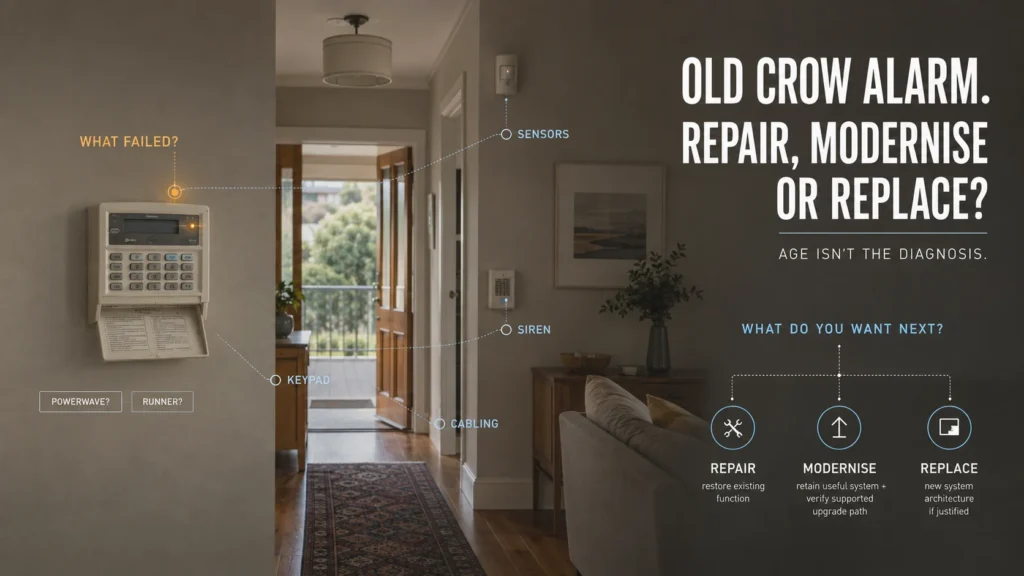
The Crow keypad has been on the wall for years. Now it’s beeping, showing a trouble light, or refusing to behave normally. The obvious question is whether it’s finally time to replace the whole thing — after all, if it’s genuinely old, maybe it’s simply run its course.
Maybe — but age isn’t the first question. Before deciding anything, two things need establishing: which Crow family you actually have, and what exactly has failed. PowerWave and Runner aren’t the same platform, and treating them as one generic “old Crow” misses the details that actually decide whether repair makes sense.
First, Identify Which Crow Alarm You Actually Have
“Crow alarm” isn’t one model. PowerWave 8, PowerWave 16, Runner 8, and Runner 16 are different platforms with different histories, and the exact family matters because current support, diagnostics, and upgrade paths differ between them.
Here’s a genuinely useful, if slightly counterintuitive, fact: Runner still appears in Crow’s current global product catalogue, while PowerWave doesn’t. At the same time, ADT Australia’s current support documentation goes into detailed, model-specific depth for PowerWave 8/16 — trouble codes, keypad functions, full event logs — while its published Crow support doesn’t cover Runner in the same way.
Those two facts point in different directions, and that’s the point. A panel’s position in a manufacturer’s current catalogue and the depth of local support documentation are two separate signals — not being in the current catalogue is not the same as a confirmed manufacturer statement that a panel is discontinued, and having thinner catalogue presence doesn’t mean a panel is unsupported. Both are worth knowing before drawing any conclusions.
A Trouble Light Doesn’t Mean the Whole Crow Alarm Is Dead
PowerWave’s documented trouble indications cover a genuinely wide range of conditions, and the Trouble indicator lighting up doesn’t tell you which one you’re dealing with on its own — you need to read the specific fault, not just notice that something’s wrong. Broadly, these fall into four categories:
- Maintenance/power — a backup battery running low, or a mains-related condition
- Detector/zone — a wireless detector, a supervised detector, or a zone reporting a problem
- Communication/reporting — a telephone line failure, or a dialler failing to complete its report
- Panel/core — possible issues with the control equipment itself; these aren’t inferred from the PowerWave trouble-light table and require separate diagnosis
The fault category changes the repair question. A low battery and a telephone line failure are both “trouble,” but they point to entirely different parts of the system, with entirely different implications for what needs fixing.
What Exactly Has Failed?
Two Crow systems of exactly the same age can need completely different responses, depending on which of these categories the actual fault falls into. None of these categories has one automatic answer — they’re the starting point for the diagnosis, not the diagnosis itself.
What Still Works?
Once the fault is identified, the second question is how much of the rest of the system remains genuinely useful. Worth checking:
- The keypad and its normal functions
- The control panel itself
- Wired zones and detectors
- Sirens
- Wireless devices
- Cabling
- The communication path
- Whether normal arm/disarm functions are still working properly
Don’t assess only the part that failed. Assess how much useful system remains around it. Whether any of this existing infrastructure can actually be retained in a repair or upgrade depends entirely on its specific condition and compatibility — not on the fact that it’s there and currently connected. A wired zone that’s still functioning correctly is a different proposition to one with degraded cabling, and a keypad that responds instantly is different to one with worn buttons or an unreliable display — details that only become clear once someone actually looks, not something to assume either way from the panel’s age.
PowerWave and Runner Aren’t in the Same Position
This is worth spelling out clearly, because it’s the difference between a real Crow-specific assessment and a generic legacy-alarm template.
Runner is still part of Crow’s current global product range. PowerWave isn’t listed there. On its own, that might suggest Runner is simply the better-positioned system. But PowerWave has detailed current Australian support documentation hosted by ADT — model-specific trouble codes, full keypad function references, event-memory tables — while Runner doesn’t appear in that same Australian support library. And both PowerWave and Runner appear together on a current Australian communicator compatibility list (more on that below).
PowerWave looks more legacy-positioned than Runner from Crow’s own current catalogue — but that alone doesn’t mean it has no support or modernisation path. Neither system is simply “the modern one” or “the dead one.” Each has some current-support evidence; it’s just a different kind of evidence for each.
Can the Communication Side Be Modernised Without Replacing the Panel?
This is where it’s worth being precise about exactly what’s been verified, because it’s easy to overstate.
A current Australian panel-compatibility list — reproduced by a monitoring company (JD Security) from Permaconn’s own published compatibility information, dated January 2025 — includes Crow Runner 8, Runner 16, and Powerwave among the panels supported for OTAUDL: Over The Air Upload/Download, meaning remote programming of the panel through a compatible communicator. Other brands on the same list include Bosch, DSC, Honeywell, Paradox, Ness, Risco, and Tecom panels, so this isn’t a Crow-specific accommodation — it’s Crow’s continued presence on a broad, current Australian industry compatibility list.
It’s important to be exact about what this does and doesn’t confirm. It confirms that some Crow installations can still interface with current Australian communicator infrastructure for remote panel programming. It does not confirm a consumer smartphone app, remote arm/disarm from a phone, homeowner-facing live status, or professional monitoring as a standalone claim — those would need their own separate evidence, and none was found for either family in this research.
The practical takeaway is narrower but still useful: specific Crow panels can still interface with current Australian communicator infrastructure for supported functions such as remote programming. What else a particular communicator can add to that installation needs to be verified separately for the exact panel and setup. A technician confirming exactly what a given communicator can and can’t do with a specific panel is a different exercise to reading a compatibility list, and it’s the one that actually matters for a repair decision.
If the fault you’re looking at is a telephone line or dialler-related trouble condition, our guide to what “Comms Fail” and “Line Fault” messages actually mean covers why a communication fault doesn’t automatically mean the control panel itself has failed.
If the Repair Works Perfectly, Will You Still Want the Result?
Here’s a scenario worth sitting with: imagine a technician fixes the exact Crow fault perfectly tomorrow. What system do you actually have afterwards?
It’s worth being honest about what you actually want from the alarm now, not just what it used to do:
- Reliable local alarm operation
- Professional monitoring
- A current communication path
- Additional zones
- A simpler everyday experience
- A smartphone app
- Remote arm/disarm
- Push notifications
On the app and remote-control question specifically: no current manufacturer-documented consumer app path for PowerWave or Runner was verified during this research. That’s a research finding, not a product verdict — it doesn’t mean no such path exists for a specific model or configuration, only that it wasn’t confirmed here. If remote app control genuinely matters to you, the supported options for your exact panel and installed communication hardware need to be checked directly before assuming repair alone will get you there.
A successful repair can restore exactly what the system used to do — but that isn’t automatically the same as giving you what you want from the system now.
If what you want has moved on from what the system was originally built to do, that’s worth knowing before spending money on a repair. Our guide on what an alarm app actually adds covers the remote-interaction question in more depth, including how to work out whether an existing system can gain that capability at all.
Repair, Modernise, or Replace?
Once the fault is identified and the remaining system value is clear, the decision generally falls into one of three categories.
Repair makes sense when the fault is localised, the rest of the system remains genuinely useful, and the repaired result still matches what you actually want from it. This isn’t a rule like “a battery fault always means repair” — it’s a conclusion that follows once the first two questions have real answers.
Modernise makes sense when the core system is worth keeping and a specific limitation has a verified supported path forward for the exact panel and installation. The Permaconn finding above shows that named Crow panels still have current compatibility with communicator infrastructure for OTAUDL remote programming; any additional reporting, monitoring or user-facing capability needs to be confirmed separately.
Replace makes sense when the fault genuinely touches the panel’s core, when several limitations are stacking up together, or when a repair would restore working function but not the outcome you actually want — particularly if a capability like app control or remote monitoring genuinely matters and no suitable supported path exists for that specific installation. This isn’t a decision based on the panel simply being a PowerWave, or simply being old.
Where assessment genuinely points to replacement, Ajax is one current platform SIPKO can design around the property’s actual requirements — not because Crow is obsolete, but because the assessment concluded that a different architecture serves the desired outcome better than continuing to work around the existing one.
SIPKO can identify the exact Crow panel you have, diagnose the actual fault, establish what remaining infrastructure is genuinely useful, and help define what you actually want the system to do next — before recommending repair, communication modernisation, or replacement.
FAQ
Is an old Crow alarm worth repairing?
It depends on the specific fault, how much of the rest of the system remains genuinely useful, and whether the repaired result still matches what you want. Age on its own doesn’t answer this.
What does the trouble light mean on a Crow PowerWave?
It points to one of several documented conditions — battery, mains, telephone line, detector, or zone-related, among others — not a verdict on the whole panel. The specific indicator matters more than the fact that a trouble light is on at all.
Is Crow PowerWave discontinued?
PowerWave isn’t listed in Crow’s current global product catalogue, but no explicit manufacturer end-of-life statement was found in this research. Those are two different things — one is a catalogue observation, the other would be a formal discontinuation.
Can a Crow PowerWave or Runner be upgraded?
Current evidence shows specific Permaconn compatibility for named Crow families on the communication/programming side. Whether a particular installation can be upgraded, and to what extent, depends on the exact panel and configuration — it isn’t a blanket yes for every Crow system.
Should I replace a Crow alarm just because it’s old?
No. Age changes the questions worth asking about a system, but it doesn’t answer the repair-or-replace decision on its own.



