

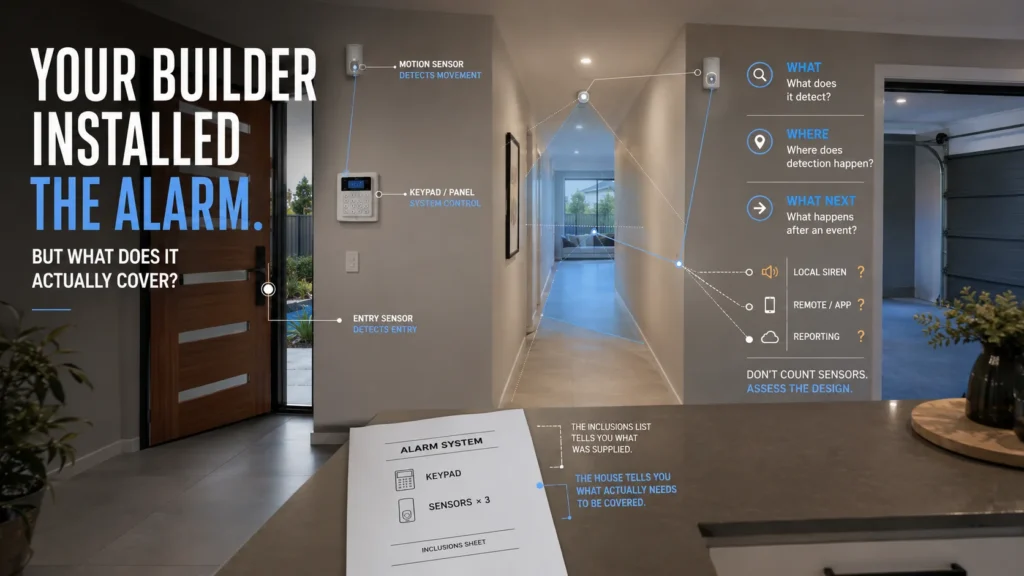
You get the keys to a new home. The inclusions list says “alarm system.” There’s a keypad near the entry and several sensors on the walls. So the security side of the build is finished — right?
Maybe. Builder-installed equipment can be entirely legitimate and perfectly capable — this isn’t about whether your builder cut corners or picked a cheap brand. The real question is simpler and more useful: does the installed configuration actually match the way this particular home needs to be protected?
That’s not something the inclusions list can answer on its own. To work it out, three questions matter more than the brand on the keypad or the number of sensors in the box: what is the system configured to detect, where does it actually detect it, and what happens after it does?
An Alarm on the Inclusions List Isn’t the Same as Knowing What It Covers
Australian builders package security in different ways, and two real examples make the pattern clear.
King Homes NSW’s Premium Living package — a paid upgrade, not a base inclusion — lists a “Bosch 2000/3000 3 Sensor and no remotes” alongside items like a freestanding cooker and a bigger air conditioning system. Security here is a line item you opt into and pay for, bundled with unrelated lifestyle upgrades.
Another builder’s standard inclusions document lists a “five sensor alarm system with 1 x Internal keypad, 1 x Internal siren, 1 x external siren and flashing light” as part of the base build — no upgrade required. It sits under a broader “SECURITY / SAFETY” heading alongside hardwired smoke detectors and the mains safety switch.
Builders can package alarm equipment in different ways — as a standard inclusion or as an optional upgrade — but the inclusion itself doesn’t tell the homeowner how well that installed configuration matches the finished floorplan. That doesn’t mean a packaged system is automatically inadequate. It means an inclusions list and a property-specific security assessment answer different questions: one tells you what was supplied, while the other asks whether that configuration actually suits the home.
An inclusions list may tell you:
- Which panel or alarm type is included.
- How many sensors are supplied.
- Whether a keypad and sirens are part of the package.
- Whether the alarm is a standard inclusion or a paid upgrade.
But that alone may not tell you:
- Which access points those sensors actually cover.
- What each sensor is intended to detect.
- How the zones are configured.
- How the system is meant to work while people are home.
- What happens after an alarm event.
- What expansion or remote capability is available.
Don’t Start With Sensor Count. Start With Detection Strategy
It’s tempting to judge a builder-installed alarm by how many sensors it came with. Three sensors sounds thin; eight sounds thorough. But the number alone doesn’t tell you much, because sensors don’t all do the same job.
Neighbourhood Watch Victoria draws a useful distinction in its own home-security guidance: entry sensors on doors and windows detect when they’re opened or closed, while motion sensors placed in key internal areas detect movement once someone’s already inside. These are different detection roles, not different quality tiers.
Picture a rear sliding door with a contact sensor and a hallway with a motion detector. The door sensor answers “did this specific opening get used?” The hallway sensor answers “is something moving through this space?” Neither is inherently better — they’re designed to catch different moments in a potential intrusion, and a system might reasonably lean on one, the other, or a mix, depending on the layout.
The important question isn’t how many detectors were included. It’s what each one was actually selected to detect.
Where Does the System Actually Detect an Intrusion?
Once you know what a sensor is meant to detect, the next question is where that detection happens — and whether it’s happening in the places that actually matter for this house.
Think through this in terms of design questions, not a checklist to tick off:
There’s no rule that every door and window needs its own contact sensor, and no floorplan-independent answer to how many detection points a house needs. A sensor count starts to make sense once you know what those sensors are actually covering — not before.
A Capable Panel Can Still Be Under-Used
It’s worth separating two things that get conflated: what a panel is capable of, and what a specific installation actually uses.
Bosch’s Solution 2000 and 3000 control panels, for example, support up to 8 or 16 fully programmable zones, STAY and AWAY arming options, and the ability to be partitioned into two separate areas. That’s a genuinely flexible platform. A builder package built around three or five sensors may use only part of what that panel is capable of. That’s not evidence that anything is wrong with the package — it simply shows why the capability of the panel and the configuration actually installed in the house are worth assessing separately.
Panel capability and installed configuration are not the same thing. A well-known, capable panel on the wall doesn’t automatically mean the installation is well-designed for the property — and a smaller sensor count doesn’t automatically mean the panel is under-powered. What matters is whether the configuration that was actually programmed matches what the house needs.
Can You Use the Alarm the Way You Actually Live in the House?
Detection and coverage are one part of the picture. The other is whether the system fits how the household actually uses the home while it’s armed.
Bosch’s Solution 2000/3000 platform supports STAY and AWAY modes specifically for this reason — arming part of the property while people remain inside, rather than an all-or-nothing setup. Think about how a household actually behaves at night: someone might be moving between a bedroom and a bathroom, a teenager might come home late, part of the house might be occupied while another part sits empty for weeks.
Was the installed zone layout configured around how this household actually wants to arm the system while people are still inside? Good hardware can still be inconvenient — or poorly matched to daily life — if the configuration behind it doesn’t reflect how the property is actually used, even though nothing about the equipment itself is faulty.
What Happens After the Alarm Detects Something?
This is the third piece of the framework, and it’s the one most easily overlooked because it isn’t visible on the wall.
An alarm event can lead to several different things, and a builder-installed system might be configured for any combination of them: a local siren and strobe, a notification to a phone, a report sent out over a communication path, or a connection to professional monitoring. None of these is guaranteed just because the panel and sensors are there — and none of them is guaranteed to be missing, either.
For the installed system, it’s worth establishing:
- Is the response local only?
- Is a remote app or user notification available?
- Is external reporting actually configured?
- Is professional monitoring connected?
- What communication hardware or path does the system use?
If the panel works perfectly well from the keypad but offers no way to check on it remotely, that’s a separate question worth its own answer — our guide on what an alarm app actually adds covers exactly that, including whether an existing system can gain that capability without being replaced.
What Should You Check at Handover?
This is the most practical part of the assessment. Before deciding anything needs to change, it’s worth establishing what you actually have:
- Exact panel make and model.
- Number and type of sensors.
- Sensor locations.
- Zone names or a zone map, where available.
- Which entries or areas are actually covered.
- How STAY/AWAY or equivalent modes are configured.
- Internal and external sirens.
- Communication hardware fitted.
- App capability, if any.
- Monitoring and reporting setup.
- User and admin access available to you.
- Manuals or documentation on hand.
- Supported expansion capability.
- Any known prewiring for future alarm additions.
This is an assessment checklist — not a statement that a builder is legally required to provide every item on it. Some of this information may not be readily available, and that’s itself useful to know: it tells you where the assessment needs to start.
One more thing worth keeping in mind. Builder documentation can sometimes group intrusion alarms, smoke alarms and electrical safety equipment under one broad “security” or “safety” heading. They’re different systems serving different purposes, so the presence of one shouldn’t be used to infer anything about how well another was designed or configured.
Does the Builder-Installed Alarm Need Replacing?
Not automatically. Once you’ve actually worked through what the system detects, where, and what happens next, the answer tends to fall into one of four categories.
Keep it. The assessment shows the installed configuration genuinely matches what the property and household need. This is a legitimate outcome, not a consolation prize — a professional assessment can end with “keep it,” and that’s exactly what it should do when the system fits.
Reconfigure it. The hardware is sound, but the zones, user setup, or arming behaviour could be better adapted to how the home is actually used.
Expand it. The existing platform supports additional detection points, communication capability, or app access that simply weren’t part of the original package.
Redesign it. Only when the coverage or capability the household actually needs can’t reasonably be achieved on the existing architecture does a broader replacement make sense.
Where redesign genuinely is the outcome, a modern platform like Ajax is one option worth designing around the property’s actual requirements — not because the builder’s brand was wrong, but because the assessment pointed toward a different architecture altogether. Changing the brand without correcting the design doesn’t solve the problem this article is about. Coverage comes from design, not the logo on the keypad.
If the property is still under construction and CCTV or video-doorbell cabling is also being planned, SIPKO’s new-build guide covers that separately.
SIPKO can look at what’s actually installed, what it’s configured to detect, where that coverage sits, and what happens after an event — and from there, work out whether the right move is to keep, reconfigure, expand, or redesign.
FAQ
Is a builder-installed alarm system usually enough?
It can’t be determined from the inclusion alone. Some builder-installed configurations suit the finished home well; others need adjusting. The only way to know is to assess the specific installation against the property.
How many alarm sensors should a new home have?
There’s no universal number. It depends on the floorplan, the access points that matter, and how the household plans to use the system — not a fixed count that applies to every house.
Are motion sensors enough for a home alarm?
Not a simple yes or no. Motion detection and entry detection serve different roles, so whether one type, the other, or a combination makes sense depends on the property’s layout and the detection strategy.
Can I add more sensors to the alarm my builder installed?
It may be possible, depending on the specific panel, its current configuration and the expansion options the platform supports.
Should I replace the alarm that came with my new home?
Not automatically. Depending on what an assessment finds, the right answer might be to keep it as-is, reconfigure it, expand it, or — only where genuinely necessary — redesign it.



