Your Kocom Intercom Stopped Working: The Definitive Masterclass
The silence from your gate isn’t just a minor technical failure—it’s a critical infrastructure collapse. For nearly three decades, Kocom systems were the gold standard for Melbourne property communication. But in 2026, the laws of physics are winning. This is the internet’s most exhaustive, technical, and strategically thorough guide for every Melbourne homeowner currently trapped behind a silent Kocom screen.
1. Introduction: When Your Kocom Intercom Stops Working
Imagine the scenario: you’re waiting for a high-value parcel, or a client is arriving for a home-office meeting. They press the button at the gate. You sit inside in perfect, agonizing silence. No chime, no video, no way to communicate. This is the reality for thousands of Melbourne residents currently dealing with a failed Kocom system. From the high-end developments in Brighton to the historic terrace renovations in Richmond, the Kocom brand was once a sign of modern living. In 2026, it often represents a “Black Hole” in your home’s security perimeter. This chapter explores the psychology of the failed intercom and why “Silence is the Scariest Signal.”
2. What Is a Kocom Intercom System?
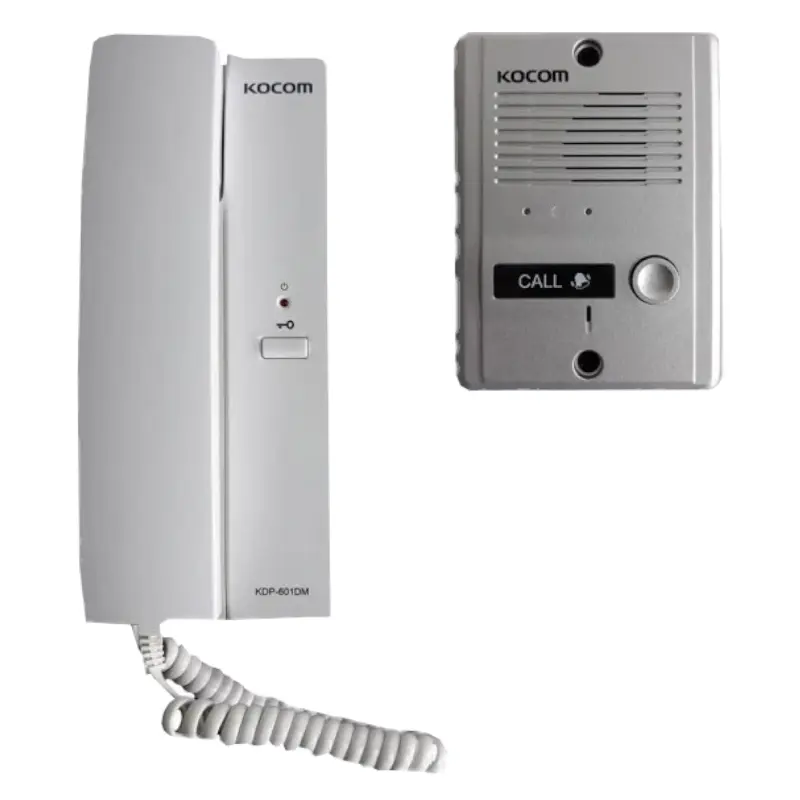
Kocom (Korea Communications Co.) rose to global prominence during the late 90s Asian electronics boom. They specialized in creating “Value Premium” hardware—devices that felt more expensive than they were. By the early 2000s, Kocom had effectively cornered the Australian market for unit developments. Why? Because their 4-wire analog protocol was bulletproof and builder-friendly. If you live in a townhouse complex in Elsternwick or Bentleigh, there’s an 80% chance a Kocom system was the original gatekeeper. Understanding this lineage is key to understanding why parts are now becoming impossible to find: the world has moved from analog 4-wire to digital IP, leaving Kocom legacy owners in a technical vacuum.
3. How Kocom Intercoms Work
To diagnose a Kocom, you must think in Voltage, not Data. Kocom systems utilize a “Common Ground” architecture. This means every signal (Audio, Video, and Door Trigger) relies on a perfectly clean electrical path. Here is the massive breakdown of the Kocom wiring loom:
A bi-directional analog audio lane. If this wire has 1% more resistance than normal, you get the “Kocom Hiss.”
The zero-point. In older Armadale homes, a rusty ground connection at the gate causes “Scrolling Video.”
The drive voltage. Any drop below 14.5V on a long driveway run in Toorak will kill the video signal entirely.
The visual heartbeat. Standard analog video is susceptible to interference from nearby 240V power lines.
4. Common Problems With Kocom Intercoms
When the system stops, it’s usually one of these “Sipko Fatal Four”:
- The Ghost Ringer: Your intercom chimes at 3 AM with no one there. This is almost always caused by an “Impedance Flux” in the outdoor button due to moisture.
- The One-Way Barrier: You can see the visitor but they can’t hear you. The internal mic-preamp in the KCV-35 monitor has cooked itself.
- Static Snowfall: The video looks like a 1970s TV with no antenna. This points to a failure in the “Sync Seperator” chip on the motherboard.
- The Frozen Gate: The visitor is verified, you press “Open,” and… nothing. The 12V relay has fused shut or the gate lock transformer has died.
5. Signs Your Kocom Intercom Is Failing
Before the “Lights Out” event, your Kocom will scream for help. Are you listening? We look for these three specific red flags in every Melbourne maintenance check:
| Symptom | Technical Cause | Risk Level |
|---|---|---|
| High-Pitched Squeal | Acoustic Feedback or Mic Preamp Gain drifting | 🔥 HIGH (Fire Risk if transformer is hot) |
| “No Signal” Blue Screen | Total video signal loss or failed camera sensor | 🛑 CRITICAL (Security Blind Spot) |
| Dim LCD Panel | Failing CCFL backlight or LED driver burnout | ⚠️ MODERATE (Aging Display) |
6. How Age Affects Kocom Units
The 20-Year Analog Ceiling
In the security industry, we talk about the “20-Year Ceiling.” Legacy Kocom units were engineered for an era where 15 years was considered a “Life-Long” purchase. In 2026, most units in Mount Martha or Sorrento are hitting their 22nd year. Electrolytic capacitors—small cans of chemical energy on the PCB—have a “Shelf Life.” Once the electrolyte boils off or dries out, the circuit becomes a noisy mess. You aren’t just fighting a “bug”; you are fighting the inevitable decay of 20th-century materials science.
7. Checking the Power Supply
When the entire system stops simultaneously—no power LED on the monitor—the problem is almost certainly the Power Supply Unit (PSU). Kocom systems use specialized switch-mode power supplies. If your monitor is in the kitchen but your transformer is in a dusty linen cupboard, it is likely “Cycling.” This means it turns on, gets too hot, and turns off to prevent a fire. Never replace a Kocom PSU with a generic 12V adapter from a hardware store. Kocom requires a specific “Clean” DC ripple that many cheap adapters lack, leading to horizontal lines on your screen.
8. Inspecting the Indoor Station
Take the monitor off the wall. If you see a “Brown” stain near the vents, your transformer has leaked fluid. If you smell a “Fishy” odor, the main processor is cooking. For units like the KCV-372, the capacitive touch buttons are prone to “Static Latch.” A single static shock from your finger in winter can permanently “kill” the button logic, requiring a total board replacement. This is a common issue we see in carpeted estates in Camberwell. This is why we recommend smart security integration for modern homes.
9. Inspecting the Outdoor Door Station
The outdoor camera (KC-MC30 or similar) is on the front lines of the Melbourne climate. UV radiation from the afternoon sun in Brighton literally melts the plastic lens cover over the years. Once it’s “milky,” your video is useless. Open the unit—do you see “Blue/Green” fuzz? That’s Copper Oxidation. It’s an insulator. If it’s on the terminals, your doorbell won’t ring. A $10 can of contact cleaner might buy you another year, but the rot is usually deep in the PCB by now.
10. Common Wiring Problems
We often find that the intercom isn’t the problem—the “Invisibe Network” is. Many Melbourne pre-wired homes from the 90s used thin telephone cable for intercoms. After 30 years, that copper is “tired.” If your audio works but your video is “Tearing,” you have a high-frequency interference issue. The cable is acting like an antenna, picking up noise from your Wi-Fi router or solar inverter. Without shielded cabling, an old Kocom cannot survive the 2026 RF-saturated environment.
11. Audio Problems: Crackling or No Sound
If your Kocom sounds like a bowl of Rice Krispies (Snap, Crackle, Pop), you have Active Arc Interference. This occurs when a wire is broken inside the insulation but is still “touching.” Every time the wind blows your gate, the connection breaks and makes, creating loud static. In St Kilda, where wind loads are high, this is the #1 audio complaint. Resoldering the connections at the gate station is the only way to stop the noise permanently.
12. Door Release Not Working
The “Strike” Failure
The Kocom button sends a 0.5-second signal to a third-party relay. If your door won’t open, 90% of the time it’s the Electric Strike in the door frame itself. These are mechanical devices. Over 20 years, the lubricant inside turns to glue. If you can hear a faint “Buzz” at the door but it won’t open, the lock is jammed. A spray of graphite lubricant can sometimes free it, but usually, it’s time for a new Strike Plate. If you’re upgrading, consider a professional video intercom installation for guaranteed reliability.
13. Troubleshooting Intermittent Operation
Does it only work when the sun is down? You have a Thermal Shutoff issue. The transformer is drawing too much current (usually because of a short in the camera) and its internal thermal fuse is tripping. Once it cools down at night, it resets. This “Cycling” will eventually kill the transformer. It is a major fire hazard in older Melbourne houses with original wiring loom.
14. Kocom Manuals: Essential Resources
Official Kocom support is virtually non-existent in 2026. However, at Sipko Security, we maintain the “Kocom Vault”—a collection of original schematic PDFs for every model from 1995 to 2020. Whether you have the KCV-35, KCV-36, or the rare KCV-372, you need the Pinout. PRO TIP: Kocom Red is almost always 12V, but if someone has used CAT5 cable to install your unit, all bets are off. Never assume colors; always test with a DMM (Digital Multi-meter).
15. Popular Kocom Models and Their Issues
A Technical Breakdown of the most common failures we see across Melbourne’s East:
| Model | Typical Application | Known Weakness |
|---|---|---|
| KCV-35 (Standard) | Apartment Units | Internal Speaker diaphragm rot (Quiet audio) |
| KCV-372 (Premium) | Toorak Luxury Estates | LCD Backlight Inverter failure (Glows but no image) |
| KCV-A374 (Legacy) | Townhouses | Power Supply Capacitor bulge (Buzzing sound) |
16. How to Identify Your Kocom Model
If you don’t know your model, you can’t find the manual. Look at the bottom edge of the monitor—there is usually a small embossed model number. If it’s been painted over (common in Fitzroy rentals), look at the button layout. 4 buttons in a row usually signal a KCV-35. A sliding switch on the side for volume signals an older analog KCV-A374. Take a high-res photo and send it to our expert ID desk if you’re stuck.
17. Minor Repairs You Can Attempt
Before you call us, try the “Sipko Reset”:
- The 10-Minute Blackout: Turn off the “Intercom” breaker at your switchboard. This drains the capacitors and forces a cold boot.
- The Button Mash: Rapidly press the “Call” button 20 times. This can “scrape” off light oxidation on the internal contacts.
- The Terminal Tighten: Open the door station and use a jeweler’s screwdriver to tighten every wire. Copper “creeps” over time and becomes loose.
18. When Repair Costs Exceed Replacement
The Repair Gap
$480+
Diagnostic + Callout + Used Parts. No warranty on adjacent legacy components.
*Note: Figures are professional estimations based on 2026 Melbourne market data. Actual project costs will vary.
19. Modern Upgrade Options
When the Kocom Bible closes, the Aiphone Chapter begins. Aiphone (Japan) is our Recommended #1 replacement for Kocom because of its “2-Wire Retrofit” technology. We can essentially “hijack” your old Kocom wires and use them to transmit high-definition digital video. It’s the safest, cleanest way to modernize a home in Sandringham or Mentone without damaging your internal walls. Read our deep-dive on Aiphone vs local brands and modern intercom comparisons for more.
20. Advantages of Upgrading From Kocom
The leap from a 2005 Kocom to a 2026 Aiphone or Urmet system is life-changing for a busy Melbourne family. You get: Direct-to-Phone calling (never miss a courier again), Wide-Angle Optics (no more blind spots for porch pirates), and Clear Voice tech (even with traffic noise from the Nepean Highway). It’s not just a repair; it’s a categorical upgrade to your home’s “Sold” value. Check our Melbourne costs guide for more context.
21. Preparing for a Kocom Upgrade
The Installation Blueprint
Don’t just buy a unit on Amazon. We need to check the “Pinout Continuity” of your existing loom. During our Brighton site audits, we often find that the original cable has water damage. We must certify the wire before installing a $1,000 digital unit. Prepare your Wi-Fi password and clear the area around your monitor—we’ll handle the technical heavy lifting, including a full signal integrity check.
22. Common Mistakes in DIY Kocom Repairs
The “Volts vs Amps” Trap
We see it every week: a homeowner tries to replace their wall transformer with a “similar looking” one from eBay. If you use a 12V 2.0A adapter on a system that requires 15V 1.0A, you will permanently “Fry” the monitor’s sync-processor. Analog intercoms have zero protection against Over-Voltage spikes. One wrong turn of a screwdriver and you’ve turned a repairable system into a $1,200 piece of wall-trash. If you’re unsure, ask a licensed professional. For those in high-risk areas, we suggest an alarm monitoring service for 24/7 protection.
23. Where to Find Kocom Replacement Parts
Looking for “Kocom Door Station Parts in Melbourne”? Good luck. Official Australian distribution for Kocom has become fragmented. Most parts sold on marketplaces are either “pulled” from old houses (meaning they have 15 years of wear) or are cheap knock-offs from overseas factories that don’t meet Australian Electrical Standards. At Sipko, we only use Certified Refurbished parts for urgent repairs, but we always advocate for a new, warranted brand transition.
24. Temporary Fixes While Waiting for Parts
If you’re stuck without an intercom for a week, use a simple Wireless Doorbell as a stopgap. Mount it NEXT to the Kocom station. It won’t open the gate, but it will stop you from missing important deliveries. For the gate, if the buzzer still works, you can manually trigger the strike by momentarily bridging the ‘L’ and ‘L’ terminals at the monitor—but only if you have the schematic! See our temporary security solutions. If your system is totally dead, check our Hikvision intercom kits for a fast replacement option.
25. Kocom Troubleshooting Step-by-Step
| Phase | Action | Target Metric |
|---|---|---|
| 01. Power | Measure Voltage at monitor pins 2 & 3 | Must be 14.8V – 15.5V DC |
| 02. Continuity | Audit Ohm resistance of the 4-wire loom | Should be < 20.0 Ohms total |
| 03. Video | Scope the CVBS pin for 1Vp-p sync | Clean analog wave, no ripple |
| 04. Audio | Check Mic bias voltage at door station | Steady 4.5V Mic excitation |
26. Upgrading vs Repair: How to Decide
A Kocom intercom system is like a 25-year-old car. You can replace the tires, but the transmission is still original. Our recommendation: If the system is over 12 years old and the repair requires more than 2 hours of labor, Replace it. The labor cost of diagnosing an old analog unit in 2026 is often 50% of the cost of a brand-new digital system. It is is an investment in your property’s tech-stack, not just a service bill. Check our Melbourne investment guide for property owners.
27. Benefits of Professional Installation for Modern Systems
Many “handymen” in Melbourne will offer to install your new intercom. Be careful. Modern digital systems like Aiphone use “Differential Signaling,” which is extremely sensitive to cable resistance. If the installer doesn’t use silver-solder joints and heat-shrink insulation, your $1,400 upgrade will be plagued by “Ghost Shadows” on the video screen. Sipko Security are certified intercom engineers. We balance the circuit, we don’t just “plug and play.”
28. Kocom Intercom FAQ
Can I integrate Kocom with my phone?
No. Legacy Kocom units are purely analog and lack the network stack required for app access. An upgrade to Aiphone is required for this feature.
My screen is “pulsing” blue. What is it?
This is a “Low Voltage” error. Your power supply is trying to boot but is hitting a short-circuit in the outdoor unit.
Are Kocom parts still in production?
Most legacy models like the KCV-35 were discontinued by 2021. Parts are now surviving on “Surplus Stock” only.
29. Real-World Stories of Kocom Failures
We recently assisted a childcare center in Sandringham whose Kocom stopped working during a morning drop-off. They couldn’t open the gate for parents. The panic was real. We performed a 24-hour transition to an Aiphone Industrial system, allowing them to use their existing cables while gaining encrypted video and a 3-year commercial warranty. Their insurance premiums actually dropped because the new system met modern audit standards. Read about education sector security or our healthcare solutions for similar case studies.
30. Call to Action: Need Help With Your Kocom Intercom?
When Your Kocom Stops Working, Call Sipko. Period.
Don’t let legacy static leave your family vulnerable. We provide 100% fixed-price audits and digital transitions for all Kocom models across Melbourne. Restore your security with 4K video, clear audio, and smartphone control TODAY.
📞 Melbourne Hotline:
0406 432 691✉️ Engineering Desk:
SipkoSecure@gmail.comLicensed Victorian Security Authority | Professional Aiphone, Urmet & Kocom Restoration | REC: 24590