
Inception Alarm Repairs & Maintenance in Melbourne
Keep your Inner Range Inception security system fully operational with professional repairs and maintenance across Melbourne. SIPKO Security provides fast diagnostics, firmware updates, access control repairs, and expert servicing.
Panel & Controller Repairs
Expert fault finding and repair of the Inception Security Controller — power supply issues, firmware errors, and communication failures resolved on-site.
Access Control Troubleshooting
Card reader failures, door release faults, and PIN access issues diagnosed and repaired. Inception access control restored to full operation.
Network & IP Communication
IP communication failures, remote monitoring disconnects, and server connection errors diagnosed and resolved by certified technicians.
Scheduled Maintenance Plans
Preventative inspections covering all zones, sensors, batteries, and firmware — keeping your Inception system reliable and compliant year-round.
Schedule Your Inception Service
Call +61 406 432 691 or complete the form and we will contact you.
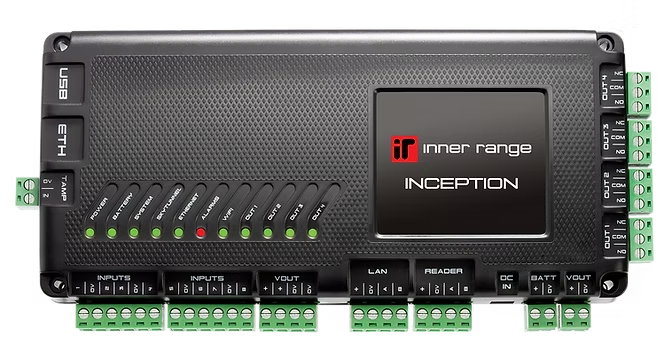
Inner Range Inception Controller
The Inner Range Inception Controller is the central intelligence of your security ecosystem. It seamlessly manages intrusion detection, access control, and smart automation from a single, high-performance integrated platform.
Scalable I/O
Supports up to 512 alarm inputs/outputs for complex site mapping.
128 Doors
Enterprise access control managing up to 128 independent door points.
10,000 Users
Massive database capacity for large-scale employee or resident management.
Web Native
Integrated browser-based configuration — no software installation required.
- Commercial & Office Buildings
- Warehouses & Logistics Hubs
- Schools, Colleges & Universities
- High-Value Residential Estates
These critical errors require professional Inception intervention to restore site security.
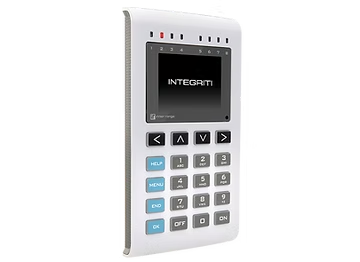
Inner Range EliteX LCD Keypad
The EliteX LCD Keypad serves as the primary touchpoint for users and maintenance technicians. It provides absolute control over the Inception system through an intuitive, high-visibility interface.
OLED Clarity
Crisp display for system status, zone names, and interactive navigation.
Backlit Keys
Adjustable brightness ensures ease of use in any lighting condition.
8 Indicators
Status LEDs for Alarms, Doors, Areas, and System Faults at a glance.
Panic Access
Dedicated duress keys for immediate emergency silent or audible alarms.
- Arm & Disarm Areas
- View Live Alarm History
- Change User PINs
- Audit System Health
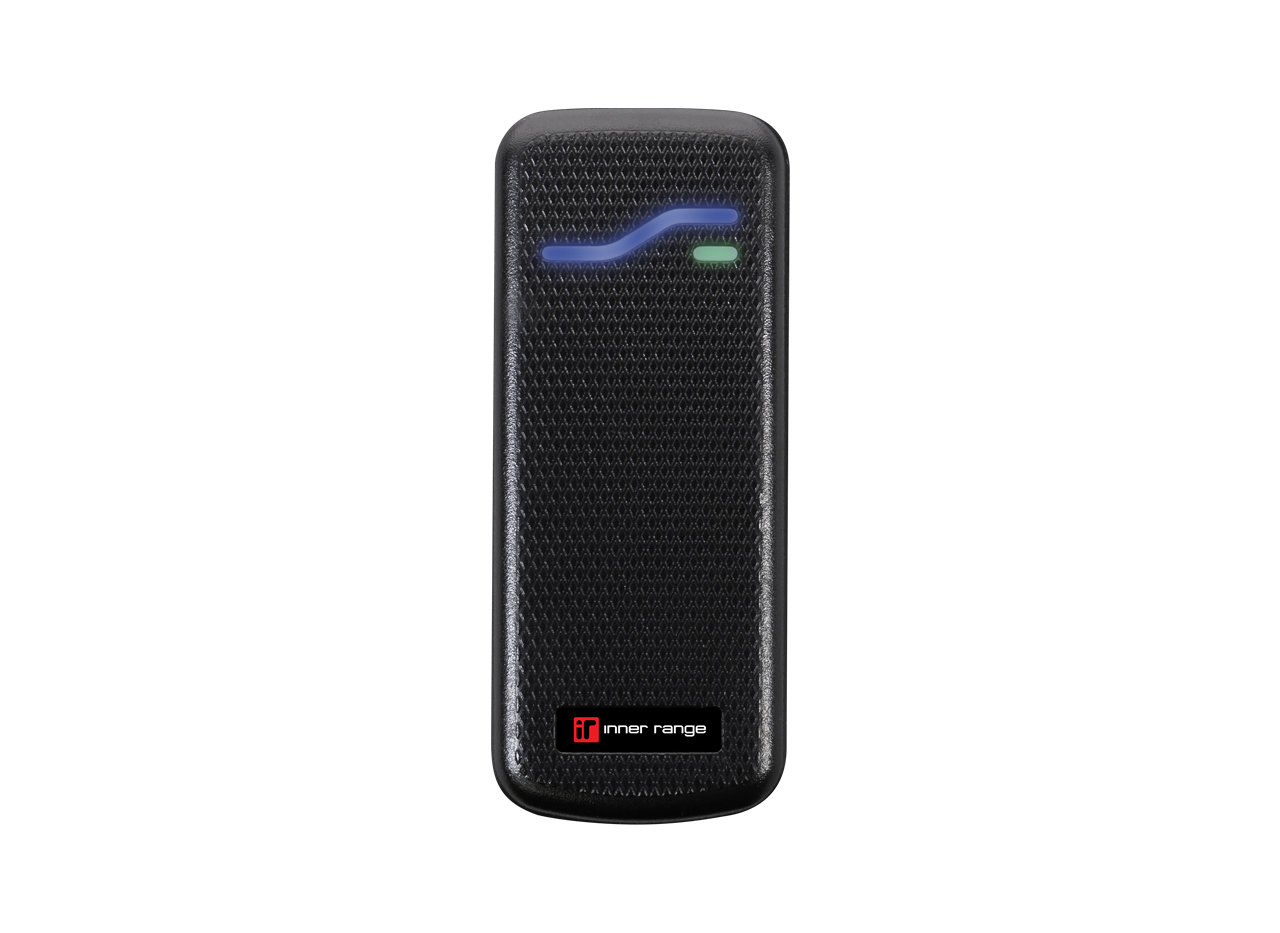
Inner Range SIFER Smart Card Reader
SIFER readers provides the high-security bridge between physical credentials and Inception’s access logic. Using multi-drop RS-485 communication, these readers deliver encrypted authentication for cards, fobs, and mobile wallets.
Triple-Auth
Configurable for Card + PIN, Card Only, or PIN Only high-security workflows.
DESFire EV2
Utilises high-security 128-bit AES encryption to prevent card cloning.
RS-485 Data
Encrypted multi-drop communication eliminates the risks of old Wiegand protocols.
Fast Arming
Support for “Arm on Card” functionality for rapid site-wide exit protocols.
- High-Profile Office Entrances
- Secure Apartment Building Lobbies
- Restricted Mission-Critical Data Centres
- Large Commercial Industrial Facilities
What Is the Inner Range Inception Security System?
The Inner Range Inception is an advanced, web-based security controller designed for commercial and high-security environments. It combines intrusion detection, access control, and automation in a single unified platform — used in offices, warehouses, retail stores, and critical infrastructure across Melbourne.
Common Inception Faults
Systems develop issues over time. Our technicians quickly diagnose the root cause:
- System not arming or disarming
- Sensors failing to trigger correctly
- Keypad or touchscreen unresponsive
- Communication loss with monitoring center
- Persistent false alarms
Control Panel Troubleshooting
The Inception controller is the system’s brain. Panel-level issues we resolve include:
- Power supply and transformer faults
- Software and firmware crashes
- Device communication failures
- Configuration database corruption
- Tamper alerts and housing issues
Keypad & Touchscreen Repairs
Inception keypads and touchscreens require specialist attention when:
- Screen is unresponsive or cracked
- Buttons or touch zones fail
- User codes are not accepted
- Firmware requires updating
Sensor & Zone Maintenance
All sensors must function reliably for effective intrusion detection:
- Motion detectors (PIR) inspection
- Door & window contact testing
- Glass break sensor calibration
- Perimeter sensor walk-test
Network & Remote Access Repairs
Inception systems depend on network connectivity. We restore:
- IP communication failures
- VPN and remote access issues
- Server connection timeouts
- Web interface access problems
Access Control Repairs
Inception manages door access via cards and PIN codes. We fix:
- Card reader failures
- Electric lock / door release faults
- Access permission errors
- Door controller wiring issues
Firmware & Software Updates
Safe firmware deployment protects your system and improves performance:
- Full configuration backup before update
- Staged firmware deployment
- Device compatibility verification
- Post-update system testing
Event Log Diagnostics
Inception records every security event. We review logs to:
- Identify repeating fault patterns
- Detect false alarm root causes
- Verify alarm trigger history
- Produce compliance audit reports
Inception Control Panel Troubleshooting
The Inception Security Controller is the brain of the entire system. When the panel develops a fault, every connected device — sensors, keypads, access readers, and sirens — can be affected. SIPKO Security technicians specialise in rapid, precise panel diagnostics.
A failing transformer, blown fuse, or degraded backup battery can prevent the Inception controller from powering on or cause random resets. We test all power input paths including mains, auxiliary modules, and the backup battery under load to pinpoint the fault.
Corrupted firmware, failed update processes, or misconfigured system settings can cause the controller to behave erratically — refusing to arm, dropping zones, or locking users out. We restore the panel to a stable software state without losing your existing configuration.
The Inception panel communicates with keypads, door controllers, readers, and sensors over RS-485 and IP networks. Wiring faults, address conflicts, or network misconfigurations can disconnect entire device groups. We trace each communication path and restore all device links.
Mismatched firmware versions across the controller and connected modules (readers, expanders, keypads) can prevent devices from being recognised. We audit all connected module firmware versions and bring them into alignment with the controller version safely.
If the controller enclosure is opened, moved, or the tamper switch is triggered, the system logs a tamper event which can escalate to a full alarm. We verify tamper switch integrity, inspect mounting hardware, and clear false tamper faults from the event log.
The Inception Controller: What We Fix
Our technicians carry diagnostic tools and common replacement components for Inner Range Inception panels. In most cases, faults are resolved on the first visit — restoring full system operation without requiring a complete replacement.
Our Panel Service Includes
- ✓ Transformer, fuse & PSU voltage testing
- ✓ Backup battery health & load testing
- ✓ Firmware version audit & safe update
- ✓ RS-485 & IP device communication check
- ✓ Configuration database integrity verification
- ✓ Full zone & partition walk-test post-repair
- ✓ Tamper switch & enclosure inspection
- ✓ Written service report issued
Inception Keypad & Touchscreen Repairs
Inception systems rely on keypads and touchscreens for arming, disarming, and accessing system settings. When these interfaces fail, users cannot control the system — creating both a security and operational risk.
Touchscreen panels that no longer register touch input are often caused by digitiser failure, internal cable disconnection, or firmware-level display driver errors. We diagnose at component level to determine whether the screen requires recalibration, reseating, or full replacement.
Physical keypad buttons can fail due to contact wear, debris ingress, or mechanical damage. Intermittent button failures are particularly dangerous as they may appear to accept inputs but send incorrect signals to the controller. We test each key individually and replace damaged button assemblies.
Keypads run their own embedded firmware that communicates with the main controller. A corrupted keypad firmware or version mismatch can cause frozen displays, boot loops, or missing menu options. We update keypad firmware independently while maintaining controller compatibility.
User PINs failing, card credentials not being accepted at the keypad, or entire access levels being inaccessible are typically configuration-level issues within the Inception web interface. We audit user profiles, access levels, and zone permissions and restore correct access without disrupting other users.
Our Keypad Repair Process
We assess physical condition — cracks, button wear, screen damage — and test all inputs live before any disassembly.
We verify the keypad firmware version, check RS-485 or IP communication logs, and confirm the device is correctly enrolled in the controller.
Depending on findings, we repair or replace the faulty component — digitiser, button PCB, or the full keypad module — using compatible Inner Range parts.
After repairs, we verify all user PINs and card credentials operate correctly and that the keypad displays the correct system status.
Minimising Disruption to Your Operations
Keypad repairs on commercial Inception systems are scheduled to minimise operational downtime. In many cases, temporary access credentials can be issued during the repair window so staff are not locked out of secured areas.
Alarm Sensor Maintenance
Sensors are the frontline of your Inception security system. Without accurate, well-maintained sensors, even the most advanced controller cannot reliably detect intrusions. SIPKO Security provides thorough inspection, testing, and calibration for every sensor type used in Inception installations.
Motion Detectors (PIR)
Passive infrared motion detectors are among the most commonly installed sensors in Inception systems. They must be correctly positioned and calibrated to detect human movement while avoiding false triggers from environmental heat sources.
- Detection zone walk-test (full 360° sweep)
- Lens cleaning and housing inspection
- Sensitivity and pulse-count adjustment
- Pet-immunity verification where applicable
- Anti-masking feature test
Door & Window Contacts
Magnetic reed contacts are the simplest sensor type but are highly susceptible to alignment issues, corrosion, and mechanical wear over time. A misaligned contact may fail to trigger — allowing a door or window to open without activating the alarm.
- Magnetic gap measurement and realignment
- Reed switch continuity testing
- Frame and door movement check
- Wired and wireless contact verification
- Zone assignment confirmation in controller
Glass Break Sensors
Glass break detectors listen for the specific acoustic frequency of shattering glass. Their sensitivity must be precisely tuned — too low and they miss real breaks; too high and background noise triggers false alarms constantly.
- Glass break simulator test at rated distance
- Sensitivity level adjustment
- Coverage area verification per room size
- Microphone and internal component check
- Battery health check (wireless models)
Perimeter Sensors
Perimeter beam detectors and outdoor motion sensors protect external boundaries. They face unique challenges including weather exposure, animal interference, and vegetation movement — all of which must be accounted for during calibration.
- Beam alignment and signal strength testing
- Weatherproofing and housing integrity check
- Vegetation clearance assessment
- Tamper protection verification
- Night and day sensitivity adjustment
False Alarm Troubleshooting
False alarms undermine trust in your security system and can result in monitoring fees or fines. SIPKO Security identifies and permanently eliminates Inception false alarm sources.
PIR sensors placed near air vents, windows with direct sun, or high-traffic areas generate unnecessary triggers that flood the event log.
Radio frequency noise from nearby equipment or building materials can disrupt wireless sensor signals, causing phantom zone activations.
Degraded sensors lose calibration accuracy over time. A single faulty motion detector is enough to repeatedly trigger your whole alarm.
Incorrect zone sensitivity settings, wrong entry/exit delays, or improper alarm profiles lead to legitimate triggers being misclassified.
The SIPKO Fix
Our technicians don’t just replace batteries and leave. We conduct thorough environment audits, recalibrate each sensor to its zone type, and validate detection logic through a complete walk-test. The result is zero nuisance alarms and maximum real-threat detection.
Inception Alarm Battery Replacement
Backup batteries are the last line of defence when mains power fails. Without a healthy battery, your Inception system will shut down during a power outage — exactly when you need it most. SIPKO Security tests, maintains, and replaces batteries before they fail.
We test each backup battery under real load conditions — not just with a basic voltage check. A battery may show full voltage at rest but collapse under load within minutes. Our load testing reveals the true remaining capacity of every cell, including the main panel battery, keypad batteries, and any wireless device cells.
Any battery that fails the load test or is approaching the end of its rated service life is replaced on the same visit. We use manufacturer-rated sealed lead-acid or lithium backup cells matched exactly to your Inception controller’s power requirements. All replaced batteries are disposed of responsibly.
After replacement, we run a simulated power outage to confirm the Inception system switches seamlessly to battery backup, sustains normal operation for the required duration, and restores from mains cleanly. A full battery service record is added to your maintenance log.
What We Replace
SIPKO Security services batteries across all Inception components:
- Main controller sealed lead-acid backup
- Door controller and reader module batteries
- Wireless sensor & transmitter cells
- Keypad internal backup batteries
- Siren and strobe unit backup cells
Firmware Updates for Inception Systems
Inner Range regularly releases firmware updates for the Inception controller and connected modules. Keeping firmware current is essential for maintaining system security, stability, and compatibility with new devices. SIPKO Security handles all Inception firmware updates safely, without disrupting your existing configuration.
System Stability
Firmware updates patch known bugs that cause random panel reboots, zone drops, or keypad connectivity issues. Staying current eliminates the most common sources of unexplained system behaviour.
Security Protection
Security vulnerabilities discovered in older firmware are fixed in updates. Running outdated firmware on a network-connected Inception system can expose it to remote exploitation — a critical risk for commercial properties.
Device Compatibility
New card readers, keypads, wireless expanders, and integration modules require the latest controller firmware to be recognised. Updates unlock support for newer Inner Range hardware without replacing the controller.
Our Safe Update Process
We never update Inception firmware without first creating a full configuration backup. Our staged approach ensures your access rules, zone logic, user profiles, and alarm schedules are fully preserved after every update.
Network & Communication Issues
Inception systems rely on IP network connectivity for remote monitoring, web-based management, and real-time alert delivery. Network faults silently break this connection — your system may appear operational but events are no longer reaching your monitoring centre or phone.
The Inception controller communicates over IP to monitoring centres, the Inner Range cloud, and remote management interfaces. IP failures — caused by incorrect network settings, DHCP conflicts, or firewall rules — silently cut this link. We identify the exact failure point and restore connectivity, including static IP configuration if required.
Connections to the Inner Range Inception server or third-party monitoring platforms can fail due to outdated server addresses, expired certificates, or port blocking at the router or firewall level. We reconfigure server connection parameters and verify encrypted communication reaches its destination.
Incorrect subnet settings, VLAN segregation, or router port forwarding misconfigurations prevent remote access to the Inception web interface. We audit the full network path — from the controller’s NIC settings through the local switch and router — and correct configuration at each layer.
Our Network Diagnostic Process
- ✓Controller IP address & subnet verification
- ✓Gateway & DNS reachability test
- ✓Port forwarding & firewall rule audit
- ✓Monitoring centre connection test (TCP/UDP)
- ✓SSL/TLS certificate validity check
- ✓Remote web interface access restoration
- ✓Live event delivery confirmation to monitoring centre
Remote Monitoring — Don’t Go Dark
Many businesses don’t realise their Inception system has lost its monitoring connection until after an incident. SIPKO Security includes a live event delivery test in every network service call — confirming your monitoring centre is actually receiving alarms before we leave the site.
Comprehensive Inception Service Coverage
From battery replacements to full system reconfiguration — SIPKO Security handles every aspect of Inception alarm maintenance in Melbourne.
Battery Replacement
Backup batteries ensure your Inception system remains active during power outages. We proactively test and replace failing batteries before they cause downtime.
- Main panel battery health testing
- Sensor & peripheral battery replacement
- 30-minute outage simulation test
- Battery capacity certification
Firmware & System Updates
Outdated firmware leaves your Inception system vulnerable. We perform safe, staged updates that improve performance without disrupting existing configurations.
- Pre-update full configuration backup
- Staged Inner Range firmware deployment
- Device driver and module updates
- Post-update full system validation
CCTV Integration
Inception alarms can trigger CCTV recordings for enhanced incident evidence. We configure alarm-to-camera triggers so every intrusion event is automatically captured.
- Alarm-triggered video recording setup
- Camera and Inception zone mapping
- Integration with IP NVR systems
- Live view during alarm confirmation
Power Supply Troubleshooting
Power faults can disable an entire alarm system. We inspect all power paths to quickly restore system operation.
- Transformer and fuse testing
- Auxiliary power module inspection
- Wiring continuity and load check
- Power distribution verification
Commercial & Residential Servicing
Inception systems are deployed across a wide range of Melbourne properties. We service them all.
- Corporate offices and campuses
- Warehouses and industrial sites
- Retail stores and shopping centres
- High-end residential installations
Emergency Alarm Repairs
When your Inception system stops working unexpectedly, every minute counts. SIPKO Security offers rapid response services across Melbourne.
- Same-week emergency booking
- On-site diagnostics within hours
- Spare parts for common Inception models
- Temporary arming solutions if required
Integration with CCTV Systems
Inception’s open integration platform allows intrusion alarms to directly trigger CCTV camera recordings, PTZ camera positioning, and live video verification. SIPKO Security designs, configures, and tests full alarm-to-camera integrations for commercial and high-security Melbourne properties.
When an Inception zone is breached, a trigger signal is sent to the CCTV recorder to immediately begin recording the relevant cameras. We map every alarm zone to its corresponding camera group and test each trigger scenario before completing the job.
Each Inception alarm zone can trigger a specific camera or a group of cameras. A PIR sensor in the server room triggers server room cameras; a perimeter beam breach triggers all external cameras. We configure granular zone-to-camera rules so footage is always relevant to the exact area of the alarm event.
Integrated systems allow your monitoring centre to pull up a live camera view the moment an alarm is received. Operators can visually verify whether an intrusion is genuine before committing a response — dramatically reducing false-alarm call-outs and operational cost.
Inception’s event log timestamps every security event. When integrated with CCTV systems, security managers can replay video from the exact moment any alarm event occurred — useful for post-incident investigations, insurance claims, and compliance audits.
How Alarm-Camera Integration Works
Inception communicates with CCTV systems using relay outputs, IP-based API calls, or third-party middleware depending on your NVR brand.
Compatible CCTV Systems
Access Control Troubleshooting
Inception’s unified platform manages both alarm detection and physical door access from a single controller. When access control fails — whether a card reader, a door release, or a user permission issue — authorised staff are locked out and security is compromised. SIPKO Security restores full access control function quickly.
Card Reader Issues
Card readers that fail to scan credentials, reject valid cards, or lose connection to the Inception controller are among the most disruptive access faults. Staff unable to enter secure areas causes immediate workflow disruptions.
- Reader LED and beep diagnostic check
- Wiegand / OSDP communication line testing
- Card credential format verification (Mifare, HID, EM)
- Reader-to-controller address conflict resolution
- Tamper and housing integrity check
- Reader reset and re-enrolment if required
Door Release Faults
Electric strikes, magnetic locks, and electromechanical door releases depend on consistent power and a correctly triggered relay from the Inception controller. A failed door release can leave a door permanently locked or permanently open — both serious security risks.
- Door release voltage and current testing
- Relay output trigger verification from controller
- Strike / mag-lock coil continuity test
- REX (Request to Exit) button function check
- Fire-mode door hold-open behaviour testing
- Wiring check back to controller output terminals
Access Permission Problems
When valid cardholders are denied access, the issue is typically in the configuration database — incorrect access levels, expired credential schedules, or zone restrictions misconfigured during a system change. We audit user profiles and access logic without disrupting other users.
- User profile and access level audit
- Credential expiry date and schedule check
- Access level zone-door mapping verification
- User group permission conflict resolution
- Event log review for denial reason codes
- Re-testing access after permission correction
Our Access Control Repair Process
We replicate the reported fault at the door and reader, collecting denial event codes from the Inception event log.
Reader, wiring, plug connector, and door release hardware are each tested independently to isolate electrical from configuration faults.
We log into the Inception web interface and review access levels, door schedules, credential formats, and user group settings.
Hardware faults are repaired or replaced, configuration errors corrected, and all affected users re-tested before we leave.
Minimal Disruption to Staff Access
We understand that access control repairs in a commercial environment must be fast and minimally disruptive. Where possible, we provide temporary access bypass credentials for affected staff during the repair window, and restore normal access restrictions as soon as the fault is resolved.
Door Controller Repairs
When doors fail to unlock or lock correctly, the fault can sit anywhere in the access chain — from the Inception controller’s relay output, through the wiring run, to the door release hardware itself. SIPKO Security inspects and repairs every component in the door control circuit to restore reliable and safe door operation.
Access Controller Module
The Inception door controller module manages relay outputs for electric strikes and magnetic locks. Faults include blown relay contacts, communication loss to the main panel, and firmware mismatches.
- Relay contact continuity test
- Module-to-panel RS-485 / IP communication check
- Controller firmware version alignment
- Output voltage verification under load
- Module address conflict resolution
Electric Strike & Mag-Lock
Electric strikes and magnetic locks fail due to coil burnout, voltage drops, incorrect power supply sizing, or mechanical wear — all of which prevent proper door release or locking.
- Coil resistance and current draw testing
- Power supply voltage match verification
- Strike/lock physical alignment check
- Strike/lock replacement with compatible unit
- Monitoring centre integration post-repair
Wiring & Cabling Issues
Door control wiring is frequently damaged by building works, pest interference, or age-related insulation failure. A single open circuit can prevent an entire door from operating correctly.
- End-to-end cable continuity testing
- Insulation resistance fault tracing
- Connector and terminal block inspection
- Cable re-run or section repair where required
- Post-repair door release cycle test
A Door That Won’t Lock Is a Security Emergency
A door that remains unlocked after an Inception access event — or refuses to release during a legitimate access — is not just an inconvenience. It is an active security failure. SIPKO Security treats door controller faults as priority calls, with technicians dispatched to site as quickly as possible to restore safe and controlled door operation.
We verify each door is configured correctly — fail-safe (unlocks on power loss) for fire exits, fail-secure (stays locked on power loss) for secure areas.
Inception doors can release on fire alarm input. We test emergency unlock behaviour and verify it does not conflict with normal access logic.
Every door controller repair is documented — faults found, components replaced, and post-repair test results — for your maintenance records and compliance requirements.
Alarm Zone Testing
Every zone in an Inception alarm system is a distinct detection circuit — a PIR sensor, a door contact, a beam detector, or a smoke detector. For the system to be reliable, every single zone must be individually tested, verified, and confirmed to trigger the correct alarms and responses. SIPKO Security performs comprehensive zone testing as part of every maintenance visit.
Passive infrared zones are walk-tested from multiple angles and distances to confirm the detection coverage area is correct and that sensitivity thresholds are appropriately set for the space. We verify that the zone triggers within the expected time window and logs correctly in the Inception event log.
Door and window contact zones are opened and closed during the armed and disarmed states. Entry and exit delay zones must trigger the correct delay countdown before sounding the alarm — not too short to trap users, not too long to compromise security. We verify all delay parameters match the site’s operational requirements.
Some zones — such as smoke detectors, panic buttons, and tamper circuits — must remain active regardless of arming state. We test these zones in both armed and disarmed modes to confirm they trigger an immediate alert under all conditions and are not accidentally suppressed during normal disarmed use.
Perimeter beam detectors and outdoor sensors are tested for both trigger sensitivity and resistance to environmental false triggers. We adjust detection thresholds to account for local conditions — wildlife activity, nearby trees, reflected street lighting — that can cause nuisance activations on sites that have not been fine-tuned.
Inception allows individual zones to be temporarily bypassed or inhibited for maintenance or access. We audit which zones are currently bypassed at the time of the service visit and confirm that no zone has been left in a bypassed state unintentionally — a common oversight that leaves parts of a property completely unprotected.
Zone Test Procedure
We download the current zone configuration from the Inception controller and cross-reference it against the physical site layout — identifying any undocumented zones or naming discrepancies.
We place the Inception system in walk test mode so each zone can be triggered individually without activating sirens or notifying the monitoring centre — allowing focused, undisturbed testing.
Every sensor in every zone is physically activated — motion detectors walked, contacts opened, beams broken. We verify each registers in the controller’s event log with the correct zone name and type.
Any zone that fails to trigger, triggers intermittently, or drops signal during testing is flagged immediately and its wiring, sensor, and zone card connection are all tested to identify the root cause.
We exit walk test mode and arm the system, triggering a test zone to confirm the full alarm chain — siren, strobe, and monitoring centre signal — all respond correctly end to end.
Zone Test Result Classification
At the end of every zone test, each zone is classified by result:
Commercial Inception Alarm Maintenance
Inception systems are predominantly deployed in commercial and high-security environments. Businesses rely on their Inception alarm not just for intrusion detection, but for access control, audit trails, and regulatory compliance. SIPKO Security provides dedicated commercial maintenance tailored to the operational demands of Melbourne businesses.
Offices & Corporate Premises
Office environments present unique Inception maintenance challenges — multiple access levels for different staff grades, after-hours arm/disarm schedules, and integration with building management systems. Maintenance downtime must be scheduled outside business hours to avoid disrupting staff workflows or triggering unnecessary alarms during the workday.
- After-hours and weekend maintenance scheduling
- Multi-level access permission review & audit
- ARM/DISARM schedule verification for shift patterns
- Lift lobby and stairwell sensor zone testing
- Integration check with BMS and fire systems
- Board room and server room 24-hour zone confirmation
Warehouses & Distribution Centres
Warehouses pose significant security challenges — large floor areas, loading dock zones that must be armed independently of the main floor, high-value stock attractive to theft, and staff working in different zones simultaneously. Inception’s zone-based arming is ideal for this environment, but must be precisely maintained to reflect the actual operational layout.
- Loading dock zone independent arming test
- High-bay PIR sensitivity calibration (tall ceilings)
- Perimeter fence and roller door sensor testing
- Partial arming mode verification for active shifts
- Vehicle access point zone and reader inspection
- Cold store and temperature-sensitive zone checks
Retail Stores & Shopping Centres
Retail environments experience the highest frequency of Inception false alarms due to customer movement, staff access patterns, and delivery schedules. Accurate sensor calibration is critical — PIR sensors must be positioned to avoid covering customer thoroughfares while still detecting after-hours intrusion. We tune every sensor to its specific retail zone role.
- PIR sensor retail-placement calibration
- Staff PIN and card access audit (high turnover)
- After-hours arming schedule validation
- Stockroom and cash office 24-hour zone testing
- Duress button functionality test at POS areas
- Monitoring centre alarm received confirmation
Commercial Complexes & Multi-Tenancy
Commercial complexes with multiple tenants require careful Inception configuration — each tenancy typically has its own access group, alarm area, and reporting path to their respective monitoring centre. Common areas such as car parks, lobbies, and amenity floors must be managed separately. We service and maintain both individual tenancy systems and shared common-area zones.
- Tenancy isolation audit — zone and access segregation
- Common area sensor and reader testing
- Car park perimeter and boom gate zone check
- Individual tenancy arming verification
- Multi-path monitoring centre routing test
- Body corporate compliance report provided
2201
Residential Inception Alarm Servicing
While the Inception controller is a powerhouse for commercial sites, its versatility makes it a preferred choice for luxury Melbourne homes. It offers a level of customisation and integration that standard residential alarms cannot match. SIPKO Security provides white-glove servicing for residential Inception installations, ensuring your home remains a safe haven.
Smart Home & Automation
Inception can act as the central brain for your home automation. We service and troubleshoot the triggers that allow your alarm system to talk to your lighting, pool pumps, and gates. Whether it’s turning on the hallway lights when you disarm or closing the blinds when you arm, we ensure the logic is flawless.
Multi-Area Protection
Large residences often require distinct arming zones — arming the main house at night while the guest house or detached garage remains protected, or keeping the perimeter active while you move freely inside. We configure and test these complex area mappings to match your family’s lifestyle perfectly.
Secure Access Control
Managing PIN codes and access cards for family members, cleaners, gardeners, and contractors is simplified with Inception. We help you audit your user database, set up time-restricted access (e.g., the cleaner’s code only works between 9am-12pm), and ensure every credential is functioning correctly.
Inner Range App Support
The Inner Range Smartphone app allows you to arm/disarm, unlock doors, and view live events from anywhere in the world. We ensure your controller’s network connection is stable, push notifications are correctly configured, and all family smartphones are securely paired with the system.
Ultimate Reliability
Commercial-grade hardware repurposed for the home means fewer failures and deeper protection than off-the-shelf residential kits.
Discreet Servicing
We work around your family schedule, providing quiet, professional maintenance with minimal disruption to your daily routine.
Full System Audit
Every service includes a full sensor walk-test, backup battery load-test, and firmware security patch check.
Alarm System Health Checks
The “set and forget” mentality is the primary cause of security system failure. Like any complex computing hardware, Inner Range Inception controllers require routine technical physical and software health checks to ensure they remain ready to respond in an emergency. SIPKO Security’s health checks detect vulnerabilities before they become critical failures.
Sensor Health & Accuracy
Sensors are the eyes of your system. Over time, environmental dust, lens degradation, or insect ingress can reduce sensitivity. We test the range and pulse count of every detection zone.
Keypad & Interface Integrity
Your primary interaction point must be flawless. We inspect touchscreens and keypads for physical wear, button responsiveness, and software lag that indicates memory or firmware errors.
Multi-Path Comm Checks
An alarm that cannot report is a silent fail. We verify the controller’s path to the monitoring centre via IP and 4G, ensuring reporting priority and failover logic are correctly configured.
Reactive (Wait for Failure)
Waiting for a “System Fault” beep usually means your security has already been compromised for days or weeks. Emergency repairs involve higher call-out fees, rushed part shipping, and stressful periods where your premisies are unsecured.
Proactive (Scheduled Check)
Annual health checks catch components like batteries reaching end-of-life or sensors with reduced range. You maintain constant protection, avoid emergency middle-of-the-night siren triggers, and extend the lifespan of your Inception hardware.
The 12-Point Inception Health Audit
Every SIPKO maintenance visit includes a comprehensive system audit following Inner Range’s best-practice guidelines.
Alarm System Expansion
Properties grow, and security needs change. The Inner Range Inception system is designed with modularity at its core, allowing it to scale from a few sensors to hundreds of zones across multiple areas. SIPKO Security specialises in seamlessly expanding your existing Inception installation to cover new wings, outdoor spaces, or additional entry points.
Zone Expansion
8-Zone LAN Expander
Adding new PIR motion detectors or door contacts? This module adds 8 additional inputs to your system. It connects via the system LAN for easy installation in remote wings of the building.
Door Expansion
SIFER Reader Module
Expanding your access control to more doors? The SIFER module allows for high-security OSDP reader connections, managing local door locks and request-to-exit buttons.
RF Expansion
Wireless Receiver Module
Need security in areas where cabling is impossible? This expansion module enables the use of low-power wireless motion sensors, door reeds, and smoke detectors.
Scaling Your Infrastructure
Expansion is more than just plugging in a new sensor. Our technicians ensure that every new component is integrated into your Inception’s logic, area mapping, and reporting paths.
Adding PIR detectors, glass breaks, or seismic sensors to recently renovated wings.
Installing secondary touchscreens in master suites or warehouse offices for local control.
Deploying outdoor beams or smart fence sensors connected back to the Inception core.
Updating your 250+ users to handle new doors and restricted areas efficiently.
Inception’s “One-Platform” philosophy means your expansion remains a single, unified system. No bolted-on third-party boxes or messy multi-app management.
The Expansion Roadmap
Site Audit
We review your current Inception hardware limits and LAN capacity.
Hardware Install
Modules are DIN-mounted and sensors are professionaly cabled.
Programming
Zones are named, timer logic set, and area permissions updated.
Commissioning
The full system is tested end-to-end with the monitoring centre.
Device Signal Strength Testing
A wireless security system is only as reliable as the airwaves it travels on. Environmental changes—like new furniture, wall renovations, or electronic interference—can degrade signal strength over time. We use specialized diagnostic tools to map your RF environment and ensure every sensor maintains a rock-solid connection to your Inception panel.
RF Environment Mapping
We analyze the “Signal-to-Noise” ratio in your property to identify background interference from other wireless devices. This ensures your security channels remain clear and prioritised.
RSSI Level Validation
Every wireless PIR and reed switch is tested for its Received Signal Strength Indication (RSSI). We look for a minimum -70dBm threshold to guarantee 100% communication uptime.
Supervision Heartbeats
Inception uses “heartbeat” supervision to tell the panel a sensor is still alive. we optimize these intervals to balance security responsiveness with sensor battery longevity.
Eliminating Wireless Dead Zones
If testing reveals a weak link, we don’t just hope for the best. Our technicians implement proven physical and software-based optimizations to restore your security integrity.
Reliability Guaranteed
Alarm Event Log Diagnostics
Every movement, every door access, and every heartbeat of your security system is recorded in the Inception’s high-capacity event log. When a fault is intermittent or suspicious activity is suspected, our technicians perform a deep-dive forensic analysis of these logs to pinpoint the exact root cause.
Security & Access History
We review precisely who accessed the building and when. This includes auditing PIN code usage, keyfob entries, and arming/disarming patterns to detect out-of-hours anomalies.
System Integrity Events
Detection of power fluctuations, backup battery health cycles, and internal memory load. These logs help us identify a failing component before it causes a complete system crash.
Ghost Alarm Diagnostics
Intermittent alarms that trigger at night can be impossible to troubleshoot visually. we use event timestamps to cross-reference with weather data or site conditions to solve the mystery.
Alarm Notification Problems
If alerts are not reaching your phone or monitoring center, your communication configuration may be compromised. The Inception system relies on a complex chain of IP, SkyTunnel, and 4G pathing to deliver real-time security updates. We diagnose and repair every link in this chain to ensure you are never left in the dark.
Smartphone App Failures
Are you missing push notifications when the alarm triggers? This is often due to account credential mismatches, SkyTunnel registration errors, or expired app permissions.
Monitoring Center Reporting
If your professional monitoring station (ARC) isn’t receiving signals, the Inception’s CID or SIA reporting paths are correctly configured but may be blocked by network firewall changes.
SMTP & Email Alerts
Email notifications often stop working when SMTP providers (like Gmail or Outlook) change their security protocols. We re-authenticate your system for modern security standards.
Physical Network Faults
The most common cause of alert failure is a physically disconnected or faulty Ethernet path. We test the integrity of the cable and the Inception’s onboard LAN port.
Notification Reliability Check
Don’t wait for a break-in to find out your notifications are broken. SIPKO’s maintenance includes a full “Push Test” end-to-end to verify that every alert trigger successfully reaches its destination.
Power Supply Troubleshooting
Power issues are the most frequent cause of total system failure. The Inception controller and its expansion modules require clean, stable voltage to maintain their high-security processing. We inspect transformers, field wiring, and power modules to ensure your system never goes dark due to electrical faults.
Transformer & AC Input
Your Inception panel step-downs 240V mains power via a heavy-duty transformer. We verify the AC secondary voltage and inspect for heat damage or humming that indicates impending component failure.
DC Voltage Stabilization
Sensors, keypads, and readers all run on a common 13.7V DC rail. If this voltage fluctuates or drops too low, devices will reboot sporadically or trigger false alarms.
Alarm Tamper Alerts
Tamper warnings are your Inception system’s proactive defense against physical sabotage. Whether it’s a sensor cover being pried open, a siren cable being cut, or a panel door being accessed without authorization, the system immediately flags the exact point of compromise. We diagnose and restore these tamper circuits to ensure your defense is never bypassed.
Sensor Case Tampers
Most PIR detectors and reed switches have a micro-switch that triggers when the housing is removed. If the spring is loose or the case is cracked, the system will report a permanent tamper fault.
Cabinet & Module Tampers
The main Inception controller and expansion modules are housed in steel enclosures with lever tampers. We ensure these are seated correctly and that “Off-Wall” tampers are securely set.
End-of-Line (EOL) Faults
Inception uses resistor monitoring to detect cable cuts. If a cable is shorted or snipped, the resistance changes, triggering a tamper alarm even while the system is disarmed.
Detection
Tamper switch opens or EOL resistance shifts out of programmed range.
Response
The Inception logs the event and sends a pushed notification to your smartphone.
Action
If programmed, sirens trigger instantly to deter active hardware sabotage.
Upgrading Older Security Systems
Is your existing alarm system struggling with discontinued parts or limited remote access? You don’t always need a complete new installation. Many legacy systems from brands like Bosch, Hills, or Paradox can be migrated to the Inner Range Inception platform, allowing you to keep your existing sensors and wiring while gaining modern smartphone control and high-end security features.
Legacy Security
Inception Upgrade
Sensor Retrofitting
Keep your existing PIRs, reeds, and cabling. We only replace the core panel and keypads.
Access Ready
Instantly transition from basic alarm to a full card-access system for multiple doors.
User Centric
Manage up to 2,000 users with detailed audit logs and custom schedules.
Inception System Health Check
Identify system faults and resolve repair issues in 60 seconds.
What is the current status of your system?
Which component appears to be failing?
Where is the Inception system installed?
How urgent is your repair/maintenance?
Frequently Asked Questions
Common questions about Inner Range Inception alarm repairs, maintenance, and servicing in Melbourne.
Melbourne’s Inception Alarm Experts
Whether your Inception system needs urgent repairs, a firmware update, or a full annual service — SIPKO Security is Melbourne’s trusted Inner Range specialist.