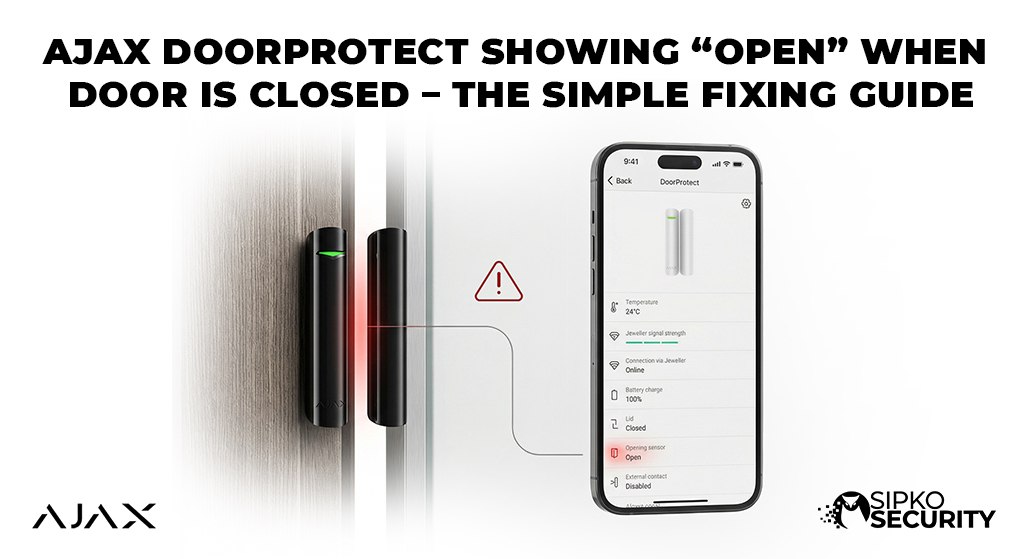
Ajax DoorProtect Showing “Open” When Door Is Closed – The Simple Fixing Guide
Is your alarm app telling you a door is open even though you’ve shut it tightly? This is the most common issue we see with Ajax alarm systems in Melbourne. If your sensor thinks the door is open, you can’t lock your house properly at night.
This guide makes it easy to fix. We’ve removed all the hard technical words and replaced them with simple steps you can do yourself in 5 minutes. No tools required—just five simple points to get your home safe again.
Common Root Causes
Before troubleshooting, it’s helpful to identify the likely culprit. Most “stuck on open” issues are caused by:
The Simple 6-Point Fixing Plan
Follow these steps to find why your sensor is acting up. Each point has a quick answer and a more detailed part if you need extra help.
Check if the Magnet is Too Far Away
Quick FixThe Simple Answer: The sensor and its magnet must be very close together (about the width of your thumb). If you have Weak Magnets or generic replacements, they may not trigger the sensor. Most importantly, the magnet MUST be on the right side of the sensor unit.
Inside the white Ajax DoorProtect box is a tiny magnetic switch. This switch is only on one side. If you accidentally moved your magnet to the other side of the door frame, the sensor will never “feel” it.
Check for Incorrect Mounting Height: Ensure the top of the magnet is level with the top of the sensor. If the magnet is mounted too high or too low, the magnetic field won’t reach the internal switch.
What to do: Look for a small line or notch on the side of the sensor. Move the magnet so it aligns perfectly with that line. Ensure the gap is less than 1cm. If you can’t get it that close, use the “Large Magnet” that came in the box—it has a stronger pull that reaches further.
If you’ve tried this and it’s still failing, you might be experiencing Sensor Aging or the internal parts are worn out. A professional service check can confirm if a replacement is needed.
Check if the Door Has Shifted
AlignmentThe Simple Answer: Make sure the magnet and the sensor are still lined up straight. If your door has sagged over time, the magnet might be missing the sensor entirely.
In Melbourne homes, timber doors often change shape with the weather. This can throw off your Magnet Alignment by moving your magnet just a few millimeters away from its original spot. Even a tiny change can make your alarm think the door is open.
If the door is old and shaky, the sensor might trigger just from a gust of wind rattling the door. We can help you remount these smart sensors so they are 100% reliable again.
Check if the Sensor is “Snapped In” All the Way
MountingThe Simple Answer: If the sensor is slightly loose on the wall, the app will show an error. Make sure you hear a “click” when you slide the sensor onto its back plate.
The Ajax bracket has a safety button on the back. This button tells the system if someone is trying to pull the sensor off the wall. If your sensor isn’t snapped in tight, the button isn’t pressed, and the status gets stuck on “Open.”
What to do: Slide the sensor off the mount and slide it back on firmly. Look at your phone app—if the warning goes away, you’ve fixed the problem! If the plastic mount is broken, you might need a replacement part.
Fix Problems with Metal or Steel Doors
Material FixThe Simple Answer: If your door is made of metal, it can “block” the magnet from reaching the sensor. You might need a small plastic spacer to lift the sensor off the metal surface.
Metal doors are very common in Melbourne apartments. Because magnetism is blocked by steel, your door sensor might not “see” the magnet properly. It’s like trying to talk through a thick stone wall.
The Fix: Use the plastic pieces (spacers) that came with your alarm kit. By lifting the sensor just 5mm off the steel frame, the magnet can work again. If you’ve lost your spacers, our Melbourne technicians carry plenty of spares in their vans.
Check if the Sensor is “Turned Off” in the App
Phone App SettingsThe Simple Answer: Check your phone app to make sure someone hasn’t accidentally “muted” or disabled that door sensor. If the app is told to ignore the sensor, it won’t show it as closed.
If you have visitors or cleaners, sometimes they can accidentally change settings in the Ajax App. There is a setting called “Temporary Deactivation.” If this is turned on, the sensor will always show an error or stay in its last known state.
What to do: Go to the device list on your phone, tap the door sensor, and look for anything that says “Disabled” or “Deactivated.” Turning it back on will usually fix the status instantly.
Check if the Signal is Weak
Connection CheckThe Simple Answer: If your door is too far away from the main white Hub, the sensor might not be able to “send” the message that the door is closed. Check the bars on your phone app.
If your security system Hub is in the middle of a big house, and your door is far away, the signal might be too weak. The app will “remember” the door as open because it didn’t get the new message that you shut it.
The Fix: Look at the signal bars on the app. If it shows only 1 bar, you might need an “extender” unit or to move your Hub closer to the doors. You can also try taking the sensor off the door and bringing it next to the Hub to see if the status changes. If that doesn’t work, you definitely need a professional maintenance visit.
Still Can’t Fix the Status?
If you’ve checked the distance, the alignment, and the signal but the app is still stuck, the internal parts might be broken due to Sensor Aging.
A failed internal clicker cannot be fixed with software. We carry brand new, genuine Ajax replacements in our service vans. Our team can swap your sensor, fix your alignment, and perform a full safety check on your entire house today.
Get Same-Day Expert HelpThe Ultimate Reliability Test
Not sure if the sensor is actually broken or just badly aligned? Follow this 30-second test to find out for sure. This is exactly what our Melbourne techs do first when they arrive at your property.
Remove the Sensor: Slide the Ajax DoorProtect off its mounting bracket so you can hold it in your hand.
Manual Touch: Take the magnet and touch it directly against the right side of the sensor (where the notch is).
Check the App: If the status changes to “Closed” instantly, your sensor is fine—it’s just a Magnet Alignment or Steel Door issue.
The Verdict: If the app still says “Open” even when the magnet is touching the sensor, the internal reed switch has failed (likely due to Sensor Aging). In this case, no amount of repositioning will fix it—you need a new sensor module.
Other Things to Know About Your Sensors
Different Sensor Models
There are two types: DoorProtect and DoorProtect Plus. The “Plus” model has extra features like a vibration sensor. If you live near a noisy road or an elevator, the vibration might be “blinding” the sensor. Try turning down the “Sensitivity” in your app settings to see if the “Open” status goes away.
Check our pricing guide if you want to swap to the better “Plus” models for extra security.
Professional Support
If you’re not sure what to do next, don’t worry. Most alarm problems are fixed with a simple tuning visit. We can check your batteries, update your software, and ensure your entire Ajax system is running perfectly for your family. Book a support visit here.
Ajax DoorProtect FAQ
What if I don’t have the original magnets?
You can use any strong magnet. However, the official Ajax ones are tested to work best. If you lost yours, you can buy a replacement kit from us.
Why is the light on my sensor blinking?
A blinking light usually means the battery is getting low. If it blinks red, the battery is almost dead. Most batteries last 7 years. You can check how much life is left in your app settings.
Can I buy a single sensor?
Yes! If one of your sensors has a broken internal clicker, we can swap just that one for a new one. It only takes a few minutes to add it to your existing system.
Restore Your Safety Today
Official Melbourne Ajax Support Center
Don’t let a “stuck” sensor ruin your home’s protection. Talk to a SIPKO specialist about your Ajax repairs, battery swaps, or professional realignment. We respond in minutes.
📧 Email Our Techs
sipkosecure@gmail.com
📞 Hotline
0406 432 691