Residential CCTV & Video Doorbells for New Builds in Melbourne
INTERCOM MASTERCLASS 2026

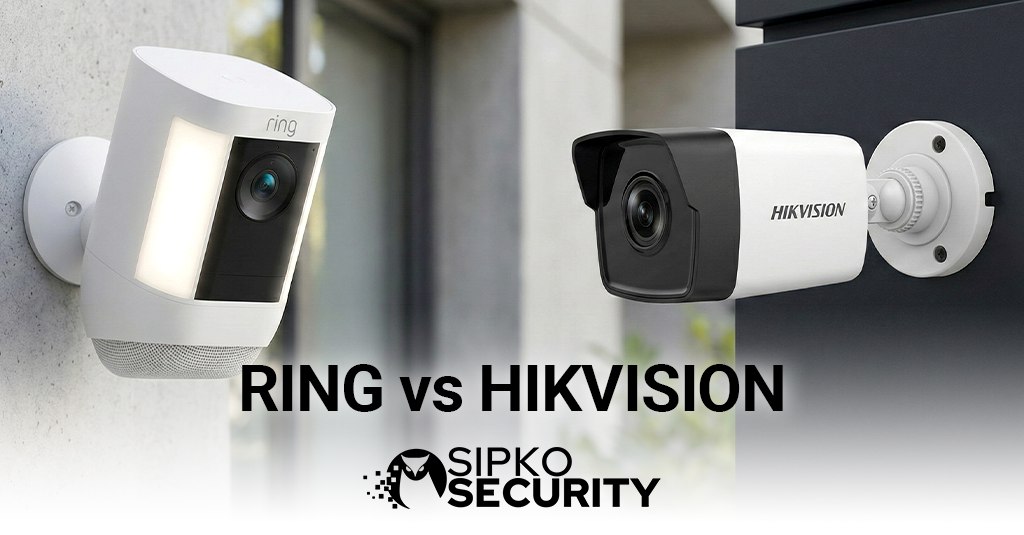
Ring vs Hikvision: The Ultimate Intercom Showdown for Melbourne Properties

SEO Meta Description: An in-depth, unbiased analysis of Ring vs Hikvision intercom systems. From renovated Richmond terraces to Point Cook family homes, we compare subscription fees, battery life, and why dependability wins over DIY ease.

Introduction: The Gadget vs The System

In the world of home security, there are two distinct paths. One is the “Silicon Valley” path: devices that are easy to buy, easy to stick on a wall, and run on subscription models. The other is the “Professional Security” path: systems that require cabling, programming, and provide industrial-grade reliability. In the battle of Ring vs Hikvision, this contrast is sharper than ever.

For a Melbourne renter in a South Yarra flat, the ability to stick a battery-powered Ring Doorbell next to the door without drilling holes is a game-changer. But for a homeowner building their dream home in Malvern East, relying on WiFi signals through double-brick walls and paying monthly fees feels like a compromise.

At SIPKO Security, we understand both appeals. We see the allure of the slick Ring app, but we also fix the frustrations when “WiFi Disconnected” appears for the tenth time. This guide compares the Amazon-owned giant (Ring) against the world’s largest video surveillance manufacturer (Hikvision) to help you decide.

If you want a doorbell you can install yourself in 10 minutes, choose Ring. If you want a security system that records 24/7 without monthly fees, choose Hikvision.

Executive Summary: The Melbourne Property Matrix

Time is money. Here is the quick verdict for your specific property type:

  • The Renter / Apartment: Ring wins. No drilling, no wiring, takes it with you when you move. Perfect for Brunswick apartments.
  • The New Build / Renovation: Hikvision wins. If the walls are open, run CAT6 cable. Hardwired reliability beats battery convenience every single time.
  • The Front Gate (50m from house): Hikvision. Ring WiFi simply won’t reach the front fence of a large property in Donvale reliably without messy range extenders.
  • The “Integration” Lover: Hikvision. If you want a dedicated indoor monitor that also views your CCTV cameras, Hikvision is the professional choice.
  • The Price Conscious: Tie. Ring is cheap upfront ($200) but expensive forever ($150/year subscription). Hikvision is expensive upfront ($800) but free forever.

The Melbourne Context: Weather, Distance, and Theft

Melbourne is not California. Our environment tests hardware in unique ways.

1. “Four Seasons in One Day” Battery drain

Lithium batteries hate extremes. In a Melbourne winter (2°C overnight), battery chemistry slows down, and Ring units deplete faster. In a heatwave (40°C), they can overheat and shut down to protect themselves. If your front door faces West in Sunshine or Tarneit, a plastic battery doorbell will struggle. Hikvision’s hardwired PoE units have no batteries to fail and are rated for higher operating temperatures.

2. The “Porch Pirate” & Device Theft

A sad reality of stick-on battery doorbells is that they are easy to steal. Ironically, the device watching for thieves can be stolen by one in seconds. Ring has a theft replacement policy, but it’s a hassle. A Hikvision intercom is typically bolted into brickwork or flush-mounted into a steel fence, secured with Torx security screws. It isn’t going anywhere.

Deep Dive: Ring (The Silicon Valley Darling)

Owned by Amazon, Ring popularized the video doorbell. Their mission is to reduce crime in neighbourhoods, and their app is undeniably slick. It is designed for the average consumer, not a security technician.

The Subscription Trap: The hardware is often sold at a loss or low margin because the real money is in the “Ring Home” (formerly Ring Protect) subscription. As of 2025, if you don’t pay the monthly fee (starting around AUD $4.95/month for basic), your Ring doorbell is essentially a live-view only device. If someone steals a package while you are sleeping, and you didn’t pay the subscription, there is no recording to show the police.

Deep Dive: Hikvision (The Professional Guard)

Hikvision creates industrial security equipment. Their intercoms are built on the same manufacturing lines as cameras used in airports and casinos. They prioritize image quality (WDR, Night Vision) and integration.

The Local Storage Advantage: Hikvision systems fundamentally differ by offering local recording. You can slot a 128GB SD card into the internal monitor or connect the doorbell to your Hikvision NVR. This means you record 24/7 or motion events for free. You own your data. There is no cloud subscription required to view your own footage.

The Monitor vs The Phone

One massive difference is the Indoor Monitor.

  • Ring: Relies on your smartphone or an Amazon Echo Show. If your phone is on silent, flat, or in another room, you might not hear the doorbell. You can buy “Chimes” to plug into wall sockets, but they are audio only.
  • Hikvision: Comes with a dedicated 7-inch or 10-inch touchscreen permanently mounted on your wall. It is always on, always connected, and powered by mains/PoE. When the button is pressed, the screen lights up instantly. It is a dedicated appliance, not an app fighting for attention with Instagram.

A Tale of Two Cities: Or, How 24 Hours Differs

To really feel the difference, let’s follow two fictional Melbourne property owners.

The Ring User
🔋

“DIY Dave”

Rents a townhouse in Coburg.

10:00 AM: A courier arrives. Dave gets a notification 4 seconds later (cloud latency). By the time the video loads, the courier is already walking away. Dave shouts “Wait!” but the audio lag makes it awkward.

2:00 PM: Dave gets an email: “Your 30-day free trial has ended.” He sighs and adds his credit card for the $4.95/month plan so he doesn’t lose his recordings.

8:00 PM: He tries to check the live view, but the app says “Battery 3% – functionality limited.” He has to go find the charging cable and take the doorbell offline for 6 hours to charge.

Verdict: Convenient setup, but constant maintenance and ongoing costs.

The Hikvision User
🛡️

“Secure Sam”

Owns a family home in Glen Iris.

10:00 AM: A courier presses the button. The indoor monitor in the kitchen rings instantly. Sam’s wife answers from the screen. Zero lag. Crisp audio.

2:00 PM: Sam checks the Hik-Connect app at work. He scrolls back through the timeline to see who dropped off a flyer yesterday. It streams instantly from his home NVR. Cost: $0.

8:00 PM: The internet cable in the street is cut by NBN works. The Hikvision system doesn’t care. It continues to work locally, ringing the internal monitor and recording to the hard drive, completely offline.

Verdict: Higher upfront effort, but seamless, rock-solid performance.

Battle Scenario 1: The “Wireless Whinge”

WiFi is invisible magic, until it isn’t. In a Kew mansion with solid brick walls, WiFi signals die quickly.

Ring’s Weakness: If your router is at the back of the house and the doorbell is at the front gate, the signal (“RSSI”) will be poor. Video will be blocky, audio will chop out, and notifications will be delayed. You end up buying “Chime Pro” extenders to bridge the gap, adding to the cost and clutter.

Hikvision’s Strength: A Hikvision intercom uses standard data cabling (CAT6) or 2-wire tech. This cable carries both power and data. It works perfectly at 100 meters. It works perfectly through five brick walls (because it goes under/over them). It is immune to WiFi interference from your neighbour’s new modem.

Key Feature Comparison Table

Comparing the popular Ring Battery Doorbell Plus vs Hikvision Gen2 IP Series.

Feature Ring (Battery Models) Hikvision (Gen 2 IP)
Power Source Rechargeable Battery (Maintenance Req.) Power over Ethernet (PoE) – Always On
Video Storage Cloud Only (Monthly Fee) Local NVR / SD Card (Free)
Indoor Station Smartphone / Amazon Echo Dedicated Wall Touchscreen
Reliability Dependent on WiFi Signal Commercial Grade 99.9% Uptime
Gate Unlock Only on specific pro wired models (Rare) Standard on almost all models
Subscription Cost ~$50 – $180 / year (Ongoing) $0 (Once off purchase)

Real-World Melbourne Scenarios: Which System Wins?

Let’s test both systems in actual Melbourne situations.

Scenario 1: The Airbnb Host in Fitzroy

Challenge: You manage 3 short-term rental properties. Guests arrive at different times, and you need to remotely let them in without being there.

Ring Solution: You can answer the doorbell from anywhere via the app and talk to guests. However, you cannot unlock the door remotely unless you install a separate smart lock (extra $300+ per property). The battery dies mid-week during high-traffic periods.

Hikvision Solution: The intercom has a built-in relay that unlocks electric strikes. You can generate temporary PIN codes for each guest (valid only during their booking). No batteries to worry about. Winner: Hikvision

Scenario 2: The Student Rental in Carlton

Challenge: You’re renting for 12 months. The landlord won’t let you drill holes or run cables. You move frequently.

Ring Solution: Perfect. Stick it on with the included adhesive mount. When you move to your next share house in Footscray, peel it off and take it with you. Total portability.

Hikvision Solution: Requires permanent mounting and cabling. Not suitable for renters. Winner: Ring

Scenario 3: The Acreage Property in Warrandyte

Challenge: Your front gate is 80 meters from the house. You need to see who’s at the gate and unlock it remotely.

Ring Solution: WiFi signal won’t reach 80 meters through trees and hills. You’d need multiple WiFi extenders ($200+) creating a mesh network, which is unreliable and laggy.

Hikvision Solution: Run a single CAT6 cable underground from gate to house. Rock-solid connection. Works perfectly at 100+ meters. Winner: Hikvision

Video Quality & Night Vision: The Camera Test

Both brands claim “HD video,” but the reality is more nuanced.

Daytime Performance

Ring: 1080p resolution is adequate. However, heavy compression to save cloud bandwidth means faces can be pixelated if the person is more than 3 meters away. The wide-angle lens distorts edges (fisheye effect).

Hikvision: 2MP (1920×1080) with WDR (Wide Dynamic Range). This means if someone stands in front of a bright window, you can still see their face clearly—Ring often shows them as a dark silhouette. Hikvision records at higher bitrates because it’s stored locally, not uploaded to the cloud.

Night Vision Showdown

Ring: Uses infrared (IR) LEDs. The image is black-and-white and grainy. Effective range: about 5 meters. Beyond that, it’s just darkness. The IR reflection off glass doors creates a “whiteout” effect, making the video useless if installed near windows.

Hikvision: Professional-grade IR with 10+ meter range. Some models offer “ColorVu” technology—full-color night vision using ambient light and a large sensor. This means you can see the color of a car or clothing at night, which is critical for police reports.

Verdict: Hikvision’s night vision is in a different league—literally commercial-grade vs consumer-grade.

Audio Quality: Can You Actually Have a Conversation?

Two-way audio sounds simple until you try it in windy Melbourne conditions.

Ring: Uses “half-duplex” audio on battery models. This means only one person can talk at a time (like a walkie-talkie). If you interrupt the courier, they won’t hear you. Wind noise is significant because the microphone is exposed.

Hikvision: Full-duplex audio (both people can talk simultaneously, like a phone call). Built-in noise cancellation filters out wind and traffic. The speaker is louder (3W vs Ring’s 1W), which matters when talking through a closed gate.

Troubleshooting: What Goes Wrong?

Here are the most common service calls we get.

Ring Regrets

  • Charging Fatigue: “I’m sick of taking it off the wall to charge it.” We hear this constantly. The novelty wears off after 6 months.
  • Phantom Motion: The battery models use PIR sensors that can be triggered by heat (cars, swaying trees), leading to 50 notifications a day and a flat battery in a week.

Hikvision Headaches

  • Firmware Updates: Unlike Ring, which auto-updates quietly, Hikvision devices sometimes need manual firmware updates to keep the app features working smoothly with new iOS versions.
  • Spider Webs: As mentioned in other guides, the professional IR night vision attracts insects, which need to be brushed away.

The Product Lineup: What Are You Actually Buying?

Understanding the specific models helps clarify the Ring vs Hikvision debate.

Ring’s Consumer Range

1. Ring Video Doorbell (Battery):
The entry model. Costs around $200 AUD. Battery lasts 1-3 months depending on activity. 1080p video. The most popular model for renters and DIY users.

2. Ring Video Doorbell Plus:
Upgraded battery model with better night vision and “Head-to-Toe” view (taller aspect ratio to see packages on the ground). Around $300 AUD.

3. Ring Video Doorbell Pro 2 (Wired):
Requires hardwiring to existing doorbell transformer. Offers 1536p “Bird’s Eye View” and radar-based motion detection. This is Ring’s premium model but still relies on cloud storage subscriptions.

Hikvision’s Professional Range

1. KV6113-WPE1 (WiFi Doorbell):
Hikvision’s answer to Ring. Battery-free, powered by existing doorbell wiring or PoE. 2MP camera. Can work standalone or integrate with Hik-Connect. Popular for residential video intercom upgrades.

2. DS-KV8113-WME1 (Modular Doorbell):
Metal construction, vandal-resistant (IK08 rating). Can add keypads, card readers, or custom name plates. Designed for gates and commercial entries.

3. Full IP Intercom Kits:
Complete systems with outdoor station + indoor touchscreen monitor (7″ or 10″). These are true intercom systems, not just doorbells. Cost ranges from $600-$1200 installed.

Privacy & Data: Who Owns Your Footage?

This is where things get uncomfortable for Ring users.

Ring’s Cloud Model: Every video clip is uploaded to Amazon’s servers. While encrypted, this has raised privacy concerns. In the US, Ring has partnerships with police departments where law enforcement can request footage without a warrant in “emergency” situations. In Australia, similar data-sharing agreements exist under certain conditions.

Hikvision’s Local Model: Video stays on your property. It’s recorded to an SD card in the monitor or to an NVR hard drive in your garage. Unless you explicitly enable cloud storage (optional), your footage never leaves your network. For privacy-conscious Melbourne families, this is a significant advantage.

Installation Reality: DIY vs Professional

Ring’s marketing promise is “install it yourself in 10 minutes.” This is true… if you have the right conditions.

When Ring DIY Works:

  • You’re renting and can’t drill holes
  • Your WiFi router is within 10 meters of the front door
  • You have a smartphone and are comfortable with apps
  • You’re okay charging the battery every 2-3 months

When Ring DIY Fails:

  • Your front gate is 30+ meters from the house (WiFi won’t reach)
  • You have thick brick walls (common in Hawthorn period homes)
  • You want to unlock an electric gate (Ring battery models can’t do this)
  • You need 24/7 recording (subscription required + cloud dependency)

Hikvision Professional Install:

A SIPKO technician will:

  • Run CAT6 cable from the gate to your router (or use existing 2-wire if available)
  • Mount the outdoor station securely with vandal-resistant screws
  • Configure the network settings and test the system thoroughly
  • Train you on how to use the indoor monitor and app
  • Provide a warranty and ongoing support

Yes, it costs more upfront. But you get a system that works reliably for 10-15 years without touching it.

The Verdict: Which One Should You Buy?

Choose Ring If:

  • You are renting and need a portable solution
  • You want zero installation hassle (stick it on, done)
  • Your front door is close to your WiFi router
  • You’re comfortable with ongoing subscription fees
  • You value the Amazon ecosystem (Alexa integration)

Choose Hikvision If:

  • You own your property and want a permanent solution
  • You need gate unlock functionality for electric locks
  • You want 24/7 recording without monthly fees
  • You already have (or plan to get) Hikvision CCTV cameras
  • You value privacy and local storage over cloud convenience
  • Your property has long distances (front gate far from house)

Frequently Asked Questions

Can I use Ring without a subscription?

Yes, but you’ll only get live view. No recordings, no event history, no person detection. Essentially, it becomes a very expensive doorbell with a camera you can only watch in real-time.

Does Hikvision work without internet?

Yes! The intercom will still ring the indoor monitor, you can still answer calls, and it will still record locally to the SD card or NVR. You just won’t be able to access it remotely via the app until internet is restored.

How long does a Ring battery actually last?

Ring claims 6-12 months, but real-world Melbourne conditions (cold winters, hot summers, high activity areas) typically yield 1-3 months. If your doorbell faces a busy street with constant motion alerts, expect weekly charging.

Can I integrate Hikvision with Google Home or Alexa?

Hikvision supports ONVIF and RTSP protocols, which means you can view the video stream on Google Nest Hubs or via third-party integrations like Home Assistant. However, it’s not as seamless as Ring’s native Alexa integration.

Explore More Comparison Guides

Get in Touch with SIPKO Security

Speak with a specialist about wired and wireless CCTV, Ajax alarms, and same-week installations. We respond quickly during business hours and offer after-hours call-outs for urgent security issues.

📞 Phone: 0406 432 691

✉️ Email: sipkosecure@gmail.com

� Head Office: Brighton, Melbourne

Prefer WhatsApp? Tell us in your message — we’ll reply on your preferred channel.

Request a Quote Online →

External Government Resources

For further verification of security standards, privacy laws, and crime statistics, we recommend consulting these official government sources: