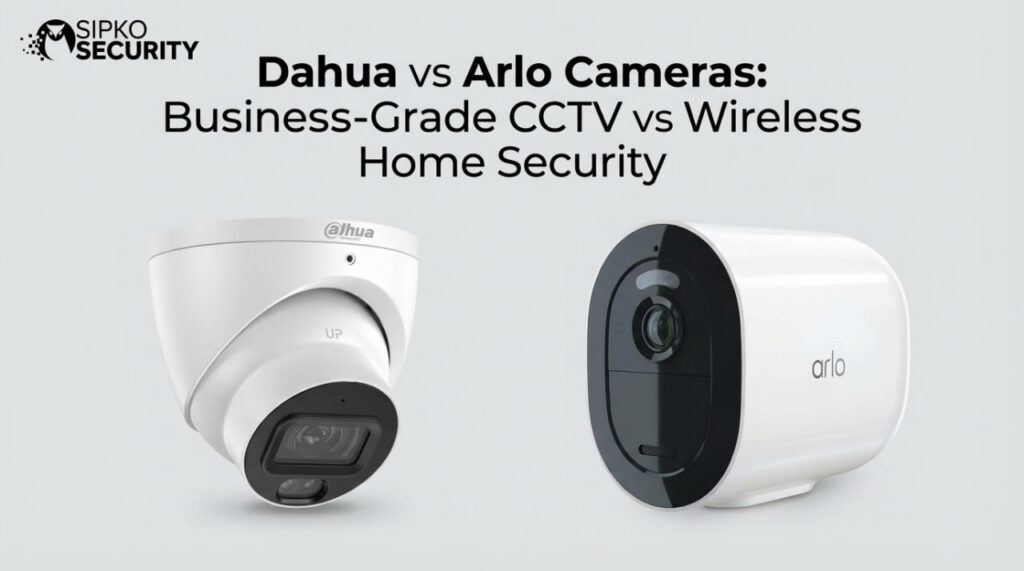
Dahua vs Arlo Cameras: Business-Grade CCTV vs Premium Wireless Home Security
SEO Meta Description: Comparing Dahua vs Arlo for Australian homes and businesses: wired PoE vs wireless, 24/7 recording, image quality, and reliability for long-term property protection.
Introduction: The Reality of Dahua vs Arlo Performance
When people call us asking about Dahua vs Arlo, the story is usually similar. A wireless kit went in first because it looked simple, there was no drilling, and the price felt reasonable. Then something important happened – a car was broken into, stock went missing, or someone walked up the driveway at 2am – and the cameras either missed it or recorded shaky, blurry clips.
Wireless systems like Arlo appeal for good reasons. They are neat, quick to mount, and fine for basic check-ins. Hardwired systems like Dahua feel more serious, with cabling, an NVR, and an installer involved. On the surface it looks like convenience versus hassle. In reality, for Melbourne homes and businesses, it is short-term convenience versus a long-term security system.
At SIPKO Security, we have spent more than five years removing or relegating DIY wireless kits and replacing them with professional CCTV across inner and bayside suburbs. Once people see the difference in reliability, night vision and playback, they usually say the same thing: “We should have done this from the start.”
Furthermore, this guide walks through the comparison of Dahua vs Arlo in plain language. We compare wired PoE vs Wi‑Fi, 24/7 recording vs battery-saving sleep, AI video analytics vs basic motion sensors, and one-off cost vs ongoing subscriptions so Melbourne homeowners, shop owners, warehouse managers, and property managers can choose what actually fits their risk, budget, and peace of mind.
“ As we often say to clients at SIPKO Security, “You only find out how good your cameras are on the worst night of the year.”
The Fundamental Architecture: Hardwired PoE vs Battery-Powered Wireless
When you compare Dahua vs Arlo, everything starts with how each system is built. Specifically, Dahua is a hardwired IP CCTV platform that uses Power over Ethernet (PoE), while Arlo is a battery-powered Wi‑Fi camera range aimed at DIY installation.
With Dahua, one network cable runs from each camera back to a Network Video Recorder (NVR). That cable carries constant power and data. Because video travels over copper inside the wall or ceiling, it is not fighting with phones, laptops, neighbours’ routers, or microwave ovens. Once the cable is in, the connection is steady.
Consequently, Arlo works very differently. Each camera talks over Wi‑Fi and runs on a rechargeable battery. The camera must stay close to an access point and manage its power carefully to stretch battery life. When Wi‑Fi is busy or weak, the video stream can stutter, drop in quality, or fail to connect. When batteries run low, cameras slow down and eventually switch off until charged again.
This gap is especially clear in Melbourne’s double-brick homes and older shopfronts. Brick, concrete, foil-backed insulation and steel framing all make life hard for 2.4 GHz and 5 GHz Wi‑Fi signals. We often see Arlo cameras on eaves or at rear doors that sit right on the edge of Wi‑Fi range. They might work fine on a calm day, but the moment the router reboots or someone starts streaming inside, those cameras fall offline.
From our side as installers, the pattern is familiar: people start with Arlo because it is fast and wireless. After a year or two of dead batteries, random offline cameras, and missed events, they call SIPKO Security for a Dahua quote. Hardwired infrastructure takes more planning, but once it is in, it becomes a “do it once, do it right” backbone for long-term property protection.
“Cabling is the expensive part you forget about. Missed footage is the part you remember forever.” – Common saying among CCTV installers
Unified Operations Analysis: Wiring Reliability vs Wireless Agility
When evaluating Dahua vs Arlo from a professional framework, we look at the trade-off between infrastructure stability and deployment speed. Dahua represents the “Fixed Asset” approach—a system that relies on physical layer connectivity (copper) to eliminate environmental variables like radio frequency interference (RFI) or network congestion.
Conversely, Arlo utilizes “Dynamic Agility”. Its lack of physical constraints allows for rapid repositioning, which is invaluable for temporary sites or properties where structural modifications are prohibited. While Dahua offers 100% duty cycle recording (24/7), Arlo optimizes for event-based efficiency. Neither approach is technically superior; rather, they serve distinct operational objectives: Dahua for continuous evidentiary integrity and Arlo for flexible deterrent visibility.
Recording Reliability: 24/7 Coverage vs Wake-Up Delays
When something happens, one question matters: Did the camera record it clearly from start to finish, or not? On that point, Dahua vs Arlo are very different.
A Dahua system records to an NVR on the premises. Every camera sends a constant stream of video, and the NVR writes that footage to a hard drive around the clock. Depending on the drive and settings, that can mean weeks or months of 24/7 history. There is no sleep mode, and no gap between “nothing happening” and “recording has started”.
Moreover, Arlo is built around battery life, so it uses the opposite approach. The camera sits in a low-power state until a Passive Infrared (PIR) sensor spots a change in heat. Then the camera wakes, connects to Wi‑Fi, talks to the cloud, and starts recording a short clip. That chain takes a couple of seconds even on a good day.
The result is common: the person walks into frame, the PIR notices them, the camera wakes and connects, and the recording starts with the person already turning away or leaving.
Wi‑Fi and internet add more risk. If the home router reboots, if NBN drops, or if the Wi‑Fi signal at that camera is weak, Arlo may not upload the clip at all. There is no local NVR quietly storing footage. No internet means no cloud recording.
With Dahua, the internet only matters for remote access. If the modem is offline, cameras still talk to the NVR over cable and the NVR still records every frame. We have arrived at sites after outages where every minute of the incident was sitting there ready to review. For casual front-porch checks, Arlo’s recording style can be fine. For staff safety, insurance claims or police reports, gaps and missing starts are much harder to accept.
Image Quality and Night Vision: Pro Sensors vs Consumer Components
A camera that records every event is still useless if the footage cannot show a face, number plate, or key detail. When we put Dahua vs Arlo side by side on the same site, the difference in image quality is obvious, especially at night.
Key technical points that help Dahua include the fact that many Dahua models use larger sensors, such as 1/1.8 inch, which capture far more light than the smaller 1/3 inch sensors found in many consumer cameras like Arlo. More light means cleaner images with less grain, better contrast, and sharper detail in low light.
Dahua also uses Smart IR. The camera monitors how bright the scene is and adjusts the power of its infrared LEDs as people move closer or further away. That stops the “white-out” effect where a face turns into a glowing oval when someone stands near the camera. Facial features and clothing stay visible, even at close range.
Arlo’s infrared is simpler. To keep costs and battery use down, many models use smaller sensors and basic IR control. When someone walks close to the camera at night, their face often blows out to a bright patch while the rest of the scene turns muddy and dark. You can see that someone was there, but not who.
Furthermore, colour night vision is another big divider. Dahua’s Starlight technology lets cameras stay in colour using only small amounts of ambient light. Arlo usually relies on a built-in spotlight to get colour, which can startle intruders. For Melbourne businesses and homeowners, police and insurers want clear, detailed footage, and this is where Dahua pulls ahead.
Motion Detection Accuracy: AI Video Analytics vs Heat Sensors
False alarms are one of the biggest frustrations when comparing Dahua vs Arlo. Arlo’s outdoor cameras use PIR sensors to wake and record. These react to changes in heat, not to the shape of a person. Outside in Melbourne weather, shifting sun patches, hot air from an outdoor unit, or animals can all look like “motion” to a PIR sensor.
Dahua cameras work another way. With constant power and a steady video stream to the NVR, they can run AI video analytics all the time. Instead of looking for heat, they analyse the picture to spot people and vehicles. This cuts false alarms dramatically. A dog can run around a yard without a single notification, while the first human that steps through a gate after closing time triggers an alert.
Arlo does offer smarter filtering in its cloud service, but many of the most useful options are locked behind a subscription plan, and the hardware is still waking up on heat, not shape.
Data Storage and Privacy: Local NVR vs Cloud Subscriptions
Where footage lives and who controls it is another major difference in the Dahua vs Arlo comparison. Dahua is built around local NVRs, where storage is on site and control stays with the owner. It can hold weeks or months of continuous footage from multiple cameras with no monthly fee.
Arlo is built around the Arlo Secure cloud. Without a subscription, storage history is short and feature-limited. With a plan, clips travel from each camera to the cloud over the internet. Consequently, if the internet link is down, Arlo cameras cannot send video to the cloud, so nothing is stored during that window.
With Dahua, remote access still works well through the free DMSS app at no extra cost. For some clients, we configure hybrid setups where important motion events back up to cloud storage, while the full archive remains on the NVR.
Total Cost of Ownership in Dahua vs Arlo Comparisons
Many people compare Dahua vs Arlo by looking only at the price on the box. A fairer way is to look at total cost over five years. A four-camera Arlo kit ($1,298) plus five years of subscriptions ($900) brings the spend to **$2,197**.
Now compare that with a professionally installed Dahua system from SIPKO Security. For many Melbourne homes, a four-camera Dahua kit with NVR and full installation sits roughly between $2,000 and $2,500. After that, there are no compulsory monthly fees.
Durability: Weather Resistance and System Security
Melbourne weather is tough. Most Dahua outdoor cameras carry an IP67 rating and metal housings. Arlo cameras handle light rain well, but they are still consumer devices with mainly plastic bodies. Furthermore, wireless systems are more exposed to RFI jammers that can push Wi‑Fi cameras offline without touching a wall.
Target Use Cases: When to Choose Dahua vs Arlo
The real divide is between temporary vs permanent. Arlo makes sense if you are renting, need short-term coverage, or want removable cameras. Dahua is essential when security is non-negotiable—for long-term family protection, retail shop safety, or industrial site monitoring where missed footage would be a serious problem.
Professional Installation: The SIPKO Security Difference
The difference between DIY and professional CCTV is not just who holds the drill. We map coverage, choose mounting heights to capture faces, and route cabling through wall cavities. Once complete, we provide full training on the DMSS app and can combine CCTV with Ajax alarms for a unified experience.
“Good CCTV is 50% hardware and 50% design. Put the best camera in the wrong spot and it still gives you a bad result.” – SIPKO Security installation team
Conclusion: Making the Right Choice in Dahua vs Arlo
When people weigh up Dahua vs Arlo, they are really choosing between quick convenience and long-term quality. Arlo offers flexibility for renters, while Dahua provides a record-every-second system designed for years of service. At SIPKO Security, we recommend stepping up to professional wired CCTV for any property where security is a permanent priority.
Ready to Upgrade from Wireless?
Professional installation is often more affordable than you expect when compared to long-term Arlo costs. Let’s design a system that never misses a second.
📞 Call SIPKO Security: +61 406 432 691
Dahua vs Arlo: Frequently Asked Questions
Question 1: Can I Use Arlo Cameras With a Dahua NVR?
In theory, mixing brands can work if the cameras support ONVIF, but most Arlo models are closed-system devices. We recommend matching Dahua cameras from day one for full feature compatibility.
Question 2: How Long Does Professional Installation Take?
For a standard Melbourne home, most installs take about one full day. Commercial sites vary from 2-5 days depending on the complexity and height of the mounting points.
Question 3: What Happens to Dahua If My Internet Goes Down?
The system keeps recording 24/7 locally to the NVR. The only features that pause are remote viewing and push notifications—the most important job of securing footage is never interrupted.
Question 4: Can I view my cameras on my phone like Arlo?
Yes. The free DMSS app provides full remote access for live view, playback, and clip exports. We set this up for you during the final training session.
Resources and Comparison Guides
- [Gov] Australian Cyber Security Centre – Best practices for securing home IoT devices and wireless systems.
- [Gov] Victoria Police Security Tips – Official guidance on camera maintenance for business and evidentiary integrity.