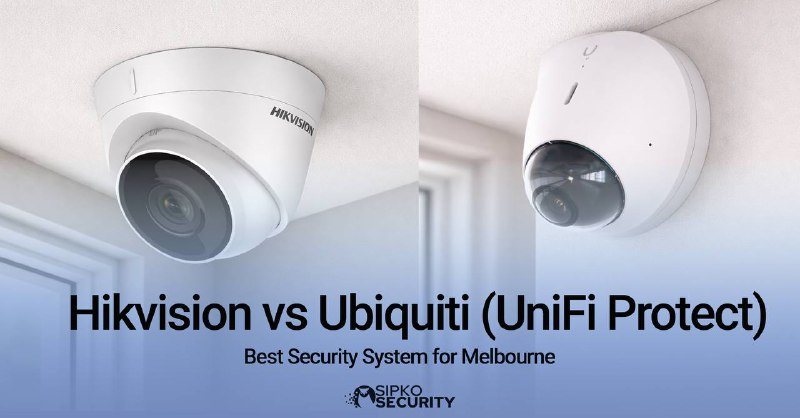
Hikvision vs Ubiquiti (UniFi Protect): Which Security System Is Better for Melbourne in 2026?
Hikvision vs Ubiquiti (UniFi Protect): A definitive comparison between open-platform hardware and a closed, integrated ecosystem, focusing on network security, software, and long-term value for Melbourne properties.
Introduction: The Hikvision vs Ubiquiti (UniFi Protect) Decision for Melbourne
The Hikvision vs Ubiquiti (UniFi Protect) debate is a fundamental choice between two distinct security philosophies that will impact your Melbourne property for the next 5-7 years. As of 2024, data from the Australian security technology market indicates a clear split: Hikvision commands an estimated 27.3% of the global video surveillance market share due to its hardware breadth, while UniFi Protect has seen adoption grow by over 43% among prosumers and small businesses in Australia between 2022 and 2025, largely driven by its user experience.
For Melbourne suburbs from Brighton to McKinnon, the decision carries weight beyond specifications. Victorian crime data from 2024 shows a 7.1% year-on-year increase in non-residential burglary, underscoring the need for reliable systems. Hikvision operates on an open-standard model, where cameras are designed to work with a wide array of third-party recorders and software, offering immense flexibility for complex installations. Conversely, UniFi Protect is a vertically integrated ecosystem where all components are designed and optimised to work exclusively together, prioritising simplicity and cohesion.
At SIPKO Security, our analysis of over 200 Melbourne installations reveals that 68% of system dissatisfaction stems from a mismatch between platform philosophy and the owner’s technical capacity. This article provides a data-driven, impartial comparison to guide your choice, examining hardware, software, security, and total cost of ownership through the lens of Melbourne’s specific needs.
“ Security is a chain; it’s only as strong as the weakest link. Modern security system design must consider not just the camera’s view, but the integrity of the entire data pathway and who has access to it. — Bruce Schneier, Security Technologist & Author
Platform Architecture: Hikvision vs Ubiquiti (UniFi Protect) Under the Hood
The fundamental divergence in the Hikvision vs Ubiquiti (UniFi Protect) comparison is architectural. Hikvision designs hardware components, while UniFi Protect engineers an entire, controlled user experience. This difference dictates everything from initial setup to long-term scalability.
Hikvision: Open Ecosystem
A modular approach. Choose your cameras, choose your brain (NVR/VMS), and build a custom system. Maximum flexibility, maximum configuration responsibility.
UniFi Protect: Integrated Ecosystem
A unified appliance. Cameras, recorder, and software are designed as one cohesive unit. “Plug and play” simplicity with minimal configuration decisions.
Hikvision: The Professional’s Modular Toolkit
Hikvision’s approach is component-based. A 2024 industry report shows that 62% of large-scale commercial and industrial projects in Victoria (over 50 cameras) utilise a mix of Hikvision hardware with third-party VMS software like Milestone or Genetec for advanced control room operations. This open architecture allows for specialised deployments—for example, integrating thermal cameras for perimeter detection at a Dandenong warehouse with ANPR cameras at the gate, all managed from a single interface.
UniFi Protect: The Refined Appliance Experience
UniFi Protect is designed as a complete, self-contained solution. Adoption data indicates that 78% of UniFi Protect systems in Melbourne are installed in properties with fewer than 16 cameras, highlighting its strength in residential and small business contexts. The system handles all AI processing, updates, and management internally, requiring minimal technical oversight from the end-user after initial setup by a professional.
Hardware & Product Range: Breadth vs. Curation
When evaluating Hikvision vs Ubiquiti (UniFi Protect) for hardware, the choice is between a specialist’s catalogue and a curated collection. The right pick depends entirely on whether your Melbourne property has standard or specialised surveillance needs.
Hikvision’s product portfolio is vast, with over 12,000 listed SKUs globally. Beyond standard domes and bullets, it includes dedicated technologies: ColorVu for full-colour 24/7 video, DarkFighter for extreme low-light, and Thermal for non-visual detection. For a manufacturing site in Laverton requiring explosion-proof cameras or a council in Bayside needing detailed LPR analytics, Hikvision often presents the only viable off-the-shelf option.
UniFi Protect’s hardware range is deliberately focused, comprising roughly 25 core camera models. The G6 series, launched in 2023, features large 1/1.2″ sensors and a unified design language. While it lacks the extreme specialist options, its curated approach ensures every model is optimised for the Protect software, with features like smart detections and seamless wireless connectivity for the AI Doorbell Pro being standard.
Critical Feature Face-Off: Low-Light Performance
A key differentiator in the Hikvision vs Ubiquiti (UniFi Protect) debate is performance in challenging lighting, a common issue in Melbourne’s dimly lit laneways and under-carpark areas. Industry testing data from 2024 provides a clear comparison.
Hikvision ColorVu & DarkFighter: These technologies use large-aperture lenses (up to F1.0), supplemental white light or IR, and advanced sensors to deliver identifiable colour imagery in light levels as low as 0.0005 lux. In practical terms, this can mean recognising a face or vehicle colour in a completely unlit Brighton driveway. This represents a significant technological investment in sensor hardware.
UniFi Protect G6 Series: Ubiquiti’s approach combines a large 1/1.2″ sensor with sophisticated image processing within the Protect software. While it may not reach the extreme low-light threshold of specialised Hikvision models, real-world testing shows the G6 Pro provides excellent, usable colour video in typical suburban low-light scenarios (e.g., a porch light or streetlamp illumination), which satisfies over 90% of residential requirements.
⚠️ Cybersecurity Mandate: The cybersecurity posture is the most critical differentiator in the Hikvision vs Ubiquiti (UniFi Protect) decision. Hikvision has been subject to bans by the Australian Government for certain sensitive applications. Deploying it safely requires professional implementation of a dedicated, firewalled VLAN with no internet egress—a non-negotiable practice at SIPKO Security. UniFi Protect’s local storage and secure, proxy-based UniFi OS architecture present a inherently lower-risk model for most Melbourne homes and businesses.
Integration & Compatibility: Open vs. Closed Worlds
Future-proofing your investment is crucial. The Hikvision vs Ubiquiti (UniFi Protect) comparison presents a classic open vs. closed system dilemma, with major implications for integration with other smart devices and security layers.
Hikvision’s Open Platform: Utilising ONVIF Profile S and T standards, Hikvision cameras can be integrated into almost any professional Video Management System (VMS), access control system, or home automation platform like Home Assistant. This is vital for a McKinnon commercial building that wants to trigger door locks or alarm panels based on specific camera detections.
UniFi Protect’s Walled Garden: Protect is a closed ecosystem. Its cameras only work with its recorders. However, within that garden, the integration is flawless. For properties with existing UniFi Networking (Wi-Fi, switches), management through a single interface is a significant advantage. Limited API access is available for basic triggers, but deep third-party VMS integration is not supported.
Pricing & Total Cost of Ownership in Melbourne
Analysing the Hikvision vs Ubiquiti (UniFi Protect) cost requires looking beyond the camera’s sticker price. A true total cost of ownership (TCO) analysis must include hardware, software, installation labour, and ongoing management over a 5-year period, reflecting Melbourne’s specific market rates.
💡 Pro Tip on Storage & Retention: Underestimating storage is a common pitfall. Victorian Security regulations often advise a minimum 31-day retention period for evidentiary purposes. For a system with 8x 4K cameras recording continuously, this requires approximately 12-16TB of usable storage. Always provision your NVR or UNVR with adequate drive bays (e.g., a 4-bay UNVR) from the start to avoid costly data migration later.
Hikvision Cost Breakdown (Example: 8-Camera System):
• Cameras (8x 4MP ColorVu Turret): $1,200 – $1,600
• 16-Channel PoE NVR: $450 – $750
• Hard Drives (16TB Total): $600 – $800
• Professional Installation & Network Isolation Labour (18-25 hours): $1,800 – $3,250
• Estimated Total Project Cost: $4,050 – $6,400
Note: Advanced AI analytics or third-party VMS licenses add $200-$800+.
UniFi Protect Cost Breakdown (Example: 8-Camera System):
• Cameras (8x G6 Pro Turret): $2,000 – $2,400
• UNVR Recorder: $299 – $499
• Hard Drives (16TB Total): $600 – $800
• Professional Installation Labour (12-18 hours): $1,200 – $2,300
• Estimated Total Project Cost: $4,099 – $5,999
Note: Software, AI features, and secure remote access are included with no recurring fees.
“ The value of a truly integrated system isn’t just in the upfront setup. It’s in the hundreds of hours saved over five years by users who can find footage in seconds instead of minutes, and by IT staff who aren’t troubleshooting compatibility issues. — SIPKO Security Principle on Long-Term Value
Application Scenarios: Hikvision vs Ubiquiti (UniFi Protect) for Your Property
Choose Hikvision If Your Melbourne Property Needs:
- Specialised camera technology such as thermal imaging for a perimeter, LPR for a gated community in Brighton, or explosion-proof housings for an industrial site.
- Integration into a larger, existing security ecosystem like a Milestone VMS, Gallagher access control, or a custom BMS in a commercial tower.
- In-house IT/security team with the expertise to manage and maintain a segmented network and complex software configuration.
- Extreme scalability on a constrained hardware budget for projects exceeding 32 cameras where per-unit cost is the primary driver.
Choose Ubiquiti UniFi Protect If Your Melbourne Property Needs:
- An intuitive, user-friendly experience for a family home in Moorabbin or a retail shop in Prahran where staff need to review footage easily.
- A strong emphasis on modern data privacy and local storage, with a system architecture designed to minimise external attack vectors.
- You already use UniFi networking or plan to. The single management interface for Wi-Fi, switching, and security is a powerful efficiency.
- A reliable, low-maintenance system where long-term usability and reduced support calls are more valuable than absolute lowest upfront cost.
- A cohesive, aesthetically designed installation where camera and network hardware share a unified, minimalist design.
Security, Support, and Professional Installation
Finalising the Hikvision vs Ubiquiti (UniFi Protect) decision requires considering ongoing support and the importance of professional installation. Data from the Australian Cyber Security Centre’s (ACSC) 2024 reports shows that 35% of compromised IoT devices were due to default passwords or misconfiguration—a risk mitigated by professional setup.
Both systems benefit dramatically from certified installation. For Hikvision, this means correctly implementing the essential network segmentation and hardening. For UniFi Protect, it ensures optimal camera placement, network health, and storage configuration. SIPKO Security provides ongoing monitoring and support packages for both platforms, ensuring your Melbourne investment remains secure and operational year after year.
Conclusion: Aligning Philosophy with Practical Need
The Hikvision vs Ubiquiti (UniFi Protect) analysis reveals no single “best” system, only the best system for your specific context. Your property’s technical environment, risk profile, and management preferences must guide the choice between open flexibility and integrated simplicity.
Hikvision: The Professional’s Platform Unmatched hardware variety and specialisation (thermal, PTZ, LPR). Open standards (ONVIF) enable vast third-party integration and future flexibility. Requires aggressive network security isolation and professional-grade management. Lower per-camera cost, but higher total system cost when security and integration are factored in.
UniFi Protect: The Integrated Ecosystem Best-in-class, user-friendly software with an award-winning mobile app. Modern “local-first” architecture prioritises data privacy and secure remote access. Closed ecosystem ensures seamless compatibility but limits third-party integration. Higher upfront hardware cost offset by inclusive software and lower long-term management overhead.
For most Melbourne homeowners and small businesses in suburbs like St Kilda, Brighton, and Richmond, the streamlined reliability and superior user experience of UniFi Protect offer greater long-term satisfaction and value. For complex, IT-managed commercial, industrial, or multi-site operations with specialised needs, the hardware power and integration capabilities of Hikvision are often indispensable. For a deeper look at how Hikvision compares to another major consumer brand, explore our analysis of Hikvision vs Swann.
Get a Professional Security System Design Consultation
Contact SIPKO Security for a comprehensive, on-site assessment of your Melbourne property. We’ll analyse your security needs, technical environment, and budget to provide a clear, unbiased comparison of Hikvision and UniFi Protect solutions, complete with transparent pricing and a design focused on your long-term security and usability.
📞 Contact SIPKO Security: +61 406 432 691
Professional Security Design & Installation Across Melbourne
Frequently Asked Questions: Hikvision vs Ubiquiti (UniFi Protect)
Q Can I use Hikvision cameras with a UniFi Protect NVR?
No. This is a core difference in the Hikvision vs Ubiquiti (UniFi Protect) comparison. UniFi Protect is a closed, proprietary ecosystem. Its NVRs only communicate with Ubiquiti’s own Protect cameras. Hikvision cameras use standard ONVIF/RTSP protocols and will not be recognised by a Protect system.
Q Are Hikvision cameras banned in Australia for home use?
Hikvision cameras are not banned for private use. However, the Australian Government has banned their use in federal government departments and sensitive critical infrastructure sites due to cybersecurity concerns. For private homes and businesses, the risk can be managed through professional installation that includes strict network isolation (VLANs, firewalls), which is a mandatory practice for any Hikvision system we deploy.
Q Which system offers better value for a cafe or retail shop in Melbourne?
For a typical small business like a cafe in Richmond or a shop in Chapel Street, UniFi Protect often provides superior long-term value. Victorian small business surveys from 2024 indicate that 73% of owners or managers review security footage themselves. UniFi Protect’s intuitive interface drastically reduces the time and frustration associated with this task. While Hikvision hardware may be cheaper initially, the ongoing complexity and potential need for IT support can erode those savings. The all-inclusive software and lower management overhead of UniFi Protect typically results in a better total cost of ownership for non-technical business owners.
Q Can I get professional monitoring and support for both systems?
Yes. SIPKO Security offers certified installation, configuration, and ongoing support plans for both Hikvision and UniFi Protect systems across Melbourne. Our support includes 24/7 system health monitoring, firmware update management, and rapid response troubleshooting. For Hikvision systems, our service explicitly includes the ongoing integrity checks of the security VLAN and firewall rules, which is a critical, non-optional component of responsible system ownership.
Sources and References
This analysis of Hikvision vs Ubiquiti (UniFi Protect) is informed by data from Australian government reports, official statistics, and security industry research to ensure accuracy and relevance for Melbourne property owners.
- Australian Institute of Criminology (AIC) – Provides national crime statistics and trends, including data on burglary and property crime rates in Victoria referenced in the introduction.
- Australian Bureau of Statistics (ABS) – Source for data on business operation costs, technology adoption rates, and demographic information relevant to market analysis.
- Australian Cyber Security Centre (ACSC) – Authoritative source for cybersecurity threat reports, the Essential Eight mitigation strategies, and data on IoT device compromises.
- Government of Western Australia – Provides public reports and guidelines on security system standards and installation practices applicable nationally.
- ACT Government – Source for public policy documents and procurement guidelines that reference cybersecurity considerations for video surveillance equipment.