
Hikvision Intercom Service & Repairs Melbourne
Ensure your Hikvision intercom remains a reliable line of defense. We provide expert on-site repairs, fault finding, and configuration for IP and 2-wire intercom installation in systems across the Melbourne metropolitan area.
App Connectivity Fixes
Restoring Hik-Connect functionality, resolving “Device Offline” errors, and ensuring notifications reach your phone instantly.
Door Release & Unlock Issues
Repairing electronic strikes, troubleshooting gate relay wiring, and fixing faults that prevent remote door unlocking.
Audio & Video Quality
Eliminating buzzing, pixelation, or “No Video” blue screens caused by cable degradation or faulty camera modules.
Regular Maintenance
System health checks, firmware updates, and lens cleaning to ensure your intercom stays operational 24/7.
Book Your Service
Call +61 406 432 691 or complete the form and we will contact you.
Featured Hardware Specialist
We don’t just troubleshoot software—we are experts in the physical maintenance and repair of Hikvision’s most popular security intercom units.
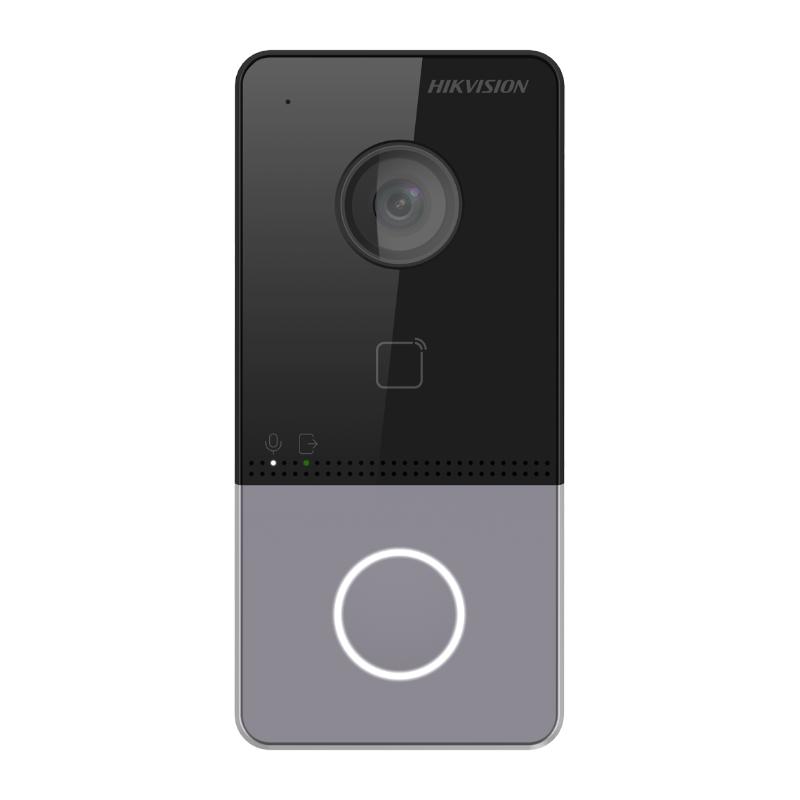
Hikvision DS-KV6113-WPE1
One of the most widely used villa door stations designed for residential homes, offices, and small commercial properties. This compact outdoor intercom combines a high-definition camera, access control features, and two-way communication in a single durable unit.
- 2 MP camera with IR supplement
- One-touch button calling design
- Built-in card reader module
- Standard PoE power supply
- IP65 protection level
- Hik-Connect APP Mobile Control
Video Parameters
Interfaces & Comms
Environmental
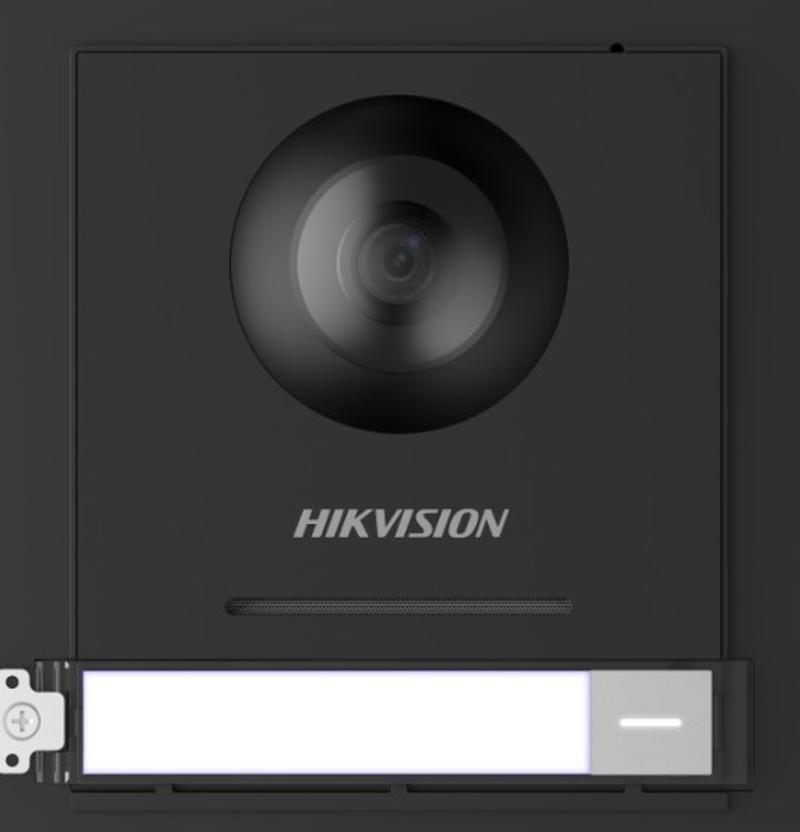
Hikvision DS-KD8003-IME1
A professional modular IP video intercom door station designed for apartment buildings and commercial access control. This model allows for customized entry systems by adding keypads, card readers, or fingerprint modules.
- 2MP HD Colorful Fish eye Camera
- Modular Expandable Design
- PoE (Power over Ethernet) Support
- 2 lock relays for dual entries
- Noise Suppression & Echo Cancellation
System Master
Audio Mastery
Installation
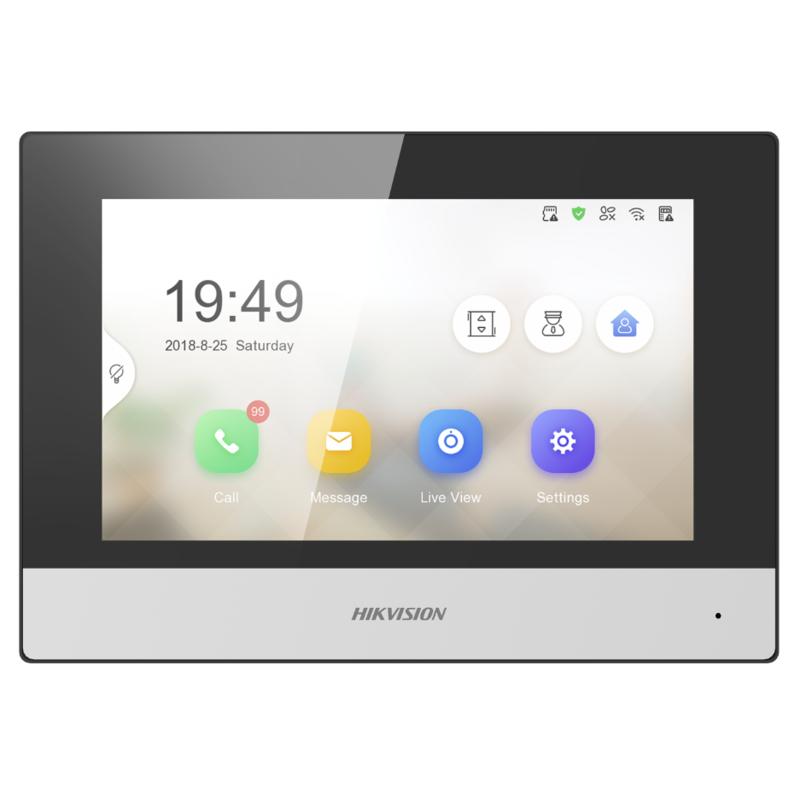
Hikvision DS-KH6320-WTE1
A 7-inch touchscreen indoor station that serves as the central control point for your home intercom. It allows residents to see visitors, communicate via two-way audio, and view live security camera feeds with a simple touch.
- 7-inch Colorful TFT Touchscreen
- 1024 × 600 Resolution Clarity
- Remote Door Unlocking & App Link
- TF Card Slot for Image Storage
- Live View of Door & IP Cameras
Display Specs
Storage & Capacity
Wireless & Network
Common Hikvision Intercom Problems We Fix
Hikvision intercoms are advanced security devices, but they can experience technical faults due to network changes, power issues, or cable wear. Our technicians specialize in diagnosing and resolving these frequent failures effectively. Learn how to choose the right system for your needs.
Connection & Offline Errors
Errors like “Connection Failed” or “Device Offline” often signal a breakdown in the network handshake or a power supply dip.
- Network Re-sync: Resetting IP addresses and cloud handshake protocols for mobile access.
- Power Testing: Checking PoE switches or 2-wire distributors for stable voltage output. See our Hikvision catalogue.
Audio & Video Failures
One-way audio, distorted sound, pixelated video, or blue screens are common on older or poorly shielded cable runs.
- Visual Interference: Shielding cables or fixing loose connections on 2-wire terminals.
- Audio Gains: Calibrating microphone sensitivity to eliminate buzzing and feedback.
Unreliable Door Unlocking
If the unlock button works intermittently or stops entirely, the fault usually lies within the relay or the electric striker wiring.
- Relay Diagnostics: Testing the activation signal from the outdoor station to the lock.
- Strike Repairs: Fixing frayed wires or faulty electronic strikers in the door frame.
Hikvision Video Intercom Screen Not Working?
A blank, flicking, or unresponsive indoor station screen can disrupt your home security. We specialize in troubleshooting and repairing Hikvision monitor display issues locally in Melbourne.
- Dead or Blank Screens: Testing power input from PoE injectors or distributors to ensure the monitor is receiving stable current.
- Touchscreen Lag/Unresponsivity: Calibrating software or identifying hardware failures on the touchscreen glass.
- Pixelation & Ghosting: Diagnosing cable crosstalk or data packet loss between the outdoor unit and indoor station.
Most screen issues are caused by faulty power supplies or outdated firmware. We resolve these without needing a full system replacement.
We verify every data signal path across your IP or 2-wire network to ensure stable HD video transmission every time the bell rings.
We keep commonly failed Hikvision indoor station components on hand for immediate on-site restoration.
Hikvision Door Station Service & Repair
The outdoor station is the first line of security, but it’s also highly exposed to the elements. We provide diagnostic and repair services for call buttons, camera modules, and audio failures in Melbourne’s variable climate.
Faulty Call Buttons
Mechanical wear or dirt buildup can stop the bell from ringing. We restore tactile response and signaling reliability.
Camera Lens & View Fixes
Moisture behind the lens or blurry vision disrupt security. We de-humidify and recalibrate optical modules.
Acoustic & Audio Clarity
Static or feedback issues are fixed by replacing speaker cones and micro-acoustic shielding components.
Solving Hikvision Intercom Audio Issues
If you’re experiencing distorted sound, buzzing, or silence, we restore clear, high-fidelity two-way audio for your system.
One-Way Audio Fixes
Identifying why communication only travels in one direction, addressing gateway firewall settings or amplifier hardware faults.
Buzzing & Static Removal
Eliminating interference caused by poor cable shielding or grounding issues that degrade sound quality.
Gain & Mic Calibration
Precision adjustment of input/output gains to prevent ear-piercing feedback loops when the volume is turned up.
Hikvision Intercom Camera & Video Fixes
A “No Video” error or a blank screen defeats the purpose of your video intercom. We diagnose the critical components—from sub-stream configuration issues to physical hardware faults—to restore your visual security chain.
Video Link & Stream Errors
If the monitor shows “Connecting” indefinitely or fails on mobile data, it’s often a configuration fault in the video bitstream settings.
- Bitrate Optimization: 1080P delivery
- Sub-stream Sync: Mobile access
Faulty Camera Modules
Physical damage to the sensor can cause permanent “No Video” blue screens. We swap modular Gen2 camera units with genuine Hikvision parts.
- Modular GEN2 Swaps
- Night Vision IR Repairs
Voltage & Data Stability
Video transmission requires high-bandwidth data and stable voltage across long 2-wire cable runs on large Melbourne properties.
- KAD Distributor Testing
- Signal Boost Logic
Hikvision Intercom Network Connectivity Issues
Modern IP intercoms rely on a stable local network. We diagnose complex faults that cause offline errors and sync failures.
IP Address Conflicts
Resolving DHCP overlaps and static IP collisions that cause stations to drop in and out of the network.
PoE Power Stability
Testing PoE switches and injectors for voltage stability to prevent unexpected reboots and system downtime.
Hik-Connect Cloud Sync
Troubleshooting P2P encryption errors and firewall blocks that prevent mobile app notifications.
Infrastructure Heatmap
Verifying RJ45 terminations to ensure network hardware can handle high-bandwidth HD video intercom traffic.
DNS & Router Audit
Optimizing local DNS pathways to ensure reliable communication between all indoor and outdoor stations.
Firmware Handshake
Version-matching across all devices to eliminate handshake errors and ensure cross-module compatibility.
Hikvision Indoor Intercom Monitor Repairs
The indoor station is the command center of your intercom system. From unresponsive touchscreens to failed audio components, we provide specialized on-site repairs for all wall-mounted Hikvision monitor models.
Touchscreen Restoration
If your monitor’s touchscreen is unresponsive or lagging, we can perform software recalibration or replace faulty digitizers.
Audio & Internal Speakers
Static-filled audio or a silent chime often indicates a failed internal speaker or a loose ribbon cable connector.
Power & Back-Bracket Fixes
Intermittent power loss is common when the monitor isn’t seated correctly on its mounting bracket or when PoE voltage dips.
Hikvision Intercom Door Unlock Problems
If your intercom is failing to release the door or gate lock, the security and convenience of your property are at risk. We specialize in diagnosing relay faults and wiring issues that prevent remote unlocking.
- Relay Board Diagnostics: Testing the NO/NC trigger pulses from the door station to ensure the unlock signal is properly reaching the lock hardware.
- Electric Strike & Mag-Lock Repairs: Fixing failed solenoid coils, magnetic plate misalignments, and loose wiring in the door frame Strike.
- Remote App Unlock Fixes: Resolving delay issues and software permission errors that prevent the Hik-Connect app from activating the relay.
We ensure your locking mechanism engages and disengages instantly every time, maintaining the security perimeter of your home or office.
We verify that the striker is receiving the correct voltage (12V/24V) to prevent coil burnout and ensure long-term mechanical reliability.
Expert configuration and wiring for dual-gate setups using Hikvision’s multiple relay outputs for independent door control.
Hikvision Intercom Power Failure Repairs
A completely dead intercom system often points to a failure in the power distribution chain. Whether it’s a blown PoE injector or a faulty 2-wire distributor, we specialize in restoring power to your security infrastructure.
PoE Infrastructure Failures
For modern IP systems, a failed PoE switch or standard-mismatch injector can brick the entire system. We test and replace critical power components.
2-Wire Power Distribution
2-wire systems rely on centralized distributors (KAD series). When these fail, both video data and power are lost simultaneously.
Wiring Shorts & Earth Faults
Damaged underground cables or moisture intrusion can cause electrical shorts that trip protective fuses in the power supply.
Hikvision Intercom Wiring & Cable Faults
Wiring issues are often the silent killers of intercom performance. From data packet loss in Cat6 runs to signal attenuation in legacy 2-wire retrofits, we provide forensic testing to identify and bridge cable gaps.
- Cat6 Transmission Testing: Diagnosing crosstalk, high-resistance joints, or poor RJ45 terminations that cause choppy video or device drop-outs.
- 2-Wire Polarity Checks: In legacy systems, swapped polarities or high signal attenuation can prevent the “KAD” distributor from seeing indoor stations.
- Weather-Damaged Cabling: Moisture intrusion in outdoor conduits can cause intermittent shorts, tripping the system’s overcurrent protection.
We use Time-Domain Reflectometers to find exact break points inside walls or underground conduits, saving you from expensive full-scale re-wiring.
We verify that data lines aren’t running parallel to high-voltage circuits, which introduces noise that degrades audio and video quality.
We replace corroded or generic terminals with gold-plated, weather-sealed Hikvision-certified connectors for permanent signal stability.
Hikvision Firmware & Software Optimization
Keeping your system firmware up to date is critical for security and stability. We perform professional firmware synchronization to ensure all modules work perfectly together and stay connected to the Hik-Connect cloud.
Bug Fixes & System Stability
Firmware updates often resolve known software glitches like random reboots, GUI freezes, or audio-sync lag between stations.
- GUI Optimization: Updating indoor station menus for faster touch response and better usability.
- Stability Patches: Eliminating memory leaks that cause systems to slow down over time.
Security & Cloud Sync
Ensure your system is protected against vulnerabilities and maintains a rock-solid connection to the Hik-Connect mobile application.
- Encryption Updates: Strengthening P2P connection security for remote communication.
- Notification Reliability: Fixing cloud signaling errors that prevent “Call” notifications.
Module Compatibility
Handshake errors between Gen1 and Gen2 devices can often be resolved with specific “version-matching” firmware loads.
- Version Matching: Synchronizing outdoor and indoor stations for seamless data exchange.
- VMS Integration: Updating firmware to support integration with Hikvision NVRs and iVMS-4200.
Hikvision Intercom Software Configuration
Our technicians use specialized Hikvision tools to audit, configure, and restore device parameters for optimal performance.
Master/Slave Synchronization
Configuring main stations and extensions to ensure every unit rings and calls precisely as intended.
Backup & Data Protection
Exporting iVMS-4200 configuration files to safeguard your settings against hardware resets or power surges.
Access & Password Recovery
Industrial reset procedures for forgotten admin passwords, restoring web interface control securely.
Hikvision Intercom Network Setup & Optimization
A high-performance intercom depends on a rock-solid network. We go beyond basic plug-and-play, configuring your routers, switches, and IP protocols for maximum security and data throughput.
IP & Static Address Management
Intermittent connection losses are often caused by DHCP leaks or IP conflicts. We establish a dedicated static IP range for your intercom stations.
- DHCP Reservation: Binding MAC addresses to prevent IP changes after a power cycle.
- Gateway Configuration: Ensuring all system modules are pointing to the correct network gateway.
VLAN & Traffic Isolation
Video intercom data can be disrupted by heavy home network-use (like streaming 4K video). We can isolate your intercom traffic on a dedicated VLAN.
- Subnet Separation: Improving security by walling off the intercom from the general internet.
- QoS Prioritization: Prioritizing voice and video packets at the switch level for zero lag.
Router & Cloud Integration
Remote app performance depends on correct router configuration. We fix “failed to connect” errors by optimizing P2P and port settings.
- Hik-Connect Stability: Optimizing cloud signaled ports to prevent “Offline” errors in the app.
- Firewall Auditing: Ensuring your security settings don’t block mobile app notifications.
Intercom & Access Control Integration Repairs
We specialize in cross-platform troubleshooting for integrated Hikvision environments, ensuring your gateway to security stays syncronized.
Wiegand Protocol Correction
Fixing credential data errors between Hikvision readers and third-party access control boards for instant entry detection.
RS-485 Bus Diagnostics
Repairing communication chain faults in modular door stations that use extra keypad or card modules for high-capacity access.
Unified Management Debugging
Resolving synchronization issues between the intercom hardware and central iVMS access control servers for total visibility.
What Does Your Hikvision Intercom Need?
Answer 4 quick questions — we’ll tell you exactly what service you need.
What is the main issue with your intercom?
How old is your Hikvision Intercom system?
What type of property do you have?
Has your system been serviced in the last 12 months?
Hikvision Intercom Mobile App Troubleshooting
Your intercom’s remote features are only as good as its cloud connectivity. We specialize in resolving Hik-Connect errors, unbinding locked accounts, and ensuring your push notifications work every time someone rings the bell.
Hik-Connect Account Unbinding
Moving into a new home or inherited a locked system? We provide professional Hik-Connect account unbinding to restore app access to a new user.
- Safe Account Transfer: Permanently removing old email/phone linkages from the device serial number.
- SADM Tool Authorization: Using official Hikvision diagnostic tools to reset cloud-binding locks.
Push Notification & Call Repair
If your indoor monitor rings but your phone stays silent, you likely have a platform-signaling error. We recalibrate your system’s communication to the Hikvision cloud servers.
- Cloud Status Auditing: Resolving “Offline” status caused by incorrect DNS or platform encryption settings.
- Notification Priority: Configuring iOS/Android notification permissions for instant “Visitor Call” alerts.
P2P Connection Engineering
Poor app video quality or “connection timeout” errors often stem from poor P2P signaling in the router. We optimize your local network for Hik-Connect.
- UPnP & Port Auditing: Opening specific communication tunnels for smooth data handshakes.
- Encryption Key Reset: Troubleshooting “Stream encrypted” errors by resetting the verification code.
Hikvision Intercom Remote Access Problems
Accessing your intercom while away shouldn’t be a gamble. We specialize in diagnosing why your system works on local WiFi but fails on 4G/5G mobile data, resolving the network handshakes that cause “Connection Failed” errors.
Global Handshake Optimization
We recalibrate the handshake timing between your local router and Hikvision’s global P2P servers for instant connection.
DNS Resolution Fixes
Incorrect DNS settings can prevent your hardware from “finding” the internet. We implement high-availability Google/Cloudflare DNS routes.
Diagnostic Core
Crystal Clear Voice Communication
Communication is the pulse of your security. We don’t just “fix” sound—we optimize the entire acoustic chain for crisp, natural interaction.
One-Way Communication
Resolving IP gateway blocks or 2-wire amplifier faults that cut visitor sound.
Static & Ground Hum
Eliminating interference from poor shielding or power-line proximity.
High-Pitch Feedback
Calibrating input/output gains to remove ear-piercing sound loops.
Internal Mastery
Testing acoustic seals and speaker cone integrity for maximum fidelity.
Packet Sync
Optimizing IP delivery to remove robotic voices caused by network jitter.
Hikvision Reset & Reprogramming
When software corruption or misconfiguration takes your system offline, a professional factory restoration and rebuild is the only way to guarantee 100% stability.
Hard Reset & Wipe
We perform physical and software-level factory resets on all indoor and outdoor units to clear corrupt cache and outdated logic.
Firmware Re-Flash
After a reset, we re-flash the latest stable firmware to ensure security patches and feature sets are fully optimized across all hardware.
Logic Rebuilding
We manually reprogram the station IDs, Master/Slave relationships, and IP addressing to restore communication between screens.
Final Validation
Rigorous testing of notification delivery, lock release timing, and audio clarity to ensure the rebuild is perfect.
Inherited a Locked System?
We provide specialized password recovery and account unbinding services for customers who have purchased or moved into a home with an existing Hikvision system. We can verify ownership and legally unlock the device serial numbers for you.
Delayed or Missing Call Notifications?
If your visitor rings the doorbell but your phone doesn’t alert you until minutes later—or not at all—the signaling chain is broken. We optimize the entire path from your door station to the Hikvision cloud.
Server Region Lag
Incorrect device registration in the wrong global server region causes massive latency. We migrate your serial numbers to the optimized Australian clusters.
Push Token Mismatch
Expired mobile push tokens often prevent the Hikvision cloud from “waking up” your handset. We perform a hard token refresh and device unbind.
Encryption Handshake
Incorrect encryption verification codes stall the signaling process. We harmonize the encryption keys between your device and the cloud platform.
OS Optimization
We configure iOS and Android power management settings to ensure the Hik-Connect app isn’t “killed” by the operating system while in background.
Our “Zero-Latency” protocol ensures that when the button is pressed, your phone rings within 1-2 seconds, anywhere in the world.
Hikvision Apartment & Multi-Tenant Intercom Repairs
Servicing large-scale Hikvision IP and 2-wire apartment systems requires specialized knowledge of network backbones and floor-to-floor isolation faults. We keep entire buildings connected.
Directory & Name Management
We fix broken tenant lists, reprogram keypad name directories, and troubleshoot facial recognition database synchronization across multiple entry points.
Floor Switch & Isolation Faults
When a single faulty screen takes down an entire floor, we diagnose the specific PoE switch or distributor causing the communication loop.
Concierge Station Integration
Repairing and optimizing the central Master Station (Concierge) to ensure seamless communication between building managers and residents.
Hikvision Villa Intercom Systems Repairs
For single-home villas, a failed intercom means missed deliveries and security gaps. We specialize in rapid-response maintenance for high-end residential systems.
Gate Integration
Repairing connections between the intercom and electric swing/sliding gates for secure vehicle entry.
Modular Expansion
Adding extra door stations or indoor monitors to cover pool houses, garages, or multiple levels.
Diagnostic Focus
- Gate Strike & Latch Troubleshooting
- 2-Wire Hybrid System Calibration
- IP Subnet Routing for Large Estates
- Outdoor Station Weatherproofing