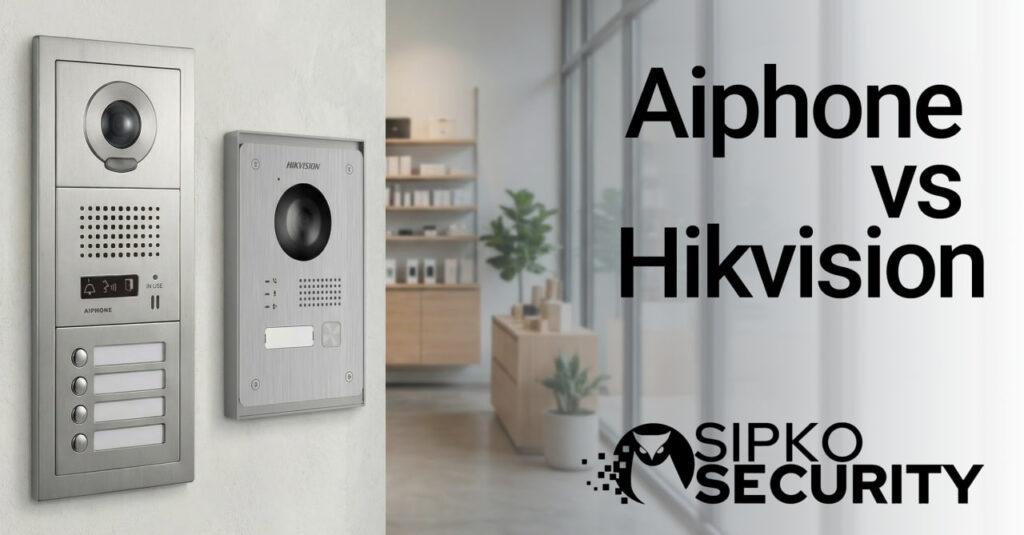
Aiphone vs Hikvision: The Ultimate Intercom Showdown for Melbourne Properties
An in-depth, unbiased analysis of Aiphone vs Hikvision intercom systems. From Brighton mansions to Southbank apartments, we explain durability, app features, and why your choice of cabling matters more than you think.
Introduction: The Tank vs The Smartphone
In the world of security, there are two distinct philosophies. One says, “Make it simple, build it like a tank, and ensure it works for 20 years.” The other says, “Make it smart, connect it to everything, and give it a touchscreen that looks like an iPhone.” In the battle of Aiphone vs Hikvision, these two philosophies collide head-on.
For Melbourne strata managers dealing with 50-tenant apartment blocks in St Kilda, the choice often seems obvious. But for a tech-savvy homeowner in a renovated Camberwell period home who wants to unlock the front gate for a courier while holidaying in Noosa, the answer is completely different.
At SIPKO Security, we don’t pick favourites. We install hundreds of intercoms across Victoria every year, from the rugged coast of the Mornington Peninsula to the busy commercial hubs of the CBD. We have seen Aiphone units survive hail storms that would crack a phone screen, and we have seen Hikvision systems provide levels of integration that make a home feel like it’s from 2050.
This guide is not a sales pitch. It is a deep, unbiased dive into the hardware, the software, and the daily reality of living with these systems. We will cover everything from “Porch Pirate” defence to the hidden costs of cabling retrofits in Victorian terraces.
“ If you want it to work for 15 years without a technician touching it, choose Aiphone. If you want to unlock the gate from your phone while sitting on a beach in Bali, choose Hikvision.
The Melbourne Context: Weather, Architecture, and Crime
You cannot choose an intercom system in a vacuum. You have to choose one that survives Melbourne. Our city throws specific challenges at electronic hardware that generic reviews from the US or UK rarely mention.
1. “Four Seasons in One Day” Durability
Melbourne’s weather is notorious. A doorbell station facing West in Werribee or Point Cook can be baked by 40°C sun in January, then blasted by horizontal rain and hail an hour later. UV radiation breaks down cheap plastics, turning them yellow and brittle within two years. Moisture ingress corrodes circuit boards.
Aiphone’s Approach: Aiphone uses marine-grade stainless steel and UV-stabilised polycarbonate. We have serviced Aiphone GT panels in St Kilda that have been exposed to salt spray and sun for 15 years and still function perfectly, even if they look a bit weathered.
Hikvision’s Approach: Hikvision’s Gen2 modules look incredible—black glass, brushed aluminium, sleek lines. However, like a smartphone, glass can crack. While they are IP65 rated, proper installation with rain hoods and silicone sealing acts is critical. In exposed coastal areas like Black Rock, we recommend their stainless steel vandal-resistant range over the standard plastic/glass modular range.
2. The “Porch Pirate” Epidemic
Since the rise of Amazon and UberEats, the intercom is no longer just for guests; it’s for logistics. Package theft is rising in inner-Melbourne suburbs like Richmond and Collingwood. The ability to answer a ring remotely and say “Just leave it behind the pot plant, thanks” is now a primary security feature.
This is where Hikvision shines. The App notification is instant (internet dependent), and the video clarity allows you to verify the courier’s ID. Aiphone’s older systems required you to be home. Their newer IP systems (IXG/JO-WiFi) do this too, but the app experience is often described by users as “clunky” compared to the slick interface of Hik-Connect.
3. The Architecture Gap
Melbourne’s housing stock varies wildly. In a modern build in Docklands, you have CAT6 data cabling everywhere. In a double-fronted Victorian terrace in Carlton, you might have two thin strands of copper wire from a doorbell installed in 1920. Aiphone’s 2-wire technology is legendary for working over this “garbage” cabling, saving owners thousands in re-wiring costs.
Deep Dive: Aiphone (The Samurai)
Founded in Nagoya, Japan in 1948, Aiphone is the Toyota of the intercom world. They do not make toasters, they do not make TVs, and they do not make alarm systems. They make intercoms. That singular focus has led to a reputation for bulletproof reliability.
Aiphone systems are typically “proprietary,” meaning an Aiphone monitor only talks to an Aiphone door station. They don’t play nice with other brands, and they see this as a feature, not a bug. By controlling the entire ecosystem, they ensure that a firmware update on your router won’t break your doorbell.
Why Aiphone Wins for Strata
Imagine you are the chairperson of the Owners Corporation for a block of 20 units. Half the residents are renters, three are elderly, and one is a tech nerd. If you install a complex Android-based IP intercom:
- The elderly residents can’t work out the touchscreen.
- The renters change the WiFi password and disconnect the unit.
- The system needs a firmware update that crashes the server.
With an Aiphone GT Series system, it’s hardwired. There is no WiFi to drop out. You pick up the handset (or press talk), and it works. Every single time. For 20 years. That is why strata managers love them.
Deep Dive: Hikvision (The Tech Giant)
Hikvision is the world’s largest video surveillance manufacturer. For them, an intercom is just another camera that happens to have a button on it. This gives them a massive advantage in video quality and software integration.
A Hikvision doorbell often uses the same high-end sensor as their security cameras—features like WDR (Wide Dynamic Range) to see faces even when the sun is behind them, and fisheye lenses to see packages left on the floor—are standard.
The real magic, however, is the Ecosystem Effect. If a Melbourne home already has Hikvision ColorVu cameras installed, the intercom monitor (the KH6 or KH8 series) becomes a central security hub. You can tap “Live View” on the intercom screen and cycle through all your perimeter cameras. You can’t do that easily with Aiphone.
The “Single Pane of Glass” Concept
In the IT and security world, everyone wants a “Single Pane of Glass”—one app to rule them all. Hikvision offers this via Hik-Connect. You open one app to:
- Answer the doorbell.
- Check the backyard CCTV.
- Arm/Disarm the alarm (if using Hikvision AX Pro).
- Unlock the front door (if using a smart lock integration).
Aiphone simply cannot match this. If you choose Aiphone, you will likely have one app for the intercom, a different app for your CCTV (e.g., Dahua DMSS), and a third app for your alarm (e.g., Ajax or Bosch). For many users, “App Fatigue” is real, and Hikvision solves it.
A Tale of Two Cities: Or, How 24 Hours Differs
To really feel the difference, let’s follow two fictional Melbourne property owners.
“Strata Steve”
Manages a 12-unit block in Hawthorn.
8:00 AM: A tenant moves out. Steve doesn’t need to reset any passwords or wipe any data. The intercom is a “dumb” terminal. It just stays on the wall.
2:00 PM: The NBN connection to the building goes down for maintenance. The Aiphone system is hardwired internally. When visitors buzz unit 4, it still rings perfectly. No internet needed.
10:00 PM: A rowdy guest tries to burn the camera lens with a lighter. The Aiphone stainless steel flush plate gets a scorch mark but the lens—protected by a thick polycarbonate shield—survives.
Verdict: Boring? Yes. Stress-free? Absolutely.
“Tech-Savvy Sarah”
Lives in a renovated smart home in Balaclava.
9:30 AM: Sarah is at work. Her cleaner arrives but forgot the key. Sarah opens the Hik-Connect app, verifies it’s her cleaner via the 1080p wide-angle video, and taps “Unlock”. Door opens.
1:15 PM: A courier buzzes. Sarah is in a Zoom meeting. She answers on her Apple Watch (via push notification), tells him to drop it, and goes back to her meeting without missing a beat.
6:00 PM: She comes home. She doesn’t use a key. The Face ID terminal on her gate recognizes her, flashes green, and lets her in automatically.
Verdict: Requires occasional updates, but adds “magic” to daily life.
Battle Scenario 1: The “Courier at the Door” Test
Let’s play out a common Melbourne scenario. You are at work in the CBD. An Amazon courier arrives at your home in Malvern. He presses the button.
With Hikvision (Gen 2 IP)
Your phone vibrates instantly with a “Call Request” push notification. You swipe to answer. The video quality is crisp 1080p. You see the courier holding a box. You tap the microphone icon.
“Hi mate, just leave it behind the pillar.” The audio is full-duplex with noise cancellation, so you don’t hear the wind roaring or traffic noise from Malvern Road. The courier nods, drops the package. You press a button on the app to take a snapshot for proof. Usefully, the event is also recorded to your NVR’s hard drive because the intercom acts as a camera 24/7.
With Aiphone (JO Series WiFi)
Your phone gets a notification. It might take 2-3 seconds longer to connect to the cloud server depending on signal. The video appears—it is clear (720p), but the field of view is slightly tighter, perhaps missing the shoes of the courier. You speak. The audio is loud and clear. It works fine. However, if you miss the call, the recording is stored on a small SD card inside the internal monitor. If someone breaks in and steals the monitor, your footage of the courier (or the thief) is gone. There is no automatic backup to an NVR safe in the roof or basement.
Battle Scenario 2: The “Old Victorian Terrace” Retrofit
You have bought a classic terrace in Albert Park. The walls are solid brick. There is no way to run new cables without destroying the heritage plasterwork. You have an old audio doorbell that doesn’t work.
The Problem with IP (Hikvision/Dahua)
Standard IP intercoms require CAT6 (Ethernet) cable. You don’t have it. Hikvision has a “2-Wire IP” range designed for this. It uses standard copper wire but sends digital data over it. It is fantastic IF the old cable is in decent condition. If the insulation is rotting or there are twisted joins hidden in the wall cavity, the high-bandwidth video signal will fail. You get pixelation, ghosting, or “Connection Failed” errors.
The Aiphone Solution
Aiphone’s DA or JO series 2-wire tech is incredibly forgiving. It uses a lower frequency signal that punches through bad cabling with ease. It is less demanding on bandwidth. We have successfully installed Aiphone video units on wire that looked like it was installed before World War II. When the cabling is questionable and re-wiring is impossible, Aiphone is the safer bet for an installer who doesn’t want a callback.
Aesthetics: Glass vs Steel
Melbourne architecture is diverse, and your intercom is the first thing visitors touch. It sets the tone.
- Hikvision: Their designs are thoroughly modern. The KH6320 indoor station looks like an iPad Mini mounted on the wall. The outdoor modular stations have a “tech” vibe—gloss black, brushed steel frames, blue LED backlighting. It suits modern rendered homes, apartments, and commercial offices perfectly. However, on a heritage bluestone cottage, it can look jarringly futuristic (and out of place).
- Aiphone: Aiphone tends to be more conservative. Their internal monitors often have larger bezels and physical buttons (which are great for wet hands or elderly users). Externally, panels like the JK or JO series are simple, discreet plastic or zinc alloy. They blend in. They don’t scream “I am a high-tech device,” which some owners prefer as it draws less attention from vandals.
Key Feature Comparison Table
Comparing the flagship models standard for residential homes (Hikvision Gen2 KD8003 vs Aiphone JO-1MDW).
Privacy and Data Security: Who Watches the Watchers?
In 2026, data privacy is a massive concern for Melbourne families. Where does the video go?
Aiphone is often preferred by privacy-conscious users (and government buildings) because their systems are traditionally “air-gapped.” The video goes from the door to the screen over a copper wire. It touches no servers, no cloud, no internet. If you buy a non-WiFi Aiphone model, it is physically impossible to hack it remotely. You sacrifice the mobile app, but you gain 100% privacy.
Hikvision relies on cloud P2P servers (AWS based usually) to route the call to your phone. While encrypted, some users are wary of using cloud-based security cameras. Hikvision has faced scrutiny in the past regarding cybersecurity, though they have heavily invested in compliance and encryption standards in recent years. For most residential users, the convenience of the app outweighs the theoretical risk, but for specific high-security clients, we stick with Aiphone.
Integration with Home Automation
Do you use Control4, Savant, or Crestron? Or perhaps Home Assistant?
Hikvision supports the ONVIF protocol and RTSP (Real Time Streaming Protocol). This means you can easily pull the video feed from your doorbell into third-party dashboards. You can display the front door stream on your wall-mounted iPad or desktop PC.
Aiphone is much more closed. While high-end models (IX Series) support ONVIF, the standard residential units (JO/DA) do not. You live in Aiphone’s world, or you don’t. Integration usually involves dry-contact relays (physical wires) to trigger a doorbell chime or a light, rather than software code.
Cost Analysis: The 10-Year View
Upfront: Hikvision is generally cheaper. A high-spec Hikvision kit might cost $600-$900 in hardware. A comparable Aiphone kit is often $800-$1200. Aiphone charges a premium for the “Made in Japan (or Thailand)” quality control.
Long Term: This is where it gets interesting.
- Scenario A (Hikvision): You install it. 5 years later, the app updates, the hardware is “End of Life,” or the touchscreen delaminates from constant sun exposure. You might upgrade it. Total Cost: 2 x Units in 10 years.
- Scenario B (Aiphone): You install it. 15 years later, it is still there. The plastic has faded slightly, but the button still clicks satisfyingly. Total Cost: 1 x Unit in 15 years.
For landlords, Aiphone is often cheaper because there are zero maintenance calls. For homeowners who want the latest tech features, Hikvision offers better “bang for buck” in terms of daily utility.
The Final Verdict: Which One Should You Buy?
Select Aiphone If:
- You manage an apartment block or owners corporation.
- You are installing it for elderly parents who need simplicity (press button, talk).
- You have old, terrible cabling and cannot re-wire.
- You want a system that will likely outlast your mortgage.
- You value privacy over connectivity.
Select Hikvision If:
- You want to answer the door from your phone reliably.
- You already have (or plan to get) Hikvision CCTV cameras.
- You want a stylish, modern glass touchscreen on your wall.
- You want advanced features like Keypad, Card Reader, or Face Recognition at a reasonable price.
- You want your intercom events recorded to your NVR for security evidence.
The Product Lineup: Decoding the Model Names
To really understand the Aiphone vs Hikvision choice, you need to know what you are actually buying. Both manufacturers produce dozens of models, but for most Melbourne residential and light commercial properties, you are looking at these core series.
The Aiphone Contenders
1. The JO Series (The Bread & Butter):
This is the staple of the Aiphone range for single homes. It features a 7-inch screen and a vandal-resistant door station. The “JO-1MDW” model adds WiFi connectivity, allowing you to answer calls on your phone. It is famous for its touch-button responsiveness and zero lag.
2. The GT Series (The High-Rise Hero):
If you live in a complex with more than 5 apartments, you likely have (or need) the GT Series. It is modular, meaning you can have a scroll list of names or a numeric keypad. It supports hundreds of tenants and works over immense cable distances. It is the “Toyota HiLux” of the intercom world—not the prettiest, but it will never let you down.
3. The IX / IXG Series (The IP Heavyweight):
This is Aiphone’s answer to Hikvision. It is a fully IP-based system designed for luxury towers and commercial campuses. It uses CAT6 cabling and has touchscreen monitors. While powerful, it is significantly more expensive than Hikvision’s equivalent and is often overkill for a standard family home.
The Hikvision Contenders
1. KV6 Series (The Entry Level):
Small, plastic, and highly functional. These are often used for rear gates or budget installations. They have fully functional 2MP cameras and app connectivity but lack the premium finish of the higher models.
2. KV8 Pro Series (The Tough Nut):
Metal construction, IK08 impact protection, and sleek design. This is a standalone unit that doesn’t need extra modules. It is popular for modern warehouse renovations and office entries in suburbs like Cremorne.
3. KD8 Modular Series (The Transformer):
This is the flagship. You buy a main camera frame, and then clip in whatever modules you want: a Keypad for PIN codes, a customized Nametag module, a Mifare Card Reader, or even a blanking plate. Usefully for Melbourne, the frames come in flush or surface mount options, allowing sleek integration into rendered brick fences.
User Interface Battle: Retro Simplicity vs Android Tablet
The hardware on the wall is important, but the software you touch every day matters more. This is where the cultural difference between Aiphone (Japan) and Hikvision (China) becomes stark.
The Aiphone Experience: “It Just Works”
Pick up an Aiphone monitor (like the JO-1MD). It feels like a high-quality appliance from 2010. The menus are basic. The icons are blocky. There are often physical buttons for “Talk” and “Unlock” below the screen.
The Pro: Muscular memory. You don’t need to look at the screen to unlock the door. You just press the button. This is critical for users with poor eyesight or arthritis. There is no “lag” when you press a physical button—the relay clicks instantly.
The Con: It feels dated. You cannot change the wallpaper. You cannot install Spotify on it. It does one thing, and one thing only. For a generation raised on iPads, it can feel underwhelming.
The Hikvision Experience: “The Smart Command Centre”
Walk up to a Hikvision KH6320 or KH8520. It looks like an Android tablet. The screen is an IPS panel with vibrant colours. You swipe to unlock. You tap icons to enter menus.
The Pro: It is beautiful. You can customize the background. You can check the weather. You can view 16 different CCTV cameras. It feels like a piece of modern technology that adds value to a renovation.
The Con: It can be complicated. We have had calls from grandmothers asking “Where has the talk button gone?” because a software update moved the icon. Touchscreens also gather fingerprints, and in a bright hallway, those smudges are visible. Furthermore, cheap models can have “touch lag,” which is frustrating when the courier is walking away.
The Future of Access: Face ID and QR Codes
We are moving beyond keys and cards. The new battleground is biometric and temporary access.
Scenario: The Dog Walker
You have a dog walker coming at 2 PM. You are at work.
- Aiphone Way: You have to answer the call live and unlock the door remotely. If you are in a meeting, the walker is locked out.
- Hikvision Way: You generate a temporary QR code in the Hik-Connect app. You SMS it to the walker. It is valid from 1:50 PM to 2:10 PM only. They scan it at the door station -> BEEP -> Door opens. You get a log entry: “QR Access – Dog Walker”. Secure, trackable, automated.
Facial Recognition: Hikvision’s “MinMoe” technology is filtering down from commercial terminals to residential intercoms. Imagine walking up to your front gate with groceries in both hands. The intercom camera scans your face, recognizes you in 0.2 seconds, and pops the lock. No keys, no phone. Aiphone is very cautious with this tech (due to privacy concerns), whereas Hikvision is pushing it aggressively as the new standard.
Installation Truths: Why You Need a Pro
A common question on Whirlpool forums is: “Can’t I just buy a Hikvision intercom on eBay and stick it on myself?”
Technically? Maybe. Legally and practically? No.
1. Victorian Cabling Laws:
In Australia, any permanent cabling that connects to the telecommunications network (which IP intercoms do via the NBN router) must be installed by a registered cabler. Doing it yourself is illegal and can void your home insurance if an electrical fire is traced back to DIY wiring.
2. The Waterproofing Mistake:
The number one killer of DIY intercoms is water. Melbourne rain is driven by strong southerly winds. A professional installer knows to silicone the top and sides of the unit but leave the bottom open for drainage. DIYers often seal the whole unit, turning it into a fishbowl when condensation builds up inside. Hikvision’s IP65 rating relies on proper mounting. See our guide on renovating with security in mind.
3. Network Configuration:
An Aiphone 2-wire system is plug-and-play. Hikvision is not. It requires IP address activation, subnet masking, and gateway configuration. If you have a password conflict or an IP clash with your Sonos speakers, your doorbell simply won’t ring. SIPKO Security technicians carry laptops and specific configuration tools to ensure stable network traffic.
The “Oh No” Moment: What Happens When Things Break?
“Error Code 0x14”
You wake up and the screen says “Network Abnormal”. You try to check the app, but it says “Device Offline”. Because Hikvision is an IP system, this could be your router, the switch, a loose ethernet cable, or an IP address conflict because your teenager installed a new Xbox.
The Fix: You generally need a technician with a laptop to scan the network, find the rogue IP address, and re-configure the port forwarding or cloud P2P settings. It’s an IT job.
“Cracklin’ Rosie”
After 15 years, you press the talk button and hear a crackling static noise. The video is fine, but the audio is fuzzy. This is usually physical corrosion on the copper wire terminations at the gate, caused by years of Melbourne rain.
The Fix: A technician (or handy owner) unscrews the faceplate, strips 5mm of fresh cable, re-terminates the screw connection, and it works for another 15 years. No laptops needed.
Troubleshooting: What Goes Wrong?
Even the best systems have quirks. Here is what we fix most often.
Hikvision Headaches
- Spider Webs: The IR lights on Hikvision cameras attract bugs, which attract spiders. A web across the lens causes the camera to focus on the web, blurring the visitor. Fix: Regular cleaning with a soft brush (or “Spider-Ex” spray around the frame).
- Firmware Mismatch: If the indoor screen has V2 firmware and the door station has V4, features may break. Fix: Professional firmware upgrade.
- Notification Delays: If your NBN upload speed is poor (common in some areas like Kew or older HFC connections), the push notification to your phone might lag.
Aiphone Annoyances
- Corrosion on Contacts: Very old units in saltwater suburbs can develop green corrosion on the terminals. Fix: Use gel-filled connectors during installation to seal the copper.
- Volume Issues: Older residents sometimes find the “ring” volume too low or high. Fix: Most Aiphone monitors have deep menu settings or physical dials to adjust this—check the manual!
- Limited Angles: Older standard lenses didn’t see packages on the floor. Fix: Install the unit lower (1200mm-1300mm) or use a 30-degree angled mounting box.
Still Confused? Let’s Talk Site Specs.
Choosing between Aiphone and Hikvision often ultimately comes down to your cabling and your specific lifestyle needs. We can assess your Melbourne property and tell you exactly what will work best.
📞 Call SIPKO Security: 0406 432 691 or Request a Quote Online
Frequently Asked Questions
Can I replace my old intercom with Hikvision without running new cables?
Yes, potentially. Hikvision’s 2-Wire IP Series is designed for this. However, it requires a specific “Distributor” unit and the cabling must be in reasonable condition. If the cable is very old or thin, Aiphone is safer.
Do these systems have monthly fees?
No. Unlike Ring, Nest, or Arlo, neither Aiphone nor Hikvision charge monthly subscription fees for basic functionality, including the mobile app use. You buy the hardware, you own it.
Can I unlock my gate with these intercoms?
Yes. Both systems have built-in relays to control electronic strikers or magnetic locks. This allows you to open pedestrian gates or even powered driveway gates from the internal monitor or your smartphone.
Which is better for NBN compatibility?
Hikvision devices are native IP devices, so they plug straight into your NBN router/modem. Aiphone IP models do the same. Older analogue systems don’t touch the NBN at all, functioning completely offline.
Explore More Comparison Guides
- Video Intercoms vs Smart Doorbells – Why hardwired beats battery every time.
- Hikvision vs Axis – A deep dive into camera brands.
- Hikvision AX Pro vs Bosch 6000 – Wired vs Wireless alarms.
- Akuvox vs Hikvision – The other major IP intercom contender.
- Maintenance Choices – Why “install and forget” matters.
External Government Resources
For further verification of security standards, privacy laws, and crime statistics, we recommend consulting these official government sources:
- Australian Cyber Security Centre (ACSC) – Source for IoT security guidelines, threat reports (2024), and advice on securing network-connected devices including surveillance cameras.
- Australian Institute of Criminology (AIC) – Provides national crime statistics and trends, including Victorian break-and-enter data referenced in the introduction.
- Office of the Australian Information Commissioner (OAIC) – Authority on Privacy Act 1988 compliance and data protection requirements relevant to surveillance system deployment.
- Federal Register of Legislation – Source for the Security of Critical Infrastructure Act 2022 and related regulations affecting surveillance equipment procurement.
- Australian Bureau of Statistics (ABS) – Provides data on business technology adoption, crime prevention expenditure, and industry-specific statistics referenced in cost analysis.
- WA Government – WA Government community safety and security guidelines.
- ACT Government – ACT Government emergency services and safety information.
- My Health Record System – Official source for healthcare data protection standards relevant to medical practice surveillance requirements.
- Department of Home Affairs – Source for critical infrastructure protection policies and guidelines affecting surveillance system procurement decisions.