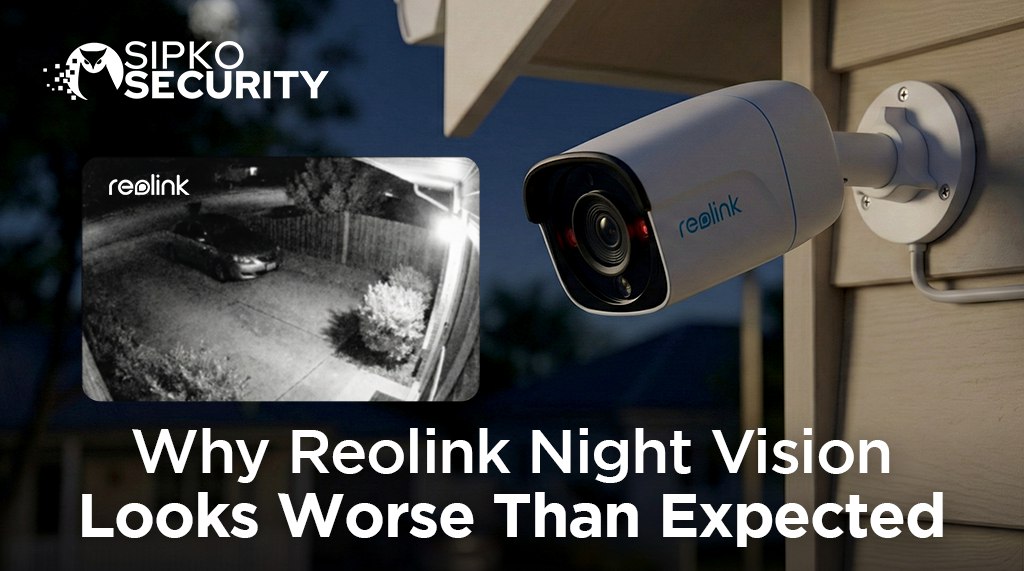
Why Reolink Night Vision Looks Worse Than Expected: The Truth About Budget 4K
The Reality of Reolink Night Vision: High resolution doesn’t always equal clear evidence. While poor images are often due to hardware limits, many issues stem from IR reflection, dirty lenses, or improper positioning. Learn how to fix your blurry, hazy, or washed-out footage.
Visualising the gap: Consumer-grade cameras often struggle with motion blur (ghosting) compared to professional sensors.
Introduction: The 4K Marketing Trap
You just installed your new 4K Reolink system. During the day, the image is crisp, and the colours pop. However, as soon as the sun goes down, everything changes. Faces become blurry smudges, and anyone walking past looks like a “ghost” floating across your driveway.
At SIPKO Security, we hear this story every week. Melbourne homeowners often choose Reolink because the specs on the box—8MP, 4K, Color Night Vision—look identical to professional systems costing three times as much. But in the world of CCTV, resolution is only half the story.
🏠 Expert Support: Improving Your Night Vision
Choosing the right camera and position is the only way to guarantee clear forensic evidence. If your current Reolink setup is struggling, our Melbourne technicians can help with professional repositioning, lighting upgrades, or installer-grade system replacements.
Explore Professional InstallationTroubleshooting Reolink Camera Blurring at Night
If your night vision is overexposed, foggy, or filled with “kaleidoscope” spots, follow these physical and technical steps to recover your image quality.
1. Physical Inspection
- Stop IR Glare: Ensure the lens is not facing smooth walls, mirrors, or reflective ceilings. Move it away from walls to prevent infrared reflection.
- Clean the Lens: Dust, spiderwebs, or water spots scatter IR light. Use a microfiber cloth for a thorough wipe.
- Weatherproofing: Check for broken seals. Humid air entering the housing causes internal condensation.
2. Setting Check
- Resolution: Ensure “Main Stream” is set to the highest (5MP/4K). App defaults often drop to “Fluent” mode.
- Image Defaults: Use the “Default” button in image settings to reset unreasonable exposure tweaks.
- Anti-Flicker: Try different cycles (50Hz/60Hz) to see if flickering or white-out issues resolve.
🏠 Special Note for Dome Camera Owners
For models like the RLC-843A, RLC-840A, or RLC-540A, check for dust on the inner surface of the dome. You may need to open the glass cover and clean the inside with alcohol. Also, ensure the lens angle doesn’t cause infrared lights to hit the plastic base.
3. The Physics Factor: Aggressive DNR
When a camera has a noisy image (grainy dots), it uses Digital Noise Reduction to clean it up. Reolink’s software is often over-aggressive. It “smears” the noise to make the image look smooth, but in doing so, it deletes the fine details.
You might get a “clean-looking” video, but you lose the texture of a person’s clothing, the logo on their hoodie, or the characters on a license plate. Professional CCTV systems process noise while preserving these vital forensic edges.
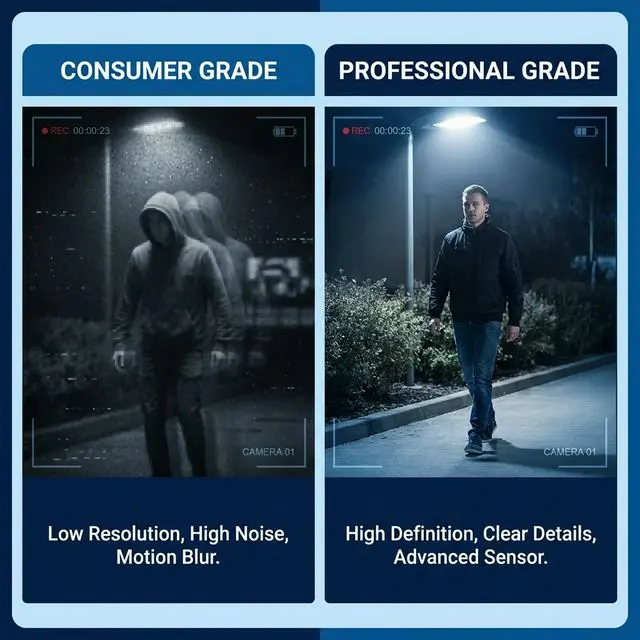
The importance of sensor size: Professional-grade sensors preserve critical forensic evidence that budget software often “smears” away.
4. The “Color Night Vision” Marketing Gimmick
Many budget cameras boast “Full Color Night Vision.” Usually, this just means they have a bright LED spotlight that turns on when motion is detected. While this provides colour, it also creates harsh shadows and can “white out” a person’s face if they get too close to the camera.
True professional low-light cameras (like Dahua or Hikvision) can see in colour in near-total darkness without needing a blinding spotlight, thanks to their massive sensors and wide F1.0 apertures.
Adding External Lighting: A Middle-Ground Solution
If your Reolink system is already installed and night vision is poor, you don’t always have to scrap the whole system. One of the most effective ways to “help” a budget sensor is to provide more light.
- External IR Illuminators: These are separate infrared floodlights that wash the yard in invisible light. This allows the camera to use a faster shutter speed, significantly reducing “ghosting.”
- Smart Motion Lighting: Integrating high-quality LED floodlights (like those from Ajax Systems) ensures that when motion is detected, the area is flooded with daylight-quality light, allowing the camera to switch to day mode for maximum clarity.
When Reolink is “Good Enough”
- Monitoring well-lit areas (street lights).
- General observation of pets or property.
- Budget-constrained DIY setups for low-risk areas.
- Daytime-focused security needs.
When to Upgrade to Professional
- You need to identify faces or plates at night.
- Large properties with zero ambient lighting.
- High-risk commercial or residential sites.
- You want 24/7 reliable evidence, not just “vibe.”
Why SIPKO Security Recommends Installer-Grade Gear
We don’t install Reolink because we cannot guarantee the result for our clients. In Melbourne, where residential burglaries are a real concern, we believe security should be more than a deterrent—it must be a forensic tool.
We specialise in Dahua and Hikvision systems because their night vision is industry-leading. For more context, read our guide on Dahua vs Reolink.
Get in Touch
Contact SIPKO Security
Speak with a specialist about wired and wireless CCTV, Ajax alarms, and same-week installations. We respond quickly during business hours and offer after-hours call-outs for urgent security issues.
📧 Email Us
sipkosecure@gmail.com
📞 Phone
0406 432 691
📍 Head Office
Brighton, Melbourne
Night Vision Frequently Asked Questions
Why does my 4K camera look grainier than my old 2MP camera?
If the sensor size stayed the same but the pixel count increased, the individual pixels are now smaller and less sensitive to light. This is a common issue with budget “high-res” cameras.
Can I fix ghosting with a firmware update?
Firmware can only do so much. Ghosting is usually a hardware limitation of a sensor that needs a slow shutter to “see” anything. While software can tweak exposure, it can’t fix physics.
Is infrared (black and white) better than colour night vision?
In absolute darkness, IR is usually sharper on budget cameras. However, professional Full-color cameras provide way more evidence (car colour, clothes colour) and are superior once ambient light is present.
Sources and References
- Victoria Police | CCTV for Business and Residential – Official recommendations for quality and placement.
- Standards Australia – AS/NZS 62676 standards for video surveillance systems.