
Unlock Your Dahua CCTV & NVR: Fast Password Reset in Melbourne
Locked out of your Dahua CCTV or NVR system? Whether it’s a forgotten password, a factory reset requirement, or a system lockout, SIPKO Security provides fast and secure password recovery across Melbourne — for NVRs, DVRs, IP cameras, and hybrid systems. If the system came with a property and you need more than a password reset, see our Dahua CCTV takeover and reconfiguration service in Melbourne.
A locked security system leaves your home or business vulnerable. Instead of struggling with outdated recovery methods or waiting in long support queues, our expert technicians handle it efficiently — on-site or remotely — using verified procedures that preserve your recordings whenever possible.
Identity & Ownership Verification
Secure verification of your identity and ownership before any reset is performed — protecting your system from unauthorised access.
Safe Reset & Password Restoration
Password recovery using verified Dahua procedures that minimise disruption to your existing recordings and system configuration.
Account Hardening & Admin Best Practices
After recovery, we set strong credentials and walk you through admin best practices so you are not locked out again.
NVR/DVR & Camera Health Check
While we are in the system, we check the health of your NVR, DVR, and connected cameras — flagging any issues before they become problems.
Fast Turnaround Across Melbourne
On-site or remote service across Melbourne with fast turnaround — minimising the window your security system is inaccessible.
Clear, Fixed Guidance Before We Begin
We explain exactly what we will do and confirm the process with you before starting — no surprises, no hidden steps.
Schedule Your Service
Call 0406 432 691 or complete the form and we will contact you.
Why Choose SIPKO Security for Dahua Password Reset?
Fast, secure recovery for Dahua NVR, DVR, and IP camera access across Melbourne — on-site or remote.
⚡ Fast & Reliable Service
Get back into your system within minutes, not hours or days.
🔒 100% Secure Process
Your data and system security remain protected with trusted methods throughout.
🛠️ Expert Technicians
Specialists in Dahua systems with proven recovery workflows and certification.
📍 On-Site & Remote Support
We come to you or assist remotely — your choice, whichever suits your situation.
🕐 Available 24/7
Emergency service for urgent cases at any time — a locked system can’t wait.
🏢 Business & Residential
We handle everything from small apartments to multi-site commercial setups.
🎥 Reset Without Losing Footage
We aim to preserve your recordings during the reset process whenever possible — using Dahua-specific procedures that minimise disruption to stored footage.
Dahua Intercom Reset — VTO Door Stations & VTH Indoor Monitors
Locked out of your Dahua intercom? We safely restore access to VTO door stations and VTH indoor monitors without breaking call flow or apartment-to-gate links.
What we reset (and keep working)
🏠 On-Site
Required for door strike and maglock testing — we attend your property and verify physical access is restored correctly.
💻 Remote
Available if network access is possible via VPN, temporary port, or cloud (DMSS/P2P) — no site visit needed.
Supported Setups
- Standalone VTO + one or more VTH indoor monitors
- Multi-apartment VTO (VTO2000A-X, VTO2202 / 3211 / 3311 series)
- SIP mode via DSS/IVS or P2P (DMSS) cloud
- Hybrid with NVR recording or ONVIF bridge
Safe Reset Workflow
- Ownership & site access verification
- Config backup (if accessible) before any changes
- Controlled reset of VTO/VTH to regain admin access
- Re-pair devices, restore call routing & door release
✅ What We Aim to Preserve
- Apartment mapping and building numbering
- Door relay timings & unlock modes
- Time schedules, snapshots, and logs when possible
🔐 Common Dahua Password Issues We Resolve
Lost or Forgotten Admin Passwords
Preventing system access due to missing credentials — the most common reason we are called.
Locked-Out Devices
Triggered after multiple incorrect password attempts or account lock — requires a controlled recovery procedure.
Factory Reset Procedures
For NVR, DVR, or IP cameras when access is fully lost — we preserve footage whenever possible.
Secure Credential Setup
Creating strong, unique passwords and admin policies to harden your system after recovery.
System Recovery
For hacked or compromised devices — clean-up, firmware checks, and safe re-enable of access.
Troubleshooting & Best Practices
Guidance to avoid future lockouts and improve day-to-day access control across your system.
⚙️ How Our Service Works
Contact Us
Share device model(s), symptoms, and site location — we assess the situation before committing to a method.
Assessment
We diagnose the lockout type and propose the safest recovery path — remote or on-site, depending on your setup.
Controlled Reset / Recovery
We perform a verified recovery or reset procedure with data-safety steps — preserving recordings wherever possible.
Unlock & Security Hardening
Access restored. We set strong credentials and walk you through admin best practices so it does not happen again.
Post-Service Support
Final checks, quick tips, and optional monitoring or maintenance advice to keep your system running reliably.
Note: Proof of ownership and site access may be required. Exact steps vary by model and firmware version.
Avoid Getting Locked Out Again
To reduce the chance of future lockouts, we recommend regularly updating and securely storing your login information. Our technicians can help create strong credentials, integrate backup access options, and enable alerts for suspicious login attempts.
🔑 Strong but Memorable
Use a passphrase — 3 to 4 words plus a number or symbol. Easy to remember, hard to guess.
🔄 Password Rotation
Change admin credentials every 3–6 months or after staff changes. Log each change in a simple register.
🗄️ Secure Storage
Keep credentials in a password manager or a sealed envelope on site — separate from the NVR/DVR room.
🔐 Backup Access
Configure a secondary admin, recovery email or SMS, and — where supported — temporary one-time codes.
🔔 Login Alerts
Enable notifications for failed attempts, geofence anomalies, and brute-force lock events.
👤 Account Hygiene
Give each user their own account and role. Disable default accounts, close unused users, and audit quarterly.

Transparent Pricing & Best-Value Service
SIPKO Security offers competitive rates with upfront quotes — you will know exactly what to expect before any work begins. No hidden fees, no surprises.
Quick Password Reset
- NVR / DVR / IP-camera admin recovery
- Safe unlock without wiping footage (where possible)
- New strong credentials + brief hardening
Dahua Intercom Reset (VTO/VTH)
- Restore admin on door stations & indoor monitors
- Re-pair apartments, door release, and routing
- Keep existing mappings where feasible
Comprehensive Maintenance
- Full health check of NVR/DVR & cameras
- Firmware review, storage & SMART checks
- Account hygiene, alerts, backup admin setup
Scope of work, fixed quote, estimated duration, and any prerequisites (e.g., proof of ownership, network access). If the situation changes on site, we seek approval before proceeding with extras — no silent add-ons.
Dahua 6MP Starlight Packages (Installed)
Click any photo to view it larger. Pricing shown for single-storey homes with a tiled roof (standard roof-cavity run).
Dahua 6MP Starlight — 4 Cameras
Complete supply + professional installation
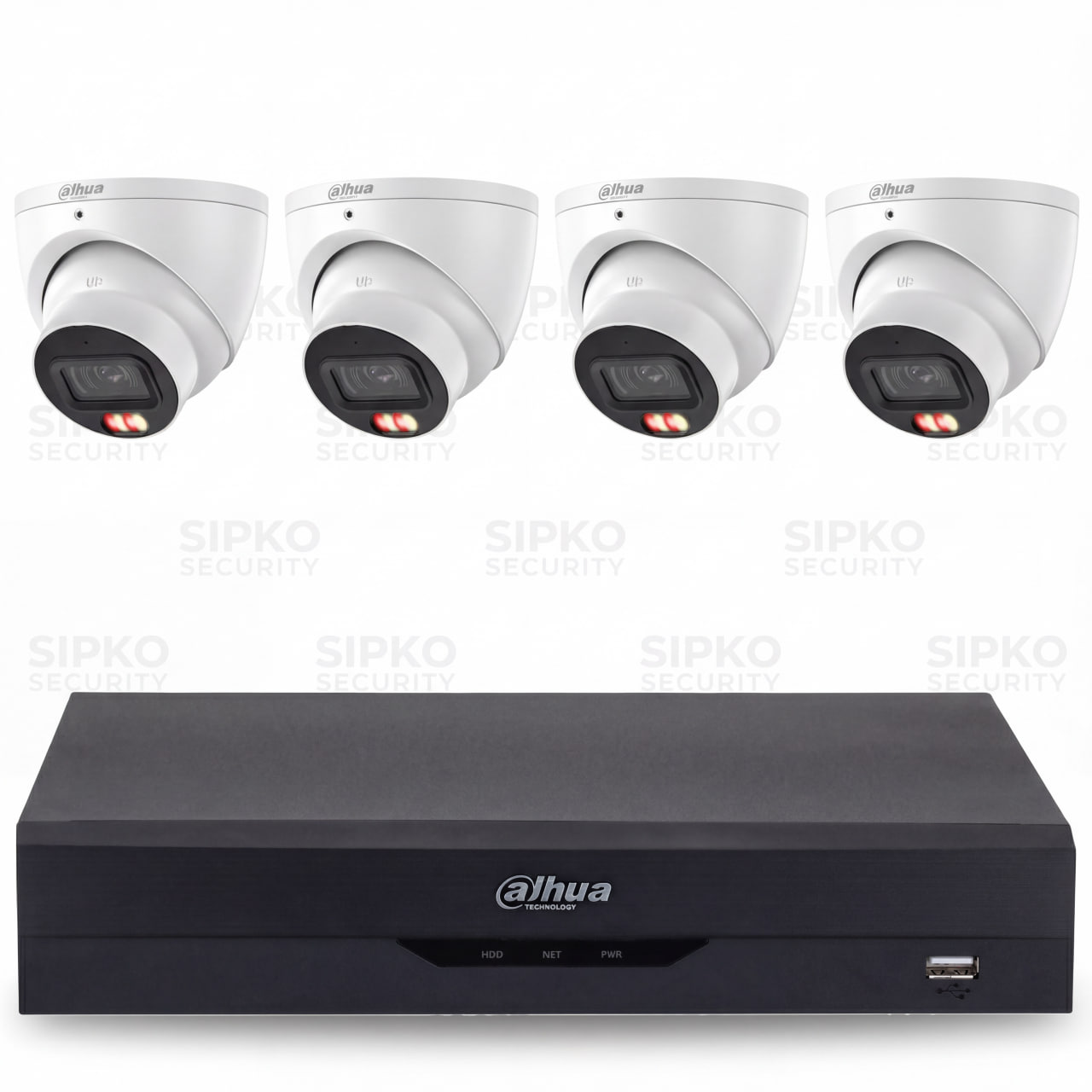
- 4 × 6MP Starlight Cameras (HDW3667EM)
- 4 Channel NVR (NVR4104HS-P-AI/ANZ)
- 2TB Hard Drive Storage
- Night Vision + Built-in Microphone
- Professional Installation (single-storey tiled roof)
- 3-Year Product Warranty
Extras
Dahua 6MP Starlight — 6 Cameras
Best value bundle for most homes
Popular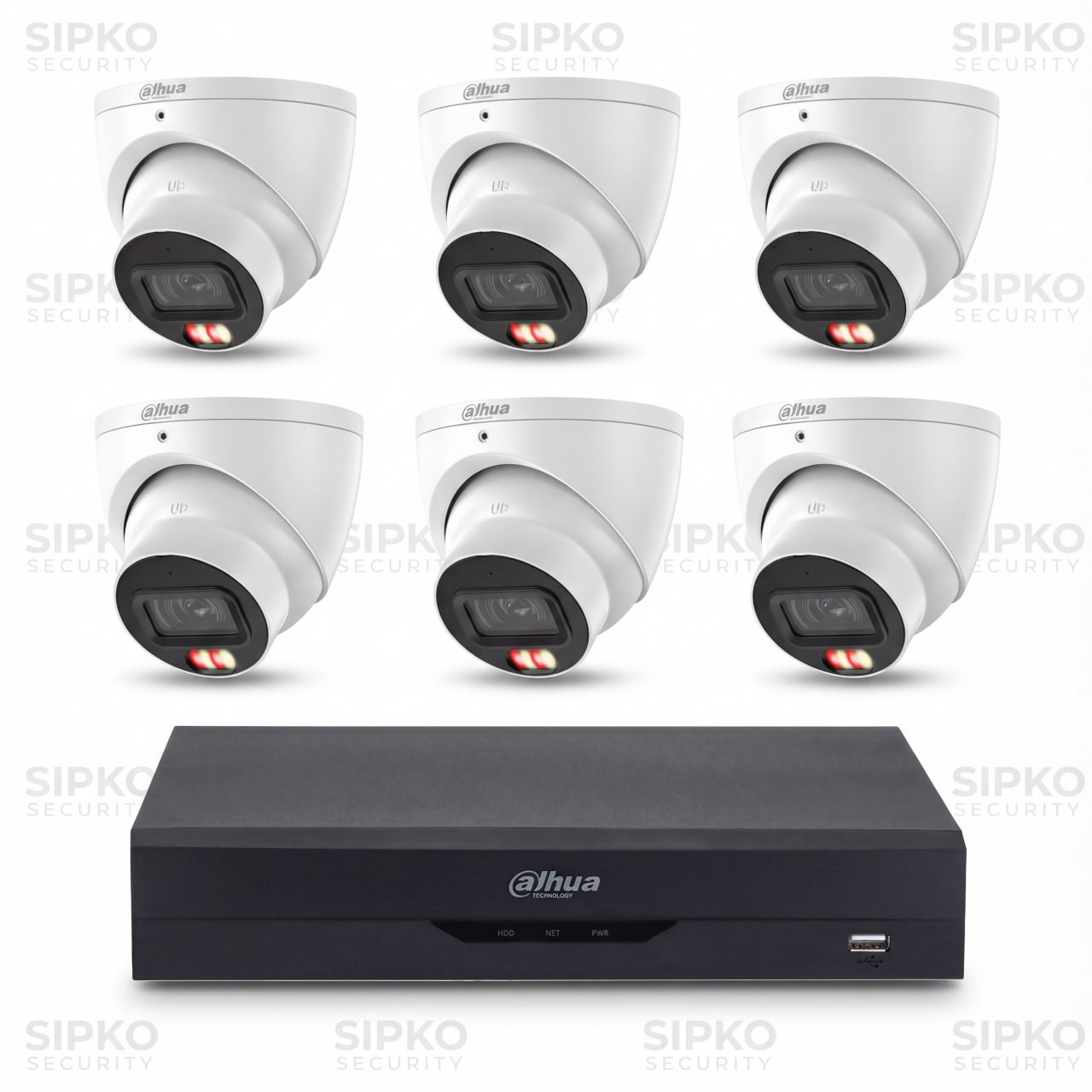
- 6 × 6MP Starlight Cameras (HDW3667EM)
- 8 Channel NVR (DHI-NVR4108HS-8P-AI/ANZ)
- 2TB Hard Drive Storage
- Night Vision + Built-in Microphone
- Professional Installation (single-storey tiled roof)
- 3-Year Product Warranty
Extras
Dahua 6MP Starlight — 8 Cameras
More coverage + larger storage
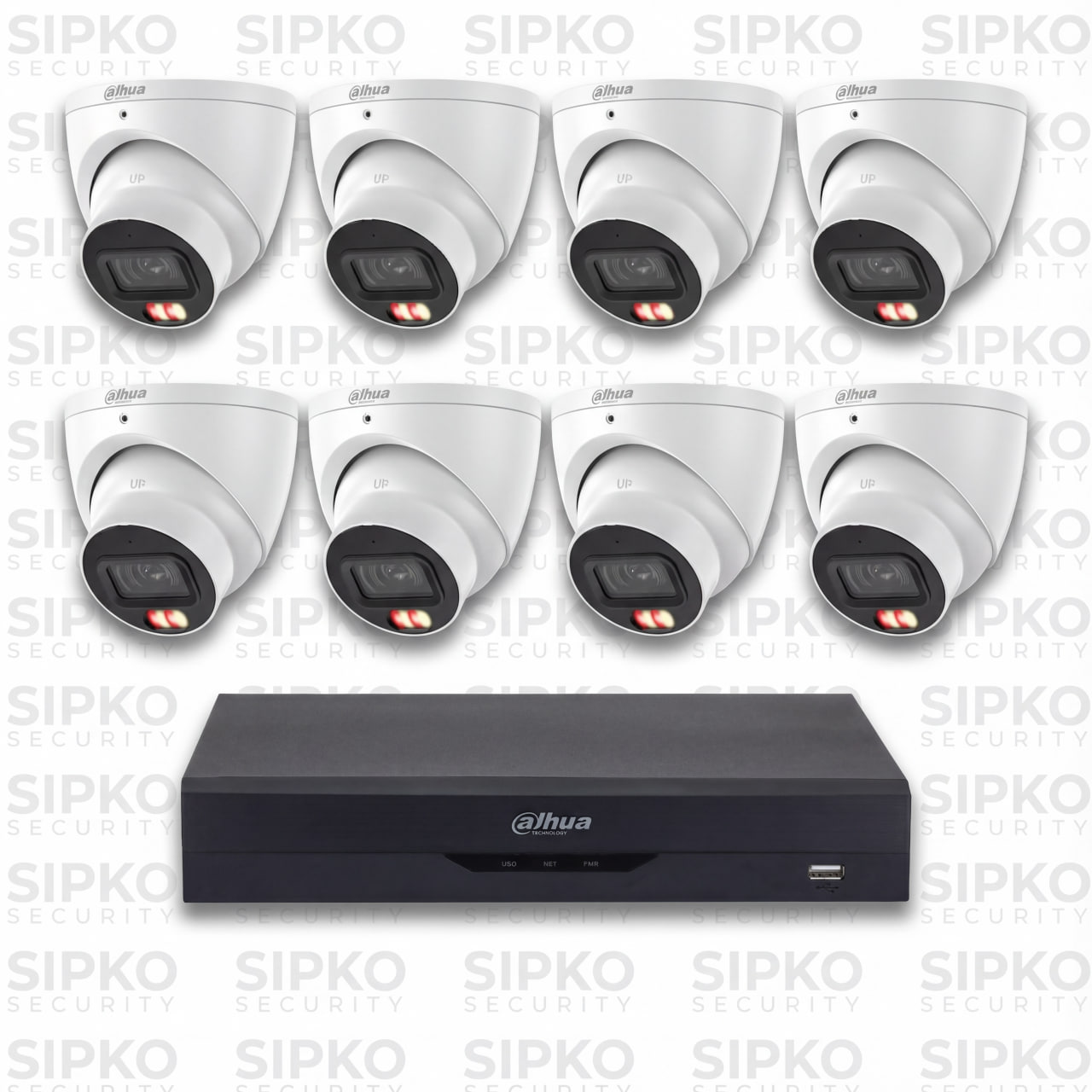
- 8 × 6MP Starlight Cameras (HDW3667EM)
- 8 Channel NVR (DHI-NVR4108HS-8P-AI/ANZ)
- 4TB Hard Drive Storage
- Night Vision + Built-in Microphone
- Professional Installation (single-storey tiled roof)
- 3-Year Product Warranty
Extras
“My Dahua NVR Says ‘Incorrect Password’ — What’s Actually Happening?”
There are three completely different reasons your Dahua system shows this message — and the fix is different for each one. Here is how to tell them apart before you do anything else.
You Have Simply Forgotten the Password
This is the most common situation — and the most fixable. The system is working perfectly. It is just rejecting the credentials you are entering because they do not match what is stored. This happens after a long period without logging in, after someone else set it up, or after a system was handed over without proper documentation.
The good news: in most cases, footage is completely safe and the system is still recording. You just cannot access the interface until the password is recovered or reset.
✓ Usually fixable without data lossThe Account Has Been Locked After Too Many Attempts
Dahua systems automatically lock an account after a set number of incorrect password attempts — this is a security feature, not a fault. If you or someone else has been trying different passwords, the system may have locked the account entirely, even if you then enter the correct password.
The lock is usually temporary (it resets after a waiting period) or permanent until an admin unlocks it. If you are the only admin and that account is locked, you need a recovery procedure to regain access.
⏱ May resolve itself — or needs recoveryThe Firmware Reset the Credentials Without Warning
Some Dahua firmware updates — particularly major version upgrades — can reset admin credentials back to a default or blank state as part of the update process. If your system updated overnight and you cannot log in this morning with the same password you used yesterday, this is likely what happened.
This is frustrating but not a sign of a hack or a fault. The system is fine — it just needs the credentials re-established. In most cases, footage stored on the hard drive is untouched.
ℹ️ Firmware-related — credentials need re-establishingThe most important thing: do not keep guessing passwords
Every failed attempt moves you closer to a full account lockout — and in some firmware versions, too many failed attempts can trigger a security hold that makes recovery more complex. If you have tried two or three passwords and none have worked, stop and call us. We diagnose which of the three scenarios above applies to your system and use the correct recovery method — so you do not accidentally make the situation harder to fix.
Dahua Password Reset by Model — Which Method Applies to You?
Find your Dahua device in the table below to see which reset method is available and whether your footage is likely to be preserved. Not sure of your model? It is printed on the label on the back or bottom of the unit.
| Device / Series | Common Use | Reset Method Available | Footage Safe? | Complexity |
|---|---|---|---|---|
| NVR4104HS-P-AI4-channel PoE NVR | Small homes, 4-camera setups | SADP tool reset or secure question (if set up) | ✓ Usually safe | |
| NVR4108HS-8P-AI8-channel PoE NVR | Medium homes, 6–8 cameras | SADP tool reset or secure question (if set up) | ✓ Usually safe | |
| NVR4116HS-4KS216-channel NVR | Larger homes, small business | SADP tool reset; factory reset if SADP fails | ⚠ Depends | |
| DHI-NVR5208-8P-IPro 8-ch NVR | Commercial, multi-site | SADP + DSS/IVSS admin recovery; on-site preferred | ✓ Usually safe | |
| DHI-NVR5416-16P-IPro 16-ch NVR | Commercial, warehouse, retail | SADP + admin recovery; complex config may need rebuild | ⚠ Depends | |
| XVR5104H / XVR5108H4/8-ch DVR (analogue + IP) | Older homes, hybrid systems | SADP tool or physical reset button (model-dependent) | ⚠ Depends | |
| XVR7108E / XVR7116EPro DVR series | Business, higher-res analogue | SADP tool; factory reset if SADP unavailable | ⚠ Depends | |
| IPC-HDW3667EM6MP IP dome camera | Standalone or NVR-connected | SADP tool reset; no local storage to lose | ✓ Usually safe | |
| IPC-HFW2849S / HFW3849S8MP bullet cameras | Outdoor, eaves-mounted | SADP tool reset; no local storage to lose | ✓ Usually safe | |
| VTO2202F / VTO3211DIntercom door station | Apartments, gate entry | SADP or web interface reset; re-pairing required after | ✓ Usually safe |
This table is a general guide based on common Melbourne-installed Dahua models. Actual reset methods vary by firmware version and configuration. SIPKO Security confirms the correct procedure for your specific unit before starting any work. Model names and reset capabilities are subject to change with firmware updates — always verify with a licensed technician.
Can You Reset a Dahua Password Without Losing Footage?
In most cases, yes. The majority of Dahua password resets — particularly those done via the SADP tool or the secure question recovery method — do not touch your recordings at all. Your footage sits on the hard drive inside the NVR or DVR, and a password reset only changes the access credentials, not the stored data. However, there are situations where a full factory reset is the only option, and in those cases, footage on the device may be lost. We always try the least destructive method first — and we tell you honestly before we start what the risk is for your specific situation.
When a reset keeps your recordings safe
If your system supports SADP-based password recovery or the secure question reset, the process only changes the login credentials. Your hard drive is not touched, your recordings continue, and your camera settings stay intact. This is the outcome in the majority of cases we handle across Melbourne.
When a factory reset may be the only option
Some older firmware versions, heavily customised systems, or devices where the SADP tool cannot reach the unit may require a full factory reset. This wipes the system configuration — and depending on the model and firmware, may also format the hard drive. We always warn you before this step and give you the option to attempt data recovery first if the footage is critical.
What SIPKO Does Before Touching Anything
Diagnose the lockout type
We identify which of the three lockout scenarios applies — forgotten password, account lock, or firmware reset.
Attempt config backup
If the system is partially accessible, we export the config before making any changes — so settings can be restored.
Try the safest method first
SADP tool or secure question recovery is always attempted before any factory reset is considered.
Confirm with you before escalating
If a factory reset is the only remaining option, we explain what will be lost and get your approval before proceeding.
Can You Reset a Dahua Password Without Losing Footage?
This is the question everyone asks first — and the honest answer is: usually yes, but not always. Here is exactly what determines which situation you are in.
In most cases, your recordings are completely safe
The majority of Dahua password resets do not touch the hard drive at all. The footage is stored separately from the login credentials — so recovering or resetting the password is like changing the lock on a door without moving anything inside the house.
- SADP tool password reset — footage untouched
- Secure question recovery — footage untouched
- Admin account unlock — footage untouched
- Credential re-establishment after firmware update — footage untouched
In some situations, a full factory reset is the only option
If the SADP tool cannot reach the device, the secure question was never set up, and the firmware does not support any other recovery path, a full factory reset may be the only way back in. A factory reset wipes the system configuration — and in some cases, the hard drive is also formatted as part of the process.
- Full factory reset on some older firmware versions
- Physical reset button on certain DVR models
- Encrypted config that cannot be recovered without the original key
What SIPKO Does Before Touching Anything
Diagnose First
We identify which lockout type you have before recommending any action — so we know which method to try.
Try Safe Methods First
We always attempt SADP tool recovery and secure question reset before considering anything more disruptive.
Back Up Config If Possible
If the system allows it, we export the configuration before making any changes — so settings can be restored.
Tell You Before We Proceed
If footage is at risk, we tell you clearly before doing anything. You decide — we never proceed without your approval.
Dahua SADP Tool — What It Is and Why We Use It
You do not need to know what SADP stands for. What matters is understanding what it does and why it is the safest first step when you are locked out of a Dahua system.
It finds your Dahua device on the network
SADP is a small program that scans your local network and finds any Dahua devices connected to it — NVRs, DVRs, cameras, intercoms. Think of it as a torch that lights up every Dahua device in the room, even if you cannot log into any of them.
It can reset the password without wiping the system
Once SADP finds the device, it can send a password reset request directly to the hardware — bypassing the login screen entirely. In most cases, this resets the admin password without touching the recordings, camera settings, or anything else stored on the system.
It requires physical access to the same network
This is the important limitation: SADP only works when the computer running it is connected to the same local network as the Dahua device — either by cable or Wi-Fi in the same building. It cannot work over the internet. This is why some lockouts require an on-site visit rather than a remote fix.
The Plain-Language Version
Imagine your Dahua NVR is a locked filing cabinet. You have forgotten the combination. SADP is like a master key that the manufacturer built into the cabinet — it does not open the drawers, it just resets the combination lock so you can set a new one. Everything inside the cabinet stays exactly where it was.
The catch: you have to be standing in the same room as the cabinet to use the master key. You cannot use it from across town.
What SADP Can and Cannot Do
Can do
- Find locked Dahua devices on the network
- Reset admin password without wiping footage
- Work on NVRs, DVRs, and IP cameras
- Confirm device firmware version
Cannot do
- Work over the internet remotely
- Recover footage that has already been deleted
- Reset devices on a different network segment
- Work if the device is offline or unpowered
What Happens to My Recordings During a Dahua Reset?
This is the question everyone worries about before calling. The answer depends entirely on which type of reset is needed — and they are very different from each other.
Password Reset
Regain login access onlyA password reset changes only the login credentials — nothing else. The recordings on the hard drive, the camera settings, the schedule, the motion zones — all of it stays exactly as it was. This is the same as changing the PIN on your phone: the photos and apps are untouched.
This is the method we use first in almost every case, and it is the one that preserves everything.
Config Reset
Restore default settingsA config reset restores the system settings — camera names, recording schedules, motion detection zones, network settings — back to their defaults. In most Dahua models, the recordings stored on the hard drive are not affected by a config reset. However, some older firmware versions do wipe the drive as part of this process.
We check the firmware version before recommending this, and we back up the config file first if the system allows it.
Full Factory Reset
Complete wipe and restartA full factory reset wipes everything — settings, credentials, and in many cases the hard drive as well. This is the last resort, used only when no other recovery method is available. We will always tell you clearly if this is the only option, explain what will be lost, and get your explicit approval before proceeding.
If your footage is critical — for example, it contains evidence of a crime — we will advise you to contact police before we do anything, so the footage can be preserved through official channels first.
What SIPKO Does to Protect Your Footage Before Starting
Identify the reset type needed
We diagnose the lockout first so we know which method is required — and whether footage is at risk before we touch anything.
Export config backup if possible
If the system allows it, we export the configuration file before making any changes — so settings can be restored even if a reset is needed.
Tell you the risk before proceeding
If footage could be lost, we say so clearly and get your approval. We never proceed with a destructive reset without your explicit go-ahead.
If your footage is critical evidence — read this first
If the recordings on your Dahua system contain footage of a crime, an incident, or anything you may need for legal or insurance purposes, do not attempt any reset yourself and tell us before we start. Victoria Police can formally request footage preservation — contact them via the Victoria Police online reporting service or call 131 444. We will hold off on any reset until you have taken the steps needed to preserve the evidence through the appropriate channels.
Dahua NVR Password Reset for Melbourne Businesses — Retail, Warehouses & Multi-Site Operations
Running Dahua cameras across more than one location? A lockout at a commercial site is a different problem to a home system — and it needs a different approach. Here is what that looks like for Melbourne business owners.
Victoria’s business community is growing fast — and so is the number of commercial Dahua systems that need professional support. Whether you run a single retail store or a chain of warehouses, the challenge is the same: you cannot afford to be locked out of your security system.
🏪 Retail Stores
Single or multi-location retail with NVRs at each site — often set up by a previous IT contractor whose credentials are no longer available.
🏭 Warehouses & Logistics
Large-channel NVRs covering loading docks, storage areas, and perimeter — a lockout here means no visibility over high-value stock.
🏢 Offices & Commercial Tenancies
Systems installed by building managers or previous tenants — credentials rarely handed over properly when staff or tenants change.
🏨 Hospitality & Venues
Hotels, restaurants, and event spaces with Dahua NVRs covering entrances, car parks, and back-of-house areas across multiple floors.
🏗️ Construction Sites
Temporary or permanent Dahua setups on active sites — often managed remotely, where a lockout cuts off the only way to check the site.
🏥 Healthcare & Education
Facilities with strict compliance requirements — access to footage may be needed quickly for incident reporting or insurance purposes.
A home NVR reset is usually straightforward — one device, one owner, one location. A commercial reset involves more moving parts, and getting it wrong has bigger consequences.
More channels, more complexity
Commercial NVRs often run 16, 32, or 64 channels. A reset that works on an 8-channel home unit may not apply the same way to a large multi-channel recorder — the recovery method depends on the exact model and firmware.
Multiple people had access
In a business, the original installer, an IT manager, and several staff members may have all touched the system. Credentials get changed, shared, or simply forgotten — and nobody knows who set the current password.
Multiple sites need a coordinated plan
If you have the same lockout across three retail stores, you need a consistent recovery approach — not three separate ad-hoc fixes that leave each site configured differently.
Footage may be needed for compliance
Businesses in retail, healthcare, and hospitality often need to produce footage for insurance claims, WorkSafe incidents, or police requests. A botched reset that wipes recordings can have real legal and financial consequences.
🖥️ DSS & IVSS Server Lockouts — The Commercial-Only Problem
Larger commercial deployments often use Dahua’s DSS (Digital Surveillance System) or IVSS (Intelligent Video Surveillance System) servers to manage cameras across multiple sites from a single platform. When you get locked out of one of these, it is not just one NVR — it can be your entire operation. This is a commercial-only scenario that requires a completely different recovery approach to a standalone NVR reset.
🔐 What gets locked
The DSS/IVSS admin account — which controls all connected NVRs, cameras, user permissions, and recording schedules across every site in the system.
⚠️ Why it is more serious
Losing access to the management server means losing visibility across all sites simultaneously — not just one location. Cameras may still record locally, but you cannot view, export, or manage anything centrally.
🛠️ How we recover it
We use Dahua-specific server recovery procedures — which differ significantly from NVR resets — to restore admin access without disrupting connected devices or wiping the event database.
How We Handle a Commercial Multi-Site Reset
Site & System Audit
We map every NVR, DVR, and server across your locations — model numbers, firmware, and how they connect.
Ownership Verification
We confirm you are the authorised owner or operator before touching anything — protecting your business from unauthorised access.
Footage Risk Assessment
We identify which recordings are at risk and advise you before any reset — so nothing critical is lost without your knowledge.
Coordinated Recovery
We recover access across all affected sites using a consistent method — so every location ends up with the same clean, documented setup.
Credential Handover
You receive a written record of all new credentials, admin accounts, and access levels — so your business is never in this position again.
Need a commercial Dahua reset across multiple Melbourne sites?
Call us or fill in the form at the top of this page — we will assess your setup and give you a clear plan before any work begins.
Common Questions from Melbourne Business Owners
The questions we get asked most often before a commercial Dahua reset — answered plainly.
Will we lose our footage during a commercial NVR reset?
In most cases, no — but it depends on which type of reset is needed. A password recovery or admin unlock does not touch the recordings stored on the hard drive. A config reset usually leaves footage intact too, though we always check the firmware version first. A full factory reset is the only method that risks wiping the drive, and we only recommend that as a last resort — and only with your explicit approval after we have explained exactly what will be lost.
Before we start anything, we tell you clearly what the risk to your footage is. If recordings are critical — for example, for an insurance claim or a WorkSafe incident — we will advise you to secure that footage through the appropriate channels before we proceed.
Can you reset Dahua NVRs across multiple sites in one visit?
Yes, and this is one of the things we plan for specifically with commercial clients. If you have the same lockout across several retail stores or warehouses, we coordinate the recovery so every site ends up with a consistent, documented setup — not a patchwork of different credentials and configurations.
Depending on your network setup, some sites may be recoverable remotely (via VPN or cloud access), which means we can handle multiple locations without necessarily attending each one in person. We assess this during the initial audit and let you know what is possible before we start.
What is a DSS or IVSS server lockout and how is it different from an NVR lockout?
A standalone NVR lockout affects one recorder at one location. A DSS (Digital Surveillance System) or IVSS (Intelligent Video Surveillance System) server lockout affects the central management platform that controls all your NVRs and cameras across every site simultaneously.
The recovery process is completely different — you cannot use the same reset method you would on a single NVR. We use Dahua-specific server recovery procedures that restore admin access without disrupting connected devices or wiping the event and recording database. If you are running a DSS or IVSS setup and you are locked out, call us before attempting anything yourself.
The system was set up by a previous IT contractor — can you still recover it?
Yes, this is one of the most common situations we deal with. A previous installer or IT contractor set up the system, the relationship ended, and nobody documented the credentials. As long as you can demonstrate that you are the authorised owner or operator of the premises and the equipment, we can work through the recovery process with you.
We will ask for reasonable proof of ownership or site access — this protects you as much as it protects us. Once verified, we use Dahua-specific recovery procedures to restore access and then hand everything over to you in writing so you are never dependent on a third party for your own system again.
How long does a commercial multi-site reset take?
It depends on the number of sites, the models involved, and whether remote access is possible. A single-site commercial NVR recovery is typically completed in one visit. Multi-site jobs are scoped individually — we give you a realistic timeframe after the initial audit, not a guess upfront.
Remote recoveries (where your network allows it) are generally faster since we do not need to travel between locations. On-site visits are required when physical access to the device is needed — for example, when a hardware reset button must be used or when door strikes and access control need to be tested after an intercom reset.
Do you service all Melbourne suburbs and surrounding areas?
Yes — SIPKO Security services Melbourne metro and surrounding suburbs. For remote recoveries, location is not a factor at all. For on-site visits, contact us with your suburb and we will confirm availability and travel time. We cover the CBD, inner suburbs, and outer metro areas including industrial and warehouse precincts.
What proof of ownership do you need before starting?
We keep this practical. For a business, we typically ask for something that confirms you are the authorised operator of the premises — this might be a lease agreement, a business registration document, or a letter from the building owner. We do not need a stack of paperwork, just enough to confirm you have the right to access the system. We will tell you exactly what we need when you contact us, based on your specific situation.
Locked Out of Your Dahua System? Let’s Fix It.
Whether it’s one NVR at a single site or a full multi-location commercial setup, we recover access fast — without losing your footage and without the guesswork.












Already have a Dahua intercom that is playing up? See our Dahua intercom repair service in Melbourne.